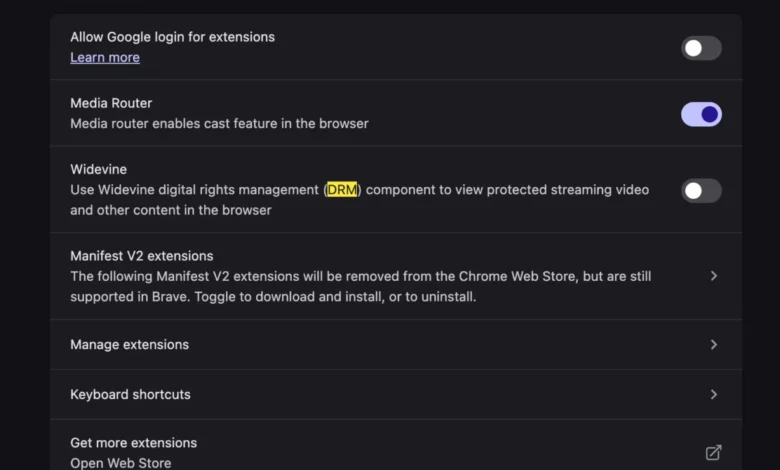
The transition to a new workstation or computing device is often heralded as an opportunity to purge legacy software bloat and optimize system performance. However, the migration process is frequently punctuated by unexpected compatibility hurdles, particularly when moving between different hardware architectures or operating system versions. One prevalent issue recently reported by users upgrading to newer macOS devices involves the specific error message: "This video format is not supported" when attempting to access YouTube TV via a web browser. This technical impediment, while disruptive to end-user media consumption, is fundamentally tied to the evolution of digital rights management (DRM) and the way modern browsers handle encrypted media extensions.
The Mechanism of Digital Rights Management in Web Browsers
To understand why this error occurs, one must first examine the architecture of modern web-based media delivery. Major streaming platforms, including YouTube TV, Netflix, and Hulu, utilize encrypted media to protect proprietary content from unauthorized recording or distribution. This protection is facilitated through Encrypted Media Extensions (EME), a W3C-standardized API that allows browsers to communicate with a Content Decryption Module (CDM).
Google’s Widevine is the industry-standard CDM used by the vast majority of streaming services. It acts as a gatekeeper, verifying that the user’s hardware and software environment meet the security requirements set by the content providers. When a user initializes a new computer, the default browser settings—specifically those pertaining to privacy, security, and hardware acceleration—may not automatically initialize or permit the Widevine CDM to function. Consequently, the browser fails to decrypt the stream, resulting in the "not supported" error message. This is not a failure of the hardware itself, but rather a configuration mismatch in the browser’s security sandbox.
Chronology of the Issue and Troubleshooting Trends
The rise of these DRM-related errors has tracked alongside the increased adoption of high-fidelity streaming services and the shift toward browser-based television consumption. While older generations of web users may recall the era of manually installing proprietary codecs—such as Adobe Flash or Windows Media Player plugins—to enable media playback, modern browser architecture has centralized these capabilities.
In late 2024 and early 2025, technical forums and support documentation saw a surge in reports from users operating on new hardware, particularly Apple Silicon-based MacBooks. The timeline of these reports typically follows a distinct pattern:

- Device Setup: The user migrates their data or performs a clean installation of an operating system.
- Initial Access: The user logs into YouTube TV, often through a browser like Google Chrome, Microsoft Edge, or a privacy-focused browser like Brave or Vivaldi.
- The Conflict: Upon attempting to launch a live stream, the browser encounters a handshake failure between the site’s DRM requirements and the browser’s local CDM settings.
- Error Trigger: The browser presents the "This video format is not supported" error, effectively halting playback.
Historical data from browser-based support centers indicates that this issue is not confined to one platform but is inherent to the cross-platform nature of Chromium-based browsers. Because these browsers share a common engine, they also share a common approach to managing EME and CDM components.
Technical Analysis of Widevine Integration
Widevine provides three levels of security, known as L1, L2, and L3. L1 is the most secure, requiring the hardware to perform the decryption and video processing within a Trusted Execution Environment (TEE). L3, conversely, is software-based and is often the fallback level for browsers. When a new installation occurs, if the browser is configured to prioritize high-privacy settings, it may disable the "Widevine Content Decryption Module" by default or restrict its access to hardware-accelerated buffers.
The resolution, while seemingly simple, involves navigating the browser’s settings to ensure the CDM is not only present but actively permitted to run. In most instances, users must:
- Access the browser’s internal components or settings menu.
- Verify that "Widevine" or "Protected Content" is set to "Allow" or "Enabled."
- Restart the browser to re-initialize the CDM handshake.
- Clear the cache related to encrypted media to force a fresh authentication token from the content provider’s servers.
This process eliminates the need for third-party codec installations, which were common in the early 2000s, but it introduces a new layer of complexity: the management of background security services that are often opaque to the average user.
Broader Implications for Digital Consumption
The reliance on Widevine and similar DRM systems highlights a significant shift in how digital media is governed. We have moved from a model of "open" media—where files were accessible if the user had the correct software—to a model of "authenticated" media, where access is conditional upon the browser’s ability to prove the security of the host machine.
Industry analysts suggest that this trend has both positive and negative implications. From a security and anti-piracy perspective, it provides content creators and distributors with the assurance that their high-value assets are protected from trivial replication. However, from a user experience standpoint, it creates "invisible" barriers. When a browser update or a system migration inadvertently toggles a security setting, the user is left with a functional machine that nonetheless fails to perform basic media playback tasks.

Furthermore, the prevalence of this issue underscores the growing influence of browser manufacturers in the streaming ecosystem. As browsers become the primary interface for almost all professional and personal tasks, the default security policies chosen by developers—such as those at Google, Mozilla, or Apple—have a profound impact on the interoperability of the internet.
Official Responses and Industry Context
While neither Google nor Apple typically issues public statements regarding these specific "not supported" error messages, they provide extensive developer documentation on EME and CDM integration. Industry representatives from organizations like the Digital Media Association (DiMA) have historically emphasized that the balance between user privacy and content protection remains a high-priority challenge.
The standard approach for these corporations is to refine the "onboarding" process of their browsers. Many modern browsers have begun implementing "permission prompts" that specifically ask users if they wish to enable protected content playback upon the first instance of a failed load. This move aims to minimize user frustration by transforming a technical error into a user-facing configuration choice.
Looking Toward Future Standards
As hardware continues to evolve, particularly with the proliferation of AI-integrated processors and hardware-accelerated encoding/decoding, the methods by which we secure digital media will likely undergo further changes. The industry is currently moving toward "Hardware-Level DRM," which binds content directly to the physical chip of the device. While this increases security, it may also lead to more frequent compatibility errors during hardware transitions.
For the average consumer, the lesson remains clear: the modern digital environment is one of managed trust. When a service fails to render content, the issue is rarely a lack of a codec, but rather a disruption in the digital "handshake" between the content provider and the user’s hardware. By understanding the role of components like Widevine, users can better navigate the complexities of modern web-based entertainment. The "This video format is not supported" error is, in reality, a symptom of the robust—and sometimes over-sensitive—security frameworks that keep the modern streaming economy functional. As long as these standards remain the foundation of digital media, users should expect occasional friction during system migrations, necessitating a baseline level of technical literacy to troubleshoot browser-level security configurations.