How to Build a High-Engagement Private Members-Only Community Using PeepSo and WordPress

The shift toward private, decentralized online spaces has accelerated as creators and businesses move away from the volatility of mainstream social media platforms. Unlike public networks, private communities prioritize high-intent interactions, data sovereignty, and direct ownership of the user experience. Historically, building these environments within the WordPress ecosystem required a cumbersome "patchwork" approach—stitching together disparate plugins for user management, messaging, and access control. This often resulted in disjointed interfaces that lacked the cohesive feel of a modern social network. PeepSo, a comprehensive social networking plugin for WordPress, has emerged as a solution to this architectural fragmentation by offering an integrated framework designed to build "social-first" environments from the ground up.

The evolution of community management tools reflects a broader trend in digital marketing: the transition from "broadcasting" to "niche-building." Data from industry analysts suggests that engagement rates in private, community-gated groups are significantly higher than those in public forums. By gating content behind a registration wall, community managers can foster a sense of exclusivity and security that encourages deeper disclosures, more meaningful networking, and higher quality peer-to-peer support.
The Architectural Shift in Community Building
The traditional model of a "locked" WordPress community often relied on a primary membership plugin—such as MemberPress or Restrict Content Pro—layered over a standard WordPress installation. While effective at securing pages, this method rarely provided the dynamic social features users expect, such as real-time activity feeds, customizable profile fields, and native messaging. These features usually required additional third-party integrations that were not built to communicate seamlessly with one another.

PeepSo alters this dynamic by prioritizing the "room" before the "gate." By building core social features—activity streams, group management, member directories, and notifications—directly into the foundation, the plugin ensures that the community feels like a living, breathing ecosystem rather than a restricted directory. Access control is then applied as a secondary layer, allowing administrators to dictate who sees which parts of the platform without compromising the site’s overall functionality.
Chronology of Implementation
For developers and site owners looking to deploy a robust private community, the process generally follows a linear, eight-step implementation phase. A standard build, excluding complex custom development, typically requires approximately 60 minutes of configuration time to move from a fresh WordPress installation to a functional, secure social environment.

- Initial Deployment: The process begins with the installation of the PeepSo Foundation plugin. Upon activation, the built-in setup wizard automatically configures essential pages, including the Activity Stream, Members Directory, and Profile settings.
- Security and Access Configuration: Administrators must define the registration flow within the "Accounts & Security" settings. This phase is critical for maintaining community integrity, as it allows for the implementation of email verification, administrator-led approval workflows, and strict password requirements.
- Customization of User Metadata: Defining the "Manage" page settings allows administrators to tailor profile fields. By balancing essential data collection—such as names and professional backgrounds—with optional fields, organizers can reduce sign-up friction while gathering the information necessary for member matching.
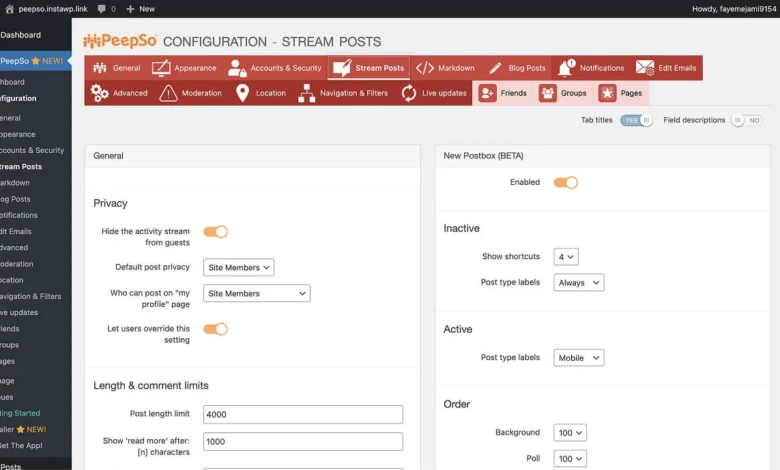
- Activity Stream Optimization: The heart of the community is the central activity feed. Customization at this stage determines the tone of the platform. Administrators must decide which media types—polls, GIFs, link previews, or video embeds—are permitted, ensuring that the feature set aligns with the specific goals of the community.
- Group Segmentation: Creating sub-communities through the Groups module allows for more granular discussions. Starting with three to four primary groups is considered a best practice for "seeding" activity, as it concentrates early-stage engagement rather than spreading it too thin across dozens of empty threads.
- Messaging and Notification Architecture: Enabling direct messaging fosters long-term retention. However, this must be balanced with a disciplined notification strategy. Over-notifying members—such as triggering alerts for every post in a group—often leads to "notification fatigue," causing users to disable alerts entirely.
- Role-Based Access Control (RBAC): PeepSo’s "User Limits" feature provides a sophisticated layer of control, allowing administrators to define what specific user roles can perform. This tiered approach is essential for scaling a community, as it provides a path for member progression and rewards active participants with elevated permissions.
- Testing and Quality Assurance: Before a public launch, the "test-user" method is the industry standard for verification. By logging in with a non-admin account, the developer can verify that all privacy settings are functioning and that restricted content is effectively hidden from unauthorized viewers.
Monetization and Financial Integration
For organizations planning to monetize their communities, the integration with Paid Memberships Pro (PMPro) serves as the industry-standard bridge. This integration allows for the mapping of membership levels to specific WordPress user roles.
By installing the PeepSo PMPro integration and the "Roles for Membership Levels" add-on, site owners can create distinct tiers—such as a "Basic," "Premium," or "VIP" access structure. When a user registers, they are prompted to select a membership level and complete payment via integrated gateways like Stripe or PayPal. Once payment is confirmed, the user is automatically assigned the corresponding role, granting them access to specific private groups or premium content. This automated workflow reduces the administrative burden on the community owner, enabling a "set-and-forget" model for subscription management.

Strategic Implications and Market Analysis
The implications of this shift toward owned, private communities are profound for businesses and content creators. Relying on platforms like Facebook Groups or LinkedIn Communities subjects creators to the "algorithm tax"—the risk that platform changes will drastically reduce the reach of their content. Furthermore, these platforms rarely provide the granular user data that a proprietary WordPress installation offers.
By owning the community platform, organizations gain full control over user data and the ability to pivot their business model. For example, a community initially built for free networking can later integrate e-commerce via WooCommerce, host educational courses through LearnDash, or introduce exclusive paid coaching tiers. This versatility ensures that the community can evolve alongside the business.

However, the responsibility for moderation and engagement shifts entirely to the site owner. Unlike a global social network that provides automated community management tools, a private PeepSo-powered site requires the administrator to curate the environment, moderate discussions, and actively participate in driving the conversation. The success of such a platform is ultimately measured by its "stickiness"—the frequency with which members return to the site not because of external notifications, but because of the inherent value provided by the other members.
Conclusion: The Future of Niche Connectivity
The transition to private, managed communities is not merely a technical upgrade; it is a strategic response to the increasing noise and lack of privacy on the open web. By utilizing tools like PeepSo, administrators can construct secure, high-engagement environments that prioritize the user experience. As the digital landscape continues to fragment, the ability to provide a "digital home" for specific interest groups will likely become a primary competitive advantage for businesses, educators, and creators alike. Whether the goal is to build a professional network, a hobbyist group, or a premium coaching program, the foundation of a successful community remains the same: a secure, well-organized, and user-centric platform that belongs entirely to the community host.