Streamlining Editorial Collaboration: How WordPress Editor Notes are Transforming Content Workflows

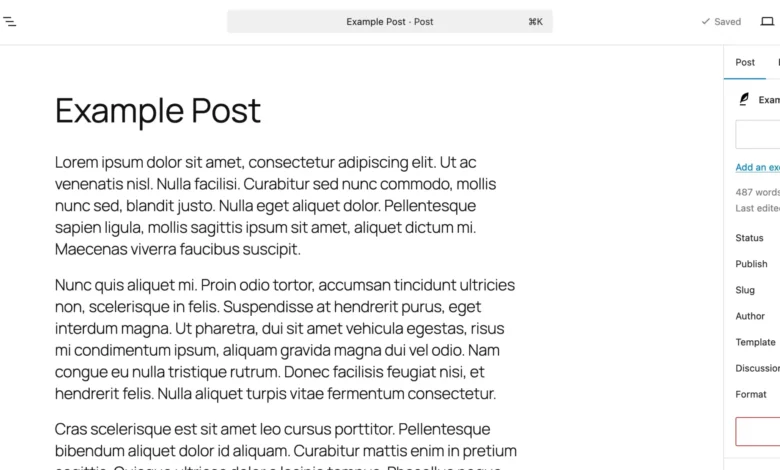
Editorial collaboration within content management systems has historically presented a fragmented landscape for development teams, copywriters, and enterprise publishers. For years, the process of reviewing, editing, and approving website content required a disparate array of external applications. Teams routinely relied on Google Docs for manuscript reviews, Figma or InVision for visual mockups, and sprawling email threads or Slack channels to track revision histories. While this multi-tool ecosystem successfully facilitated digital publishing, it introduced significant operational inefficiencies. Content creators were forced to constantly copy and paste text back and forth between environments, frequently losing vital contextual information along the way, while project managers struggled to maintain an accurate audit trail of changes and approvals.

To address these persistent friction points in the digital publishing lifecycle, core contributors to the WordPress project introduced a native in-editor feedback mechanism known as Notes. Designed to integrate seamlessly into the Gutenberg block editor, the Notes feature eliminates the reliance on third-party collaboration tools by enabling stakeholders to attach contextual comments directly to individual page elements. Whether applied to text paragraphs, high-resolution imagery, complex grid layouts, or overarching styling configurations, Notes ensure that feedback lives precisely where the content resides. This architectural shift marks a fundamental evolution in how publishing teams collaborate, bringing review cycles directly into the administrative dashboard and establishing a unified workspace for modern web development.
Anatomy of the WordPress Notes Feature
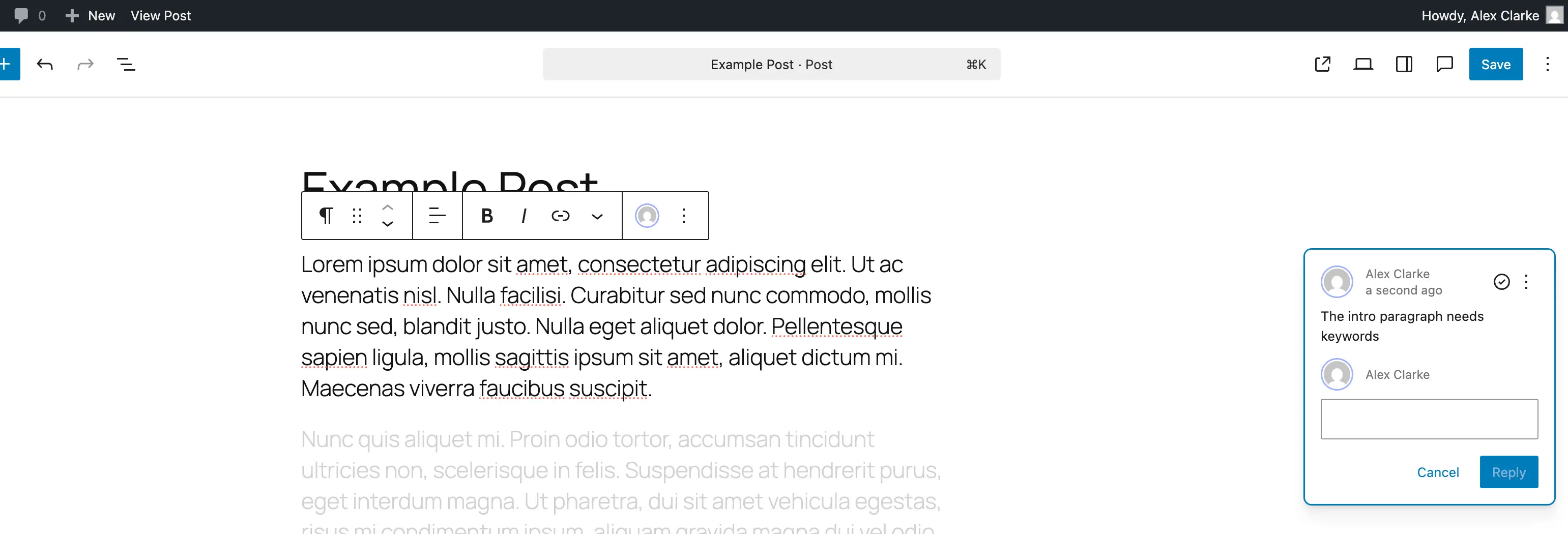
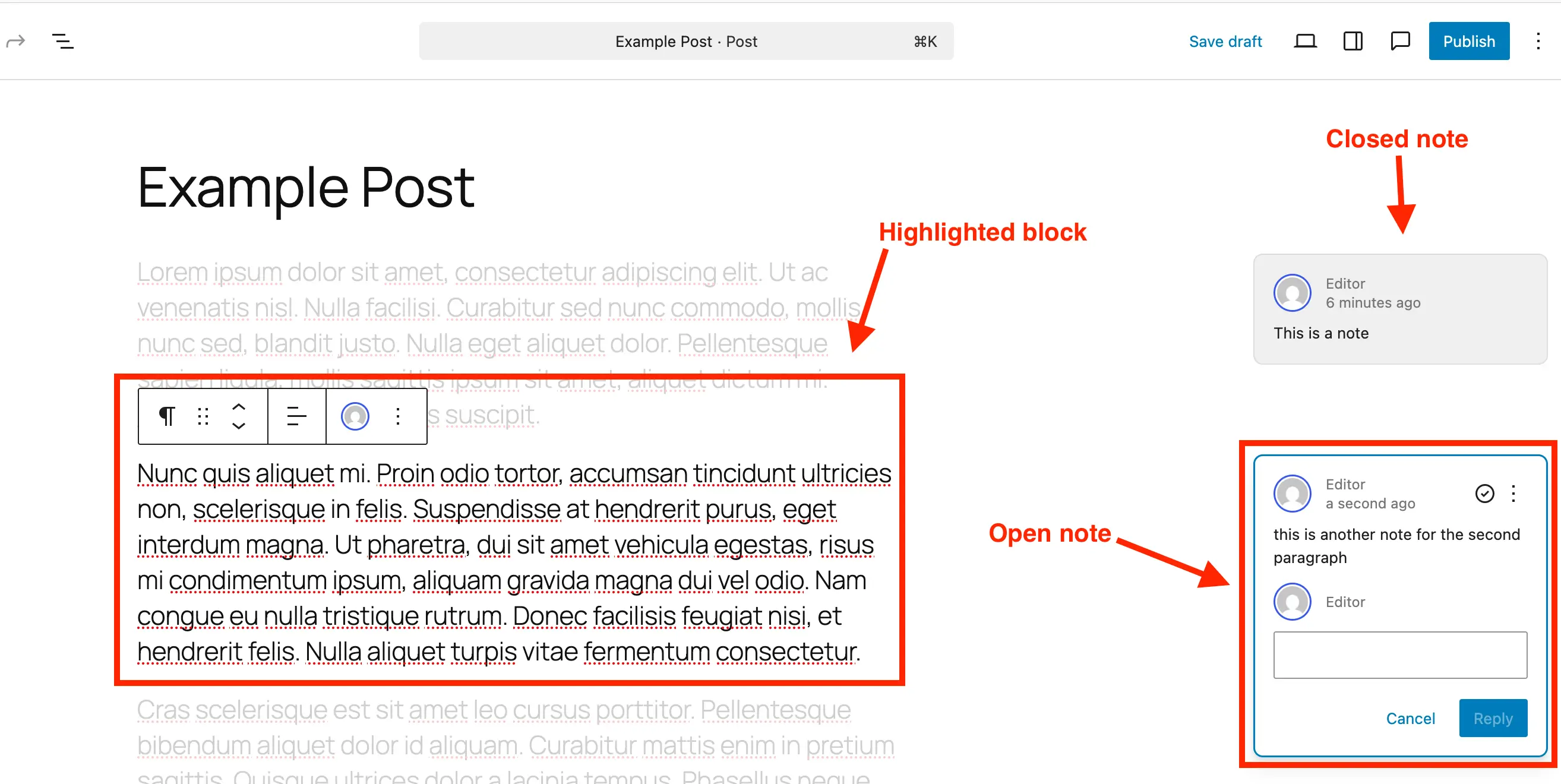
At its technical core, the WordPress Notes system leverages the modular nature of the Gutenberg block editor to anchor feedback to specific data nodes within a post or page structure. When a user creates a note, the system associates the metadata with the unique client ID of that designated block. Visually, active notes manifest as subtle comment indicators positioned alongside the content interface.

When a team member selects an individual note, the editor initiates a dynamic visual focus state: the targeted block remains highlighted while the surrounding page content subtly fades into the background. This targeted isolation ensures that reviewers can concentrate entirely on the specific segment under discussion without being distracted by adjacent layout elements. The adjacent sidebar panel displays the complete conversational thread, including the original author’s identity, timestamped entries, and an interactive reply field.
This contextual binding fundamentally alters the traditional proofreading paradigm. Rather than instructing an editor to modify "the third paragraph under the second subheading," a reviewer can attach a note directly to that exact paragraph block. Stakeholders can subsequently debate revisions, propose alternative phrasing, and track the evolution of the copy entirely within the native WordPress environment. Furthermore, the feature accommodates the entire editorial hierarchy, allowing administrators, editors, authors, and external clients with appropriate user roles to participate in the review cycle without installing additional plugins or managing external access permissions.
Step-by-Step Integration and Workflow Management
Adopting Notes into an existing editorial workflow requires minimal friction, as the interface has been engineered to mirror familiar modern documentation platforms. The process begins within the standard WordPress block editor interface, where any post, page, or custom content type can be opened for collaborative review.
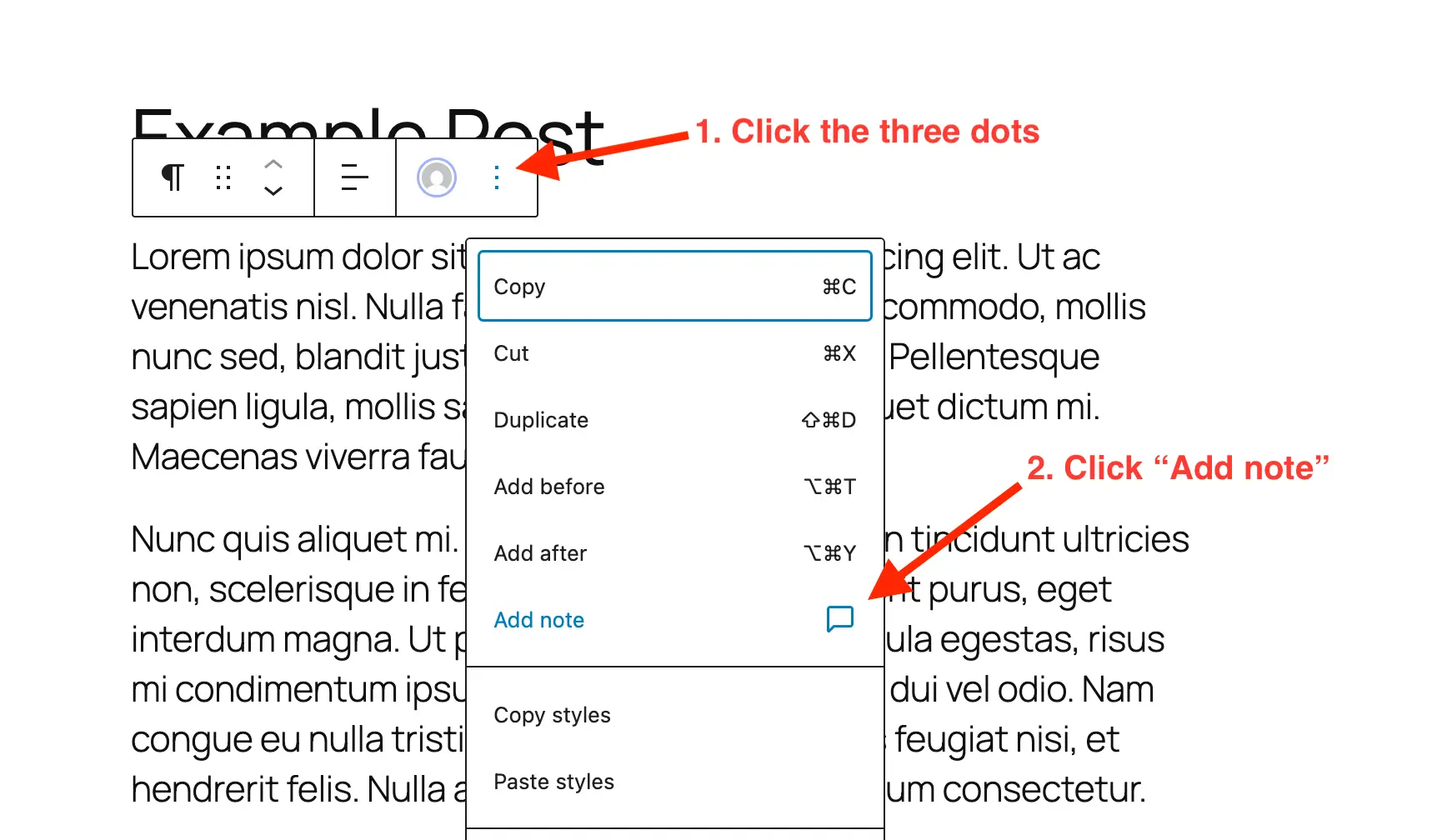
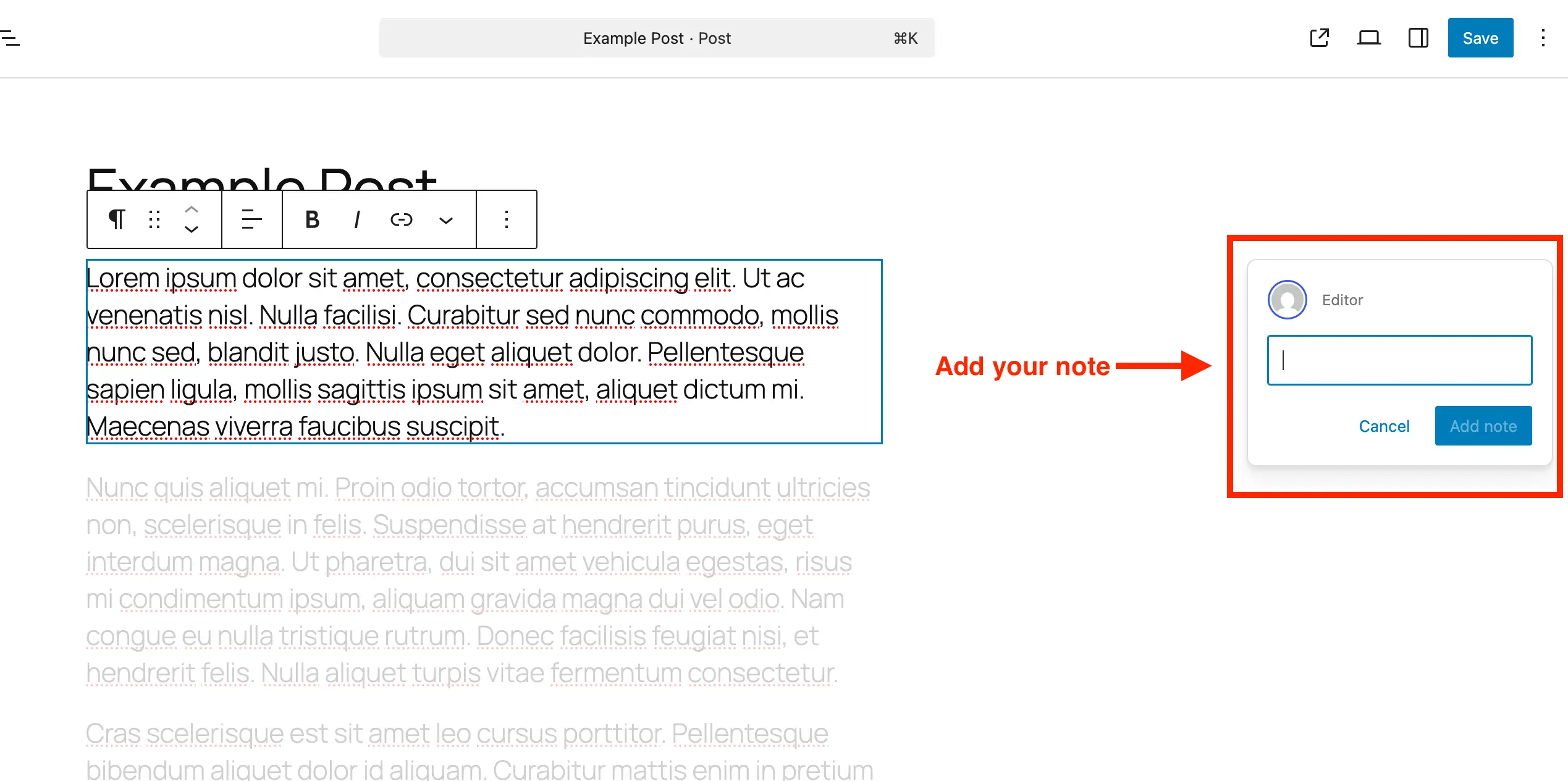
To initiate feedback, a user navigates to the specific block requiring attention—whether it is a standard header, an image gallery, or a custom quote component—and accesses the block options menu via the conventional three-dot interface. Selecting the "Add Note" command reveals an expandable text input panel on the right side of the screen. As the reviewer types, the input box automatically expands to accommodate longer instructions or multifaceted critique, supporting line breaks and multi-paragraph commentary.
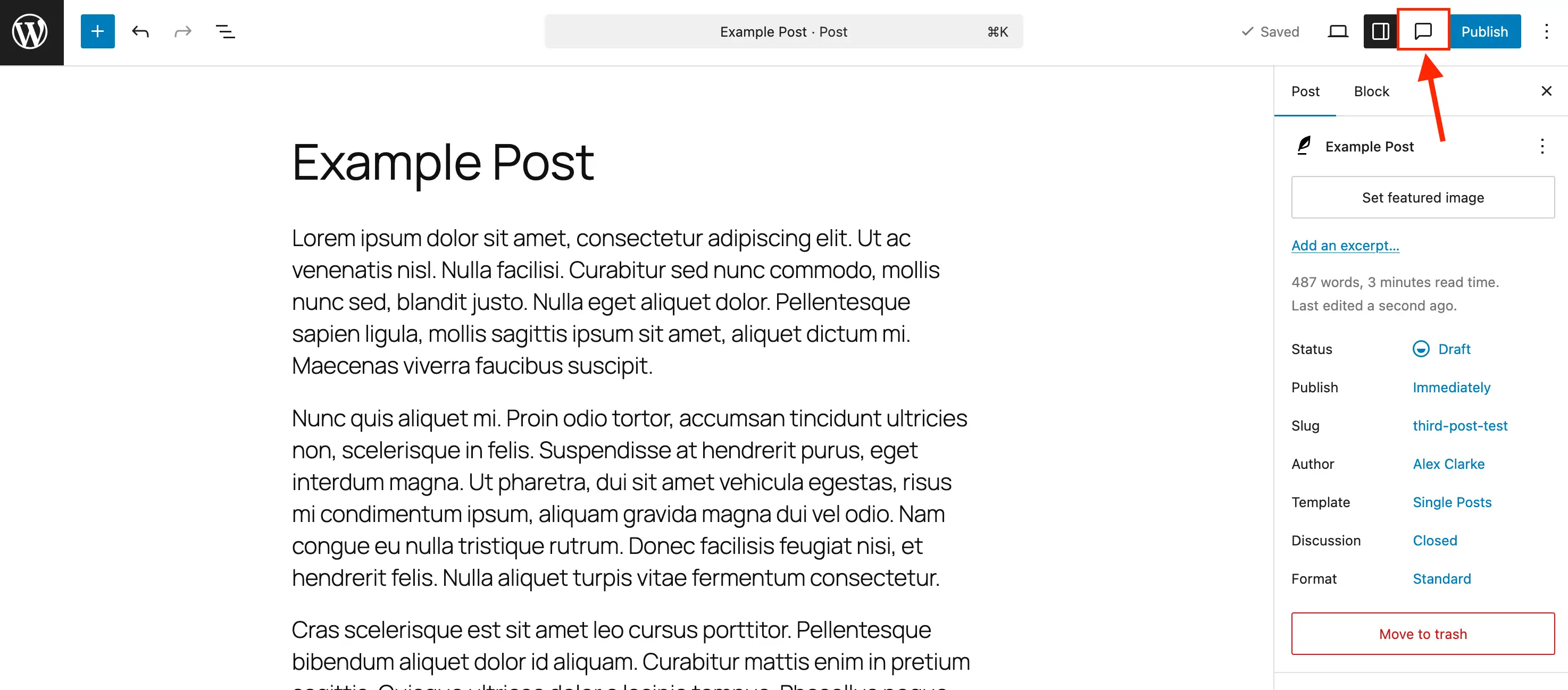
Managing and resolving accumulated feedback is handled through a dedicated Notes panel accessible via a centralized comment-bubble icon situated in the main editor toolbar. Clicking this icon consolidates all open and resolved items into an organized sidebar view, allowing project leads to triage feedback systematically.
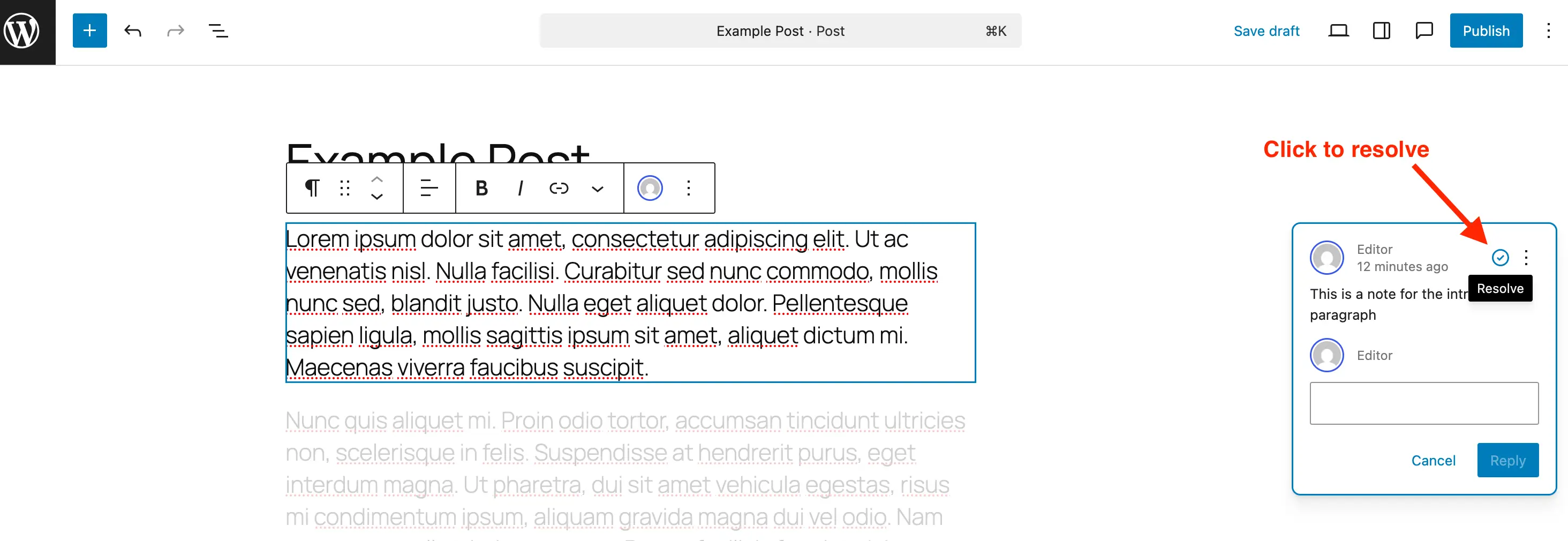
Once a requested revision has been executed within the block, the user responsible for implementation can click the resolve icon—represented by a checkmark—to close out the item. Resolved notes automatically recede from the active display when standard sidebar panels are closed, though they remain accessible within the historical log for auditing purposes. For long-term database hygiene, particularly on high-volume enterprise websites hosting thousands of pages, administrators can permanently delete completed notes via the individual item menu, preventing unnecessary bloat in the underlying MySQL database tables. Conversely, if a previously resolved issue requires further deliberation, the same menu structure provides an option to reopen the thread instantly.
Extending Notes to Custom Post Types and Developer Implementation
While WordPress enables the Notes feature by default for standard native posts and pages, enterprise implementations frequently rely on custom post types (CPTs) to structure diverse content inventories, such as product catalogs, event listings, or portfolio directories. To maintain editorial consistency across these specialized content structures, developers must explicitly declare editor support for Notes during the registration phase.
For sites utilizing modular management plugins such as Post Types Unlimited, this integration requires simply checking a designated "Notes" box within the post type’s "Supports" configuration settings. For developers writing custom themes or functionality plugins via native PHP, support must be explicitly declared within the register_post_type function array. Specifically, the editor parameter within the supports argument must be updated to include the boolean declaration 'notes' => true.
register_post_type( 'book', [
    'label' => 'Books',
    'public' => true,
    'show_in_rest' => true,
    'supports' => [
        'title',
        'editor' => [ 'notes' => true ], // Enables native Notes support
        'author',
    ],
] );
For legacy custom post types already established in a production environment, developers can programmatically merge Notes support into existing editor configurations without disrupting other active parameters. This is achieved by hooking into the WordPress initialization sequence and updating the post type support registry dynamically:
/**
 * Programmatically enable editor notes for existing custom post types.
 */
add_action( 'init', function()
    $post_types = [ 'portfolio', 'case_study' ];
    foreach ( $post_types as $post_type )
        $supports = get_all_post_type_supports( $post_type );
        $editor_supports = array( 'notes' => true );
        if ( is_array( $supports['editor'] ) && isset( $supports['editor'][0] ) && is_array( $supports['editor'][0] ) )
            $editor_supports = array_merge( $editor_supports, $supports['editor'][0] );

        add_post_type_support( $post_type, 'editor', $editor_supports );

 );
Conversely, organizations that prefer a strictly minimalist editorial interface—or those bound by strict client-facing governance models where internal revision notes should remain hidden—can disable the feature entirely for specific post types. By utilizing the register_post_type_args filter, developers can systematically strip the notes parameter from designated arrays, ensuring the administrative workspace remains uncluttered where collaborative reviews are unnecessary.
/**
 * Disable Notes via post type args filter for specific post types.
 */
add_filter( 'register_post_type_args', function( $args, $post_type )
    $post_types = [ 'post', 'page' ];
    if ( in_array( $post_type, $post_types, true ) && isset( $args['supports']['editor']['notes'] ) )
        unset( $args['supports']['editor']['notes'] );

    return $args;
, 10, 2 );
Industry Implications and Strategic Analysis
The widespread deployment of native in-editor notes represents a significant milestone in the ongoing maturation of WordPress as an enterprise-grade content management system. For over two decades, the platform’s primary critique in high-stakes corporate environments centered on its fragmented collaborative tooling. Enterprise competitors, including proprietary publishing systems and specialized headless CMS architectures, often touted sophisticated visual review interfaces as a primary competitive advantage.
By embedding contextual collaboration directly into the Gutenberg core, WordPress bridges this functionality gap. Industry analysts note that centralizing the feedback loop yields measurable productivity gains across several operational vectors:
- Contextual Accuracy: Eliminating the ambiguity of external screenshot sharing ensures that copyedits and design critiques target the exact block architecture intended by the reviewer.
- Security and Data Privacy: Retaining review histories within the secure parameters of the WordPress database prevents the leakage of proprietary pre-release data to third-party document-sharing platforms.
- Accountability and Audit Trails: Timestamped user replies and definitive resolution markers provide project managers with an unalterable record of editorial sign-offs.
- Reduced Administrative Overhead: Content teams spend less time orchestrating multi-application feedback loops and more time executing substantive structural refinements.
As digital agencies, media conglomerates, and corporate marketing departments increasingly demand unified digital workplaces, native features like Notes reinforce the versatility of the open-source ecosystem. By reducing administrative friction and bringing editorial oversight directly to the point of creation, WordPress continues to solidify its position as a dominant infrastructure for the modern web.