Building an Automated Intelligent Document Processing System on AWS: A Deep Dive into Cloud-Native Solutions

The drive towards digital transformation has placed immense pressure on organizations to efficiently manage and process vast quantities of documents. In response, the development of sophisticated Intelligent Document Processing (IDP) systems has become a critical area of innovation. This article delves into the architecture and implementation of a fully automated IDP system, built on Amazon Web Services (AWS), designed to handle Freedom of Information-type requests. This system significantly enhances efficiency compared to traditional manual processes, demonstrating the power of cloud-native solutions for complex data handling challenges.
The Genesis of the IDP System
The impetus for developing this automated IDP system stemmed from a real-world requirement to manage data privacy and respond to citizen requests efficiently. In Ireland, similar to many jurisdictions, citizens have the right to inquire about personal data held by organizations. For a large insurance claims database, this translated into a need to process numerous requests from individuals seeking to know if their personal details, such as names and addresses, were recorded. The manual system in place was time-consuming and resource-intensive.
To address this, a robust, cloud-based IDP system was conceived. The core objective was to automate the extraction of Personally Identifiable Information (PII) from various documents submitted in response to these requests. The system was meticulously designed to be largely autonomous, with a crucial Human-In-The-Loop (HIL) component for final validation, ensuring accuracy and compliance. This approach not only streamlined the request fulfillment process but also resulted in an estimated 90% improvement in efficiency over the previous manual methods.

Architectural Overview and AWS Service Integration
The IDP system leverages a suite of AWS services to create a seamless, end-to-end workflow. At a high level, the process is orchestrated by AWS Step Functions, triggered by an EventBridge Scheduler. The workflow involves several key stages, each powered by AWS Lambda functions:
- Email Ingestion: An AWS Lambda function monitors a designated email inbox for incoming requests. This function is configured to parse emails, identify relevant attachments, and store them securely.
- Text Extraction: Another Lambda function utilizes Amazon Textract, a machine learning service that automatically extracts text and data from scanned documents, to process the attached images.
- Classification and PII Extraction: A final Lambda function employs Amazon Bedrock, a fully managed service offering access to leading AI models, to classify the document type and extract specific PII such as names, dates of birth, and addresses.
This article will provide a simplified, yet illustrative, walkthrough of implementing such a system on the AWS cloud platform. It is important to note that while the author is an AWS user, they hold no affiliation with Amazon Web Services.
Setting the Stage: Email Integration and Credential Management
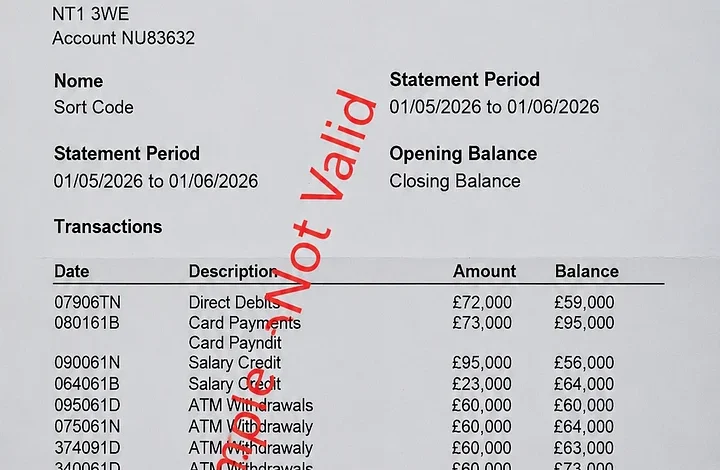
For this demonstration, the system will utilize a personal Gmail account as the email server. In a production environment, a corporate Outlook account would typically be integrated. Each email is assumed to contain a single attachment, which is expected to be an image file (JPG or PNG) of a document such as a passport, driver’s license, or bank statement.

To enable AWS Lambda to securely access the Gmail account, a crucial initial step involves configuring OAuth 2.0 credentials. This typically entails setting up an application within the Google Cloud Console, obtaining client IDs and secrets, and then establishing an authorization flow to gain access to the user’s mailbox. The returned credentials, including refresh tokens, must be stored securely. AWS Secrets Manager is the recommended service for this purpose, providing a centralized and encrypted repository for sensitive information.
The process of storing OAuth credentials involves creating a new secret in AWS Secrets Manager. The client ID, client secret, and other relevant authentication details are stored in a JSON format. This ensures that the Lambda functions can retrieve these credentials programmatically without hardcoding them, thereby maintaining a high level of security.
Data Storage: Amazon S3 Buckets
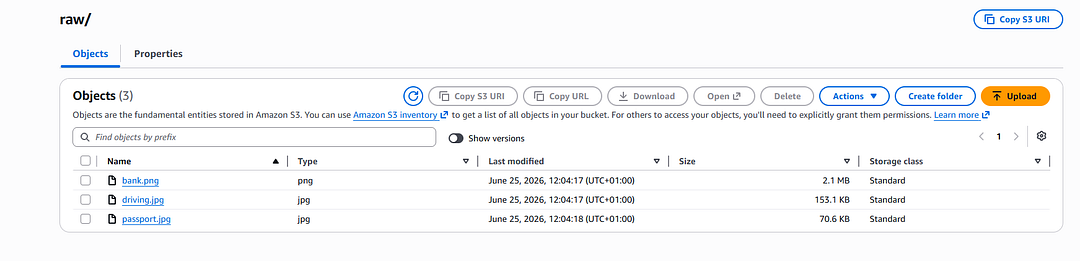
Amazon Simple Storage Service (S3) serves as the primary data storage solution for this IDP system. A general-purpose S3 bucket is configured with specific folders to manage the different stages of data processing:
raw/: This folder stores the original image attachments extracted from incoming emails.textract/: Here, the output from Amazon Textract, containing the extracted text and metadata from the images, is stored in JSON format.results/: The final output, including document classification and extracted PII, is saved in this folder.
This structured approach to data storage ensures organization, facilitates auditing, and simplifies data retrieval for subsequent analysis or manual review.

Core Processing Components: AWS Lambda Functions
The intelligence of the IDP system is primarily driven by three AWS Lambda functions, each performing a distinct but interconnected task within the workflow.
Lambda 1: ingest_email_image
The ingest_email_image Lambda function is the entry point for processing incoming email requests. It performs the following key operations:
- Email Polling: It connects to the configured Gmail inbox and polls for emails associated with a specific label (e.g., "DocumentProcessing").
- Credential Retrieval: It securely retrieves the OAuth credentials from AWS Secrets Manager to authenticate with Gmail.
- Attachment Validation: For each email, it verifies that there is exactly one attachment and that the attachment is in a supported image format (JPG or PNG).
- S3 Upload: Valid image attachments are uploaded to the
raw/folder in the designated S3 bucket. - Output Generation: The function returns metadata about the processed emails and attachments, which serves as input for the next stage in the workflow. Invalid attachments or duplicate emails are logged separately for further investigation.
This Lambda function is configured with several environment variables to manage its behavior, including the S3 bucket name, the Gmail label to monitor, the ARN of the Secrets Manager secret, logging levels, and limits on the number of images processed per run.
Lambda 2: extract_text
The extract_text Lambda function is responsible for extracting textual information from the image attachments stored in the raw/ S3 folder. It leverages Amazon Textract for this purpose:

- Textract Integration: The function initiates a synchronous document text detection job with Amazon Textract, passing the S3 object containing the image.
- Data Storage: The output from Textract, which includes the extracted text, individual lines, confidence scores, and source metadata, is saved as a JSON file in the
textract/folder of the S3 bucket.
The output from Textract is comprehensive, providing a structured representation of the document’s content. This includes the full text of the document, broken down into lines with associated confidence levels, which is crucial for downstream analysis. The structured data also contains valuable metadata, such as the number of pages in the document and the source S3 location.
Lambda 3: classify_and_extract_pii
The classify_and_extract_pii Lambda function represents the core intelligence of the IDP system, utilizing AWS Bedrock and the Claude Sonnet 4.6 model to understand and extract relevant information.
- Input Processing: This function receives the JSON output from Amazon Textract as its input.
- Bedrock Invocation: It interacts with Amazon Bedrock, specifically the Claude Sonnet 4.6 model, to perform two primary tasks:
- Document Classification: The model is prompted to identify the type of document (e.g., "bank_statement," "passport," "driving_licence").
- PII Extraction: The model is further instructed to extract specific PII fields, including first name, last name, date of birth, and address.
- Output Generation: The results of the classification and PII extraction are compiled into a new JSON file and stored in the
results/folder of the S3 bucket.
The success of this Lambda function hinges on the quality of the prompt provided to the Bedrock model. For the simplified example, a concise prompt is sufficient. However, in more complex scenarios with varied document types and less structured data, a more elaborate prompt and potentially a more powerful model might be necessary.
To utilize Bedrock, the model’s ARN must be noted from the AWS Bedrock console. Additionally, the IAM permissions for the Lambda function need to be updated to include access to the chosen Bedrock model and its inference endpoints in the relevant AWS region.
Orchestrating the Workflow: AWS Step Functions

While it’s technically possible to chain Lambda functions directly in code, AWS Step Functions provide a robust and scalable solution for orchestrating complex workflows. Step Functions allow for visual definition of the process, robust error handling, and automatic retries.
The Step Functions workflow is defined using the Amazon States Language (ASL). For this IDP system, the workflow begins with an EventBridge Scheduler triggering the Step Function. The workflow then proceeds to invoke the ingest_email_image Lambda. The output of this Lambda is then processed in a Map state, allowing parallel processing of each image attachment. Within the Map state, the extract_text Lambda is invoked, followed by the classify_and_extract_pii Lambda. Finally, the workflow includes states for recording success or failure, providing a clear audit trail.
The visual representation of the Step Functions workflow clearly illustrates the sequence of operations, including error handling branches that ensure the process can gracefully recover from unexpected issues.
Automated Execution: Amazon EventBridge Scheduler
To ensure the IDP system operates automatically and on a predictable schedule, Amazon EventBridge Scheduler is employed. EventBridge acts as a serverless event bus that can trigger various AWS services based on defined schedules.

In this implementation, an EventBridge schedule is configured to run daily at 11:55 PM. This timing is strategic, aiming to process all emails that have arrived in the inbox throughout the day. The schedule is configured as a recurring, cron-based event, allowing for precise control over the execution time.
The EventBridge schedule is set up to target the AWS Step Functions workflow. This means that every day at the specified time, EventBridge will initiate an execution of the Step Function, thereby kicking off the entire IDP process. The configuration also allows for flexible time windows, start/end dates, and integration with dead-letter queues (DLQs) for enhanced reliability.
Productionizing the System: Enhancements and Considerations
The simplified system outlined provides a strong foundation for an automated IDP. However, transforming it into a production-ready solution requires several key enhancements:
- Human-in-the-Loop (HIL) Interface: A dedicated user interface is essential for the HIL component. This interface would allow human reviewers to examine the extracted PII, verify its accuracy, and make any necessary corrections. This is particularly important for compliance with data privacy regulations.
- Advanced Document Handling: For production systems, the ability to handle a wider variety of document formats (e.g., PDFs, scanned documents with handwritten text) and complex layouts is crucial. This might involve more sophisticated configurations of Amazon Textract or the use of specialized OCR engines.
- Robust Error Handling and Monitoring: Comprehensive logging, alerting, and monitoring mechanisms are vital. This includes setting up CloudWatch Alarms for key metrics and integrating with services like AWS X-Ray for detailed tracing of requests.
- Scalability and Performance Tuning: While AWS services are inherently scalable, performance tuning might be necessary based on the expected volume of requests. This could involve optimizing Lambda function configurations, adjusting S3 bucket policies, and selecting appropriate Bedrock model instance types.
- Security Best Practices: Beyond secure credential management, a production system would require a more comprehensive security posture, including fine-grained IAM roles, VPC configurations, and data encryption at rest and in transit.
- Cost Management: Building and operating such a system incurs costs. It is imperative to monitor AWS service usage and implement cost optimization strategies, such as rightsizing Lambda functions and utilizing S3 lifecycle policies.
Cost Implications:
It is crucial for anyone implementing a similar system on AWS to be aware of the associated costs. Services like Lambda, Textract, Bedrock, Step Functions, Secrets Manager, and S3 all have associated usage-based pricing. Careful monitoring and prompt deletion of unused resources are essential to avoid unexpected charges. For example, running numerous Textract or Bedrock calls can quickly add up, especially if processing large volumes of documents. Understanding the pricing models for each service is a prerequisite for any production deployment.
Broader Impact and Future Outlook
The implementation of this automated IDP system signifies a significant leap forward in how organizations can manage data privacy requests and extract valuable information from unstructured documents. The efficiency gains achieved (up to 90%) translate directly into cost savings and improved operational agility.
The architecture demonstrates a modern, cloud-native approach that can be adapted to a wide range of industries, including finance, healthcare, and government. By leveraging services like Amazon Textract and Amazon Bedrock, organizations can unlock insights from documents that were previously difficult or impossible to process automatically.
The inclusion of the Textract step, even in this simplified example, highlights the flexibility of the AWS platform. While Bedrock might suffice for straightforward image-based PII extraction, the ability to integrate Textract provides a powerful option for handling more complex inputs like PDFs or documents with handwritten annotations. This layered approach allows for tailored solutions that meet specific business needs.

Looking ahead, the evolution of AI models within Amazon Bedrock and the continuous improvements in Amazon Textract will further enhance the capabilities of such IDP systems. Organizations that embrace these technologies will be well-positioned to gain a competitive advantage through more efficient data processing and improved decision-making.
Conclusion
This exploration into building an automated Intelligent Document Processing system on AWS underscores the transformative potential of cloud technologies. By integrating services like Lambda, S3, Textract, Bedrock, Step Functions, and EventBridge, organizations can create highly efficient, scalable, and secure solutions for handling document-based workflows. The system described, while simplified, provides a practical blueprint for automating tasks such as Freedom of Information requests, demonstrating a clear path to significant operational improvements. For those seeking to replicate this setup, a comprehensive GitHub repository containing all necessary code and configuration files is available, offering a valuable resource for practical implementation.
For all the code and ancillary files, check out my GitHub repo at the link below. Note that I have redacted ARNs, bucket names, AWS account numbers, and anything else that may pose a privacy or security risk: https://github.com/taupirho/document-intake-aws-pipeline
Related posts: