Streamlining the WordPress Experience: A Deep Dive into Eliminating Yoast SEO Upsells for Enhanced Administrative Clarity

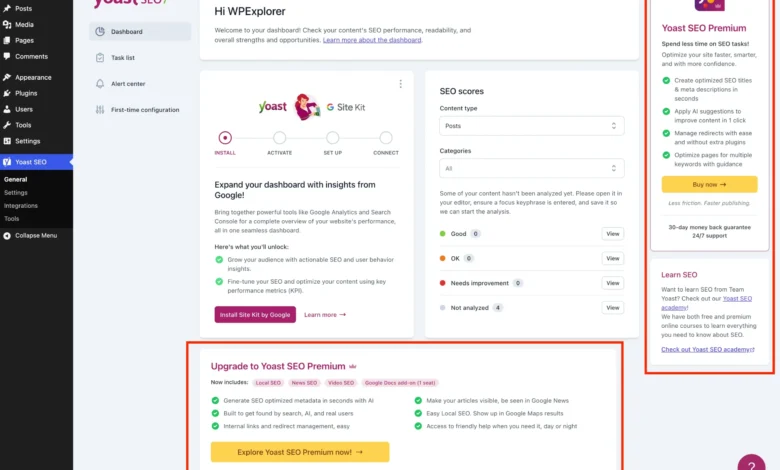
The digital landscape of WordPress, a platform powering over 43% of the world’s websites, frequently presents users with a dichotomy: powerful, free tools accompanied by persistent prompts to upgrade to premium versions. Among the most ubiquitous of these tools is Yoast SEO, a plugin celebrated for its robust features in content optimization, sitemap management, and search engine visibility. Despite its invaluable free offerings, Yoast SEO’s administrative interface has become increasingly characterized by a proliferation of upsell notifications, premium banners, and extraneous menu items, leading to a cluttered and often distracting user experience. This article, published on May 24, 2026, explores comprehensive methods to remove these premium upgrade prompts, offering web developers and site administrators a pathway to a cleaner, more efficient WordPress backend.
The Freemium Model and Its Challenges
Yoast SEO stands as a titan in the WordPress plugin ecosystem, boasting over 5 million active installations. Its success is largely attributed to its effective freemium business model, which provides essential SEO functionalities at no cost while reserving advanced features for its paid Premium version. This model allows the company to sustain development, invest in new features like AI-generated titles and descriptions, and offer dedicated support. However, the aggressive integration of upsells – ranging from premium upgrade banners and extra admin menu pages to dashboard widgets and sidebar advertisements – often disrupts the workflow for users committed to the free version, or for agencies managing numerous client sites where budget constraints or specific feature requirements preclude premium subscriptions. The visual noise can detract from the core administrative tasks, increasing cognitive load and potentially reducing overall productivity.
The Quest for a Clean Admin Interface
For web professionals, the integrity of the WordPress admin interface is paramount. A clean, uncluttered dashboard facilitates quicker navigation, reduces errors, and enhances the overall user experience, particularly when handing over sites to clients. The constant presence of premium solicitations can undermine this professional aesthetic and efficient operation. While purchasing Yoast SEO Premium is the simplest route to eliminate these distractions, offering a suite of advanced features like a redirect manager and multiple focus keywords, it is not a viable option for every user or project. Consequently, a demand has emerged for technical solutions to prune the administrative interface, allowing users to leverage Yoast SEO’s free capabilities without the incessant nudges towards an upgrade. The following sections detail a programmatic approach using PHP and CSS to achieve this streamlined environment.

Establishing the Foundational PHP Class
To systematically manage the removal of various upsell elements, a structured PHP class provides an organized and maintainable solution. This approach encapsulates all necessary code, ensuring logical grouping and preventing potential conflicts. The class is designed to execute its functions only when Yoast SEO is active and to gracefully exit if the Premium version is already installed, preventing redundant operations. This foundational class can be integrated into a child theme’s functions.php file, via a code snippets plugin, or as a new Must-Use (MU) plugin for broader application across a multisite network.
if ( ! class_exists( 'WPEX_Remove_Yoast_SEO_Upsells' ) )
    class WPEX_Remove_Yoast_SEO_Upsells
        /**
         * Class Constructor.
         */
        public function __construct()  defined( 'WPSEO_PREMIUM_VERSION' ) )
                return;

            // All action and filter hooks will be added here.

        // All methods for removing upsells will be added here.

    new WPEX_Remove_Yoast_SEO_Upsells;
The class_exists check is a standard WordPress practice to prevent re-declaration errors, while the WPSEO_VERSION and WPSEO_PREMIUM_VERSION constants ensure the code only runs under the correct conditions.
Targeted Removal of Premium Admin Pages
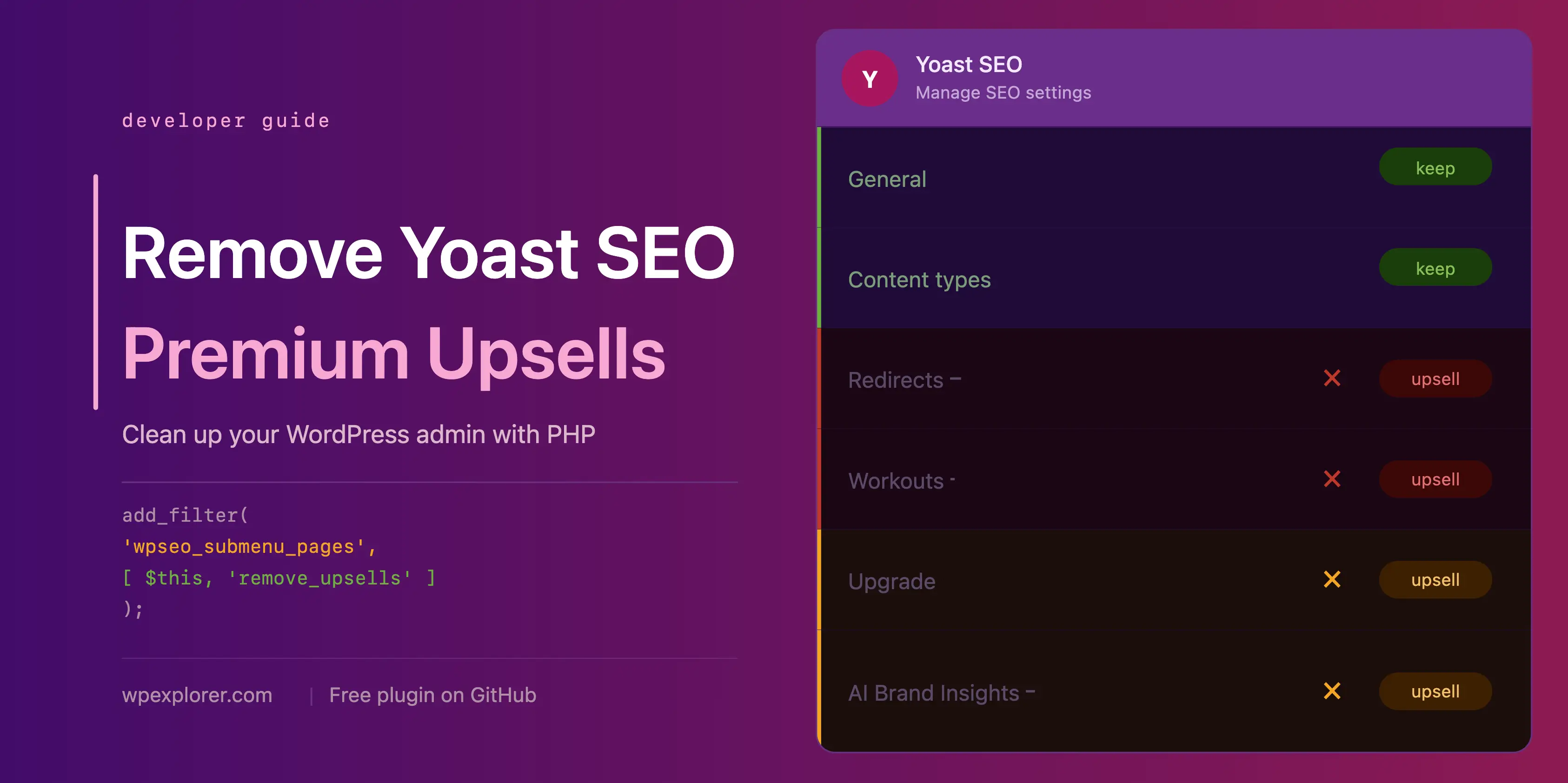
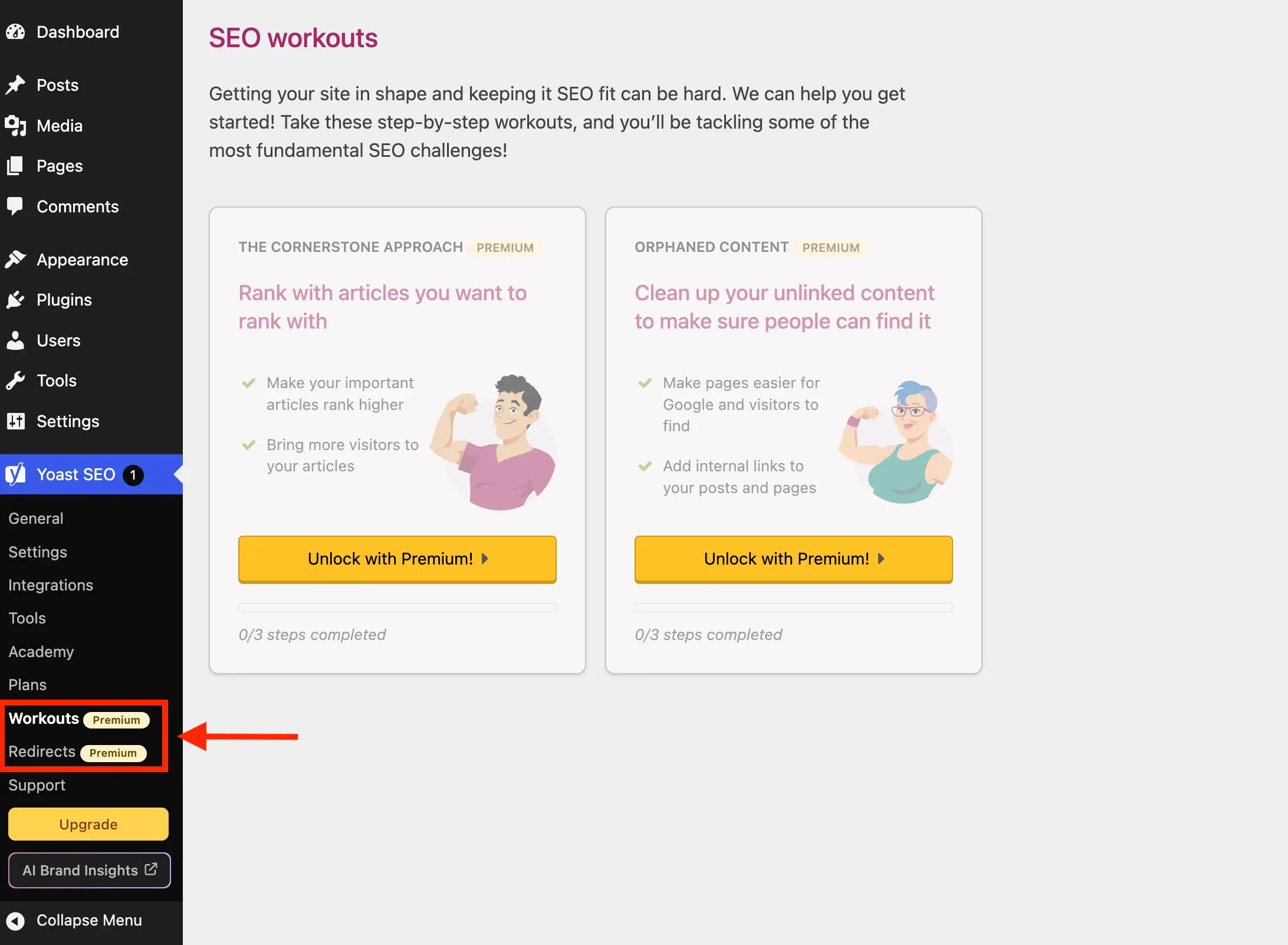
Yoast SEO introduces several menu pages within the WordPress admin dashboard that exclusively serve the Premium version. Pages such as "Redirects" and "Workouts" offer no functionality in the free version, instead redirecting users to an upgrade screen. These pages contribute to menu clutter and an unfulfilled user experience. A sophisticated method involves hooking into the wpseo_submenu_pages and wpseo_network_submenu_pages filters, allowing the system to dynamically identify and remove premium-badged pages. This adaptive strategy minimizes the need for manual updates should Yoast introduce new premium pages in the future.
// Inside the __construct() method:
add_filter( 'wpseo_submenu_pages', [ $this, 'remove_premium_admin_pages' ], PHP_INT_MAX );
add_filter( 'wpseo_network_submenu_pages', [ $this, 'remove_premium_admin_pages' ], PHP_INT_MAX );

// After the __construct() method:
/**
 * Removes any Yoast submenu pages that are flagged as premium
 * by checking for the presence of the premium badge in the menu title.
 */
public function remove_premium_admin_pages( array $pages ): array
    return array_filter( $pages, function( $page )
        // Remove pages flagged with the premium badge (e.g. Redirects, Workouts)
        if ( isset( $page[2] ) && str_contains( $page[2], 'yoast-premium-badge' ) )
            return false;

        return true;
     );
This filter, set with PHP_INT_MAX priority, ensures that the removal logic executes after Yoast SEO has fully registered all its menu items, guaranteeing effective intervention. An alternative, more explicit approach involves defining a static array of known premium page slugs, though this requires manual updates for future Yoast releases.

Eliminating Unnecessary Administrative Pages and Upsell Buttons
Beyond the explicitly premium pages, Yoast SEO also includes administrative pages in its free version that, for many users, offer minimal practical value and primarily serve as sales funnels or external links. Pages like "Plans," "Academy," and "Support" fall into this category, providing comparisons for paid plans, links to external learning platforms, or collections of support resources readily available elsewhere. These pages contribute to unnecessary menu bloat.
Furthermore, prominent "Upgrade" and "AI Brand Insights" buttons appear in both the sidebar navigation and the admin toolbar, consistently prompting users toward premium features. While the "Upgrade" button can be managed through the wpseo_submenu_pages filter, the "AI Brand Insights" button, due to its high registration priority, necessitates a direct removal via WordPress’s remove_submenu_page function. Similarly, the admin toolbar links require specific action through the admin_bar_menu hook.

// Inside the __construct() method:
add_action( 'admin_menu', [ $this, 'remove_upsell_submenu_pages' ], PHP_INT_MAX ); // For AI Brand Insights
add_action( 'admin_bar_menu', [ $this, 'remove_admin_bar_links' ], PHP_INT_MAX ); // For toolbar buttons

// After the __construct() method (updated remove_premium_admin_pages):
/**
 * Removes any Yoast submenu pages that are flagged as premium
 * by checking for the presence of the premium badge in the menu title.
 * Also removes the Upgrade upsell button and other unnecessary admin pages.
 */
public function remove_premium_admin_pages( array $pages ): array
    $pages_to_remove = [
        'wpseo_upgrade_sidebar',
        'wpseo_licenses', // Formerly 'Plans'
        'wpseo_page_academy',
        'wpseo_page_support',
        'wpseo_redirects', // Explicitly add if not caught by badge
        'wpseo_workouts',  // Explicitly add if not caught by badge
    ];
    return array_filter( $pages, function( $page ) use ( $pages_to_remove )
        if ( isset( $page[2] ) && str_contains( $page[2], 'yoast-premium-badge' ) )
            return false;

        if ( isset( $page[4] ) && in_array( $page[4], $pages_to_remove, true ) )
            return false;

        return true;
     );


// After the __construct() method (new methods for toolbar and AI Brand Insights):
/**
 * Removes the AI Brand Insights sidebar button directly from
 * the admin menu after all pages have been registered.
 */
public function remove_upsell_submenu_pages(): void
    remove_submenu_page( 'wpseo_dashboard', 'wpseo_brand_insights' );


/**
 * Removes the Upgrade and AI Brand Insights upsell buttons
 * from the Yoast SEO admin toolbar menu.
 *
 * @param WP_Admin_Bar $wp_admin_bar Admin bar instance.
 */
public function remove_admin_bar_links( WP_Admin_Bar $wp_admin_bar ): void
    $wp_admin_bar->remove_node( 'wpseo-get-premium' );
    $wp_admin_bar->remove_node( 'wpseo_brand_insights' );
Disabling the Yoast SEO Dashboard Widget
The Yoast SEO dashboard widget, a persistent fixture on the WordPress dashboard, presents an overview of SEO scores and a feed of the latest blog posts from Yoast.com. While seemingly innocuous, this widget performs an uncached HTTP request to yoast.com/feed/widget/ upon every dashboard load. This not only introduces unnecessary overhead but also transmits sensitive server environment details (WordPress and PHP versions) with each request. For performance-conscious administrators and those prioritizing privacy, its removal is a sensible optimization.
// Inside the __construct() method:
add_action( 'wp_dashboard_setup', [ $this, 'remove_dashboard_widget' ], PHP_INT_MAX );
add_action( 'admin_enqueue_scripts', [ $this, 'remove_dashboard_widget_assets' ], PHP_INT_MAX );

// After the __construct() method:
/**
 * Removes the Yoast SEO dashboard widget.
 */
public function remove_dashboard_widget(): void
    remove_meta_box( 'wpseo-dashboard-overview', 'dashboard', 'normal' );


/**
 * Dequeues the Yoast SEO dashboard widget scripts and styles.
 */
public function remove_dashboard_widget_assets(): void
    $current_screen = get_current_screen();
    if ( ! ( $current_screen instanceof WP_Screen && $current_screen->id === 'dashboard' ) )
        return;

    wp_dequeue_script( 'yoast-seo-dashboard-widget' );
    wp_dequeue_style( 'yoast-seo-wp-dashboard' );
    wp_dequeue_style( 'yoast-seo-monorepo' );
Concealing Upsell Banners and Locked Premium Fields with CSS

Many Yoast SEO upsells are injected as JavaScript components, making direct PHP removal challenging. These include promotional banners at the bottom of settings pages, sticky sidebars promoting upgrades, and numerous "locked" fields within settings that are exclusively for premium users. Since these elements lack unique, reliably stable IDs for easy targeting, a robust CSS-based approach is necessary. This involves injecting custom CSS to hide these elements, leveraging their structural position and specific classes (like yst-button--upsell or yst-feature-upsell). This method, while effective, requires careful monitoring as future Yoast updates might alter their HTML structure or class names, necessitating adjustments to the CSS selectors.
// Inside the __construct() method:
add_action( 'admin_enqueue_scripts', [ $this, 'remove_upsells_from_admin_pages' ], PHP_INT_MAX );
add_action( 'admin_enqueue_scripts', [ $this, 'remove_upsells_from_metaboxes' ], PHP_INT_MAX );

// After the __construct() method (updated remove_upsells_from_admin_pages with all CSS):
/**
 * Hides the premium upgrade banner, sticky sidebar, locked fields, and integration cards on Yoast
 * admin pages using inline CSS.
 */
public function remove_upsells_from_admin_pages(): void
    $current_screen = get_current_screen();
    if ( ! ( $current_screen instanceof WP_Screen && str_contains( $current_screen->id, 'wpseo_' ) ) )
        return;

    $css = '
        #yoast-seo-general .yst-@container > div:last-child:has([data-action=load-nfd-ctb]),
        #yoast-seo-general .yst-min-w-[16rem]:has(>.yst-sticky),
        #yoast-seo-settings main + div:has([data-action=load-nfd-ctb]),
        #yoast-seo-settings .yst-root div[class*=yst-fixed],
        #yoast-seo-settings main section .yst-feature-upsell,
        #yoast-seo-settings main section.yst-grid:has(fieldset > .yst-space-y-8 > .yst-feature-upsell:only-child),
        #yoast-seo-settings main section.yst-grid:has(fieldset > .yst-space-y-8 > .yst-feature-upsell:only-child) + hr,
        #yoast-seo-settings main form fieldset > .yst-flex > .yst-divide-y > .yst-py-4:has(.yst-button--upsell),
        #yoast-seo-settings main fieldset.yst-group > ul > li:has([data-action=load-nfd-ctb]),
        #wpseo-integrations .yst-root section > .yst-grid > div:has([data-action=load-nfd-ctb]),
        .yst-root .yst-table-row:has(.yst-button--upsell),
        .seo_page_wpseo_tools .wpseo_content_cell .yoast_premium_upsell,
        .seo_page_wpseo_tools #sidebar-container.wpseo_content_cell  display: none !important;
    ';
    wp_register_style( 'wpex-remove-yoast-upsells', false );
    wp_enqueue_style( 'wpex-remove-yoast-upsells' );
    wp_add_inline_style( 'wpex-remove-yoast-upsells', $css );


/**
 * Hides premium upsell fields and buttons from the Yoast SEO
 * metabox and block editor sidebar panel using inline CSS.
 */
public function remove_upsells_from_metaboxes(): void
    $current_screen = get_current_screen();
    if ( ! ( $current_screen instanceof WP_Screen && in_array( $current_screen->base, [ 'post', 'term' ], true ) ) )
        return;

    $css = '
        .wpseo-metabox-content div:has(> button > .yst-badge--upsell),
        :is(.wpseo-metabox-content,.yoast-modal-content) .yoast-prominent-words,
        :is(.wpseo-metabox-content,#yoast-seo:seo-sidebar) .yst-root > div > button[data-id*=AIFixes],
        .wpseo-metabox-content .collapsible_content > .yst-flex:has(.yst-badge--upsell),
        .wpseo-metabox-content .collapsible_content > .yst-flex:has(.yst-badge--upsell) + hr,
        :is(.wpseo-metabox-content,.yoast-modal-content) .yst-feature-upsell--card,
        #yoast-seo:seo-sidebar .components-panel > div:has(.yst-badge--upsell),
        #premium-seo-analysis-upsell-ad-sidebar,
        #premium-seo-analysis-upsell-ad-metabox  display: none !important;
    ';
    wp_register_style( 'wpex-remove-yoast-metabox-upsells', false );
    wp_enqueue_style( 'wpex-remove-yoast-metabox-upsells' );
    wp_add_inline_style( 'wpex-remove-yoast-metabox-upsells', $css );
The CSS is strategically enqueued only on relevant admin screens (Yoast settings pages, post/term editors) to minimize performance impact. This meticulous targeting aims to hide only the upsells without inadvertently affecting legitimate settings or functionalities.
Broader Impact and Implications for the WordPress Ecosystem

The pursuit of a decluttered WordPress administrative experience reflects a growing sentiment within the web development community. While plugin developers like Yoast SEO are justified in seeking revenue through premium offerings to support their extensive work, the method of aggressively promoting these upgrades can lead to friction. Solutions like the one detailed here offer a pragmatic compromise, allowing users to benefit from powerful free tools while maintaining a professional and distraction-free workspace.
However, relying on custom code and CSS selectors to counteract dynamic plugin interfaces comes with inherent challenges. Future updates to Yoast SEO may introduce changes to its HTML structure or class names, potentially rendering existing selectors ineffective. This necessitates ongoing maintenance and vigilance from users implementing these solutions. The availability of a dedicated, open-source plugin like wpex-remove-upsells-for-yoast-seo (available on GitHub) simplifies deployment but still requires users to manually check for updates following major Yoast releases.
Ultimately, this initiative highlights a broader trend: the continuous effort by WordPress users and developers to customize their environments for optimal efficiency and aesthetic appeal. It underscores the platform’s flexibility and the community’s ingenuity in adapting tools to specific needs, even when those needs diverge from a plugin’s intended monetization strategy. For those who find these technical interventions too demanding, exploring alternative SEO plugins, many of which offer different freemium models or focus on a leaner interface, remains a viable path. This ensures that regardless of individual preference or budget, a powerful, user-friendly SEO solution remains within reach for every WordPress site.