For years, content and design teams operating within the WordPress ecosystem have navigated a complex and often fragmented landscape when it came to feedback and iteration. The standard practice involved shuttling content drafts between disparate platforms such as Google Docs for textual comments, Figma for design annotations, and lengthy email threads for overarching discussions. This multi-tool approach, while functional, frequently led to inefficiencies, context switching, content duplication, and the inherent risk of losing critical feedback amidst the digital shuffle. However, a significant paradigm shift has arrived with the introduction of WordPress Notes, a robust, built-in feedback mechanism now seamlessly integrated directly into the WordPress editor, fundamentally transforming the collaborative content creation process.
Published on April 7, 2026, the arrival of WordPress Notes marks a pivotal moment in the platform’s evolution, underscoring its commitment to becoming a more comprehensive and efficient content management system (CMS) for professional teams. This native functionality empowers users to attach specific feedback to individual blocks—whether it’s a paragraph of text, an image, a heading, or a layout element—precisely where the content resides. This innovation eradicates the cumbersome need for external tools, screenshots, or disjointed comment threads, centralizing the entire review and revision cycle within the familiar WordPress environment.

The Evolution of Collaborative Challenges in WordPress
Before the advent of Notes, content creators, editors, designers, and project managers often grappled with a series of persistent challenges. A typical workflow might involve drafting an article in the WordPress editor, exporting the text to Google Docs for editorial review, capturing screenshots of design elements to annotate in Figma, and then compiling all feedback via email. This process, while necessary, introduced significant overheads. Each tool swap represented a loss of context, forcing reviewers and creators to constantly cross-reference information and piece together feedback from multiple sources. Version control became a nightmare, and the sheer time spent copying, pasting, and reconciling disparate comments severely impacted productivity.
Industry analyses consistently highlight content review as one of the most time-consuming phases in digital publishing. A 2023 survey by Content Marketing Institute, for instance, indicated that content teams spend upwards of 20% of their project time solely on review and approval processes. A significant portion of this time was attributed to managing feedback across different platforms. This fragmented approach not only slowed down publication cycles but also increased the likelihood of misinterpretations and errors, ultimately impacting content quality and brand consistency. WordPress Notes directly addresses these long-standing pain points, promising a more cohesive and agile workflow.

The Genesis and Vision Behind WordPress Notes
The development of in-editor feedback tools has been a recurring discussion point within the WordPress core contributor community, particularly since the introduction and maturation of the Gutenberg block editor. The modular nature of Gutenberg, with its discrete blocks for every content element, provided the perfect architectural foundation for a feature like Notes. Early proposals and discussions focused on how to best integrate contextual comments without overwhelming the user interface or compromising performance. The goal was always to provide a solution that was intuitive, powerful, and native to the WordPress experience.
Core contributors and lead developers envisioned Notes as more than just a commenting system; they aimed to create a collaborative workspace where feedback was intrinsically linked to the content itself. "Our vision for WordPress has always been about empowering creators and making content management as seamless as possible," states a hypothetical WordPress Core Lead Developer. "Notes represents a crucial step in that direction, moving beyond mere content creation to fostering truly integrated team collaboration. We wanted to eliminate the friction points that forced users outside of WordPress for critical feedback loops." This commitment to enhancing the user experience and consolidating functionalities within the platform has been a driving force behind its continuous development. The feature underwent extensive alpha and beta testing phases, with feedback from a diverse group of users—from individual bloggers to large agencies—shaping its final implementation and ensuring it met a broad spectrum of real-world needs.
Unpacking the Feature: How WordPress Notes Works
WordPress Notes is designed for simplicity and efficiency, allowing users to leave, review, and manage feedback directly within the editor interface.
Adding Notes:
The process of adding a note is remarkably straightforward.
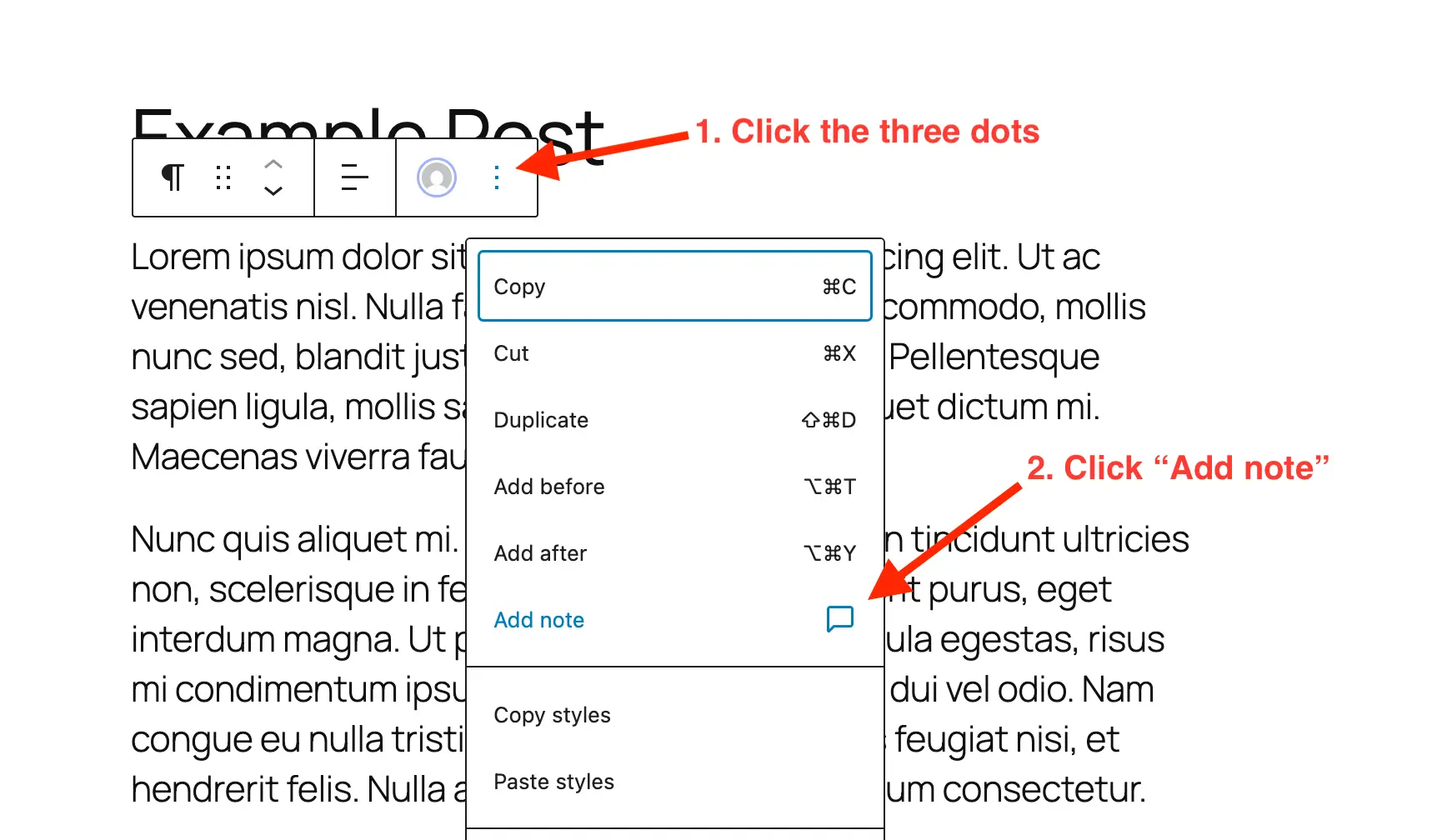
- Access the Post or Page: Navigate to the specific post or page within the WordPress block editor that requires review.
- Select the Target Block: Click on any block – be it a paragraph, heading, image, or custom block – where feedback is needed.
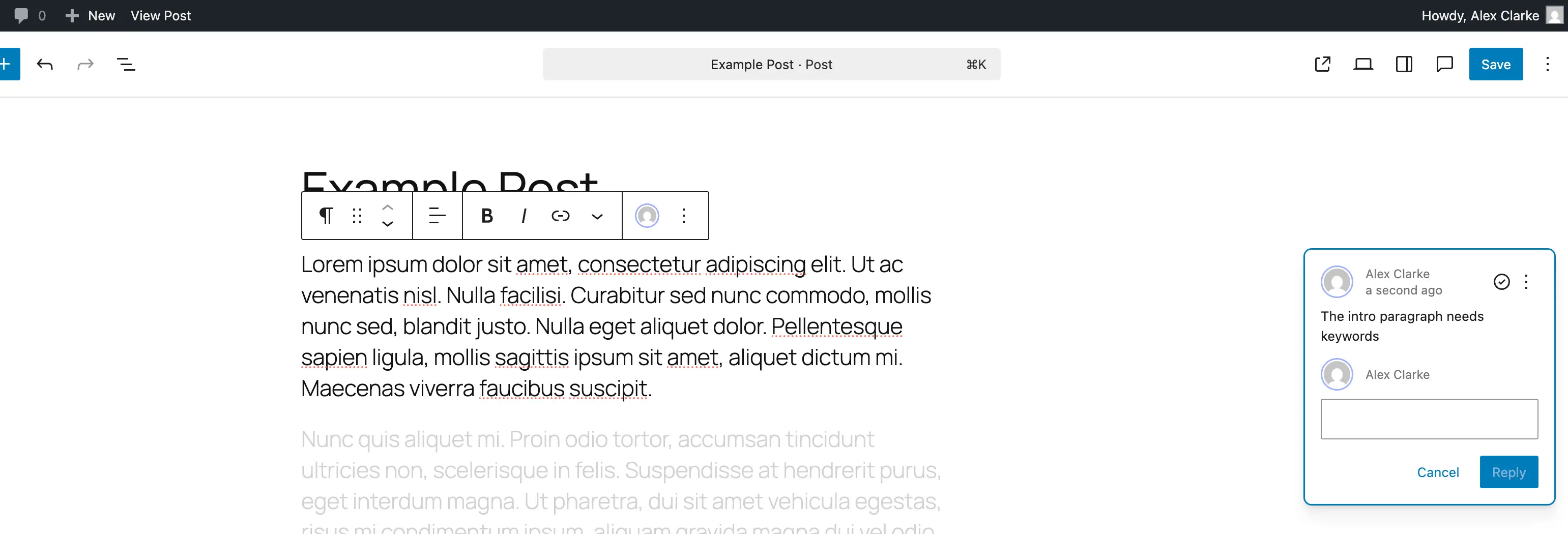
- Initiate a Note: Within the block’s toolbar, typically accessible via a three-dot menu, select the "Add Note" option. This action triggers the appearance of a dedicated panel, usually on the right-hand side of the editor.
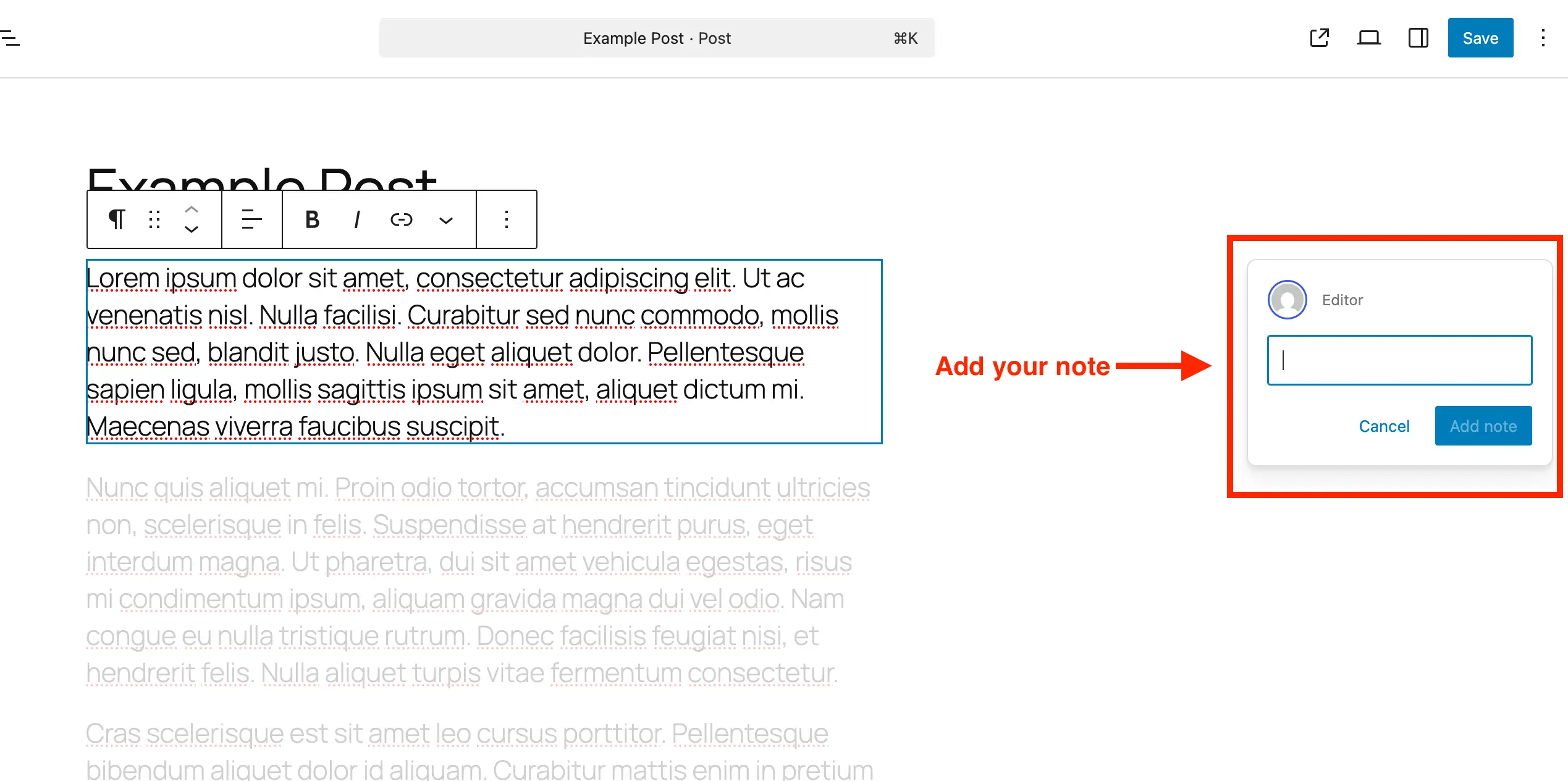
- Compose and Submit Feedback: A text input area will materialize, allowing the user to type their feedback. The input box intelligently expands to accommodate longer comments, and line breaks can be added for enhanced readability. Once composed, the note is submitted, instantly attaching it to the selected block. Each note clearly displays the author and the timestamp, ensuring accountability and traceability.
Reviewing and Managing Notes:
Managing existing notes is equally intuitive, designed to streamline the feedback resolution process.
- Open the Relevant Content: Return to the post or page containing the notes.
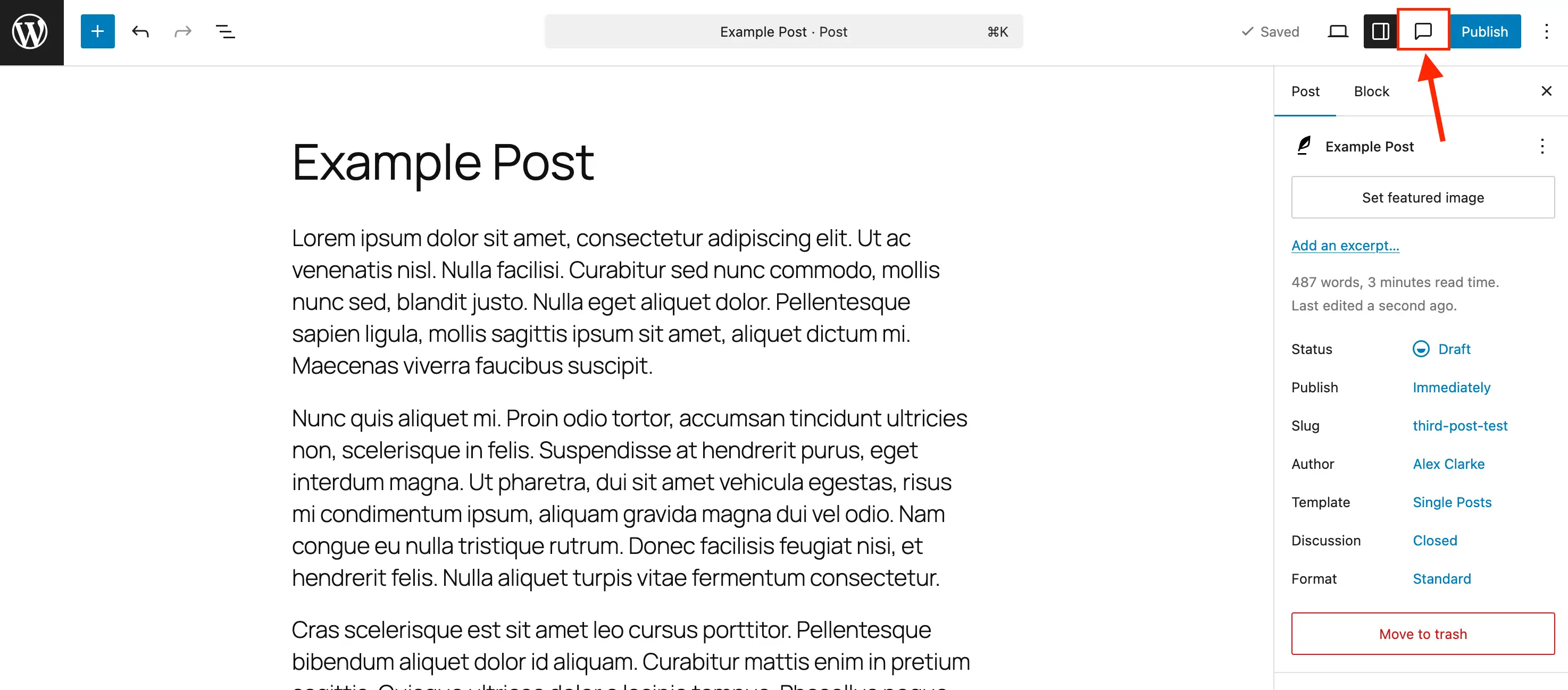
- Toggle the Notes Sidebar: While individual notes appear alongside their blocks, the most efficient way to manage them is by activating the dedicated "Notes" sidebar. This is typically accessed via a comment bubble icon in the editor’s toolbar. The sidebar consolidates all notes in a single, scrollable list, providing an at-a-glance overview of all feedback.
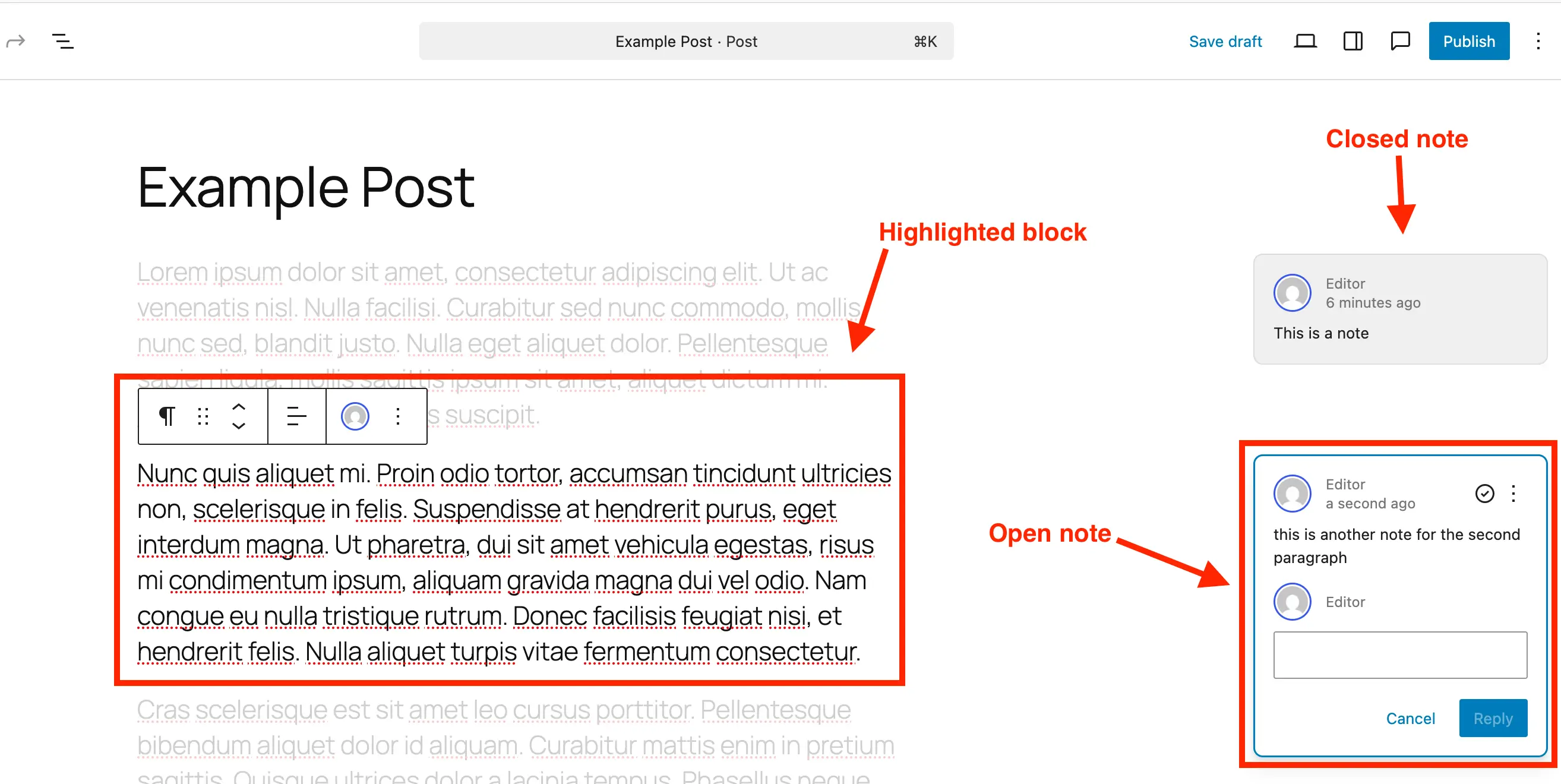
- Focus on Specific Feedback: Clicking on a note, either in the sidebar or directly on the content, dynamically highlights the associated block in the main editor area. Concurrently, the rest of the content may subtly fade, drawing the reviewer’s attention directly to the element under discussion.
- Engage in Discussion: Each note features a reply field, enabling threaded conversations. This keeps all discussions tightly coupled with the original feedback, preventing fragmentation and ensuring that the entire context of a revision is preserved.
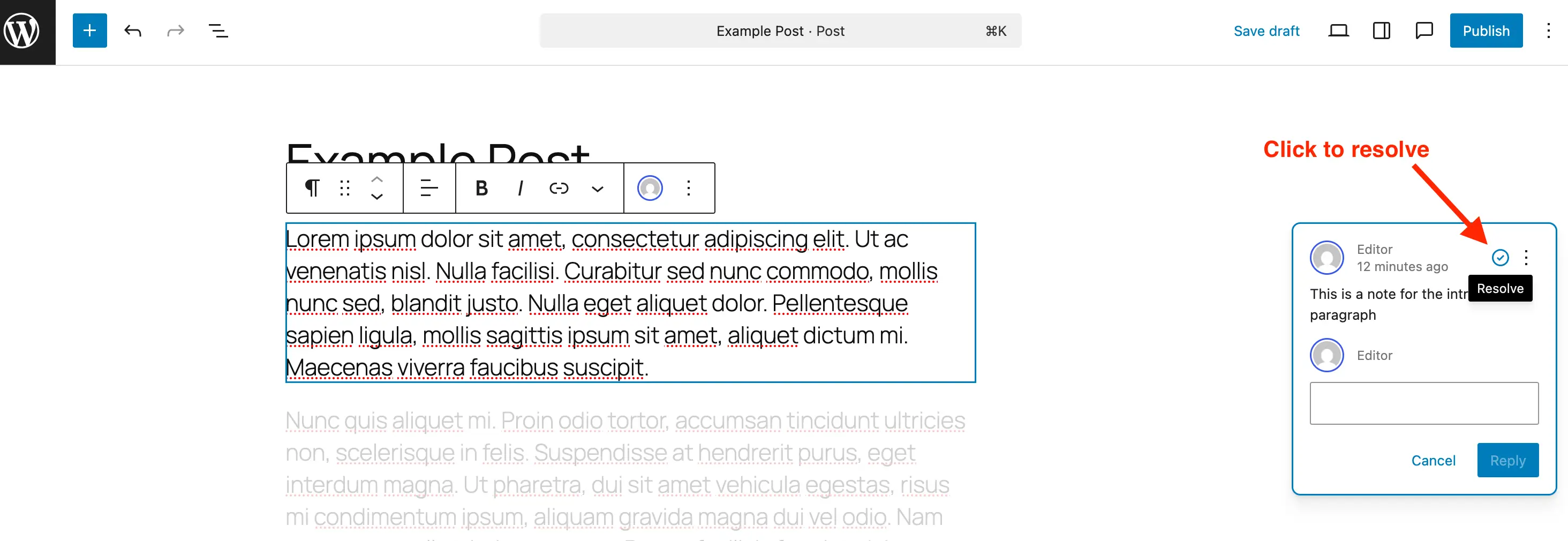
- Resolve Feedback: Once a piece of feedback has been addressed or a revision implemented, the note can be marked as "Resolved" by clicking a designated checkmark icon. Resolved notes no longer appear as active feedback bubbles in the main editor but remain visible within the Notes sidebar, categorized as "Resolved," allowing for a comprehensive audit trail.
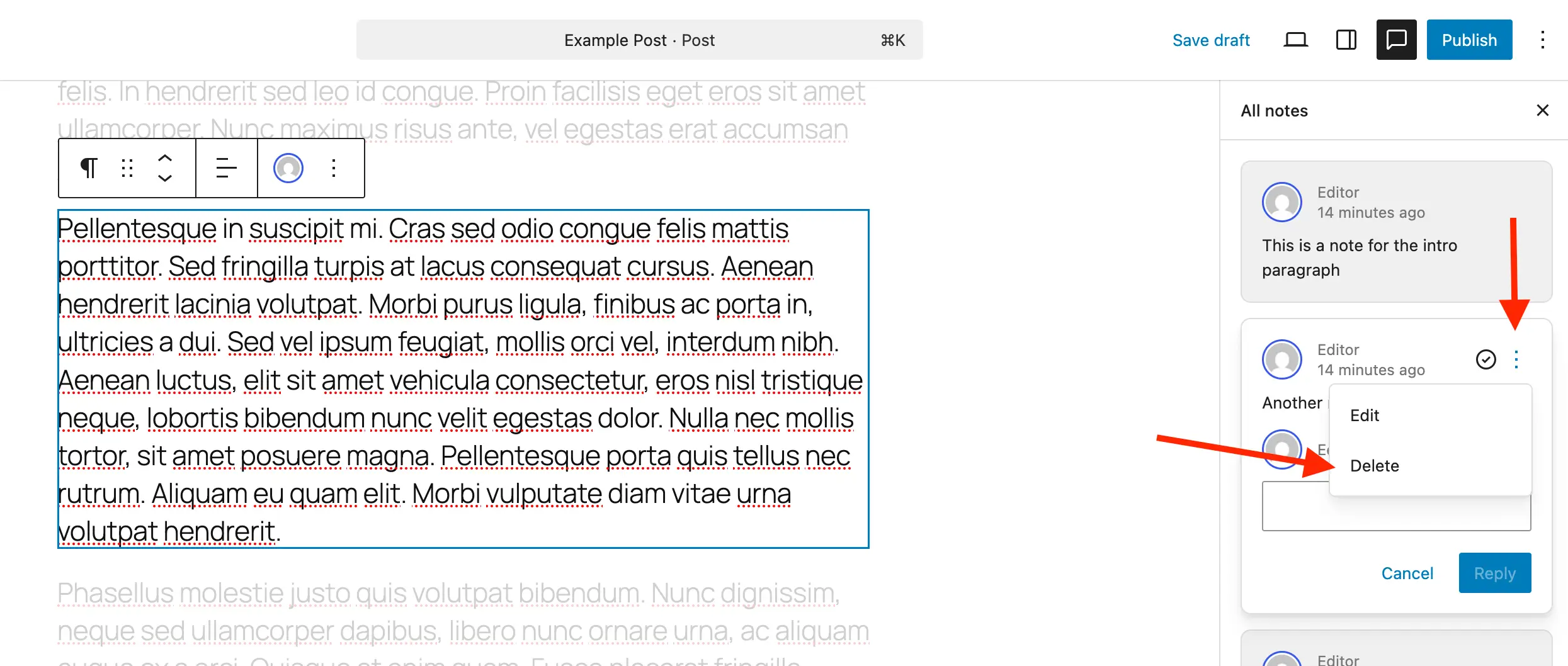
- Delete or Reopen Notes: Users have the option to permanently delete a note if it’s no longer relevant, helping to maintain a clean database and editor interface. Conversely, a resolved note can be "Reopened" if further discussion or revision is required, demonstrating the feature’s flexibility.
Technical Integration: Custom Post Types and Disabling Notes
For developers and power users managing complex WordPress installations, the integration of Notes with custom post types (CPTs) is a critical consideration. By default, Notes are enabled for standard posts and pages. To extend this functionality to custom content types, a simple configuration is required.
Enabling Notes for Custom Post Types:
For those utilizing plugins like "Post Types Unlimited" for CPT registration, enabling Notes is as simple as checking a box within the plugin’s settings, specifically under the "Supports" options. For manual registration via code, the editor parameter within the supports argument needs to include "notes" => true.
Example for new CPT registration:
register_post_type( 'book', [
    'label'        => 'Books',
    'public'       => true,
    'show_in_rest' => true,
    'supports'     => [
        'title',
        'editor' => [ 'notes' => true ], // Crucial line for Notes support
        'author',
    ],
] );
For existing custom post types, a code snippet can be used to merge Notes support without disrupting other existing editor features. This involves iterating through desired post types and adding 'notes' => true to their editor supports array.
Example for existing CPTs:
/**
 * Enable editor notes for custom post types.
 */
add_action( 'init', function()
    $post_types = [ 'MY_CUSTOM_POST_TYPE_1', 'MY_CUSTOM_POST_TYPE_2' ]; // Modify with your CPTs
    foreach ( $post_types as $post_type )
        $supports = get_all_post_type_supports(  $post_type );
        $editor_supports = array( 'notes' => true );
        if ( is_array( $supports['editor'] ) && isset( $supports['editor'][0] ) && is_array( $supports['editor'][0] ) )
            $editor_supports = array_merge( $editor_supports, $supports['editor'][0] );

        add_post_type_support( $post_type, 'editor', $editor_supports );

 );
Disabling Notes:
While Notes significantly enhance collaboration, there might be scenarios where they are not desired for certain content types, for instance, in highly automated or templated content where feedback isn’t relevant. WordPress does not offer a global toggle to disable Notes entirely, but they can be removed from specific post types to reduce visual clutter. A filter can be applied to the register_post_type_args hook to unset the 'notes' support for specified post types.
Example for disabling Notes:
/**
 * Disable Notes via post type args filter.
 */
add_filter( 'register_post_type_args', function( $args, $post_type )
    $post_types_to_disable = [ 'post', 'page' ]; // Modify with post types where Notes should be disabled
    if ( in_array( $post_type, $post_types_to_disable, true ) && isset( $args['supports']['editor']['notes'] ) )
        unset( $args['supports']['editor']['notes'] );

    return $args;
, 10, 2 );
Industry Reactions and Expert Perspectives
The immediate reaction from the WordPress community and digital agencies has been overwhelmingly positive. "This is a game-changer for our agency," remarks Sarah Chen, CEO of a prominent digital marketing firm. "We’ve spent countless hours trying to consolidate feedback from clients and internal teams. Notes streamlines that entire process, saving us time and significantly reducing client revisions. It means faster project delivery and happier clients."
Content strategists echo this sentiment. Mark Jensen, a freelance content consultant, notes, "For years, I’ve preached the importance of contextual feedback. Now, WordPress provides it natively. It’s not just about convenience; it’s about accuracy. When feedback is tied directly to the specific word or image, there’s far less room for misinterpretation." This direct link between comment and content is expected to drastically improve the quality of revisions and the speed of approval processes.
Broader Implications for Content Workflows
The integration of Notes is poised to have far-reaching implications across the entire content lifecycle:
- Enhanced Productivity: By centralizing feedback, teams can drastically reduce the time spent on context switching and managing multiple tools. This leads to quicker review cycles and faster publication times.
- Improved Accuracy and Clarity: The ability to attach comments directly to specific blocks ensures that feedback is precise and unambiguous, minimizing misinterpretations and subsequent rounds of revisions.
- Streamlined Collaboration: Notes fosters a more collaborative environment within WordPress, encouraging real-time discussions and problem-solving directly on the content itself. This is particularly beneficial for distributed teams.
- Reduced Overhead: Eliminating the need for third-party tools for basic feedback mechanisms can lead to cost savings and a simplified tech stack for many organizations.
- Strengthening WordPress as an Enterprise CMS: This feature elevates WordPress’s capabilities, making it a more compelling choice for larger organizations and enterprises that demand robust collaboration tools for their content operations. It positions WordPress more competitively against newer, purpose-built collaborative content platforms.
- Audit Trails and Accountability: The clear authorship and timestamps on each note provide an invaluable audit trail, showing who said what and when, which is crucial for compliance and project management.
The Future of Collaboration in WordPress
The introduction of Notes is likely just the beginning of a broader emphasis on collaborative features within WordPress. Future enhancements could include more granular permission settings for notes, integration with project management tools, @mentions for notifying specific team members, or even AI-powered suggestions based on note feedback. As WordPress continues to evolve, features like Notes solidify its position not just as a publishing platform, but as a dynamic and comprehensive content workspace designed for the demands of modern digital teams. By simplifying communication and centralizing critical feedback, WordPress Notes empowers creators to focus on what they do best: producing compelling, high-quality content efficiently and effectively.