How WordPress Developers Can Visually Identify and Audit Sponsored and Nofollow Links Inside the Gutenberg Editor

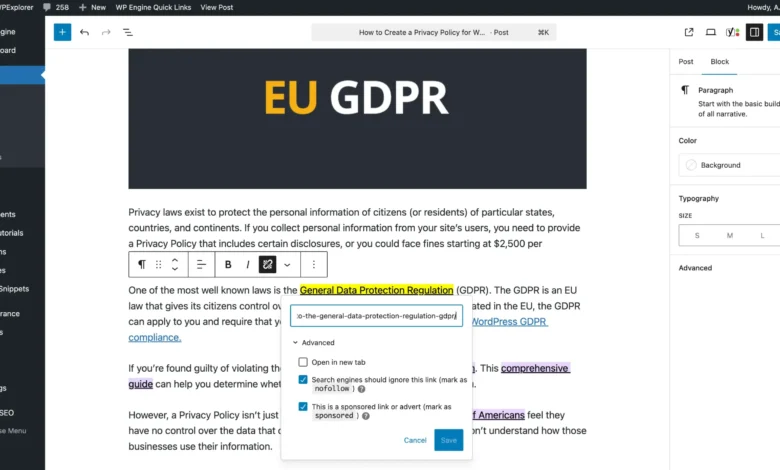
As website portfolios scale into thousands of posts, maintaining rigorous search engine optimization standards and precise affiliate disclosures becomes a monumental administrative challenge for digital publishers. Managing affiliate relationships requires strict adherence to search engine guidelines, particularly regarding how outbound links are coded. For platforms that rely heavily on sponsored content and affiliate monetization, distinguishing between standard editorial links, nofollow attributes, and sponsored tags is vital for compliance and site architecture integrity. To address this operational bottleneck, developers and site administrators are increasingly adopting workflow enhancements that streamline internal content auditing directly within the content management system.
Background Context of Affiliate Link Management and SEO Compliance
The evolution of link attribution attributes has transformed how publishers structure outbound connections. For years, the rel="nofollow" attribute served as the universal standard for signaling to search engine crawlers that a specific link should not pass PageRank or influence search engine rankings, frequently utilized for paid placements and affiliate partnerships. However, in late 2019, Google introduced more nuanced relational attributes: rel="sponsored" specifically for advertisements or paid placements, and rel="ugc" for user-generated content like comments and forum posts.
For publishers with legacy content libraries, transitioning from blanket nofollow tags to modern sponsored attributes is a painstaking process. Furthermore, ensuring that every affiliate link carries the proper disclosure text alongside the appropriate HTML attributes demands constant vigilance. Historically, editors had to inspect the HTML code block of individual links within the WordPress editor—a time-consuming and inefficient method when auditing lengthy articles or massive content repositories containing thousands of pages.
The Need for In-Editor Visual Cues
Content management efficiency relies heavily on reducing friction during the editing and auditing process. Without visual indicators in the backend text editor, writers, editors, and SEO managers cannot easily discern link types at a glance. Editorial teams frequently struggle to evaluate whether an article is over-monetized, whether links lack essential attributes entirely, or whether legacy posts comply with updated regulatory frameworks set by agencies like the Federal Trade Commission (FTC).
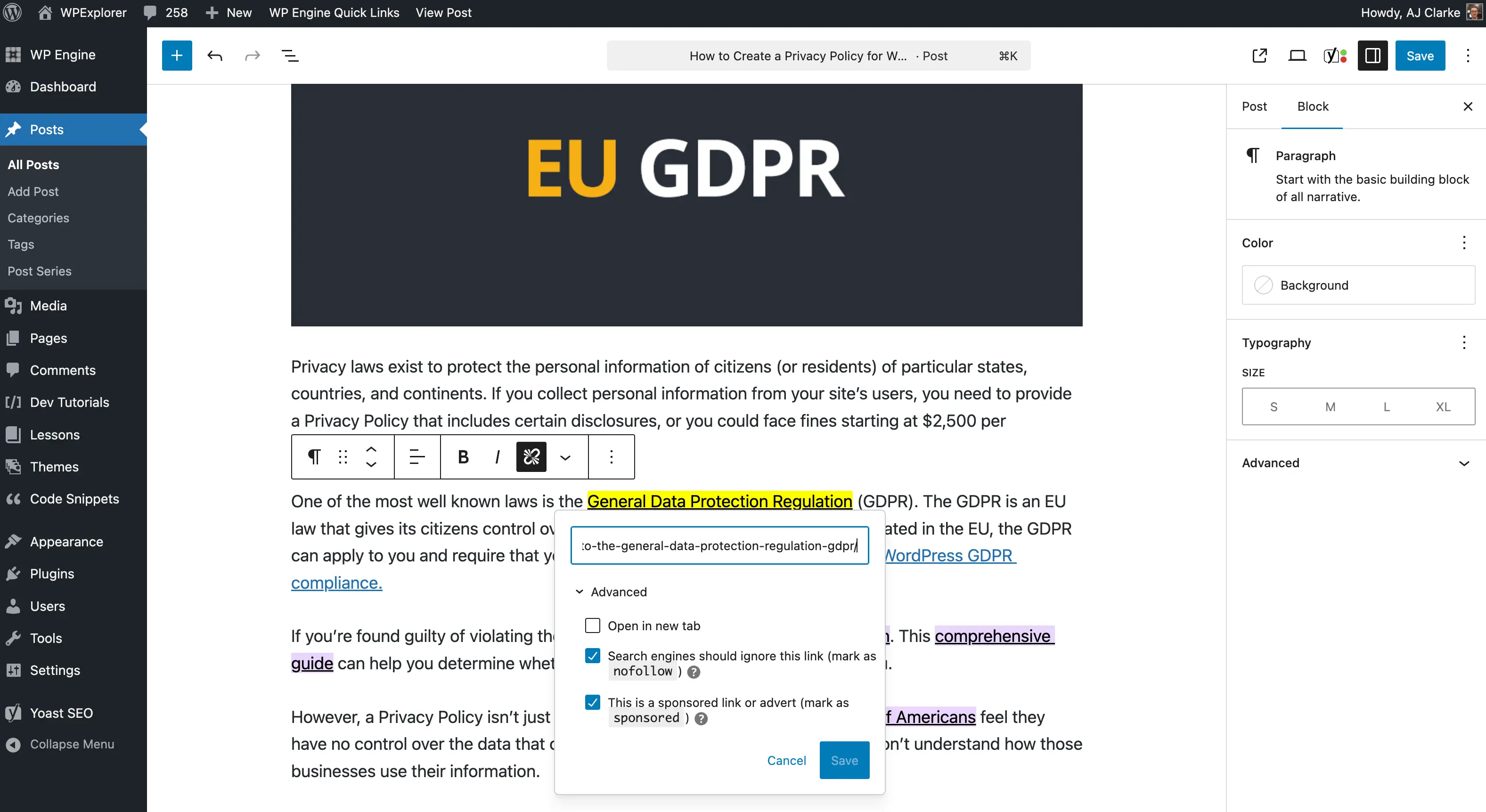
By introducing a mechanism that visually highlights links based on their rel attributes directly inside the WordPress Gutenberg block editor, publishers can immediately assess link distribution without toggling to the Code Editor view. This proactive approach allows teams to catch omissions, rectify missing disclosure attributes, and optimize commercial link density before content goes live or during routine content audits.
Technical Implementation: Integrating Custom CSS into the WordPress Editor
Implementing a visual highlight system requires injecting custom cascading style sheets (CSS) into the WordPress editor environment. Modern WordPress architecture, encompassing both the classic editor and the block-based Gutenberg interface, supports custom editor stylesheets and inline style hooks.
There are two primary methods for applying custom styles to the editor interface. The first involves registering an external stylesheet via a child theme using the after_setup_theme hook combined with add_theme_support('editor-styles') and add_editor_style(). This method loads a designated CSS file automatically across the administrative editing environment.
The second method utilizes inline CSS injection via the enqueue_block_editor_assets hook. This approach is particularly advantageous for developers packaging functionality into standalone utility plugins, allowing administrators to activate or deactivate the feature globally without modifying theme files.
Utilizing CSS Attribute Selectors for Link Targeting
Targeting specific link attributes efficiently relies on advanced CSS attribute selectors. Specifically, the tilde attribute selector ([attribute~=value]) matches elements whose attribute value is a list of whitespace-separated values, one of which is explicitly a specified string.
By constructing a selector that identifies anchor tags containing either the sponsored or nofollow relationship, developers can apply high-contrast background and text colors. For example, targeting elements matching a[rel~=sponsored] and a[rel~=nofollow] ensures that any link carrying these designations is rendered with a distinct visual signature, such as a bright yellow background paired with dark text.
To ensure these styles apply accurately within the Gutenberg block editor without interfering with frontend display, developers target the .editor-styles-wrapper class name. This containment guarantees that the highlighting logic remains strictly within the administrative dashboard.

.editor-styles-wrapper a:is([rel~=sponsored],[rel~=nofollow])
    background: #FFFF00;
    color: #000;
Packaging the Solution as a Lightweight Utility Plugin
Rather than manually inserting code snippets into theme functions, developers often package such administrative tools into lightweight plugins. This modular approach simplifies maintenance across multiple WordPress installations. A standard implementation utilizes the WordPress plugin architecture to queue the inline styles securely:
/**
 * Adds inline CSS to the block editor to highlight sponsored and nofollow links.
 */
add_action( 'enqueue_block_editor_assets', function()
    wp_register_style( 'wpexplorer-editor-highlight-rel-sponsored-nofollow', false );
    wp_add_inline_style(
        'wpexplorer-editor-highlight-rel-sponsored-nofollow',
        '.editor-styles-wrapper a:is([rel~=sponsored],[rel~=nofollow])background:#FFFF00;color: #000;'
    );
    wp_enqueue_style( 'wpexplorer-editor-highlight-rel-sponsored-nofollow' );
 );
Once active, this code immediately flags qualifying outbound links across all posts and pages within the editor interface, streamlining comprehensive content audits and reducing manual inspection times significantly.
Broader Implications for Content Publishing and Ecosystem Efficiency
The adoption of custom administrative tools highlights a persistent friction point within the broader WordPress ecosystem: the tension between core plugin repository review processes and rapid developer workflows. Independent developers frequently bypass the official WordPress.org plugin directory for minor utility tools, citing lengthy review queues and administrative bottlenecks. This reliance on alternative distribution platforms, such as GitHub, underscores the demand for more agile developer tooling within enterprise and independent publishing sectors alike.
Ultimately, integrating visual indicators for link attributes represents a minor technical adjustment that yields major operational benefits. By improving transparency and ease of auditing within the content management workflow, publishers can maintain rigorous SEO standards, ensure regulatory compliance regarding affiliate disclosures, and safeguard the long-term health of their digital properties.