As Large Language Model (LLM) chat interfaces rapidly transition from novelty tools to ubiquitous digital infrastructure, accessibility advocates and software engineers are sounding the alarm over a critical design oversight: the widespread exclusion of users who rely on assistive technologies. Full-screen conversational environments—such as OpenAI’s ChatGPT, Anthropic’s Claude, Google Gemini, and GitHub Copilot—have fundamentally reshaped how the global public interacts with software, accesses public services, and secures employment. However, because the development of these systems has been overwhelmingly driven by visual paradigms, millions of individuals navigating blindness, low vision, motor disabilities, or cognitive differences face severe access barriers. Industry experts emphasize that without a concerted shift toward inclusive engineering, the proliferation of AI tools threatens to exacerbate digital inequality on a global scale.
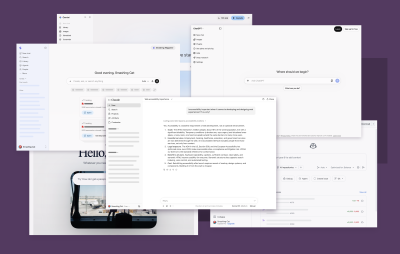
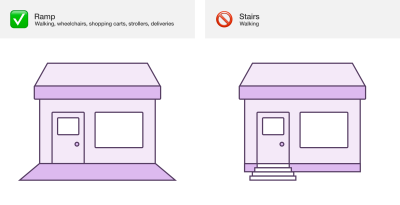
The imperative for accessible AI development extends far beyond basic compliance with legal frameworks such as the Americans with Disabilities Act (ADA) or the European Accessibility Act. In the digital economy, exclusion translates directly to tangible losses: diminished educational opportunities, reduced employability, restricted access to essential public services, and the forfeiture of entertainment and civic participation. As web technologies increasingly power native desktop environments via frameworks like Electron and Tauri, developers bear the responsibility of ensuring that these immersive interfaces do not replicate physical architecture barriers in the digital realm.
Overcoming Visual Bias in Conversational Interfaces
The root of the accessibility gap in modern AI systems lies in an entrenched visual bias within the software industry. Human-computer interaction in LLM chat interfaces heavily relies on spatial cues, such as left- and right-aligned text bubbles, color contrasts, dynamic loading animations, and split-screen layouts. For a sighted user, the arrival of an AI-generated response is immediately obvious via ocular scanning. For a screen reader user, however, the appearance of new text in the Document Object Model (DOM) is entirely imperceptible unless explicit programmatic accommodations are made.

Addressing this disparity requires reimagining the fundamental user flow of an AI conversation: entering a prompt, processing the request, streaming the response, and reviewing the output. Without targeted interventions, screen readers remain silent while complex data is rendered visually, leaving users with the false impression that applications have stalled or crashed.
Implementing Reliable Live Region Announcements
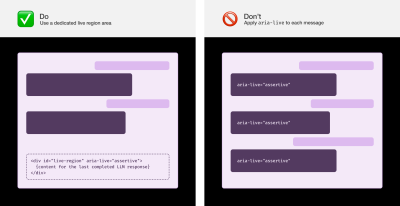
To bridge the gap between visual and non-visual experiences, developers must implement live region announcements with meticulous precision. Industry veterans caution against common pitfalls, such as applying aria-live attributes directly to individual message nodes, which can lead to unpredictable screen reader behavior. Instead, engineering teams should establish a dedicated, assertive live region container positioned at the end of the DOM.

Usability considerations dictate specific timing and streaming protocols. Announcing text as it streams token-by-token results in an unintelligible, jarring auditory experience. Best practices require systems to wait until message streaming is fully complete before dispatching the entire response to the live region. Furthermore, because LLM queries frequently involve complex processing delays, applications must communicate operational states effectively. When visual loading indicators lack accompanying text, assistive technologies should trigger periodic updates—such as a repeating "Loading" announcement every five seconds—accompanied by randomized contextual phrasing like "Researching," "Thinking," or "Planning." This prevents users from assuming the interface has malfunctioned during long-running computational tasks.

Structural Navigation: Headings, Landmarks, and Skip Links
Navigating lengthy chat histories can quickly become exhausting for keyboard and screen reader users. To mitigate navigational friction, developers must leverage semantic HTML structures paired with thoughtful ARIA implementations.

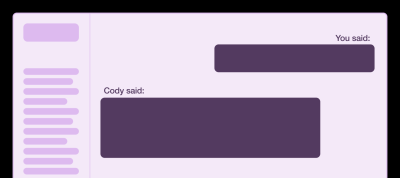
- Visually Hidden Headings: Inserting hidden heading elements (such as
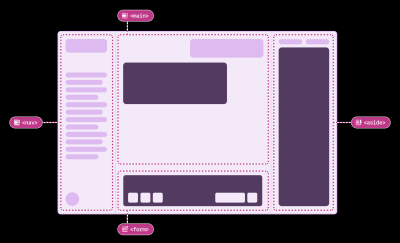
<h2>) before each user prompt and AI response—prefixed with identifiers like "You said" or "[Agent Name] said"—allows screen reader users to jump between conversational turns effortlessly. This mirrors how sighted users visually scan a chat window to re-establish context. - Strategic Landmark Regions: While landmarks are essential for defining major layout zones (such as navigation sidebars, main chat areas, and prompt input forms), wrapping every individual chat message in a landmark role creates "landmark pollution." In long sessions containing dozens of messages, excessive landmarks overwhelm screen reader menus, rendering navigation cumbersome.
- Skip Links and Composite Widgets: Implementing robust skip-to-content links enables users to bypass repetitive interface chrome and dive straight into active conversations. Additionally, transforming conversation history lists into composite widgets allows users to navigate entire sidebars using standard arrow keys rather than pressing the tab key dozens of times.
Preferences, Customization, and Advanced Content Handling
True digital accessibility prioritizes user customization. Modern LLM interfaces frequently perform secondary, background operations—such as code searching, reasoning chains, file reading, and tool calling. Announcing every interim step by default can overwhelm users with excessive auditory noise. Providing granular preference toggles empowers users to switch off secondary action announcements or customize the verbosity of their experience.

Similarly, respectful implementation of the prefers-reduced-motion media query ensures that users sensitive to flashing lights or sweeping layout transitions are spared distracting animations. Keyboard shortcuts, likewise, must be fully re-bindable to accommodate diverse linguistic keyboard layouts and prevent conflicts with screen reader command sets.

When handling specialized content formats such as data tables and dense code blocks, direct text-to-speech conversion of raw strings fails. Tables lose row-column relationships when stripped of semantic markup, while multi-thousand-line code snippets become unlistenable gibberish. Advanced implementations address this by substituting concise metadata summaries—such as reporting a table’s dimensions and core trend, or stating a code file’s name and line count—while preserving full semantic access when users manually focus on the content block.
The Broader Impact and Industry Implications
As regulatory bodies worldwide tighten enforcement of digital accessibility standards, organizations failing to incorporate inclusive design into their AI deployment strategies face mounting legal exposure and reputational risk. The integration of artificial intelligence into critical sectors—including healthcare, education, and government administration—makes accessibility a baseline ethical and operational requirement rather than an optional enhancement.
Industry leaders emphasize that achieving genuine parity requires more than automated accessibility testing tools; it demands active collaboration with disabled individuals throughout the product lifecycle. By centering the lived experiences of users who rely on assistive technology, software developers can transform AI chat interfaces from exclusionary silos into universally accessible engines of human knowledge and productivity.