In the fast-paced ecosystem of search engine optimization (SEO), digital marketers, webmasters, and content strategists frequently encounter pages that underperform despite holding strong underlying domain authority. Whether dealing with a sudden drop in product page rankings, a competitor abruptly seizing top search positions, or client assets failing to convert traffic into revenue, the immediate reaction is often to initiate a massive, resource-heavy site crawl. However, industry professionals increasingly recognize that sweeping site audits are rarely necessary for initial troubleshooting.

Semrush’s free SEOquake Chrome extension offers a streamlined alternative, enabling practitioners to audit technical signals, on-page optimization, linking structures, and core metrics without ever leaving the active browser tab. By leveraging a structured three-minute workflow divided into rapid triage and precise diagnosis, SEO professionals can quickly isolate performance bottlenecks and determine whether an issue is isolated to a single URL or indicative of a broader, site-wide architectural failure.

Understanding the SEOquake Toolkit and Color-Coded Metrics

Developed by Semrush, SEOquake is designed to simplify complex SEO research by embedding diagnostic tools directly into the browser environment. Upon installation, the extension provides two primary modes of evaluation: a Quick View pop-up for rapid assessment and a Full Report interface for deeper data analysis.

To maximize efficiency during an audit, SEOquake utilizes a color-coded reporting system. Green indicators signify healthy metrics that align with established best practices, denoting elements that require no immediate intervention. Orange indicators highlight warnings or potential optimization gaps that demand a human judgment call based on contextual risk and site-specific goals. Red indicators point to critical errors—such as broken structured data or severe technical blockers—that actively impair search engine parsing and visibility. Mastering these visual cues allows auditors to maintain focus and prioritize remediation efforts systematically, moving from the most critical infrastructure faults to minor optimization refinements.

Minute One: Rapid Triage Using the Quick View Pop-Up

The triage phase constitutes the first 60 seconds of the audit workflow, addressing a fundamental question: Is there an obvious, high-level failure preventing the page from ranking or converting? The Quick View pop-up features five distinct tabs, with the Page Info, Audit, and Content tabs serving as the primary engines for rapid assessment. Spending roughly 20 seconds per tab provides an immediate baseline reading of any target URL, such as a sample e-commerce product page.

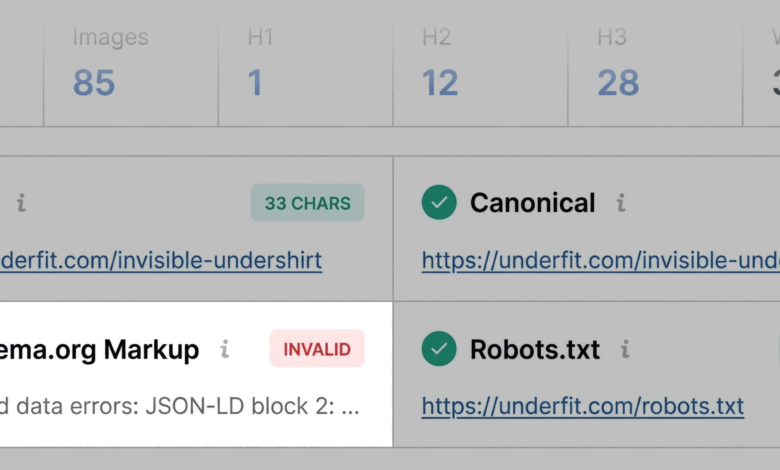
Starting with the Page Info tab yields a high-level overview of core on-page elements, including the document title, meta description, URL structure, and canonical tags. A swift scan prioritizes checking whether title tags and meta descriptions are present, appropriately length-optimized, and aligned with search intent. During this phase, critical flags immediately draw attention. For instance, if an e-commerce product page triggers a red warning regarding Schema.org markup, it typically points to JSON-LD parsing errors. Because invalid product schema can disqualify a page from earning valuable rich snippets—such as pricing, availability, and aggregate star ratings in search engine results pages (SERPs)—such errors represent severe commercial liabilities that demand immediate elevation to the fix list. Other minor flags, such as marginally long meta descriptions, are noted but deprioritized as non-blockers.

Transitioning to the Audit tab uncovers technical SEO essentials that may evade basic visual inspections. This panel checks crawlability, indexation status, meta robots instructions, mobile responsiveness, and XML sitemap presence. While a page might display predominantly green or orange statuses indicating the absence of an emergency, orange warnings still require critical evaluation. For example, notices regarding missing or misconfigured hreflang tags must be contextualized; if a site serves only a single geographic market, the warning carries minimal weight, whereas an international brand would face severe indexing risks.

Concluding the triage minute with the Content tab exposes structural clarity and keyword distribution. Heading tag hierarchies (H1 through H6) dictate how human readers and automated systems—including modern AI search engines—parse topical relevance. An erratic heading hierarchy, such as an H1 buried deep within the page layout followed by abrupt jumps to an H4, signals a structural flaw that hampers accessibility and content comprehension. Furthermore, image summaries often reveal dozens of missing alternative text attributes. Because images drive user engagement and conversion on modern web pages, unoptimized media assets reduce both search visibility and compliance with web accessibility standards.

Minutes Two and Three: Deep-Dive Diagnosis Using the Full Report

Having isolated preliminary flags during the triage phase, the auditor transitions into the diagnostic phase, spending the remaining two to three minutes inside SEOquake’s Full Report panels. Accessing this dashboard via the "View Full Report" link opens six comprehensive analytical panels covering technical audits, keyword density, internal and external links, and integrated Semrush domain metrics.

The Full Audit panel provides granular visibility into crawlability and technical compliance. Utilizing the internal section menu allows auditors to jump straight to flagged items rather than manually scrolling through hundreds of passing tests. For example, if triage identified a potential sitemap issue, the Full Audit panel can confirm whether an XML sitemap exists but remains unlinked or improperly formatted. Testing structured data directly through integrated tools like the Google Rich Results Test validates whether JSON-LD errors are genuinely breaking rich snippet eligibility.

Simultaneously, the Keyword Density panel evaluates topical coverage and term frequency within the visible text. Reviewing the keyword cloud and 1-word/multi-word phrase tables ensures that primary target keywords appear naturally in high-value locations such as title tags, H1 headings, and meta descriptions. While automated tools frequently capture interface text, button labels, and script-based strings (such as interactive zoom labels), a manual review confirms whether the core topical authority of the page aligns with user intent.

Analyzing the Links panel is equally critical for uncovering navigational friction. Broken internal links or failing external resources degrade user experience and waste crawl budget. If a report flags dozens of broken external JavaScript links, a deeper investigation into the underlying code determines whether those resources are actively harming page performance or merely representing legacy widgets.

Strategic Implications: Page-Level Fixes Versus Site-Wide Audits

The final analytical step involves integrating data from the Semrush panel to establish broader context. By evaluating domain-level metrics—such as authority scores, organic traffic volumes, and backlink profiles—marketers can accurately diagnose the nature of an underperforming URL.

A weak, unoptimized page residing on a high-authority domain with robust overall traffic typically indicates an isolated, page-level problem fixable through straightforward on-page editing, schema correction, and content enhancement. Conversely, structural warnings such as missing XML sitemap integration or recurring JSON-LD template errors usually point to site-wide architectural issues. When infrastructure faults extend beyond a single URL, relying solely on page-level patches proves insufficient. In such scenarios, professionals escalate the diagnostic process by initiating a comprehensive site crawl using enterprise tools like Semrush Site Audit, allowing teams to identify and remediate systemic technical debt across thousands of URLs simultaneously.