The Chronology of the Sunset
The decision to retire the Website Translator Widget did not happen overnight; it is the culmination of a long-term shift in how Google manages its developer products. The initial signal arrived in May 2020, when Google announced a series of deprecations across its developer ecosystem. While the widget remained functional for years following that announcement, it effectively entered a maintenance-only state.
As the October 1, 2026, deadline approaches, the implications for web administrators are significant. After this date, the widget will no longer receive security updates, performance patches, or compatibility fixes for modern browser standards. While the scripts may technically continue to load for a brief window post-deadline, relying on an unsupported, deprecated service presents a security vulnerability and risks broken user experiences as web standards evolve. Google has officially directed all remaining users of the widget to transition to the Google Cloud Translation API, a move that signals a transition from a free, "plug-and-play" model to a usage-based, commercial infrastructure model.
Background and Context: Why the Change?
To understand why this change is occurring, one must look at the evolution of the web. In the mid-2000s, when the widget was first introduced, the internet was far less standardized. Providing a "quick fix" for translation was a massive boon for accessibility. Today, however, the digital landscape has shifted toward high-performance, SEO-optimized, and dynamic content delivery.
Google’s Cloud Translation API is designed for professional applications, requiring a developer to handle API keys, authentication, and backend integration. For a large enterprise, this is standard procedure. For a small non-profit, a personal blog, or a local business, this requirement creates a high barrier to entry. The move essentially separates the casual user from the enterprise user, effectively ending the era of free, "copy-paste" translation tools provided by the search giant.

The Market Response: GTranslate and Alternatives
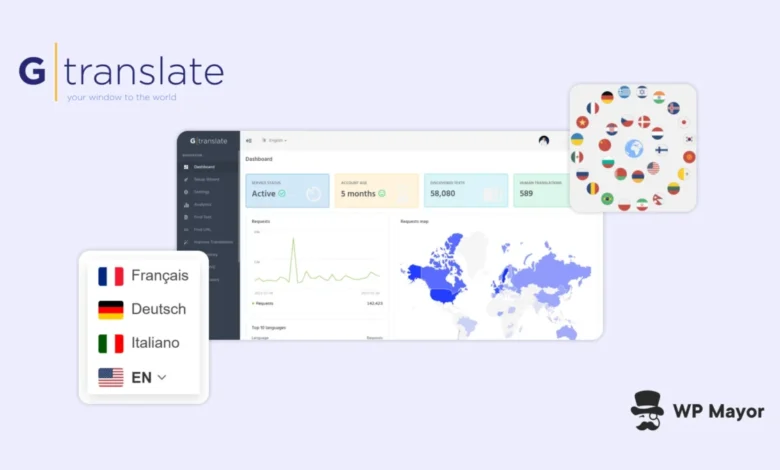
As the deadline looms, the void left by Google is being filled by specialized third-party services. One of the most prominent alternatives is GTranslate, which has positioned itself as the primary successor for those seeking a seamless migration path.
The service offers a tiered approach that mirrors the needs of different website categories. For non-commercial entities—including educational institutions, charities, government portals, and personal hobby sites—GTranslate provides a free widget that functions similarly to the original Google tool. Unlike the deprecated Google widget, however, the GTranslate alternative allows for greater customization of the UI, including the ability to display flags, globe icons, and native-language labels, providing a more professional aesthetic.
For commercial entities, the transition necessitates a shift toward paid subscription models. This is a critical point of departure from the legacy Google model. Businesses that generate revenue through their web presence will now have to budget for translation services, as GTranslate’s advanced features—such as neural machine translation, human editing, and SEO-optimized subdirectories—are locked behind a paywall. This shift represents a broader trend in the web development industry: the professionalization of translation as a core component of digital marketing and SEO strategy, rather than a secondary "add-on" feature.
Technical Implications for WordPress and Beyond
For the WordPress ecosystem, the transition is relatively straightforward, yet it requires manual intervention. WordPress site owners currently utilizing the Google snippet must perform a two-step process: first, locate and remove the existing code, and second, implement the replacement.
For those who hard-coded the Google widget into their theme files, the process involves searching for specific hooks or script tags, such as google_translate_element. Once the old code is excised, developers can use the GTranslate API or plugin to inject the new code into the same container. This allows the site’s design to remain untouched, as the new widget can be configured to occupy the same space in the footer or navigation menu.

This is not limited to WordPress. The same logic applies to static HTML sites, Joomla, Drupal, and custom-built PHP applications. Because these widgets operate as client-side JavaScript, they remain platform-agnostic, meaning a single, simple configuration script can replace the legacy Google functionality on virtually any web architecture.
The SEO Reality: Beyond Simple Translation
A critical distinction that site owners must grasp before the October deadline is the difference between "browser-based translation" and "multilingual SEO."
The Google Website Translator Widget—and its free alternatives—function entirely within the user’s browser. When a visitor selects "Spanish" from the dropdown, the script translates the text on the fly. However, to a search engine crawler like Googlebot, the page remains in its original language. This means that if a business wants to be found by users searching in Spanish, the free widget is insufficient.
True multilingual SEO requires the creation of unique, indexable pages. Paid versions of tools like GTranslate solve this by generating distinct URLs for each language (e.g., example.com/es/ or es.example.com). These pages are then crawled, indexed, and ranked by search engines, allowing the site to capture organic traffic from international markets.
The sunset of the Google widget serves as a wake-up call for many businesses that have relied on "quick and dirty" translation for years. As the internet becomes increasingly globalized, relying on browser-side translation is no longer a viable long-term strategy for growth. Moving to an API-driven, SEO-capable solution is not merely a technical necessity to avoid broken widgets; it is an opportunity to improve discoverability in foreign markets.

Preparing for the Transition
With the October 1, 2026, deadline now less than a week away, site administrators should prioritize an audit of their current web assets. The process of auditing a portfolio of sites is often overlooked, particularly by agencies or freelancers who manage multiple domains. Many legacy sites may contain the Google script in obscure footer files or sidebar widgets that have not been touched for years.
Failure to remove the script will not necessarily "break" the entire website, but it will result in an error or a non-functional UI element, which negatively impacts user trust and brand perception. For sites with a significant international audience, a broken language selector can lead to a direct loss in engagement and conversion rates.
As the industry moves away from Google’s legacy widget, the transition marks the end of a free-to-use utility that defined the early days of the accessible, multilingual web. While the loss of a free tool may cause short-term friction for small business owners, the shift toward professional, SEO-integrated translation tools is a necessary evolution. For those who act now to replace the deprecated script with a modern, supported alternative, the transition is an opportunity to improve both the user experience and the global reach of their digital presence. Whether through the use of free, non-commercial alternatives or by investing in professional, growth-oriented translation services, the directive for the next seven days is clear: update, migrate, and optimize.