The migration to a new computing device is often anticipated as a productivity boon, characterized by pristine operating system states, optimal hardware performance, and the absence of legacy software clutter. However, this transition frequently uncovers technical incompatibilities, particularly concerning digital rights management (DRM) and browser-based media playback. A common point of friction for users transitioning to new hardware, particularly Apple Silicon-based MacBooks, is the sudden appearance of a "This video format is not supported" error message when attempting to access YouTube TV. This issue, while frustrating for end-users, is fundamentally rooted in the complex interplay between web browsers, protected content delivery systems, and hardware-level security protocols.
The Mechanism of Digital Rights Management
To understand why a modern, high-performance computer would fail to render a standard video stream, one must first look at the role of Widevine. Widevine is a proprietary digital rights management (DRM) platform owned by Google. It is the industry standard for protecting premium video content, such as that provided by live television services, subscription streaming platforms, and high-definition movie rentals.

When a user initiates a stream on a service like YouTube TV, the browser does not simply download a video file. Instead, it engages in a sophisticated "handshake" protocol with the content server. The browser must prove that it is running in a secure, authenticated environment capable of handling encrypted media. This is where Widevine comes into play. It provides the Content Decryption Module (CDM) that allows the browser to decrypt the stream in real-time. If the browser lacks the necessary Widevine components, or if the hardware environment is not correctly reporting its security capabilities to the browser, the handshake fails, and the system defaults to an error message, which is frequently presented to the user as an unsupported video format.
Chronology of the Compatibility Conflict
The emergence of these errors often follows a predictable pattern for users setting up new machines. The timeline of this issue typically manifests as follows:
- Initial Setup: The user installs a fresh operating system and a web browser. In many instances, especially with privacy-hardened or minimalist browser installations, the default settings may exclude the automatic loading of third-party DRM modules to conserve resources or enhance user privacy.
- Access Attempt: Upon navigating to the YouTube TV web interface, the browser initializes the playback engine. It attempts to load the encrypted media stream.
- Security Validation Failure: The browser’s CDM attempts to verify the hardware-backed security features of the new machine. Because the machine is unrecognized or the browser has not been granted explicit permission to use Widevine, the validation protocol returns a negative status.
- Error Trigger: The YouTube TV server, interpreting the failed validation as an incompatible browser or hardware configuration, blocks the playback and displays the "This video format is not supported" notification.
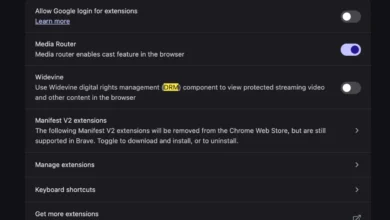
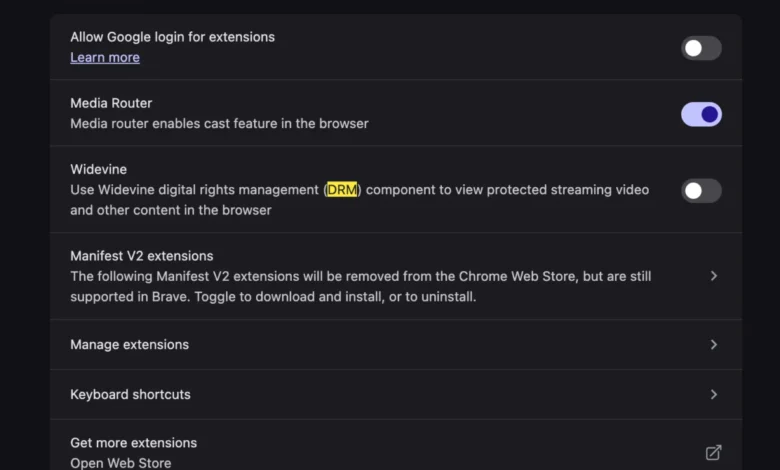
- Resolution: The user is required to navigate to the browser’s internal settings—often found within the "Privacy and Security" or "Content Settings" menus—to manually toggle the "Allow Widevine" or "Enable DRM" option.
Data and Hardware Trends
The prevalence of this issue has increased alongside the industry-wide shift toward hardware-accelerated video decoding. According to market research data from 2024, nearly 75% of all streaming traffic is now protected by some form of CDM, such as Widevine, PlayReady, or FairPlay.

Apple’s transition to its proprietary Silicon architecture (the M-series chips) has introduced a new layer of security known as the Secure Enclave. This hardware-based key management system is designed to handle cryptographic operations in isolation from the main processor. While this significantly enhances security, it also requires browser developers to ensure that their software is fully optimized to communicate with the Secure Enclave for DRM decryption. When a user moves to a new MacBook, the software environment may not yet be fully "synchronized" with the hardware’s specific security requirements, necessitating the manual intervention described above.
Industry Implications and User Experience
The necessity of manually enabling DRM modules represents a broader conflict in modern web development: the tension between user privacy and content protection. Browser vendors, such as Mozilla (Firefox), Brave, and Vivaldi, have made significant efforts to allow users to opt-out of DRM modules. While this is a victory for open-source advocacy and privacy, it creates a fragmented user experience for mainstream consumers who expect "plug-and-play" functionality.
Content providers argue that DRM is an essential requirement imposed by content creators and rights holders. Without the guarantee of secure, hardware-backed playback, major networks would be unwilling to license their live broadcasts for digital streaming. Consequently, the "This video format is not supported" error is less of a technical bug and more of a "security gate" that the user is inadvertently keeping closed.

Official Responses and Best Practices
While Google, the developer of both YouTube TV and Widevine, has not issued a formal "recall" or patch for this error—as it is functioning as intended—technical support documentation for major browsers has become increasingly robust. Industry experts suggest that the following steps are now standard practice for any new hardware deployment involving streaming media:
- Browser Verification: Ensure that the browser is running the latest version. DRM modules are frequently updated to patch vulnerabilities, and an outdated CDM will be rejected by content servers.
- Permission Management: Users should verify that "Protected Content" is set to "Allowed" within the browser’s global settings.
- Hardware Acceleration: Users should ensure that "Use hardware acceleration when available" is toggled on in browser settings. Because Widevine often relies on the computer’s GPU to perform the decryption process, disabling hardware acceleration can lead to the very error message that users are attempting to avoid.
Future Outlook: The Path Toward Seamless Playback
As the industry moves toward more sophisticated authentication methods, the reliance on manual toggles like Widevine enablement may eventually be phased out in favor of background, invisible security checks. Standard bodies like the World Wide Web Consortium (W3C) continue to refine the Encrypted Media Extensions (EME) API, which is the underlying framework that allows browsers to interact with CDMs.
The long-term goal for hardware manufacturers and browser developers is to create an environment where the hardware’s security capabilities are automatically detected and verified upon the first browser launch. For now, however, the "This video format is not supported" message remains a technical hurdle for users of new devices. It serves as a reminder that the convenience of modern streaming is heavily reliant on the seamless cooperation between proprietary software modules and the underlying hardware security architecture. For the end-user, the solution remains one of awareness: understanding that while the machine is new, the security requirements of premium content remain constant, and they often require an explicit invitation from the user to function correctly within a new digital environment.