The Essential WordPress Must-Use Plugins Collection Every Developer Needs for Production and Staging Environments


Streamlining WordPress development workflows has long remained a primary objective for veteran web engineers and agency professionals managing dozens or hundreds of client sites. Across the broader WordPress ecosystem, developers frequently maintain a localized repository of custom utility scripts designed to strip out redundant code, optimize site performance, and enforce rigid security postures from the moment a project is initialized. Historically, these code snippets were pasted directly into a theme’s functions.php file or bundled into basic custom extensions. However, industry best practices increasingly favor leveraging the WordPress must-use plugins (MU-plugins) directory to ensure these vital configurations persist across theme modifications, core software updates, and client handovers.
Understanding the Mechanics and Architecture of Must-Use Plugins
Must-use plugins occupy a unique architectural layer within the WordPress framework. Located in the wp-content/mu-plugins/ directory, these specialized PHP files execute automatically upon every core request without requiring manual activation through the traditional administrative dashboard. Unlike standard plugins, which can be toggled on or off by site administrators, MU-plugins function as foundational extensions of the core application layer.
The terminology itself is a historical artifact tracing back to WordPress MU, the original multi-blog platform architecture that eventually merged into single-site WordPress core with version 3.0. Today, the directory serves as an ideal centralized repository for administrative enhancements, privacy controls, performance tweaks, and security hardening patches. By housing custom utility scripts in this location, developers mitigate the risk of accidental removal during theme transitions or child-theme updates. Furthermore, because MU-plugins load prior to standard plugins and themes, they can reliably filter global behaviors, modify database options, and intercept requests before standard application logic executes.
Performance Optimization and Core Bloat Reduction
Modern WordPress installations frequently ship with extensive feature sets designed to cater to a broad global audience, yet many of these features remain entirely superfluous for targeted business websites, portfolios, and enterprise applications. Eliminating unnecessary HTTP requests, reducing database write operations, and stripping redundant markup from the document header directly contributes to faster asset delivery and improved Core Web Vitals scores.
Among the primary performance bottlenecks addressed by veteran developers is the extraneous markup generated within the HTML head tag. Standard installations automatically output Really Simple Discovery (RSD) links for legacy remote publishing clients, Windows Live Writer manifests, shortlinks, oEmbed discovery endpoints, and generator tags that broadcast the exact running version of WordPress to automated network scanners. Implementing a dedicated cleanup routine removes these redundant bytes from every page load, reducing the attack surface and optimizing network payload sizes.
Similarly, native emoji support—introduced into core to provide fallback rendering for legacy browsers—enforces an ongoing performance penalty. On contemporary web infrastructure where native operating system emoji rendering is universally supported, the inclusion of dedicated JavaScript files, external stylesheets, and DNS prefetch directives pointing to s.w.org represents unrequested overhead. Disabling emoji scripts globally prevents unnecessary resource hints from firing on every page view.
Media Library and Database Hygiene
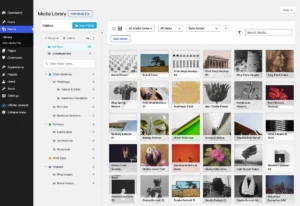
Unmanaged media uploads and unchecked revision histories frequently cause database bloat and excessive disk space consumption over the lifespan of a website. By default, WordPress generates multiple intermediate thumbnail sizes for every uploaded image, multiplying storage requirements exponentially within high-volume media repositories. While disabling intermediate sizes altogether requires careful coordination with external image optimization CDNs, managing post revisions provides an immediate, risk-free performance win. Restricting stored revisions to a fixed threshold—such as five per post—prevents the wp_posts table from expanding uncontrollably while maintaining an adequate safety margin for content editors.
Additionally, addressing orphaned attachment pages prevents search engines from indexing thin-content URLs. Every media asset uploaded to WordPress generates a unique attachment permalink containing little to no contextual text. Implementing a 301 redirection rule that routes these attachment URLs directly to their parent post—or gracefully falls back to the homepage—protects SEO rankings from algorithmic penalties associated with low-quality or duplicate content.
Privacy Compliance and External Request Mitigation
Regulatory frameworks such as the General Data Protection Regulation (GDPR) place strict legal requirements on website operators regarding third-party data transmission. Out-of-the-box WordPress configurations frequently initiate outbound requests to external services without explicit administrative oversight.
Gravatar integration serves as a primary example. When comment avatars are enabled, every comment rendered on a page triggers an external HTTP request to Automattic servers, transmitting a hashed version of the commenter’s email address alongside the visitor’s IP address. Disabling native avatar support eliminates these third-party dependencies entirely, bolstering user privacy and reducing reliance on external server uptime.
The integration of artificial intelligence features into core platforms has further complicated privacy compliance. With core software incorporating native AI support functions alongside third-party extensions like Jetpack and Elementor introducing independent machine learning connectors, editorial teams risk inadvertently transmitting proprietary data to external large language models. Enterprise client contracts and strict non-disclosure agreements often prohibit sending content to third-party endpoints without prior authorization. Deploying systemic filters that disable core AI support hooks and third-party AI integrations ensures compliance with data governance policies across managed environments.
Security Hardening and Administrative Lockdown
While no single code snippet can substitute for a robust firewall, strong authentication credentials, and rigorous update schedules, hardening default behaviors significantly reduces vulnerability vectors. User enumeration represents a prevalent reconnaissance technique utilized by malicious actors seeking valid login handles. Standard WordPress installations expose usernames through native XML-RPC endpoints, author archive loops, REST API user queries, and sitemap indices. Closing these vectors systematically—returning standardized 404 responses for author archives and generic error messages on the login interface—obfuscates potential attack paths.
XML-RPC functionality, originally designed to facilitate remote application publishing, has long served as a focal point for automated brute-force attacks and distributed denial-of-service amplification via pingback abuse. While newer publishing workflows rely exclusively on the secure REST API, legacy xmlrpc.php files often remain accessible. Disabling authentication-dependent XML-RPC methods, stripping out pingback handlers, and removing outdated HTTP headers neutralizes these historical vulnerabilities.
Furthermore, disabling the built-in file editor prevents malicious actors from executing arbitrary PHP code directly via the administrative dashboard should an administrator account become compromised. Enforcing this restriction via foundational configuration layers ensures that even if user privileges are elevated improperly, live source code modification remains blocked.
Managing Staging and Production Environments Separately
A critical discipline in professional web development involves differentiating between production environments and testing infrastructure. Certain administrative configurations are exceptionally hazardous when misapplied. For instance, disabling outgoing email notifications via the pre_wp_mail filter is an essential safeguard on staging clones and local development environments to prevent test notifications, password resets, and simulated orders from reaching real customers. Conversely, deploying this same restriction to a live production server results in immediate communication failure for critical transactional messages.
Similarly, restricting password reset capabilities or enforcing rigid comment moderation policies must be evaluated based on the specific operational goals of the deployment. Automated staging safeguards must be treated as temporary or environment-specific measures rather than universal additions to every production codebase.
Industry Implications and Future-Proofing Development Workflows
The growing adoption of curated must-use plugin collections reflects an industry-wide shift toward standardized, modular, and maintainable WordPress architecture. As agencies scale their operations, eliminating redundant manual configuration steps saves thousands of cumulative development hours annually. Centralizing these utility scripts within shared GitHub repositories allows engineering teams to continuously audit, update, and deploy proven performance and security enhancements across diverse client portfolios.
Ultimately, mastering the must-use plugin directory empowers developers to exert precise, programmatic control over the underlying WordPress application layer. By stripping away digital bloat, reinforcing privacy compliance, and hardening security defaults at the foundational level, web professionals can deliver faster, leaner, and more secure digital experiences.
Related posts: