TikTok Empowers Creators with Enhanced Keyword Control for Improved Content Discovery

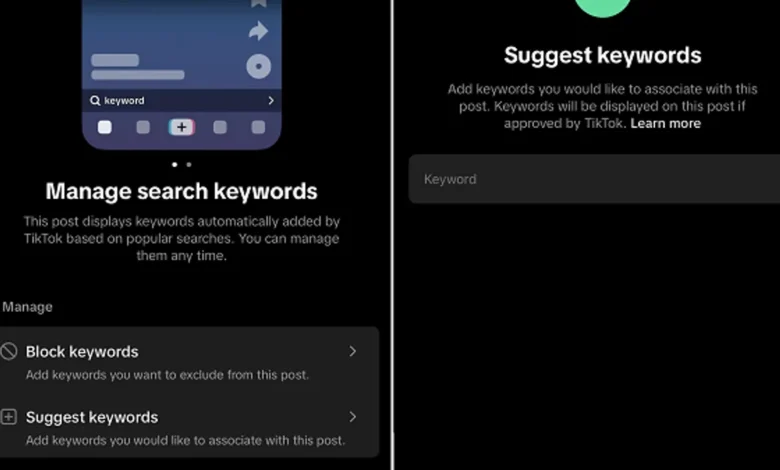
TikTok has introduced a significant update to its platform, granting creators more granular control over how their video content is discovered by users. This new feature allows creators to actively manage, block, and suggest keywords associated with their uploaded clips, aiming to bridge the gap between a creator’s intended audience and the platform’s powerful recommendation algorithms. While this empowers creators, TikTok retains a crucial oversight role to ensure that suggestions remain relevant and do not lead to the miscategorization of content.
The update, first observed and reported by app researcher Jonah Manzano on Threads in late April 2026, signifies a move towards a more collaborative approach between TikTok’s AI-driven systems and the creators who populate its vast content ecosystem. Previously, keyword association was largely an automated process, relying on TikTok’s algorithms to analyze video content and assign relevant search terms based on popular queries and existing data. This new functionality introduces a layer of human curation, allowing creators to fine-tune these associations and potentially increase the discoverability of their work among targeted audiences.
Background: The Evolution of Content Discovery on TikTok
TikTok’s meteoric rise has been fueled by its highly effective recommendation engine, the "For You" page (FYP). This algorithm is designed to surface content that users are most likely to engage with, based on a complex interplay of factors including user watch time, likes, shares, comments, and the content itself. While incredibly effective at keeping users engaged, this algorithmic control has also presented challenges for creators seeking to ensure their content reaches the most relevant viewers.
Historically, creators have relied on a combination of engaging content, trending sounds and hashtags, and strategic posting times to maximize reach. However, the nuanced nature of keyword matching has often been a black box. An algorithm might misinterpret a video’s subject matter or associate it with a trending term that is only peripherally related, leading to a disconnect between the content and the audience it’s shown to. This can result in lower engagement rates and a sense of frustration for creators who feel their efforts are not being recognized by the platform.
This update addresses these pain points by introducing a direct channel for creator input into the keyword assignment process. It acknowledges that creators possess an intimate understanding of their own content and the specific terminology that best describes it, knowledge that can sometimes elude even the most sophisticated AI.
Key Features and Functionality
The core of this new feature revolves around the ability for creators to interact with the keywords TikTok automatically assigns to their videos. As illustrated in the initial reports, upon uploading a clip, creators are presented with a list of keywords that the platform has identified as relevant. These keywords are generated based on the video’s visual and audio content, as well as analysis of popular searches related to similar content.
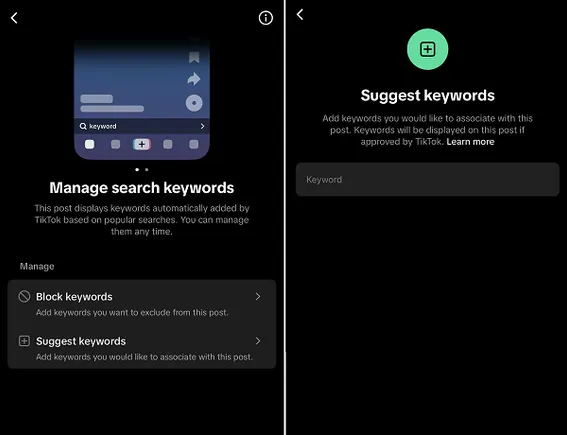
Creators now have two primary actions they can take:
-
Block Keywords: If a creator believes a keyword assigned by TikTok is inaccurate, misleading, or irrelevant to their content, they can choose to block it. This action essentially tells the algorithm to de-emphasize this particular term when considering the video for search results or FYP recommendations. For instance, a cooking channel might post a video about a specific regional dish. If TikTok automatically associates it with a broader, less specific category like "fast food," the creator can block that term to ensure their content is not mistakenly grouped with less relevant categories.
-
Suggest Keywords: Conversely, creators can also propose new keywords that they believe more accurately represent their video. This allows them to proactively guide the algorithm towards terms that might not have been immediately obvious to the AI. This is particularly useful for niche content or for creators who use specific industry jargon or unique phrasing that might not be part of the general trending vocabulary. For example, a creator specializing in vintage electronics repair might suggest highly specific terms related to particular models or repair techniques that a general algorithm might overlook.
TikTok’s statement accompanying the feature clarifies its purpose: "This post displays keywords automatically added by TikTok based on popular searches. You can manage them at any time." This suggests that the platform views this as an ongoing dialogue with its creators, aiming to refine its understanding of content and user intent.
TikTok’s Oversight: Balancing Automation and Human Input
Crucially, TikTok has emphasized that it will maintain oversight of creator suggestions. This is a vital safeguard designed to prevent the abuse of the system and ensure the integrity of the platform’s search and recommendation functionalities. The goal is not to allow creators to artificially inflate their visibility by associating their content with unrelated popular terms, which would ultimately degrade the user experience.
The platform’s statement indicates that "the app will still retain oversight to avoid unrelated suggestions." This implies a review process, either automated or human-assisted, that checks proposed keywords against a set of criteria for relevance and accuracy. This dual approach—leveraging creator knowledge while maintaining algorithmic integrity—is key to the success of this new feature. It ensures that while creators have more agency, the platform’s core function of connecting users with genuinely relevant content remains intact.
Implications for Creators and the TikTok Ecosystem
The introduction of this keyword management feature has several significant implications for creators and the broader TikTok ecosystem:

Enhanced Audience Reach and Relevance
The most direct benefit for creators is the potential to significantly improve their audience reach and relevance. By actively curating the keywords associated with their videos, creators can:
- Target Niche Audiences More Effectively: Creators in specialized fields can ensure their content is found by users actively searching for those specific topics, rather than being lost in broader categories.
- Reduce Misdirection: Blocking irrelevant keywords can prevent videos from being shown to users who are unlikely to engage with them, thereby improving engagement metrics and signaling to the algorithm that the content is well-matched.
- Capitalize on Emerging Trends: Creators can be more proactive in associating their content with relevant emerging trends or search terms, potentially gaining an early advantage.
Mitigation of Algorithmic Errors
Automated systems, while powerful, are not infallible. Misinterpretation of content, especially in complex or nuanced videos, can lead to errors in keyword assignment. This feature provides a mechanism for creators to correct these errors, preventing potential damage to their reach and engagement. For example, a video that uses a common phrase with a double meaning might be miscategorized if the algorithm defaults to the more common, but in this context, incorrect meaning.
Increased Creator Agency and Transparency
This update signals a greater degree of transparency and agency for creators. It acknowledges their expertise and provides them with tools to actively participate in the discovery process. This can foster a stronger sense of partnership between creators and the platform, potentially leading to increased creator satisfaction and retention.
Potential for Strategic Content Planning
The ability to research and suggest keywords can also inform creators’ content planning strategies. By observing which keywords are automatically assigned and exploring relevant terms through tools like TikTok Trends (accessible via TikTok’s Business Creative Center), creators can gain insights into what the platform perceives as relevant and adapt their content creation accordingly.
Risk of Misuse and the Importance of Oversight
While the benefits are substantial, there are inherent risks. Creators might be tempted to keyword-stuff their videos with popular but irrelevant terms to gain a temporary boost in visibility. This is where TikTok’s oversight becomes critical. The platform’s ability to identify and de-prioritize content that appears to be gaming the system will be essential to maintaining the quality of search results and user experience. If misused, this feature could lead to an increase in low-quality or irrelevant content appearing in search results, undermining the very purpose of the update.
Data and Trends in Content Discovery
The importance of effective content discovery on platforms like TikTok cannot be overstated. According to industry reports from early 2026, search queries originating within social media platforms have seen a significant surge, with a substantial percentage of younger demographics now using these platforms as their primary search engines for products, information, and entertainment. This trend underscores the critical need for creators to optimize their content for these discovery engines.
Furthermore, studies on user behavior on short-form video platforms consistently show that discoverability is a key factor in user retention. When users can easily find content that aligns with their interests, they are more likely to spend more time on the app. Conversely, if users struggle to find what they’re looking for, they may churn.
TikTok’s own internal data, though not publicly released in detail, likely shows that precise keyword matching correlates with higher user engagement and longer watch times. By enabling creators to refine these matches, TikTok is essentially investing in the quality of its search results and, by extension, the overall user experience.
Expert and Creator Reactions (Inferred)
While specific public statements from major creators or industry analysts regarding this particular update were not immediately available, the general sentiment among content creators regarding greater control over algorithmic visibility is overwhelmingly positive. Based on previous discussions about algorithm transparency and creator tools, it can be inferred that:
- Professional Creators and Agencies: These entities are likely to view this as a valuable tool for optimizing campaign performance and ensuring brand messaging reaches the intended audience accurately. They often have dedicated teams for content strategy and analysis, which will leverage this feature to its full potential.
- Niche Content Creators: Creators who operate in specialized areas, where broad algorithmic categorization can be a significant hurdle, will likely find this feature particularly beneficial. They can now more effectively advocate for the specific terminology that defines their content.
- Emerging Creators: For those new to the platform, this feature could help demystify the discovery process and provide a more direct pathway to reaching an initial audience, reducing the feeling of being lost in the vastness of TikTok’s content library.
The potential for creators to proactively influence their content’s discoverability aligns with a broader industry trend towards greater creator empowerment and transparency from social media platforms.
Conclusion: A Step Towards Smarter Discovery
The introduction of creator-managed keywords on TikTok represents a significant evolution in how content is discovered on the platform. By blending the power of AI with the nuanced understanding of creators, TikTok is aiming to create a more precise and effective discovery engine. This update not only benefits creators by offering them greater control and the potential for expanded reach but also contributes to a richer and more relevant experience for users.
While the success of this feature will depend on TikTok’s ability to effectively balance creator input with algorithmic integrity and prevent misuse, the initial move signals a promising direction for content discovery. As the digital landscape continues to evolve, platforms that empower creators with more sophisticated tools for visibility and audience engagement are likely to foster more vibrant and sustainable content ecosystems. This enhancement is a testament to TikTok’s ongoing commitment to refining its platform and supporting its vast community of creators in navigating the complexities of digital content distribution.
Related posts: