The transition to a new computing device is often anticipated as an opportunity to purge legacy software, optimize system performance, and improve overall productivity. However, this migration process frequently reveals compatibility hurdles, particularly concerning digital rights management (DRM) and browser-based media playback. A common technical obstruction encountered by users migrating to modern hardware, including the latest MacBook models, is the "This video format is not supported" error message when attempting to access YouTube TV. This specific error is rarely a reflection of actual hardware failure, but rather a configuration discrepancy between browser security protocols and content protection standards.
The Mechanism of Digital Rights Management (DRM)
At the core of the "video format not supported" error is the implementation of Widevine, a proprietary Digital Rights Management (DRM) technology developed by Google. Widevine is utilized by streaming platforms, including YouTube TV, Netflix, and Disney+, to ensure that high-definition and premium content is decrypted securely within a user’s browser.

Modern web browsers, such as Google Chrome, Microsoft Edge, and Mozilla Firefox, utilize Encrypted Media Extensions (EME) to interface with content decryption modules (CDM) like Widevine. When a user initializes a new operating system or installs a fresh browser instance, the browser must negotiate a handshake with the Widevine service to verify the integrity of the hardware environment. If this module is disabled, restricted by browser privacy settings, or fails to initialize during the initial setup of the browser profile, the streaming service is unable to verify the secure pathway for media delivery, resulting in the error message.
Chronology of Browser-Based Streaming Constraints
The integration of DRM into web browsers has evolved significantly over the past decade. Prior to the adoption of HTML5, streaming services relied heavily on Adobe Flash Player to deliver protected content. The transition away from Flash—a process that reached its conclusion in December 2020—necessitated the widespread adoption of EME and Widevine.
- 2014-2015: The W3C (World Wide Web Consortium) began the controversial process of standardizing EME, allowing for DRM in browsers without the need for external plugins.
- 2017: Major browsers, including Chrome and Firefox, moved to complete the integration of Widevine, marking a shift toward "plugin-free" DRM.
- 2020-2022: As streaming providers shifted toward 4K and high-bitrate HDR content, the security requirements for these CDMs became more rigorous, requiring hardware-backed security modules (often referred to as L1 security) to verify that the device is authorized to decode premium streams.
- 2025: As seen with recent hardware migrations, the complexity of these security layers often results in "false negative" errors where the browser fails to communicate the presence of the Widevine module to the server, triggering the "format not supported" notification.
Technical Analysis of the Error
When a user encounters the "This video format is not supported" message, it is often a symptom of one of three specific technical states:

- Module Initialization Failure: The Widevine component is present within the browser files but has failed to initialize due to a background process crash or a corrupted configuration file during the initial system sync.
- Privacy-Centric Blocking: Certain privacy-focused browsers or "hardened" configurations disable DRM components by default. If a user imports settings from a previous, highly restricted profile, these components may remain disabled, effectively blocking the platform from rendering the stream.
- Hardware Acceleration Conflicts: Modern browsers rely on GPU acceleration to decode high-resolution video. If the new hardware’s drivers are not fully initialized or if there is a conflict between the GPU and the browser’s media engine, the browser may report a format error because it cannot establish the secure pipeline required by the Widevine module.
Resolving the Compatibility Conflict
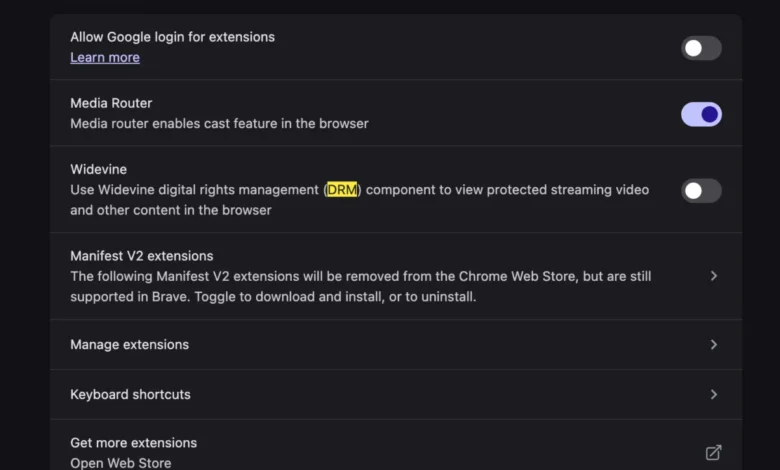
To resolve the issue, users must ensure that the browser is permitted to execute the DRM-protected components. While the specific menu location may vary depending on the browser version, the process generally involves navigating to the Content Settings or Protected Content section within the browser’s advanced privacy menu.
Once the "Protected Content" or "Widevine Content Decryption Module" is toggled to an active state, the browser must typically be restarted to re-initialize the CDM. In many cases, a simple refresh of the YouTube TV tab after ensuring the setting is enabled allows the browser to re-request the necessary decryption keys from Google’s servers. Unlike the legacy requirements for external codec packs—such as K-Lite or QuickTime components—which often led to system instability, the current Widevine architecture is integrated into the browser’s sandbox, meaning that enabling it is a secure and standard process.
Broader Industry Implications
The reliance on Widevine highlights the tension between user privacy, hardware sovereignty, and the demands of content providers. Content creators and copyright holders mandate that platforms like YouTube TV protect their broadcasts from unauthorized redistribution. Consequently, the user experience is inextricably linked to the ability of the hardware and software to prove their "trustworthiness" to the server.

Industry analysts observe that as 8K streaming and high-fidelity HDR become standard, the requirements for DRM will likely become more stringent. This creates a challenging environment for users who prefer open-source software or highly customized computing environments, as the "walled garden" of protected streaming services continues to tighten its requirements for hardware-level attestation.
Future Outlook and User Experience
For the average consumer, the move toward automated DRM management is generally viewed as an improvement over the manual installation of codecs that characterized the early 2000s. However, the rise of "unsupported format" errors suggests that the abstraction layer between the browser and the hardware is becoming increasingly fragile.
Industry experts suggest that as browser architectures move toward more modular designs—such as those seen in the shift toward "web apps"—the stability of these DRM modules will become a primary factor in user retention. If a user cannot stream their preferred live content on a new, high-performance machine due to a hidden configuration setting, the perception of device quality is negatively impacted.
To mitigate these issues, browser developers are increasingly looking at automated diagnostic tools that can detect if a Widevine module is present but inactive. By shifting the burden of resolution from the user to the browser’s internal diagnostic engine, developers hope to eliminate the frustration associated with initial device setup.
Conclusion
The "This video format is not supported" error on modern devices is a standard artifact of current digital rights management protocols. It serves as a reminder that the modern web is not a purely open environment; rather, it is a highly regulated ecosystem where hardware and software must constantly authenticate one another to facilitate secure media playback. By understanding the role of the Widevine module and ensuring its activation within the browser’s settings, users can resolve these playback issues without the need for additional hardware or complex software workarounds. As streaming technology continues to advance, the seamless integration of these security modules will remain a critical metric for browser and hardware manufacturers alike.