WordPress Administrators Implement Custom Solutions to Optimize Yoast SEO User Interface and Remove Promotional Content

Published on May 24, 2026
WordPress, the world’s most popular content management system, thrives on a vibrant ecosystem of plugins that extend its functionality. Among these, Yoast SEO stands out as one of the most ubiquitous, installed on millions of websites globally. While the free version of Yoast SEO provides indispensable tools for content optimization, sitemap management, and search engine visibility, its aggressive integration of premium upgrade prompts has prompted a segment of the WordPress administration and development community to seek and implement custom solutions to declutter the backend interface. This movement, driven by a desire for a cleaner, more efficient workflow, utilizes targeted PHP and CSS interventions to remove persistent upsell banners, unnecessary administrative pages, and dashboard widgets, thereby enhancing the user experience for those committed to the free tier.
The Freemium Model and Its Inherent Tensions
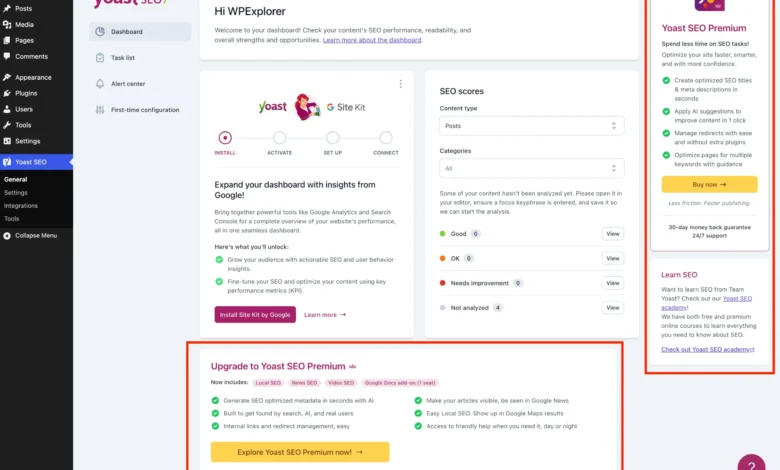
The freemium business model, where a basic version of a product is offered for free while premium features are reserved for paying customers, is a cornerstone of the WordPress plugin ecosystem. This model allows developers like Yoast to reach a vast audience, demonstrating the value of their product and subsequently converting a percentage of free users into paying subscribers. Yoast SEO Premium, for instance, offers advanced functionalities such as AI-generated titles and descriptions, a redirect manager, and support for multiple focus keywords. However, the commercial imperative to drive these upgrades often manifests as "upsell noise" within the free product—a proliferation of banners, dedicated menu pages, dashboard widgets, and sidebar advertisements.
For individual site owners, this might be a minor annoyance. For professional developers and agencies managing numerous client websites, or for anyone prioritizing a pristine administrative interface, these constant prompts can become a significant distraction and workflow impediment. The core challenge lies in the tension between a plugin developer’s need for monetization and the user’s expectation of a focused, unencumbered tool.

The Administrator’s Pursuit of a Streamlined Experience
The initiative to remove Yoast SEO’s promotional elements is largely spearheaded by WordPress administrators and developers who value efficiency and a clean user interface. They contend that while Yoast SEO’s core features are invaluable, the embedded marketing collateral detracts from the professional environment of the WordPress dashboard. The primary argument against the persistent upsells is not a rejection of Yoast SEO Premium’s value, but rather a preference for an unadulterated experience of the free product, free from commercial solicitations that do not pertain to their immediate operational needs.
Industry data consistently highlights the importance of user experience (UX) in software adoption and retention. While Yoast’s strategy is a common monetization tactic, a segment of its user base actively seeks methods to customize their software environment. This has led to the development of sophisticated code-based solutions that allow users to regain control over their WordPress admin area, transforming it from a potential sales funnel into a purely functional workspace.
Technical Interventions: A Deep Dive into Custom Code Solutions
The implemented solutions are primarily rooted in PHP and CSS, leveraging WordPress’s hook and filter system to dynamically modify the administrative interface. To ensure organization and prevent conflicts, these code snippets are typically encapsulated within a custom PHP class, which is then added to a child theme’s functions.php file, a code snippets plugin, or an MU plugin. Crucially, these solutions include checks (WPSEO_VERSION, WPSEO_PREMIUM_VERSION) to ensure they only activate when Yoast SEO Free is present, avoiding unnecessary processing or conflicts with the premium version.
Streamlining Navigation: Removing Premium & Unnecessary Admin Pages

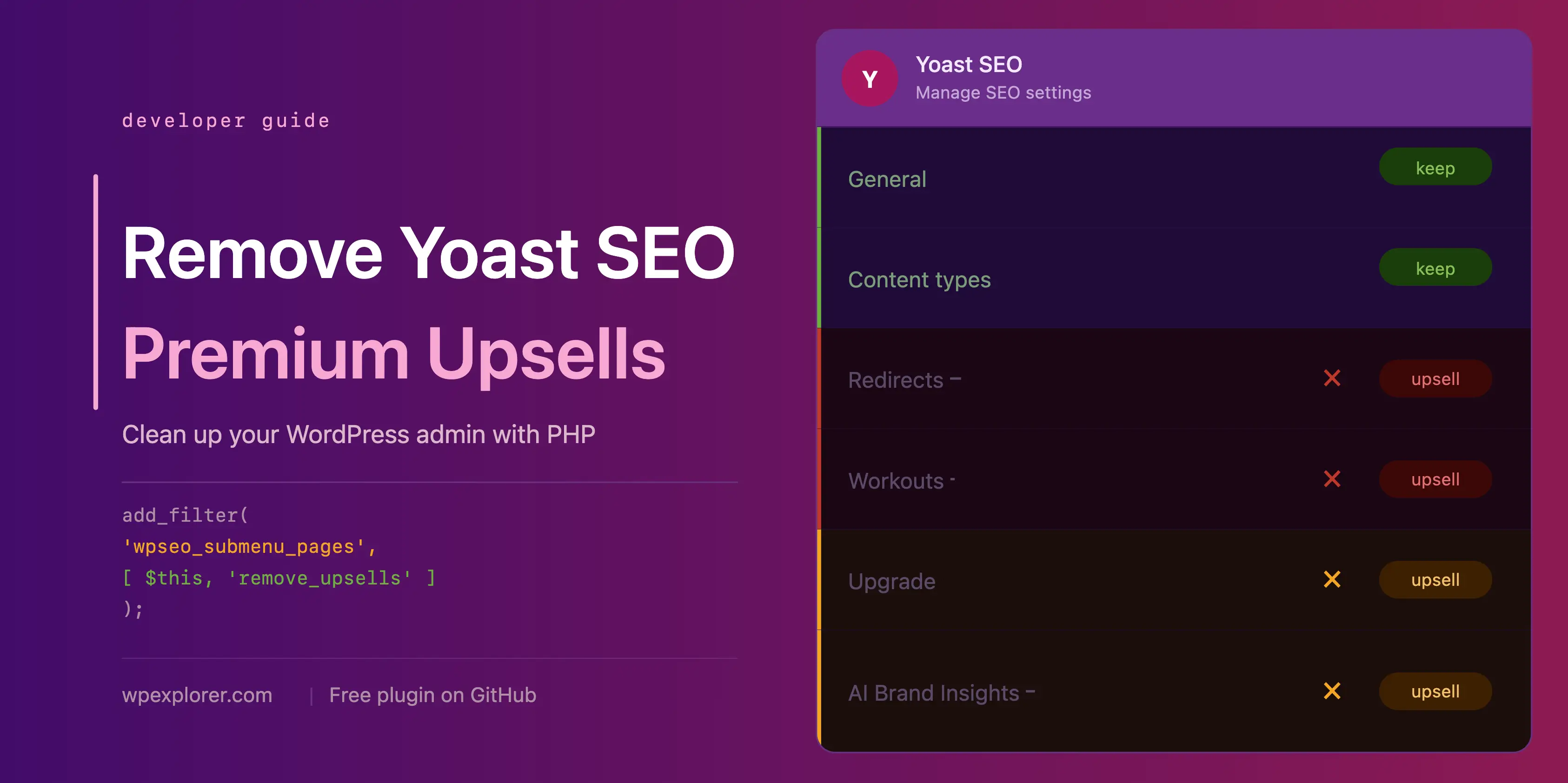
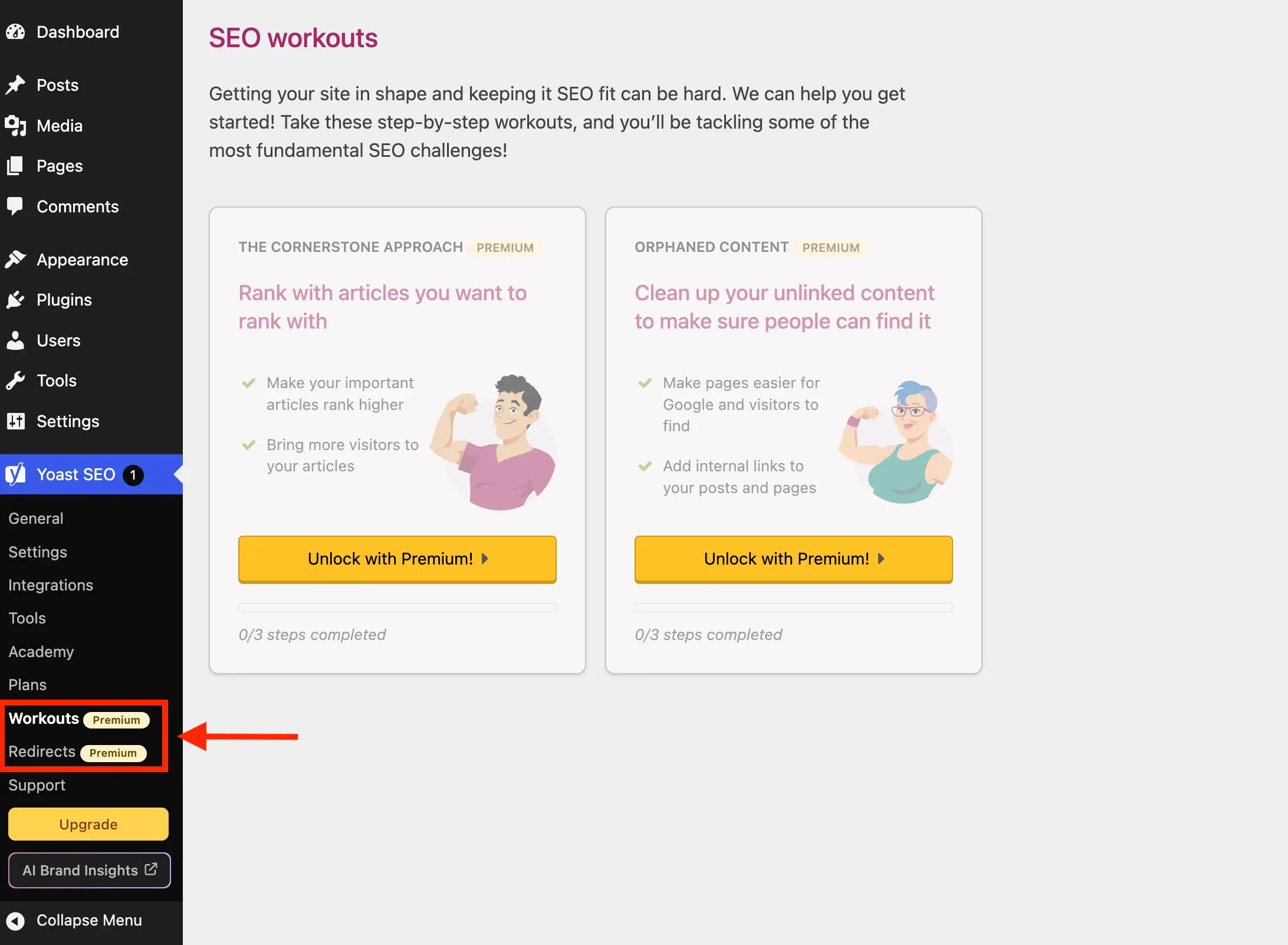
A significant portion of the "upsell noise" emanates from new menu items and sub-pages within the Yoast SEO section of the WordPress admin menu. Pages like "Redirects" and "Workouts" are explicitly premium features, leading only to an upgrade screen when clicked in the free version. Developers have targeted these elements using the wpseo_submenu_pages filter, which allows for the modification of Yoast’s registered submenu items.
Two main approaches are employed:
- Dynamic Badge Detection: This method intelligently scans for a "premium badge" HTML snippet within the menu item’s title. This adaptive technique removes any page Yoast designates as premium, reducing the need for manual updates if new premium pages are introduced.
- Explicit Slug Listing: Alternatively, administrators can define a specific array of page slugs (e.g.,
wpseo_redirects,wpseo_workouts) to remove. While less adaptive, this offers precise control.
Beyond premium-locked pages, the community also targets "unnecessary" pages that, while not strictly premium, serve little day-to-day purpose for a free user. These include:

- Plans: A page dedicated to comparing and purchasing Yoast’s premium offerings, essentially a sales page.
- Academy: Links to Yoast’s external online learning platform, with most content being premium and requiring an external account.
- Support: A collection of external links to Yoast’s help resources, easily bookmarkable and redundant as an admin menu item.
By extending the remove_premium_admin_pages method to include slugs like wpseo_upgrade_sidebar, wpseo_licenses, wpseo_page_academy, and wpseo_page_support, administrators achieve a significantly cleaner navigation structure.
Eliminating Visual Clutter: Admin Toolbar and Dashboard Widgets
The visual intrusiveness extends beyond the sidebar navigation. Yoast SEO also embeds "Upgrade" and "AI Brand Insights" buttons in the WordPress admin toolbar at the top of the screen. These are addressed by hooking into admin_bar_menu and using remove_node to eliminate their presence. A specific challenge with the "AI Brand Insights" button is its high priority registration, necessitating a direct remove_submenu_page call within the admin_menu hook to ensure its removal.

The Yoast SEO dashboard widget is another common target for removal. This widget, split between SEO scores and the latest Yoast.com blog posts, poses two main issues:
- Performance Overhead: It makes an uncached HTTP request to
yoast.com/feed/widget/upon every dashboard load, adding unnecessary server load and delaying page rendering. - Privacy Concerns: It transmits WordPress and PHP version details as query string parameters with each request, potentially exposing server environment information.
To counter this, remove_meta_box is used to eliminate the widget from the dashboard. Furthermore, admin_enqueue_scripts is utilized to dequeue associated scripts and styles (yoast-seo-dashboard-widget, yoast-seo-wp-dashboard, yoast-seo-monorepo), ensuring no residual assets are loaded, further optimizing dashboard performance.
Tackling JavaScript-Rendered Promotions and Locked Fields

Some of Yoast SEO’s promotional elements are rendered as JavaScript components, making them impervious to standard PHP hook-based removal. These include promotional banners at the bottom of admin pages, sticky sidebars with upgrade prompts, and locked premium fields within settings. The community’s solution for these elements involves targeted CSS injections.
While acknowledging the fragility of CSS selectors (which can break if Yoast updates its design or class names), administrators utilize highly specific selectors to display: none !important; these components. This includes targeting:
- General upgrade banners and sticky sidebars on Yoast admin pages.
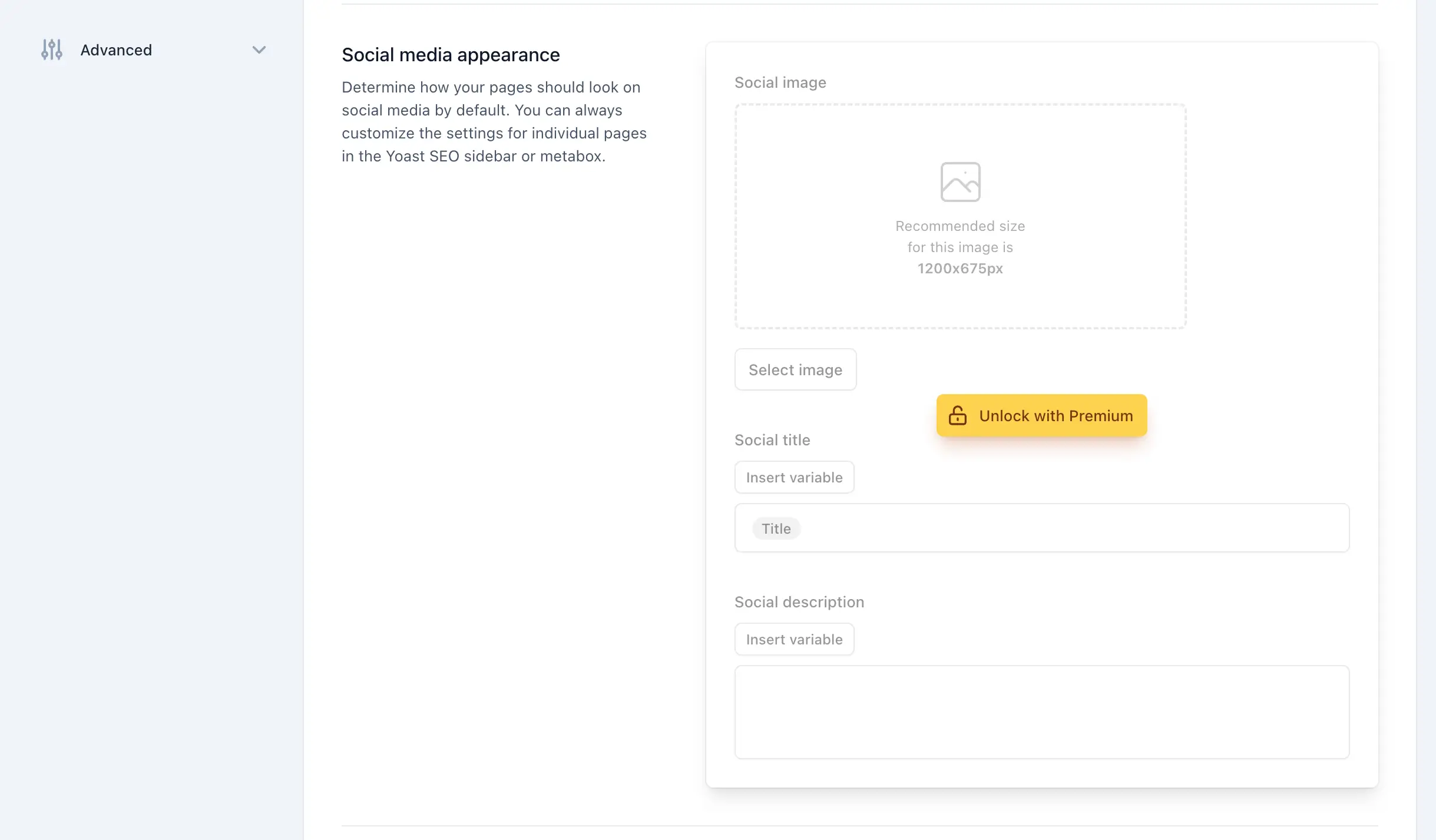
- "Locked Premium Admin Fields," identifiable by classes like
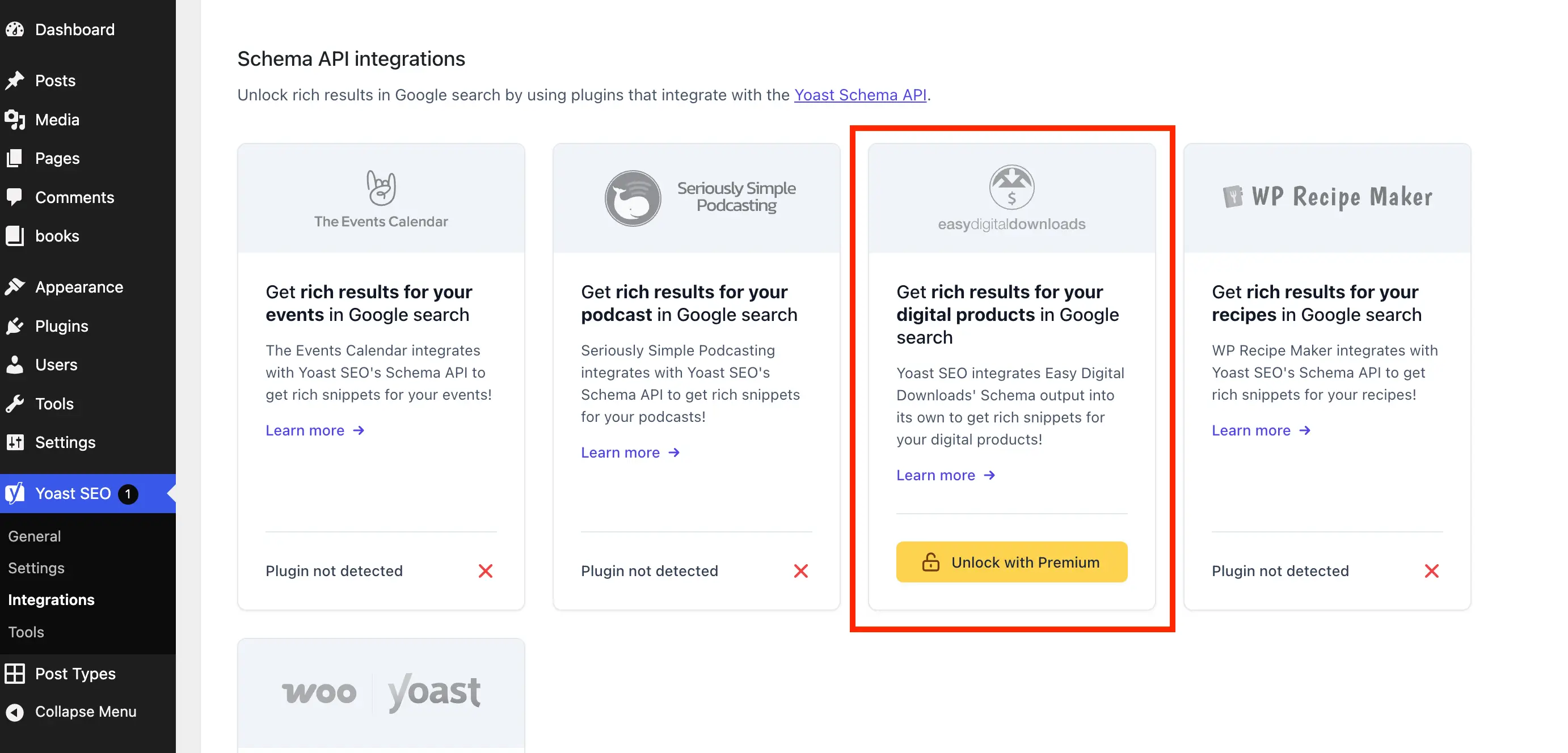
yst-button--upsellon upgrade buttons oryst-feature-upsellon entire sections. This allows for the removal of visually locked options that serve no function in the free version. - "Upsell Cards from the Integrations Page," where specific selectors target cards prompting "Unlock with Premium."
- "Premium Upsells in the Editor Metaboxes" and the Gutenberg sidebar, which are particularly intrusive due to their presence during content creation. These are also hidden via CSS, ensuring a clean editing experience.
The CSS is typically enqueued conditionally, loading only on relevant admin or post-editing screens to maintain efficiency.
The Broader Implications: User Experience, Plugin Development, and Open Source Ethos
The collective effort to refine the Yoast SEO free experience highlights several broader implications within the WordPress and open-source communities:
- Enhanced User Experience: For millions of users, particularly professional developers, these solutions significantly improve the daily workflow by removing distractions and cognitive load, allowing them to focus solely on SEO tasks.
- Balancing Monetization and Usability: This scenario underscores the ongoing tension between a plugin developer’s need to monetize their product through a freemium model and the user’s desire for a clean, highly functional tool free from commercial overtures. It demonstrates how users actively shape their software environment when provided with the means.
- The Power of Open Source: The very nature of WordPress as an open-source platform empowers users to inspect, modify, and adapt software to their specific needs. This communal effort to "cleanse" the Yoast SEO interface is a testament to the flexibility and adaptability inherent in the open-source ethos.
- Maintenance Challenge: While effective, these custom solutions require ongoing maintenance. As Yoast SEO evolves, updating its design, class names, or internal hooks, the custom PHP and CSS snippets may need adjustments to remain effective. This ongoing effort is often facilitated through community-driven repositories, such as the
wpex-remove-upsells-for-yoast-seoplugin available on GitHub, which serves as a centralized hub for these updates.
Official Stance and Alternatives
Yoast BV, the company behind Yoast SEO, naturally encourages users to upgrade to the premium version, citing the additional features and the removal of upsells as primary benefits. Their business model relies on these conversions, and the presence of upsells is a deliberate strategy. The custom solutions implemented by the community are not a criticism of Yoast’s commercial strategy, but rather a user-driven response to tailor the software to specific preferences.
For users who find the maintenance of custom code cumbersome, purchasing Yoast SEO Premium remains the simplest and most officially supported method to achieve a clean interface while gaining access to advanced features. Alternatively, the market offers a variety of Yoast SEO alternatives, some of which may adopt less intrusive freemium models or cater to different user priorities.
The ongoing dialogue and technical innovation surrounding Yoast SEO’s free version underscore a dynamic aspect of the WordPress ecosystem: the constant negotiation between commercial interests and the user community’s pursuit of an optimized, distraction-free digital environment. As WordPress continues to evolve, so too will the strategies employed by both plugin developers and their dedicated user base.