Bot Traffic: Kinsta’s Managed WordPress Protection vs. Cloudflare’s Advanced Solutions Examined.

Bot traffic has transcended its former status as a peripheral security concern, emerging as a critical infrastructure challenge for WordPress site owners, according to a recent report from Kinsta. The company’s comprehensive "AI & Bot Traffic Report," which analyzed over 10 billion requests across its managed infrastructure, revealed that automated traffic now poses significant operational and resource burdens, moving beyond mere footnotes in security audits or analytics reports. This paradigm shift underscores a growing imperative for robust, intelligent bot management solutions.
The Evolving Threat: Bot Traffic as an Infrastructure Problem

For years, bots were often categorized simply as "good" (like search engine crawlers) or "bad" (like spammers or attackers). However, Kinsta’s findings highlight a more nuanced and pervasive threat. Malicious and inefficient bots are increasingly sophisticated, capable of mimicking human behavior and exploiting vulnerabilities in ways that directly impact site performance and stability. Crawlers are not merely indexing static content; they are aggressively hitting dynamic endpoints, becoming ensnared in query-string loops, effectively bypassing caching mechanisms, and generating traffic patterns that deviate significantly from conventional indexing. This behavior leads to wasted server resources, increased operational costs, skewed analytics, and degraded user experiences for legitimate visitors. The sheer volume and complexity of this automated traffic have elevated it from a security annoyance to a foundational infrastructure problem that demands a strategic response.
The digital landscape has seen an explosion in automated agents, from legitimate search engine bots and AI training crawlers to malicious scraping tools, credential stuffers, and DDoS attack vectors. This proliferation has made distinguishing between beneficial and harmful automated traffic increasingly challenging. The economic implications are substantial; businesses face higher hosting bills due to excessive resource consumption, potential data breaches from sophisticated attacks, and diminished trust from customers encountering slow or compromised websites. Kinsta’s report indicates that this problem is not theoretical but a daily reality for a significant portion of WordPress sites under its management, necessitating a proactive and specialized approach to bot protection.
Kinsta’s Strategic Response: A Tailored Bot Protection Solution
In response to this escalating threat, Kinsta has launched its proprietary bot protection service, a built-in tool designed specifically for WordPress environments. This solution empowers Kinsta-hosted site owners to identify, manage, and mitigate unwanted automated traffic directly from their MyKinsta dashboard. The introduction of Kinsta bot protection marks a significant step towards providing managed, WordPress-centric security layers, aiming to simplify a complex operational challenge for its users.
The move has naturally prompted questions among users already employing Cloudflare, a widely recognized web performance and security provider whose infrastructure Kinsta itself leverages. Concerns revolve around the potential overlap, redundancy, and optimal configuration when using both Kinsta’s new tool and existing Cloudflare bot protection features. To address these queries, Kinsta recently hosted a "Bot Traffic Reality Check" webinar, featuring insights from its Director of Engineering, Laszlo Farkas, and CTO, Daniel Pataki, providing clarity on the distinct roles and advantages of each solution.
Deconstructing Cloudflare’s Bot Protection Landscape
To fully understand Kinsta’s offering, it’s crucial to delineate Cloudflare’s multi-tiered bot protection services. Cloudflare, known for its extensive network and security features, provides several options, each with varying degrees of control and complexity. Kinsta’s hosting stack utilizes Cloudflare for essential services like CDN, WAF (Web Application Firewall), and DDoS mitigation, establishing a foundational layer of protection. Kinsta’s bot protection also operates on this same Cloudflare infrastructure, using its underlying detection engine. However, as Laszlo Farkas highlighted, "We use the same infrastructure as Cloudflare. We have the same knowledge and same options as Cloudflare, but we have the deep expertise to have better default sets we can give our customers to handle WordPress traffic." This distinction is key: leveraging the same engine does not mean offering the same product.
Cloudflare’s bot protection offerings include:
-
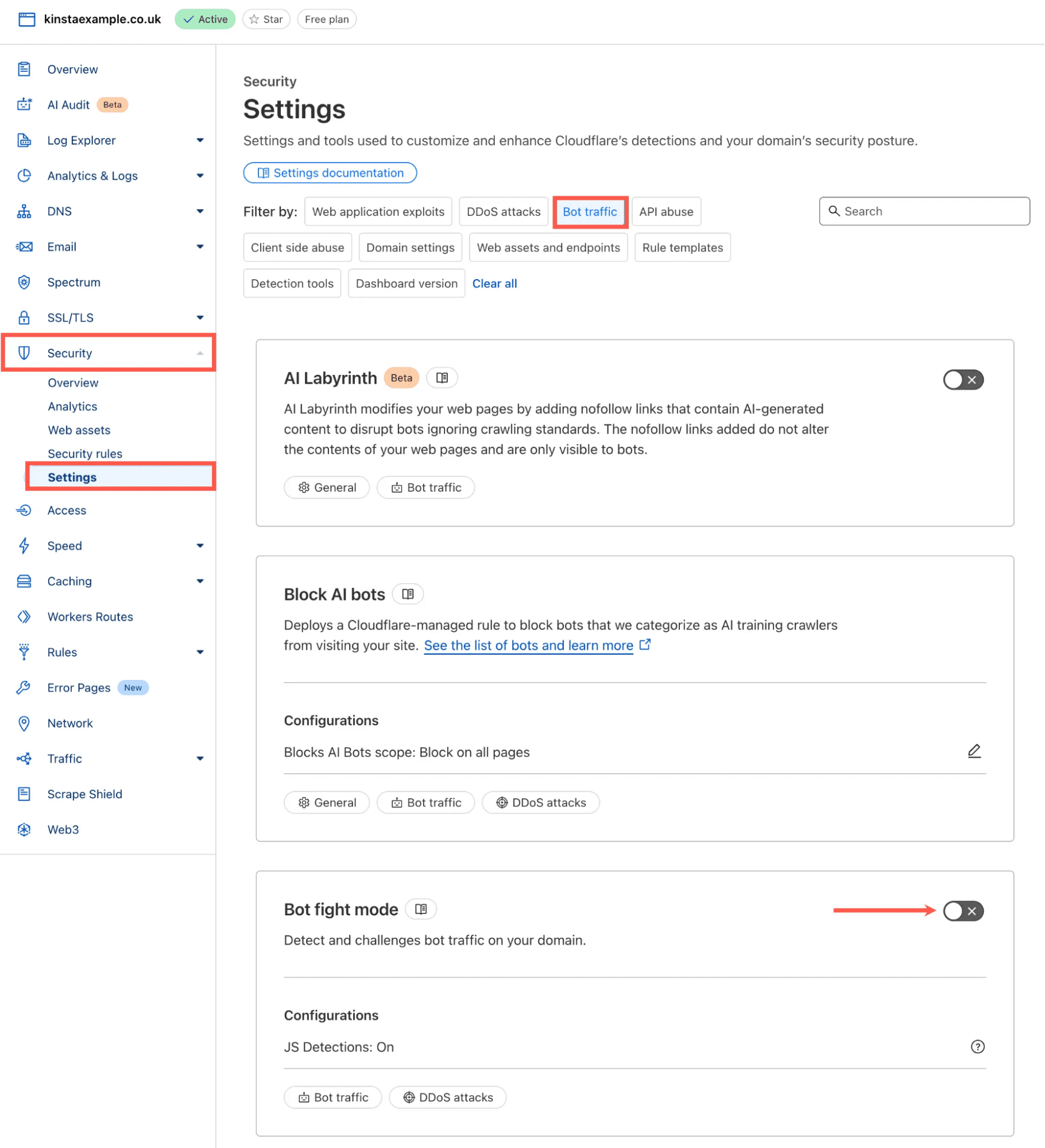
Cloudflare Bot Fight Mode: This is the most basic option, available across all Cloudflare plans, including the Free tier. It functions as a simple on/off toggle, offering broad bot mitigation without requiring any custom rule configuration. Its primary advantage is ease of use. However, its significant limitation is a lack of granular control. Bot Fight Mode applies domain-wide and cannot be bypassed or customized with WAF custom rules or Page Rules, as it does not operate on Cloudflare’s Ruleset Engine. This can be problematic for WordPress sites with legitimate automated traffic that might inadvertently be challenged.
-
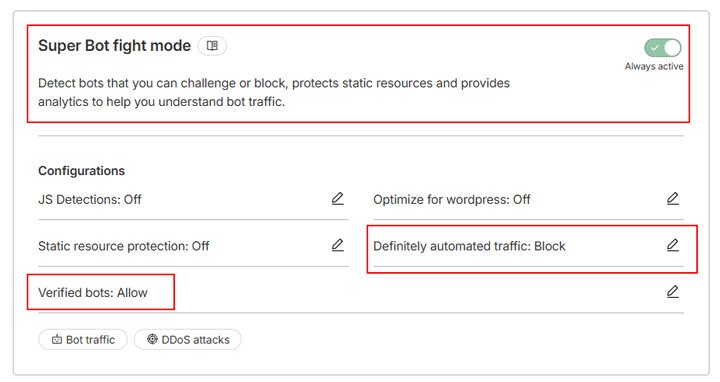
Cloudflare Super Bot Fight Mode: Available with Pro, Business, and Enterprise plans (without the dedicated Bot Management add-on), Super Bot Fight Mode offers a higher degree of control. Users can define specific actions—allow, challenge, or block—for broad categories of traffic, such as "definitely automated," "likely automated," and "verified bots." Unlike its simpler counterpart, Super Bot Fight Mode operates on the Ruleset Engine, enabling the creation of WAF custom rules with "Skip" actions to carve out exceptions for specific traffic patterns. While more flexible, it remains a broad-domain tool, lacking the granular, per-request bot scoring capabilities of Cloudflare’s most advanced solution.
-
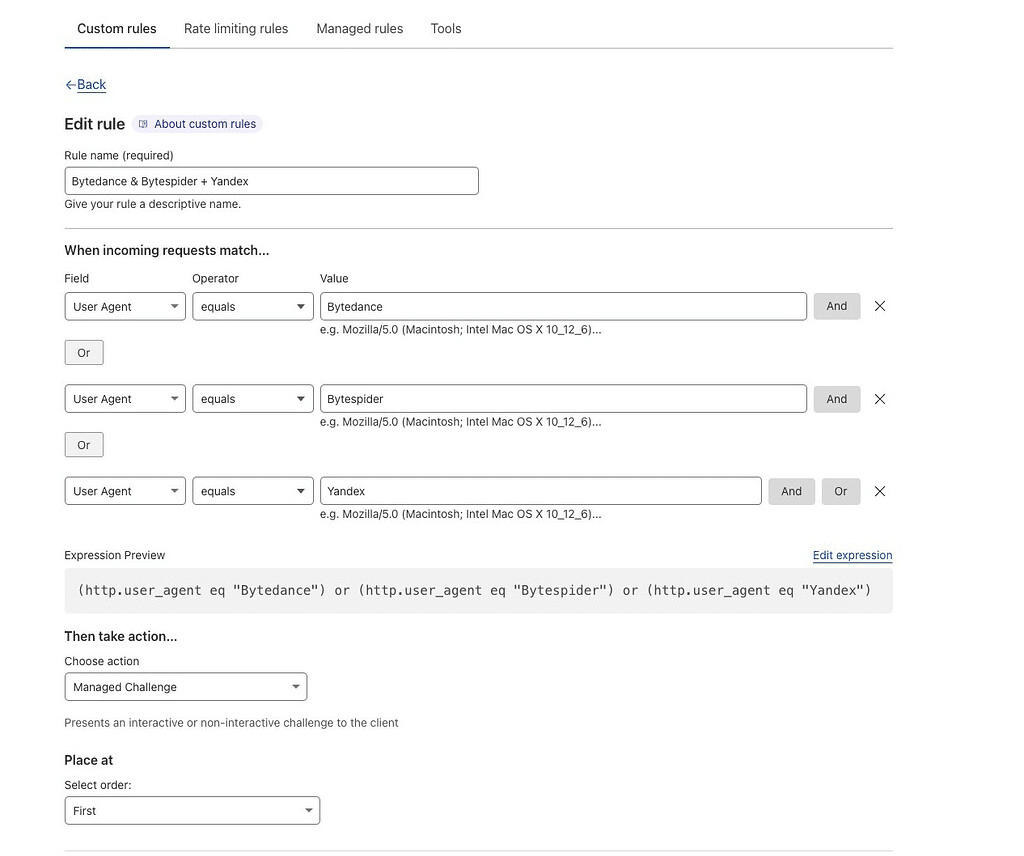
Cloudflare Bot Management and Custom Rules: This represents Cloudflare’s most sophisticated and flexible bot protection offering, typically available as an Enterprise add-on. Bot Management assigns a machine learning-based bot score (from 1 to 99, with 1 being highly automated and 99 highly human) to every request. This granular scoring, combined with the ability to define actions using WAF custom rules or Cloudflare Workers, allows for highly precise traffic management. Users can leverage various signals, including bot score, URI path, country, ASN, IP range, headers, and user agent, to craft extremely specific rules. For instance, a user could challenge low-scoring requests on a login page while allowing all traffic to a public blog. This level of customization demands a deep understanding of traffic patterns, continuous rule building, rigorous testing for false positives, and ongoing monitoring and tuning.
Kinsta’s Differentiated Approach: WordPress-Centric Protection
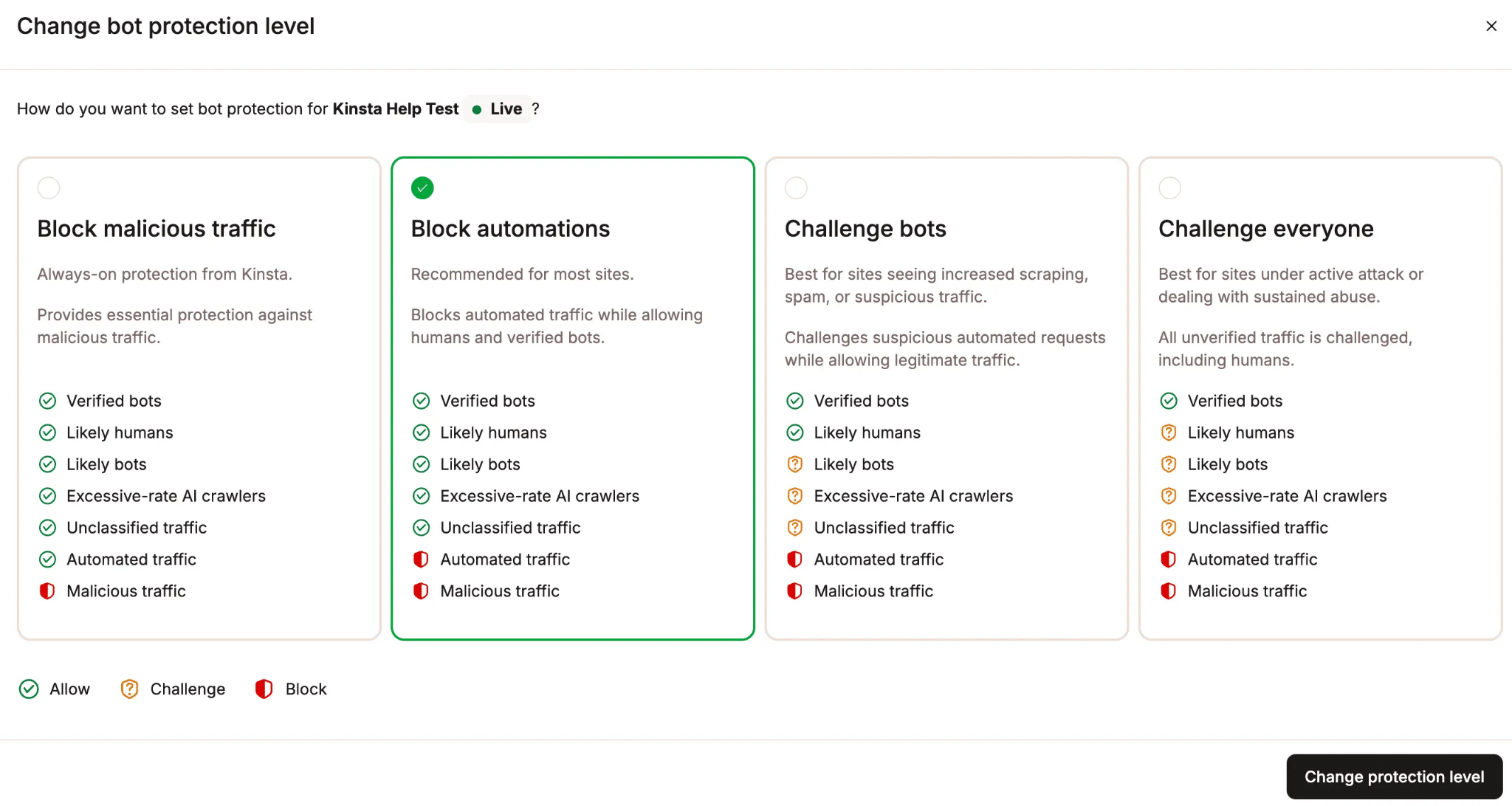
Kinsta bot protection strategically positions itself between the simplicity of Cloudflare Bot Fight Mode and the extensive, often complex, customization required by Cloudflare Bot Management. It offers a managed, WordPress-specific layer of protection, designed to simplify the operational burden for site owners.
Kinsta’s key differentiators include:
- WordPress-Aware Classification Rules: While leveraging Cloudflare’s detection engine, Kinsta layers its own classification rules. For example, an AI crawler generating an unusually high volume of requests might be reclassified as an "excessive-rate AI crawler" and challenged, even if Cloudflare’s general list identifies it as a verified bot. This WordPress-specific tuning allows Kinsta to better understand and respond to traffic patterns, endpoints, and automations common in the WordPress ecosystem.
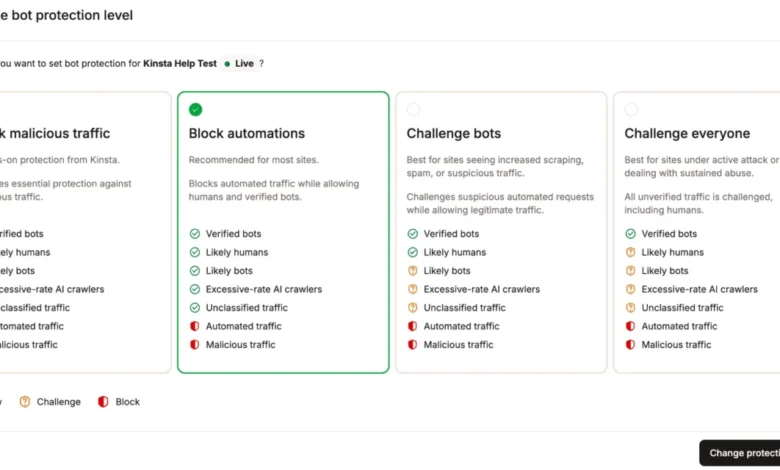
- Four Protection Levels: Kinsta provides four distinct preset protection levels that can be applied per environment (e.g., stricter on production, more permissive on staging). These levels offer a straightforward way to adjust the aggressiveness of bot mitigation without requiring manual rule creation. Challenges can manifest as browser-based checks, background validations, or interactive tests, designed to be minimally disruptive to legitimate human visitors who, once cleared, typically aren’t challenged again for at least 10 days.
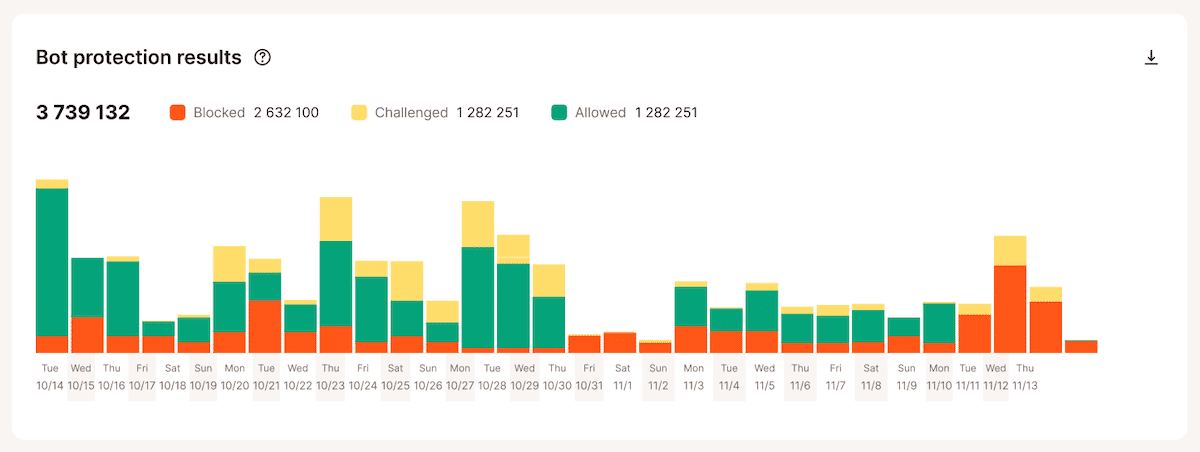
- Detailed Traffic Classification in MyKinsta: Kinsta’s Analytics in MyKinsta offers comprehensive visibility into how every request is classified: likely humans, verified bots, likely bots, unclassified traffic, automated traffic, malicious traffic, and excessive-rate AI crawlers. Crucially, it also reports on how each request was ultimately handled (allowed, challenged, or blocked). This granular reporting helps site owners understand their traffic without needing to parse raw log data, recognizing that "automated" doesn’t automatically mean "unwanted."
- Managed WordPress Allow List: WordPress sites depend on a myriad of legitimate automated activities, including REST API requests, scheduled tasks, plugin integrations, and e-commerce workflows. Kinsta offers an "Allow typical WordPress automations" toggle, activating a managed allowlist of trusted WordPress endpoints and services. This feature prevents stricter bot rules from inadvertently blocking essential site functions. Additionally, users can add specific exceptions for IP addresses, paths, or user agents under "Always Allow." This managed approach eliminates the need for individual customers to identify and configure exceptions for common WordPress integrations.
- Separate AI Crawler Control: Recognizing that AI crawlers are distinct from malicious bots, Kinsta provides a dedicated "Block AI crawlers" toggle. This allows users to entirely block AI crawlers, including verified ones, without impacting legitimate search engine crawlers like Googlebot or Bing. This separate control acknowledges the different operational decisions required for AI crawler traffic versus general bot traffic.
- Bulk Controls Across Environments: For agencies and users managing multiple WordPress sites, Kinsta supports bulk actions directly from the WordPress sites list. This enables simultaneous adjustments to protection levels, AI crawler blocking, and WordPress automation allowlist settings across numerous environments, streamlining management.
- Integrated Expert Support: Bot traffic issues are rarely isolated. They can stem from malicious activity, AI crawlers, misconfigured integrations, plugin conflicts, or legitimate marketing campaigns. With Kinsta bot protection, support is provided by the same team that understands the entire WordPress hosting environment, eliminating the need to correlate data and troubleshoot issues across separate vendor dashboards.
The Integration Conundrum: Running Multiple Protection Layers
A prevalent question, particularly highlighted during Kinsta’s webinar, concerned the advisability of running both Cloudflare’s bot features and Kinsta’s bot protection concurrently. Laszlo Farkas unequivocally stated that while technically feasible, it is not recommended. "Technically, they work together, but I generally wouldn’t recommend enabling both… Running both can also introduce unnecessary friction. For example, a visitor could end up seeing multiple managed challenges instead of just one at their first visit." Daniel Pataki further simplified this, advising, "You can use both, but there’s no real reason to. It’s much safer just to use one or the other." The primary downside is redundant challenges for legitimate visitors, creating unnecessary friction without offering substantial additional security benefits.
Furthermore, Kinsta advises against placing any other CDN, reverse proxy, or WAF (including an independently managed Cloudflare account with active proxying, WAF, or bot features) in front of a Kinsta site running Kinsta bot protection. Such configurations obstruct Kinsta’s ability to discern the true origin of each request, rendering its bot protection less effective at distinguishing automated traffic from human traffic. For users unsure about their current setup, Kinsta Support is recommended for guidance before making any changes.
Data and Diagnostics: Cloudflare vs. Kinsta Monitoring
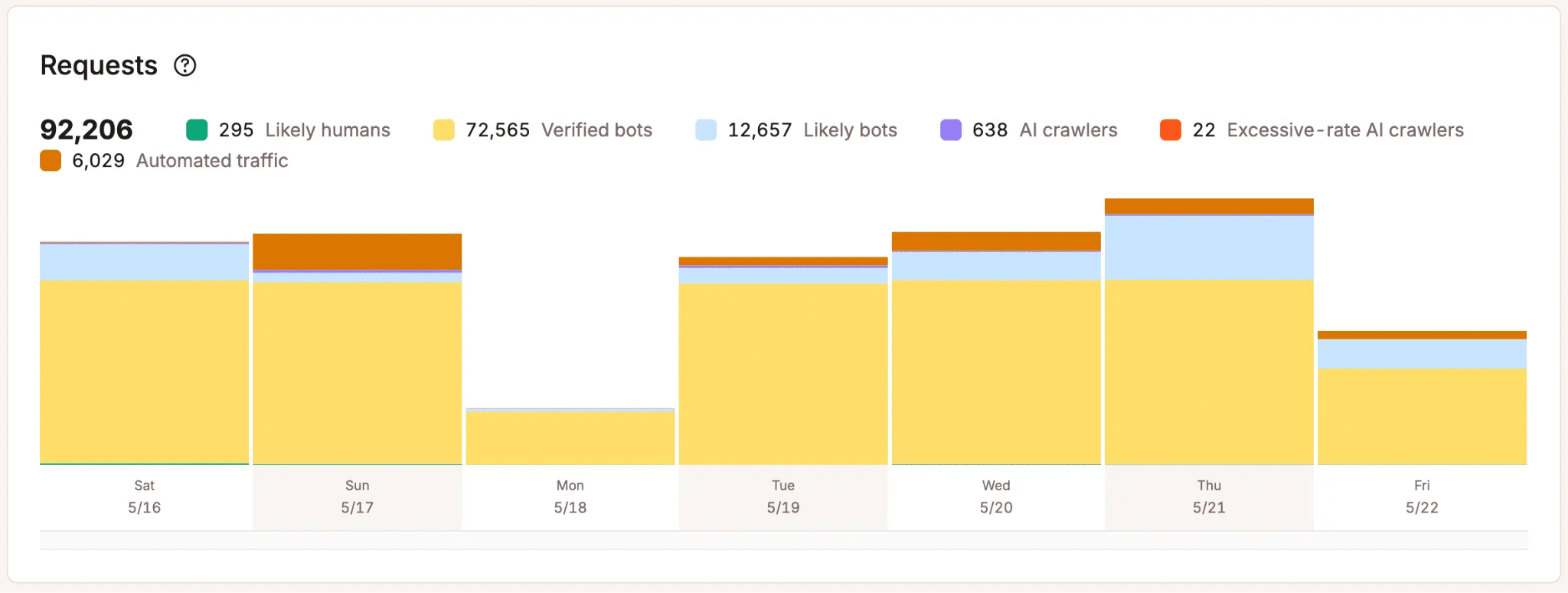
Monitoring capabilities also differ between the two platforms. Cloudflare offers extensive flexibility for forensic investigation, allowing users to drill into individual requests with custom filters across almost any request attribute. This makes Cloudflare’s tooling excellent for spotting patterns and investigating specific incidents. However, Cloudflare’s bot analytics are based on sampled data, meaning they do not provide a full count of every request, which can affect the reliability of exact traffic numbers.
In contrast, Kinsta reports on 100% of all requests hitting a site, providing aggregated hourly and daily statistics within MyKinsta. This makes Kinsta the more accurate and trustworthy source for platform-level traffic counts and trends over time, despite lacking Cloudflare’s ad hoc, drill-down filtering capabilities. Therefore, for deep incident investigation, Cloudflare has the edge, but for accurate, comprehensive metrics on overall site traffic and bot activity, Kinsta offers superior data integrity.
Strategic Choices for WordPress Site Owners
The decision between Kinsta’s bot protection and Cloudflare’s advanced tools ultimately hinges on the level of control desired and the resources available for managing bot mitigation.
- Use Kinsta bot protection for managed WordPress security: This is the recommended default for most WordPress sites hosted on Kinsta, especially for agencies managing multiple clients, teams without dedicated security personnel, or anyone prioritizing business operations over continuous security rule maintenance. Kinsta’s solution offers a robust, WordPress-tuned, and largely hands-off approach.
- Use Cloudflare’s advanced bot tools for complete control: For organizations with the expertise and resources to manage a sophisticated security posture, Cloudflare’s Super Bot Fight Mode with custom WAF rules or Bot Management offers unparalleled flexibility. This path is suitable for those who understand their traffic in intricate detail, require endpoint-specific handling, and are prepared to build, test, monitor, and continuously refine custom rules. Laszlo Farkas summarized this by stating, "If you have the expertise and the time to fine-tune this yourself, that’s probably the better choice for you. If you don’t, and you want to focus on your business rather than the nitty-gritty traffic control details, Kinsta’s solution is the better option because it’s managed, fine-tuned for WordPress, and maintained for you."
In most scenarios, adopting a single primary bot protection layer is advisable to avoid complexity and potential friction.
The Future of WordPress Security: Bots as an Operational Priority

The landscape of web traffic is irrevocably altered by the pervasive presence of automated systems. As Daniel Pataki articulated, bots are a "double-edged sword," simultaneously enabling useful web functions and posing significant performance, cost, and analytical challenges. The increasing activity of crawlers, AI tools, and various automated agents necessitates a paradigm shift in how WordPress teams approach site operations. Bot protection is no longer a set-and-forget security feature but an ongoing operational imperative.
Kinsta’s bot protection is designed to address this evolving need by offering a managed, intelligent starting point for WordPress site owners. With its tailored protection levels, dedicated AI crawler controls, WordPress-aware defaults, and integrated visibility within MyKinsta, it aims to empower teams to manage non-human traffic effectively without transforming every site into a custom rule-building project. This ensures that WordPress sites can continue to thrive in an increasingly automated digital environment, balancing the benefits of automation with the critical need for security and performance. For those seeking to delve deeper into this critical area, Kinsta offers its comprehensive AI & Bot Traffic Report and a dedicated webinar on the subject.