The digital content landscape has dramatically shifted, with search engines increasingly prioritizing not just what is written, but who is writing it. For content creators and publishers striving for higher rankings on Google, focusing solely on keyword optimization and on-page SEO may no longer suffice. The critical missing piece often lies in Author SEO, a strategic approach to optimizing an author’s digital identity to signal credibility, experience, and trustworthiness to search engines, directly influencing Google’s E-E-A-T (Experience, Expertise, Authoritativeness, and Trustworthiness) criteria. This fundamental shift underscores a broader industry movement towards verified, high-quality information, particularly in an era saturated with diverse and often conflicting content.
Understanding E-E-A-T and the Imperative of Author SEO
At its core, Author SEO involves meticulously curating and presenting an author’s profile to ensure search engines can accurately identify and validate the individual behind the content. This includes their qualifications, professional experience, and verifiable credentials. Google’s Human Quality Raters, a global team tasked with evaluating the quality of search results, utilize the E-E-A-T framework to assess how effectively Google’s ranking systems surface reliable content. While E-E-A-T is not a direct ranking factor in the traditional sense – meaning there isn’t a specific algorithm that directly measures it – it profoundly influences how Google’s systems interpret and rank content. Strong author signals provide clear cues to Google, helping its algorithms recognize content as credible, authoritative, and trustworthy.
The E-E-A-T acronym breaks down into four critical components:
- Experience: Does the author have direct, first-hand experience with the topic? This could involve using a product, visiting a location, or living through a particular event.
- Expertise: Does the author possess a high level of knowledge or skill in the subject matter? This is often demonstrated through education, professional certifications, or a track record of publications.
- Authoritativeness: Is the author recognized as a go-to source for the topic by others in the industry or the public? This is reflected in external links, mentions, and citations from other reputable sources.
- Trustworthiness: Is the content accurate, honest, and safe for users? This encompasses everything from factual accuracy to secure website practices and transparent disclosure of affiliations.
In a recent study by Semrush, it was found that websites with higher E-E-A-T signals tend to rank significantly better for competitive keywords, particularly in niches where accuracy and trust are paramount. This data reinforces the growing consensus among SEO professionals that ignoring author credibility is a critical oversight.
The Evolution of Google’s Focus on Authorship
Google’s emphasis on author identity is not a new phenomenon, but its current manifestation through E-E-A-T represents a more sophisticated evolution. The journey began with initiatives like Google Authorship, introduced in 2011, which allowed authors to link their Google+ profiles to their content. The idea was to visually highlight authors in search results with a profile picture and name, ostensibly to boost click-through rates and reinforce authority. However, Google Authorship was ultimately discontinued in 2014, largely due to low adoption rates and complex implementation.
Despite this setback, the underlying principle – the value of identifying credible authors – never truly disappeared. Following the discontinuation of Authorship, Google continued to refine its understanding of content quality, particularly in response to the proliferation of low-quality and misleading information online. This led to a gradual, but significant, shift towards evaluating broader signals of quality, culminating in the formalization and increased prominence of the E-E-A-T guidelines in its Search Quality Rater Guidelines, which have seen numerous updates, notably in 2018 and subsequent core algorithm updates. These updates consistently underscored the importance of content produced by knowledgeable and trustworthy sources, particularly for "Your Money or Your Life" (YMYL) topics such as health, finance, and legal advice, where inaccurate information could have serious consequences for users. Industry analysts, such as those from Moz and Search Engine Land, have consistently observed and reported on Google’s increasing algorithmic reliance on these quality signals.
Implementing Author SEO in WordPress: A Strategic Imperative
For the vast majority of websites globally, WordPress serves as the foundational Content Management System (CMS), powering over 43% of all websites on the internet. Its extensive plugin ecosystem makes it an ideal platform for implementing advanced SEO strategies, including Author SEO. While core WordPress offers basic user profiles, a dedicated SEO plugin is essential to fully harness the power of structured data and E-E-A-T signals. All in One SEO (AIOSEO) stands out as a robust solution, being one of the few major WordPress SEO plugins with a purpose-built Author SEO (E-E-A-T) module. This module moves beyond the default WordPress user profile, offering structured fields for expertise, experience, and credentials that seamlessly integrate into Person schema.
The following steps outline a comprehensive strategy for setting up Author SEO within WordPress using AIOSEO, requiring no coding expertise:
1. Installation and Activation of the AIOSEO Plugin
The first step involves integrating AIOSEO into your WordPress environment. After acquiring an AIOSEO plan (Plus plan or higher is required for the Author SEO feature), download the plugin zip file and obtain your license key from the AIOSEO dashboard.
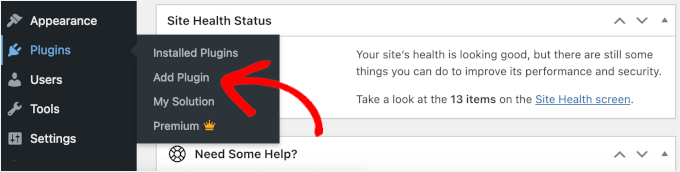
- Navigate to Plugins » Add New in your WordPress admin area.
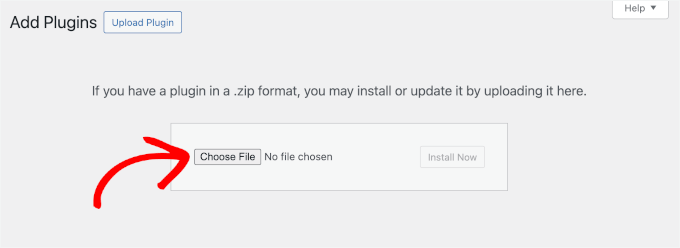
- Click ‘Upload Plugin,’ choose the downloaded zip file, then click ‘Install Now’ and ‘Activate.’
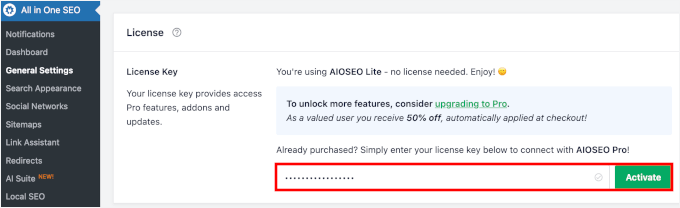
- Once activated, go to AIOSEO » General Settings and enter your license key to activate the premium features. This foundational step ensures that your site is equipped with the necessary tools to generate sophisticated author-related structured data.
2. Configuring the Author SEO (E-E-A-T) Feature
With AIOSEO installed, the next crucial step is to enable its dedicated Author SEO functionality.
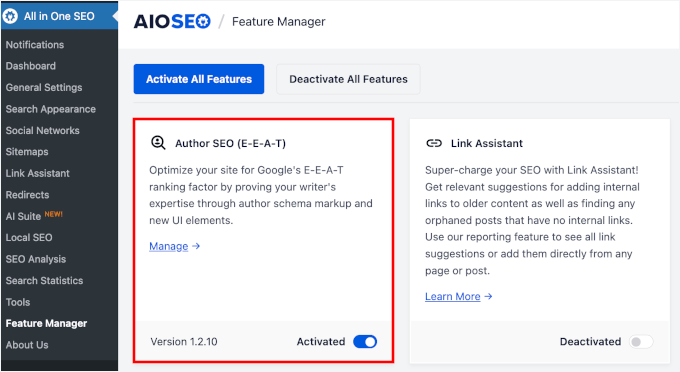
- Access the Feature Manager within AIOSEO and toggle on ‘Author SEO (E-E-A-T).’ This action unlocks extended author profile fields and structured data settings.
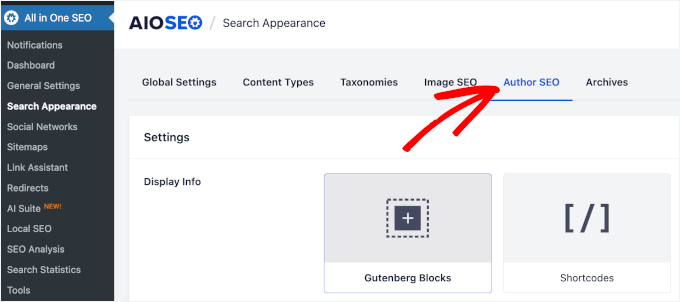
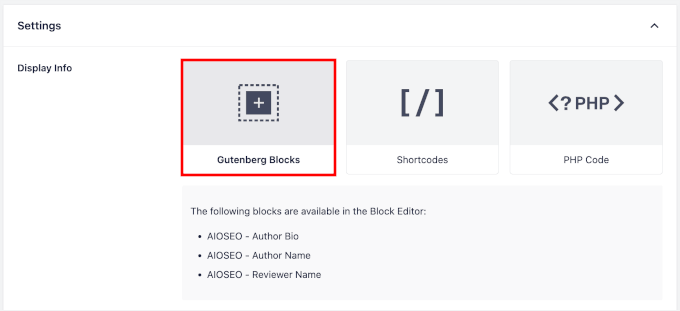
- Proceed to Search Appearance » Author SEO to configure display options. It is highly recommended to set ‘Display Info’ to ‘Gutenberg Blocks’ for code-free integration of author information.
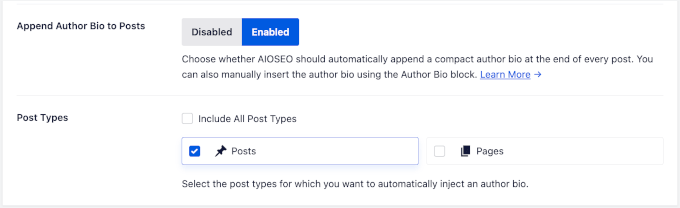
- Enable ‘Append Author Bio to Posts’ and select ‘Posts’ (or other relevant post types) to automatically add author bio boxes to your content.
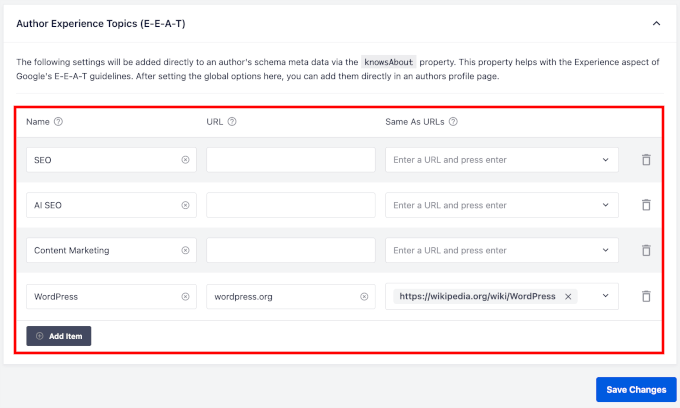
- Crucially, populate the ‘Author Experience Topics’ section. This list should include broad and specific topics your blog covers, each with a relevant URL and referencing pages. For instance, instead of just "SEO," consider "WordPress SEO Plugin Reviews" or "Local SEO Strategies for Small Businesses." This detailed mapping helps Google understand the topical alignment of your authors. After filling these details, click ‘Save Changes.’
3. Building Comprehensive Author Profiles
A complete WordPress user profile is foundational for Google to assess an author’s credibility. This goes beyond basic contact information.
- For new authors, go to Users » Add New User. For existing authors, navigate to Users » All Users and click ‘Edit’ on their profile.
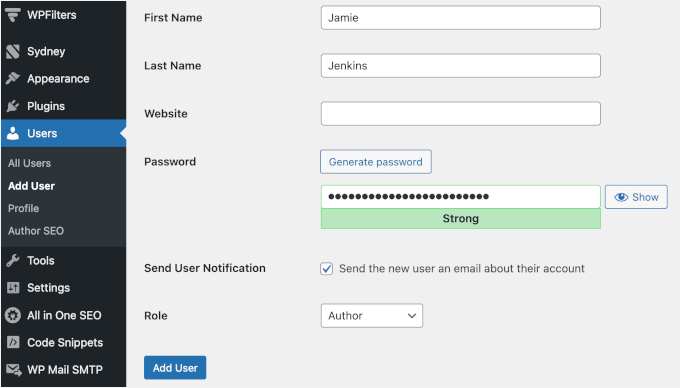
- Fill in all standard WordPress profile fields: username, email, first name, last name, website, and a detailed biographical info. The biographical info should be a concise, third-person summary highlighting their qualifications and relevance to your site’s topics.
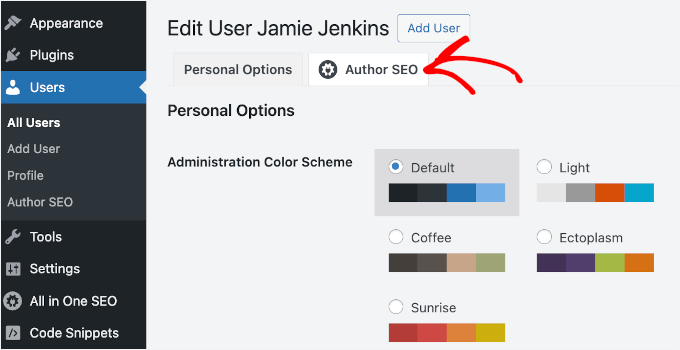
- Once the basic profile is established, switch to the ‘Author SEO’ tab, provided by AIOSEO. Here, a deeper layer of detail is added:
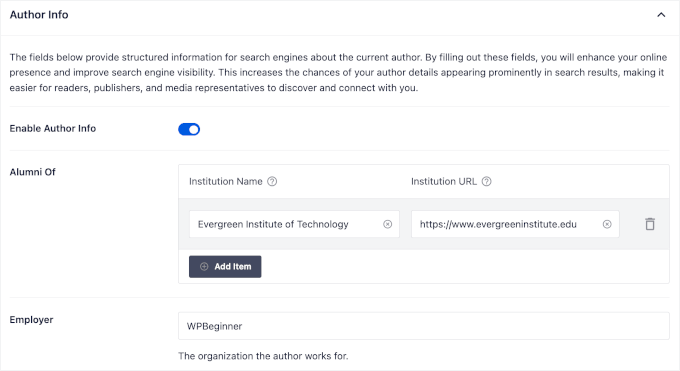
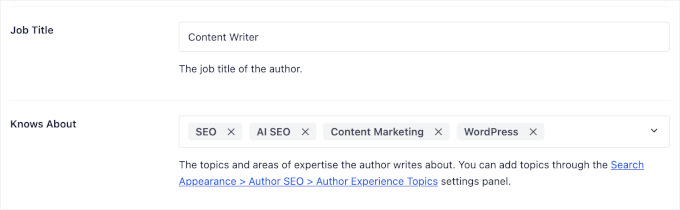
- Core Profile Fields: Fill in ‘Job Title,’ ‘Employer,’ and ‘Institution Name’ (e.g., universities or professional bodies) with corresponding URLs. These fields directly feed into the author’s JSON-LD Person schema markup, a machine-readable format that Google uses to understand entities.
- Expertise Topics: Reiterate and refine the ‘Knows About’ field with 3-5 narrow, verifiable topics the author has genuinely written about or possesses credentials for. Generic terms dilute the signal. For example, "WordPress Security Plugins" is more effective than "security."
- Awards and Spoken Languages: While not visible on the front end, these fields contribute to the schema markup, providing additional credibility markers that Google can process in the background.
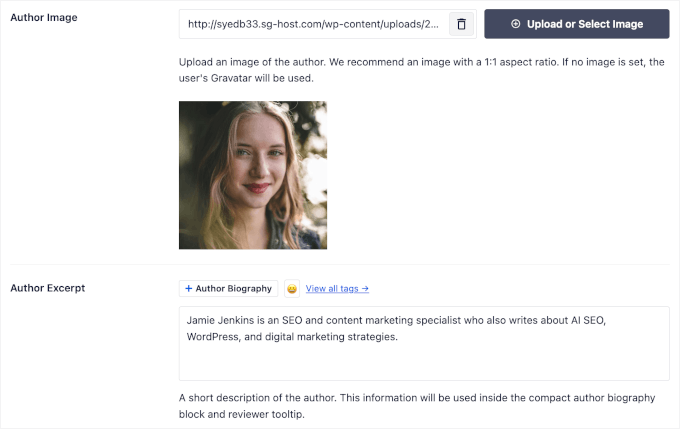
- Author Image, Excerpt, and Bio: Upload a professional author image and refine the author bio. The bio is a critical on-page E-E-A-T signal. It should be rich with verifiable claims: specific achievements, named publications, certifications, and a clear demonstration of experience. For example, "Sarah Chen, a certified Google Analytics professional, has consulted for 40+ small businesses since 2019 and regularly contributes to Search Engine Land."
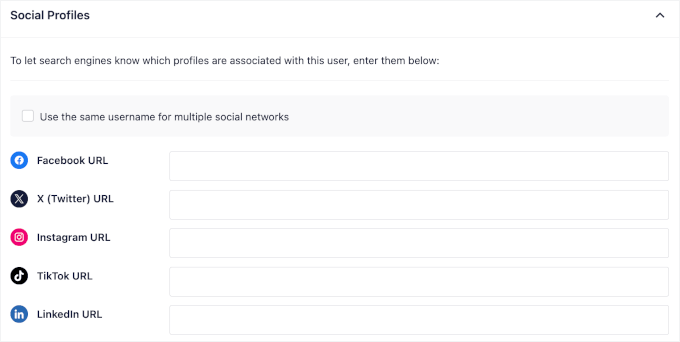
- External Profile URLs (sameAs): This is a powerful signal. Add links to the author’s verified presence outside your website, such as LinkedIn, official portfolio sites, academic profiles, or industry directory listings. AIOSEO converts these into
sameAsproperties within the schema, allowing Google to cross-reference and confirm the author’s identity across the web. Platforms like LinkedIn, ResearchGate, and official university pages carry significant weight. The goal is to build a consistent digital footprint that Google can consolidate into a Knowledge Panel, effectively treating the author as a known entity.
- Click ‘Update User’ to save all changes. Repeat this process for all authors on your site.
4. Establishing Organizational Credibility with Schema (For Businesses & Multi-Author Blogs)
While Author SEO focuses on individuals, Google also assesses the credibility of the publishing organization. This is especially crucial for multi-author blogs or businesses.
- Go to AIOSEO » Search Appearance » Global Settings.
- Under ‘Knowledge Graph,’ ensure ‘Organization’ is selected (unless you are a solo blogger representing yourself, in which case ‘Person’ is appropriate).
- Fill in the ‘Organization Name,’ ‘Organization Logo,’ ‘Website URL,’ ‘Phone Number,’ and ‘Contact URL.’ These fields map to Organization schema properties, providing Google with verifiable information about your brand.
- Add your organization’s social profile URLs. These
sameAsvalues in the Organization schema help Google cross-reference and confirm your brand’s identity across various platforms, reinforcing overall trustworthiness. - Click ‘Save Changes.’
5. The Critical Role of Reviewers for YMYL Content (Optional but Recommended)
For websites dealing with YMYL topics (e.g., medical advice, financial guidance, legal information), adding a qualified reviewer is a paramount E-E-A-T enhancement. Google holds such content to the highest standards, and explicit verification by an expert significantly boosts trust signals.
- Create a Reviewer User: Add the reviewer as a new WordPress user (or edit an existing one), similar to authors. Assign a ‘Contributor’ role if they won’t be publishing content.
- Fill Out Reviewer’s Author SEO Fields: Edit the reviewer’s profile and navigate to the ‘Author SEO’ tab. Populate fields like ‘Job Title,’ ‘Employer,’ ‘Institution,’ ‘Awards,’ ‘Knows About,’ ‘Bio,’ and ‘External Profile URLs.’ These should specifically highlight their professional qualifications and expertise relevant to the review topic (e.g., an MD credential for a health reviewer).
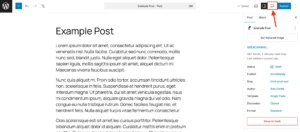
- Add the AIOSEO Reviewer Block to Posts: In the WordPress block editor for a relevant post, add the ‘AIOSEO – Reviewer Name’ block. Position it visibly, typically near the top or below the author meta.
- In the right-hand sidebar of the editor, use the ‘Reviewer’ dropdown to select the appropriate reviewer for that specific post. This action automatically populates the block with the reviewer’s name and photo and outputs their details in the page’s structured data alongside the author’s. This directly communicates the writer-and-reviewer relationship to Google’s algorithms.
6. Verifying Schema Markup and Optimizing Author Archive Pages
After setting up profiles, it’s crucial to ensure Google can properly access and interpret the structured data.

- Enable Author Archive Indexing: Go to AIOSEO » Search Appearance » Archives. Under ‘Author Archives,’ confirm ‘Show in Search Results’ is set to ‘Yes’ for multi-author blogs with unique, credentialed writers. For single-author blogs or authors with very few posts, ‘No’ is often recommended to avoid duplicate or thin content issues.
- Validate Schema: Use Google’s Rich Results Test tool (search.google.com/test/rich-results) to paste your author page URL (typically
yoursite.com/author/username). This tool confirms if Google detects valid structured data, such asProfilePageandPersonschema. While it may not flagPersonas a "rich result" type, it confirms the presence and validity of the schema properties. For a comprehensive check, validator.schema.org can be used. Address any errors or warnings flagged by these tools. - Optimize Author Archive Page Appearance: For indexed author archive pages, enhance their presentation. Add a unique header, a prominent author photo, a comprehensive bio, links to social profiles, and potentially a custom message or introduction. The goal is to make these pages valuable destinations, not just bare lists of posts, further reinforcing trust for both users and search engines.
7. Displaying Author Information with AIOSEO Author Blocks
Making author information visible to readers directly within posts is as important as the backend schema.
- AIOSEO offers two dedicated author blocks for the WordPress block editor:
- AIOSEO Author Name Block: Designed for placement near the post title, it displays the author’s name and profile picture, offering an immediate trust signal.
- AIOSEO Author Bio Block: Ideal for the bottom of the post, this block provides the full author bio, educational background, social media links, and areas of expertise. It can be configured for a ‘Compact’ or ‘Full’ version.
- If ‘Append Author Bio to Posts’ was enabled in Step 2, a compact Author Bio block will be automatically added. Otherwise, manually insert these blocks into your posts.
- Update or publish your posts to ensure these blocks are visible on the front end.
Implications for Content Strategy and Digital Publishers
The diligent implementation of Author SEO signifies a profound shift in content strategy. It moves beyond a purely keyword-centric approach to one that prioritizes authentic expertise and verifiable trust. Publishers are increasingly tasked with not just creating engaging content, but also transparently showcasing the human intelligence and credibility behind it. This impacts hiring decisions, content review processes, and overall brand messaging. Industry experts widely agree that this trend will only intensify, making a robust Author SEO strategy an indispensable component of any successful digital presence. By embracing these practices, websites can not only improve their search engine visibility but also cultivate a stronger, more trustworthy relationship with their audience. The long-term implication is a more responsible and credible online information ecosystem, where quality and authority are rewarded.