WordPress 6.8 Introduces Speculative Loading: A Comprehensive Guide to Faster Web Navigation and Server Trade-Offs

The release of WordPress 6.8 brought a profound structural change to millions of websites worldwide through the introduction of speculative loading. Designed to drastically reduce perceived load times, this native performance feature anticipates user navigation by prefetching or prerendering pages in the background before a visitor even clicks a link. While heralded by core developers as a major leap forward for user experience and modern web standards, the feature’s activation by default has sparked significant discussion among administrators, developers, and server infrastructure managers regarding resource consumption, caching behaviors, and server loads.
Understanding the Evolution of Resource Hints and the Speculation Rules API
To understand the scope of speculative loading in WordPress 6.8, one must examine the evolution of browser optimization techniques. Prior to this release, WordPress relied heavily on the Resource Hints API—a mechanism utilizing dns-prefetch, preconnect, and preload tags. These attributes instructed web browsers to resolve domain names or fetch critical assets like Google Fonts and external style sheets ahead of time. However, these older methods were primarily asset-specific and lacked contextual awareness of a user’s potential browsing journey across an entire website.
WordPress 6.8 elevates this capability by integrating the W3C-backed Speculation Rules API. Unlike basic asset hints, the Speculation Rules API allows developers and content management systems to dictate full-page navigation strategies. When a visitor lands on a page, the browser evaluates embedded JSON-based rules, identifying high-probability navigation targets—such as internal blog posts or category archives—and silently downloading them in the background. Consequently, when the user finally clicks the link, the destination page appears instantly, transforming the traditional multi-second wait into a seamless transition.
Chronology and Implementation Details in WordPress Core
The journey toward native speculative loading began taking shape within core development discussions throughout late 2024, culminating in the official merge and release announcement in early 2025 and 2026 iterations. The WordPress core team engineered the system to target logged-out users by default, mitigating security and privacy concerns associated with authenticated sessions.
The default configuration generated by WordPress utilizes a conservative prefetch strategy. By default, the system scans internal links matching wildcard patterns (/*) while explicitly excluding sensitive or dynamic paths. Excluded areas include admin dashboards (/wp-admin/*), backend scripts (/wp-*.php), media uploads (/wp-content/uploads/*), plugin directories, query strings (*?(.+*), links marked with rel="nofollow", and elements styled with specific CSS classes like .no-prefetch. This cautious approach minimizes unintended server stress while testing the waters of browser-level automation.

Browser Support and Technical Limitations
Despite its integration into WordPress core, the practical utility of speculative loading remains dictated by browser compatibility. As of current web standards, the Speculation Rules API enjoys robust support across Chromium-based browsers, including Google Chrome, Microsoft Edge, and Opera. Conversely, major alternative browsers such as Mozilla Firefox and Apple Safari do not natively support the Speculation Rules API.
For users browsing via non-supported platforms, the embedded speculation rules are treated as progressive enhancements and safely ignored, resulting in no console errors or broken functionalities. However, this fragmentation means that a significant demographic of internet users—particularly mobile Safari users on iOS devices—will not experience the performance benefits of speculative loading until wider industry adoption occurs.
Analyzing the Implications: Server Load vs. User Experience
The decision by WordPress core maintainers to enable speculative loading globally by default has introduced a complex set of operational trade-offs for site administrators. On one hand, the performance metrics are undeniable. By cutting down navigation latency, websites feel faster, which can improve user engagement metrics, lower bounce rates, and align more favorably with core web vitals evaluated by search engine algorithms.
Conversely, the background prefetching mechanism introduces distinct challenges:
- Increased Server Resource Utilization: Because the browser requests pages a user might never visit, web servers experience phantom traffic. On high-traffic enterprise sites or shared hosting environments, this speculative crawling can significantly inflate CPU, RAM, and bandwidth usage, potentially leading to higher hosting costs or degraded server performance.
- Content Freshness and Dynamic Data: Websites that frequently update real-time content—such as stock tickers, live news feeds, or inventory-based e-commerce platforms—risk serving stale cached data if a speculative fetch occurs milliseconds before a database modification.
- Plugin and Analytics Discrepancies: Certain analytics plugins, advertising scripts, or session-tracking tools count page views upon initialization. If a page is prefetched but never viewed, analytics data can become skewed, and scripts relying on strict user interactions may behave unpredictably.
Customization and Administrative Control Mechanisms
Recognizing that a one-size-fits-all approach is inadequate for the diverse ecosystem of WordPress websites, developers have provided specific hooks and filters to modify or completely deactivate the feature.

Administrators wishing to disable speculative loading entirely can do so by injecting a single line of code into their theme’s functions.php file or via a dedicated code snippet plugin:
// Disable Speculative Loading Completely
add_filter( 'wp_speculation_rules_configuration', '__return_null' );
For those seeking granular control rather than complete deactivation, WordPress offers programmatic filters. The wp_speculation_rules_configuration filter allows developers to alter the operation mode—switching from conservative prefetch to aggressive prerender—and adjust the eagerness parameter (conservative, moderate, or eager). Furthermore, custom URL paths can be shielded from speculative processes using the wp_speculation_rules_href_exclude_paths filter, ensuring specialized custom post types or transactional pages remain untouched by automated browser requests.
Verification and Diagnostic Procedures
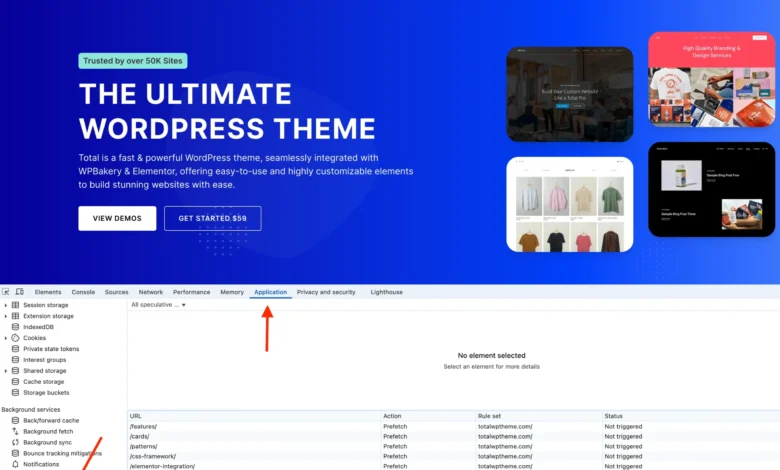
Website administrators who wish to audit how speculative loading operates on their properties can utilize built-in browser developer tools. Within Chromium-based browsers, navigating the developer console to the "Application" or "Network" panels reveals dedicated subsections for "Speculative Loads" or "Speculation Rules." Here, auditors can inspect whether rules are successfully parsed, review which URLs are currently targeted for prefetching, and analyze the real-time status of background requests.
Outlook for Website Administrators
The integration of speculative loading in WordPress represents a significant maturation of content management systems aligning with advanced browser capabilities. While the performance gains for supported browsers are tangible, administrators must weigh these benefits against server resource overhead and potential plugin compatibility hurdles. By understanding how to audit, customize, or disable these rules, web professionals maintain the necessary oversight to balance high-speed user experiences with sustainable server infrastructure management.