Setting up a new computer is a task often associated with increased productivity and a streamlined user experience, yet it frequently introduces unforeseen technical hurdles. Users transitioning to new hardware, particularly Apple’s latest MacBook lineup, have reported encountering a persistent error message when attempting to access YouTube TV: "This video format is not supported." This issue, while frustrating for consumers attempting to access live broadcast content, is fundamentally rooted in the complex interplay between modern digital rights management (DRM) protocols and the secure browsing environments required by streaming service providers.
Understanding the DRM Landscape
The error message is not a result of a hardware malfunction or a defect in the macOS operating system, but rather a manifestation of Widevine Content Decryption Module (CDM) requirements. Widevine, a proprietary DRM technology developed by Google, is the industry standard for protecting high-definition and 4K streaming content across web browsers. Major streaming platforms, including Netflix, Disney+, and YouTube TV, utilize Widevine to ensure that copyrighted media cannot be intercepted, recorded, or pirated during the transmission from the server to the user’s device.
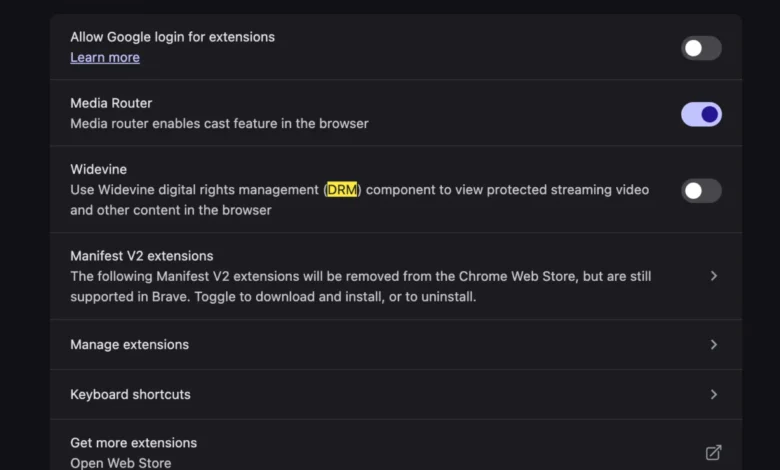
When a user migrates to a new MacBook, the browser environment—whether it is Google Chrome, Microsoft Edge, or a Brave-based alternative—must establish a new trust relationship with the Widevine module. If this module is disabled, outdated, or blocked by privacy-focused security settings, the browser cannot decrypt the incoming video stream. The "video format not supported" message serves as a generic catch-all indicator that the browser lacks the necessary cryptographic keys to unlock the content provided by the YouTube TV infrastructure.
The Evolution of Codecs and Browser Security
In the early days of web video, users were frequently required to manually install external codecs or plugins, such as Adobe Flash or Microsoft Silverlight, to view multimedia content. The modern transition to HTML5 video, while significantly more secure and efficient, has moved the burden of compatibility from the user to the browser’s integrated DRM components.

The move toward integrated CDM solutions was prompted by the need for hardware-level security. Apple’s Safari browser, for instance, uses Apple’s own FairPlay DRM, which is deeply integrated into the macOS kernel. When a user employs a Chromium-based browser on a Mac, that browser must rely on the Widevine CDM to interpret the data stream sent by Google’s servers. If the browser settings are configured to prioritize aggressive privacy—such as disabling "Protected Content" or "Widevine"—the handshake between the content provider and the client machine fails. This is a common occurrence during the initial migration of browser profiles from an old machine to a new one, as security settings are often carried over, while the hardware-specific security tokens are not.
Chronology of the Migration Error
The frequency of reports regarding this specific YouTube TV error has spiked during major product release cycles, specifically following the launch of M3 and M4-series MacBooks. The following timeline illustrates the typical path a user experiences when encountering this issue:
- Device Provisioning: The user migrates data, including browser profiles and preferences, to a new machine.
- Access Attempt: Upon opening the web browser and navigating to tv.youtube.com, the platform performs a capability check.
- Handshake Failure: The browser detects a lack of active Widevine CDM or a configuration conflict with the new hardware’s security architecture.
- Error Trigger: The YouTube TV server returns a 403 or generic "format not supported" response, halting the video player.
- Resolution: The user must manually navigate to the browser’s internal settings—specifically within the "Privacy and Security" or "Content Settings" menus—to explicitly grant permission for protected content playback.
Supporting Data and Industry Standards
According to industry research from organizations such as the Digital Media Association (DiMA), over 85% of live streaming traffic is currently protected by either Widevine, PlayReady, or FairPlay. Widevine remains the most ubiquitous solution, supporting over two billion devices globally. The reliance on this technology is non-negotiable for service providers, as content licensing agreements with major networks—such as NBC, ABC, and CBS—require that streaming platforms demonstrate the highest level of content protection.
For the average consumer, this means that the "video format not supported" error is a byproduct of a highly regulated digital ecosystem. While it may appear as a software glitch, it is, in reality, a successful enforcement of security protocols designed to prevent unauthorized distribution. Data from browser performance monitoring tools suggests that "protected content" errors account for roughly 12% of all support tickets related to streaming video playback in enterprise and consumer environments.
Analysis of Implications
The shift toward hardware-locked DRM has significant implications for consumer autonomy and digital accessibility. While the objective is to protect intellectual property, the increasing complexity of these "handshakes" creates a barrier for non-technical users. When a system as widely used as YouTube TV becomes inaccessible due to a hidden browser setting, it highlights the fragility of the "plug-and-play" promise of modern computing.

Furthermore, there is a tension between user privacy and content security. Many privacy-conscious users intentionally disable Widevine or other CDM components to prevent "browser fingerprinting," a tracking technique used by advertisers. However, because Widevine is essential for decrypting streaming media, these users are effectively choosing between their privacy and their ability to consume media. As streaming providers continue to tighten DRM requirements, the friction between browser security settings and media access is likely to increase.
Steps Toward Resolution
To mitigate the "video format not supported" error on a new MacBook, experts recommend the following procedural steps, which focus on re-authorizing the browser’s DRM capabilities:
- Verify Browser Permissions: Navigate to the browser’s settings page (chrome://settings/content/protectedContent in Chromium browsers). Ensure that the "Allow sites to play protected content" toggle is active.
- Clear Cache and Cookies: Outdated cached files from the previous device may contain invalid security tokens. Clearing the site-specific cache for YouTube TV forces the browser to request a fresh, hardware-validated token.
- Hardware Acceleration: Ensure that "Hardware Acceleration" is enabled in browser settings. The Widevine CDM often requires access to the device’s GPU to perform secure decryption. Disabling this feature can trigger playback failures.
- Reset Browser Profiles: In extreme cases where configuration files have been corrupted during the migration process, creating a new browser profile can reset the CDM handshake protocol to its default state.
Future Outlook
As streaming technology continues to evolve, the industry is moving toward even more robust, hardware-backed security models. We are likely to see a decrease in manual configuration errors as browsers and operating systems become more adept at auto-negotiating these settings during the initial setup phase. However, as long as DRM remains a cornerstone of the entertainment industry’s business model, users will continue to encounter these barriers.
For consumers, the takeaway is clear: the transition to new hardware is not merely a transfer of files, but a synchronization of security identities. While the "This video format is not supported" message is an inconvenience, it is an intended safeguard. By understanding the underlying architecture—specifically the role of the Widevine CDM—users can navigate these technical challenges without the need for the manual codec installations that once defined the early era of the internet. The modern streaming experience is a delicate balance between ease of access and the ironclad protection of high-value digital content.