WordPress Introduces ‘Notes’ for Streamlined In-Editor Collaboration and Content Feedback

The landscape of digital content creation and management has long grappled with the inherent complexities of team collaboration, often forcing creators and reviewers into a fragmented workflow across disparate platforms. However, a significant advancement in this domain has arrived with WordPress’s integration of a new native feature: Notes. Published on April 7, 2026, this innovative tool is set to revolutionize how content and design feedback are managed within the world’s most popular content management system, promising a more cohesive and efficient editing experience directly within the WordPress editor.
For years, content teams, designers, and project managers operating within the WordPress ecosystem have navigated a labyrinth of external tools to facilitate content and design reviews. The typical process involved drafting content in WordPress, then exporting it or taking screenshots to share in platforms like Google Docs for textual comments, Figma for design annotations, or relying on lengthy, often confusing, email threads. This multi-tool approach, while functional, invariably led to inefficiencies: content being copied back and forth, version control issues, and a persistent loss of context as feedback became detached from its specific on-page element. This common challenge was a significant friction point for agencies, enterprises, and even small teams striving for agile content delivery. Industry reports have consistently highlighted that inefficient communication and fragmented workflows can increase project timelines by 15-20% and lead to higher error rates.

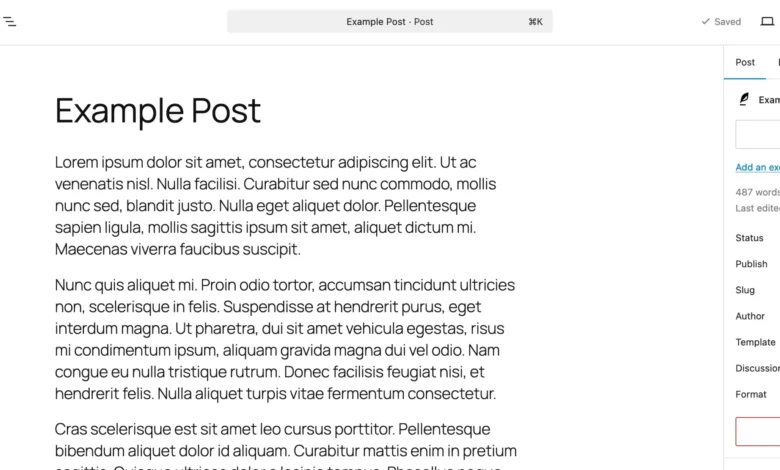
The introduction of WordPress Notes marks a pivotal moment, addressing these long-standing pain points head-on. By embedding a robust feedback mechanism directly into the block editor, WordPress is positioning itself as an even more comprehensive solution for collaborative content production. This built-in functionality eliminates the need for external tools for the primary feedback loop, centralizing discussions right where the content lives. Users can now attach contextual comments to any specific block – be it a paragraph, an image, a heading, or a custom layout element – ensuring that feedback is always precise, actionable, and directly linked to the design or content it pertains to.
The Evolution of In-Editor Feedback
The journey towards integrated feedback tools within content platforms is a natural progression driven by the demands of modern digital workflows. Before Notes, WordPress’s native commenting system was primarily geared towards public engagement on published posts, not internal editorial collaboration. The shift towards the block editor (Gutenberg) itself, which began its rollout in WordPress 5.0 in late 2018, laid the architectural groundwork for such granular, block-level interactions. This modular approach to content construction made it technically feasible to anchor feedback to individual components, moving beyond page-level comments.

The development of Notes likely involved extensive user research and community feedback, identifying the core needs of content teams. Early discussions within the WordPress core development community often revolved around how to enhance collaborative editing, a feature set increasingly becoming standard in competing cloud-based document and design tools. This initiative reflects a broader trend in software development to reduce context switching and consolidate functionalities, ultimately boosting user productivity.
Diving Deeper: How Notes Work
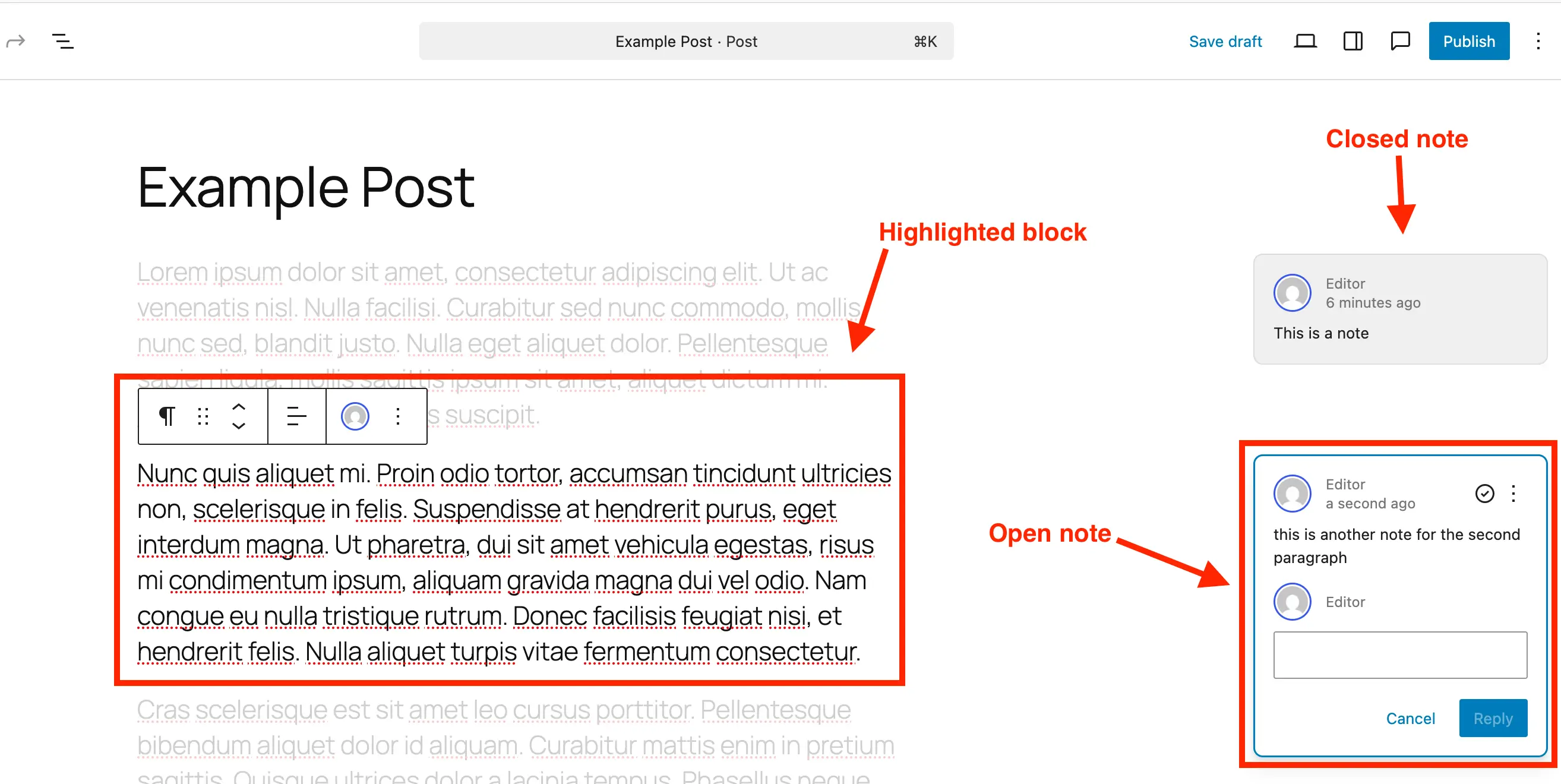
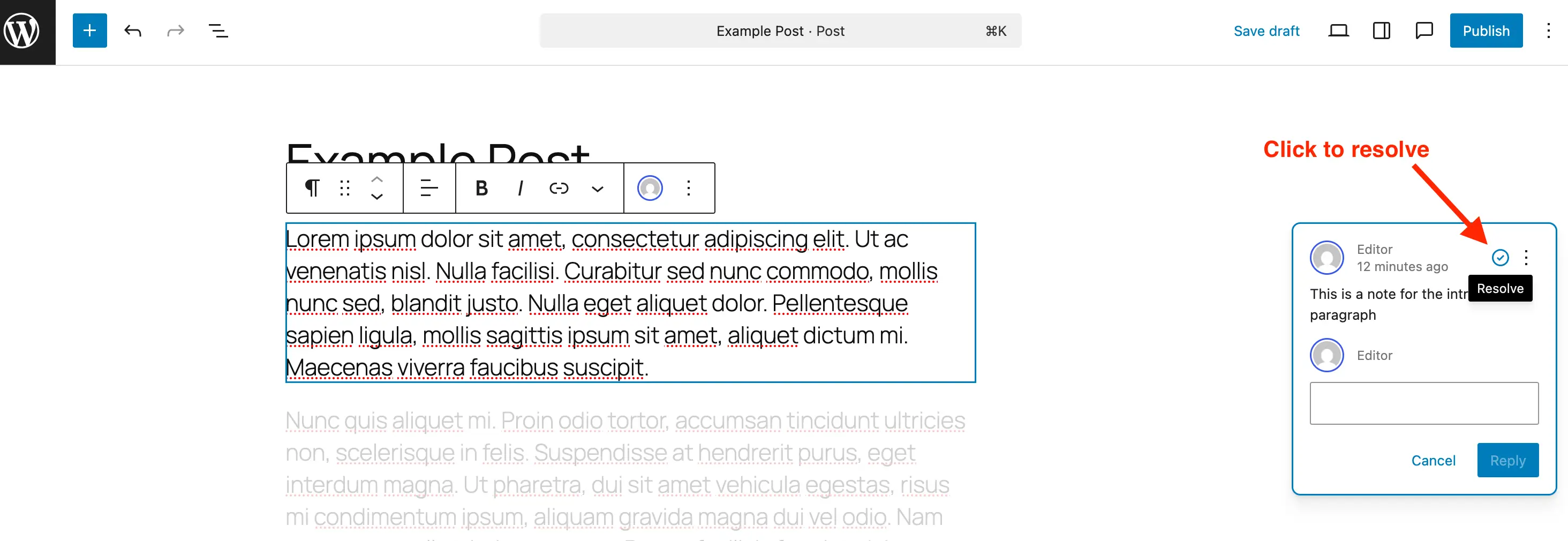
At its core, a WordPress Note is a block-attached comment designed for internal team collaboration. When a note is added, it appears as a distinct annotation, typically on the right-hand side of the editor interface, mimicking familiar comment bubbles found in document collaboration software. Each note clearly displays the author, date, and provides a direct reply mechanism, fostering threaded conversations. A key design element is its contextual highlighting: clicking a note instantly highlights the corresponding block within the main content area, while subtly fading out other elements. This visual cue ensures immediate focus on the specific content or design element under discussion, drastically reducing ambiguity and the time spent locating referenced items.
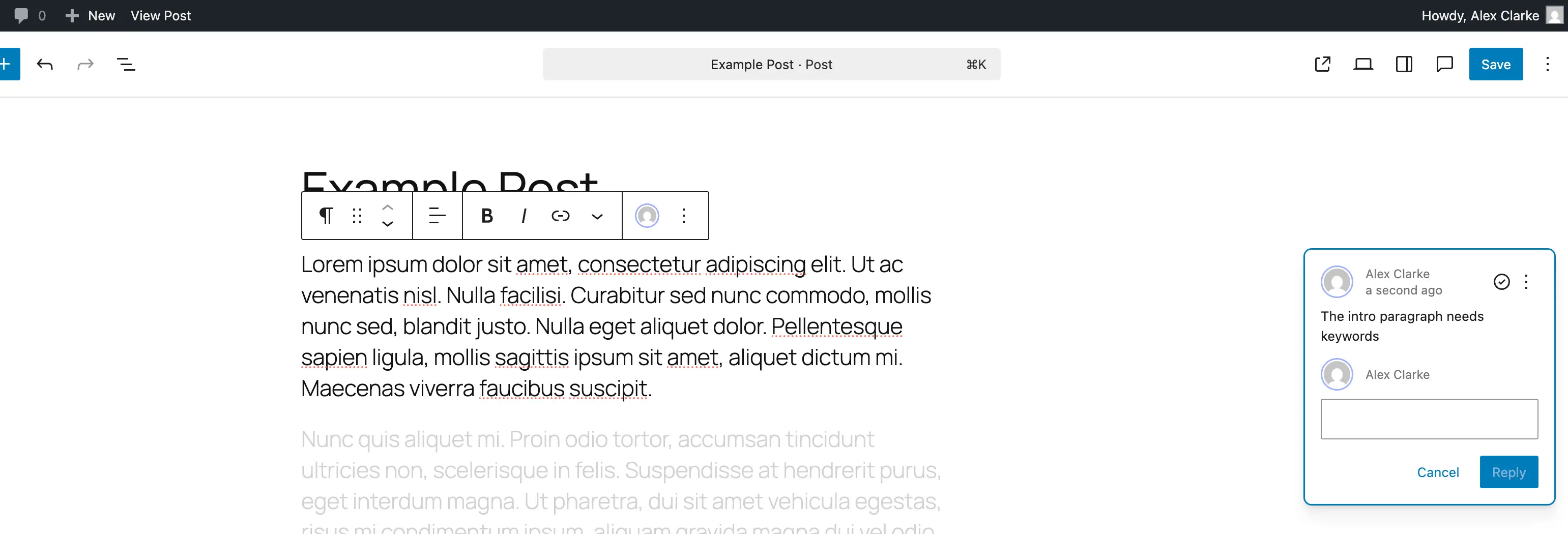
This functionality transforms the WordPress editor from merely a content input interface into a dynamic collaborative workspace. Content strategists can suggest rewrites for specific sentences, designers can pinpoint visual inconsistencies in images or layout blocks, and editors can flag grammatical errors or factual inaccuracies, all within the live drafting environment. This real-time, in-context feedback loop is critical for accelerating review cycles and ensuring a higher quality of published content.
Practical Implementation: Adding Feedback Effortlessly
Adding a note in WordPress is designed to be intuitive, minimizing any learning curve for existing users of the block editor. The process is streamlined into a few simple steps:
- Open the Post or Page: Navigate to the specific content requiring review within the WordPress block editor.
- Select the Target Block: Identify the precise paragraph, image, heading, list item, or any other block where feedback is necessary. A simple click selects the block.
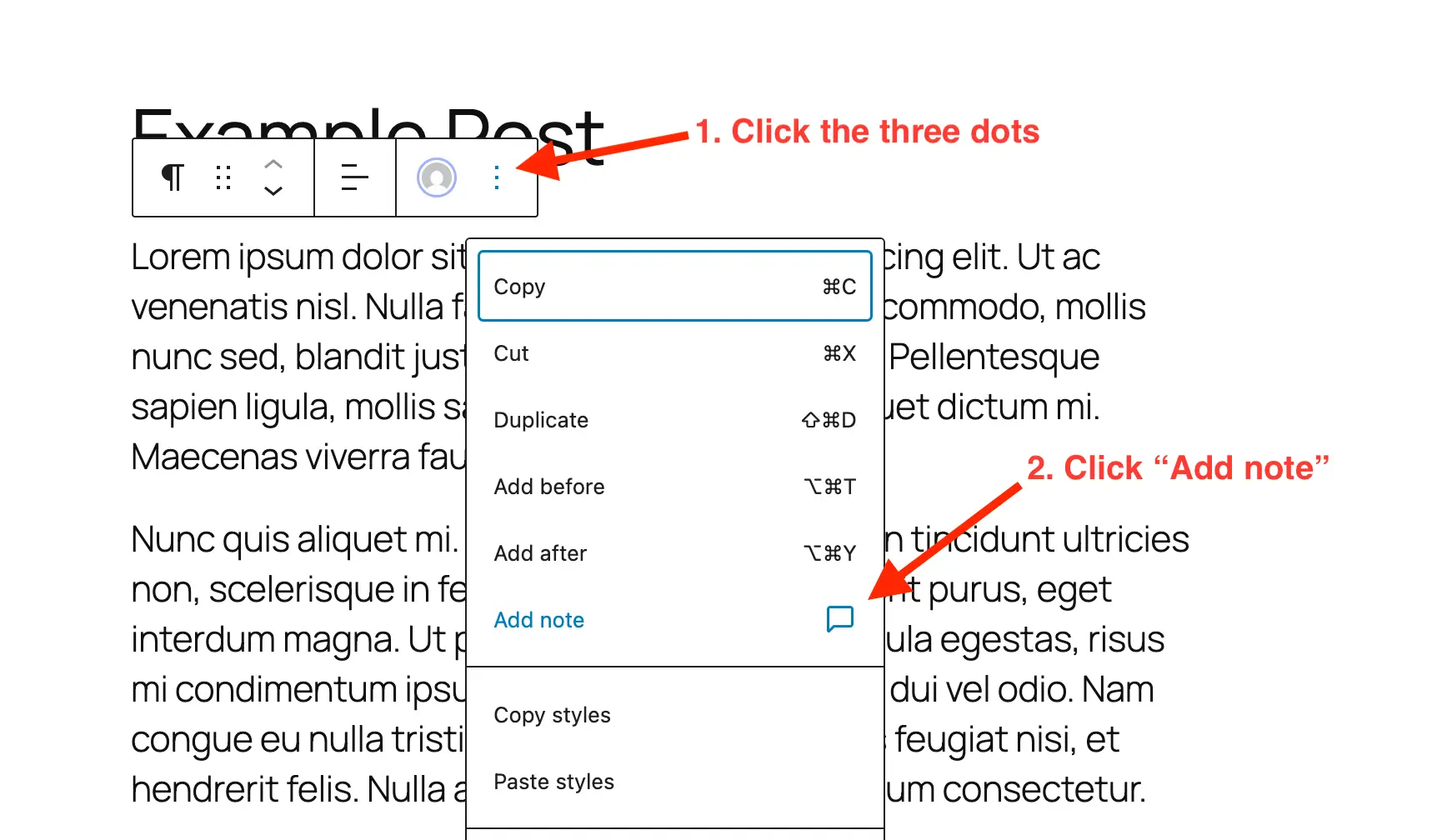
- Access Block Options: Click the three-dot menu (kebab menu) associated with the selected block. This menu reveals various block-specific actions.
- Initiate "Add Note": From the dropdown menu, select the newly integrated "Add Note" option. This action triggers the appearance of a dedicated feedback panel.
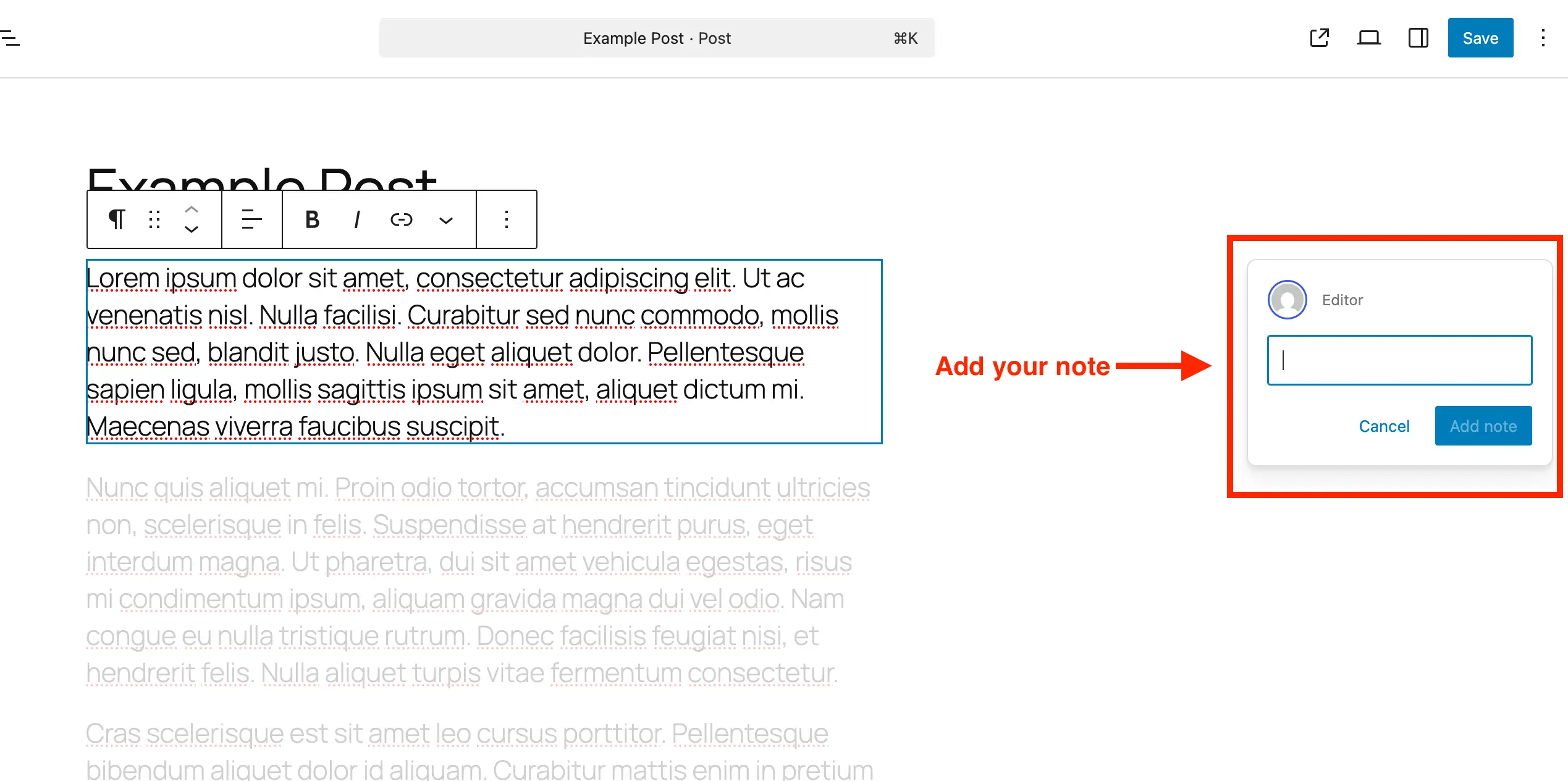
- Compose and Submit Feedback: A text input area emerges, usually on the right side of the editor. Users can type their feedback, which dynamically expands to accommodate longer comments, and utilize line breaks for clarity. Once composed, the note is submitted, instantly becoming visible to other collaborators.
This seamless integration ensures that feedback can be provided without disrupting the creative flow or requiring a mental shift to another application. The immediate visibility of new notes also facilitates quicker responses and resolutions, contributing to a more agile content pipeline.
Managing Collaboration: Reviewing and Resolving Notes
The utility of a feedback system lies not just in its ability to add comments, but also in its capacity to manage and resolve them effectively. WordPress Notes provides a robust set of tools for this:
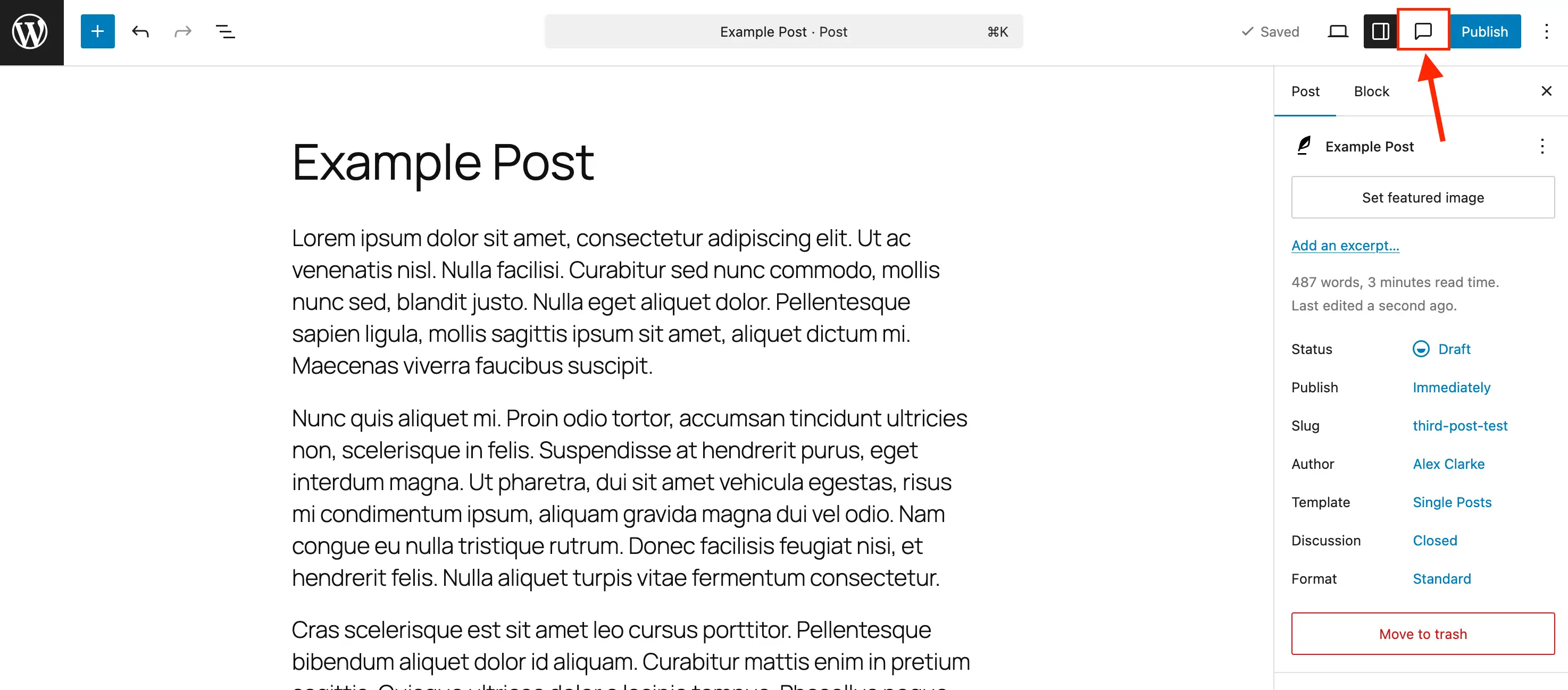
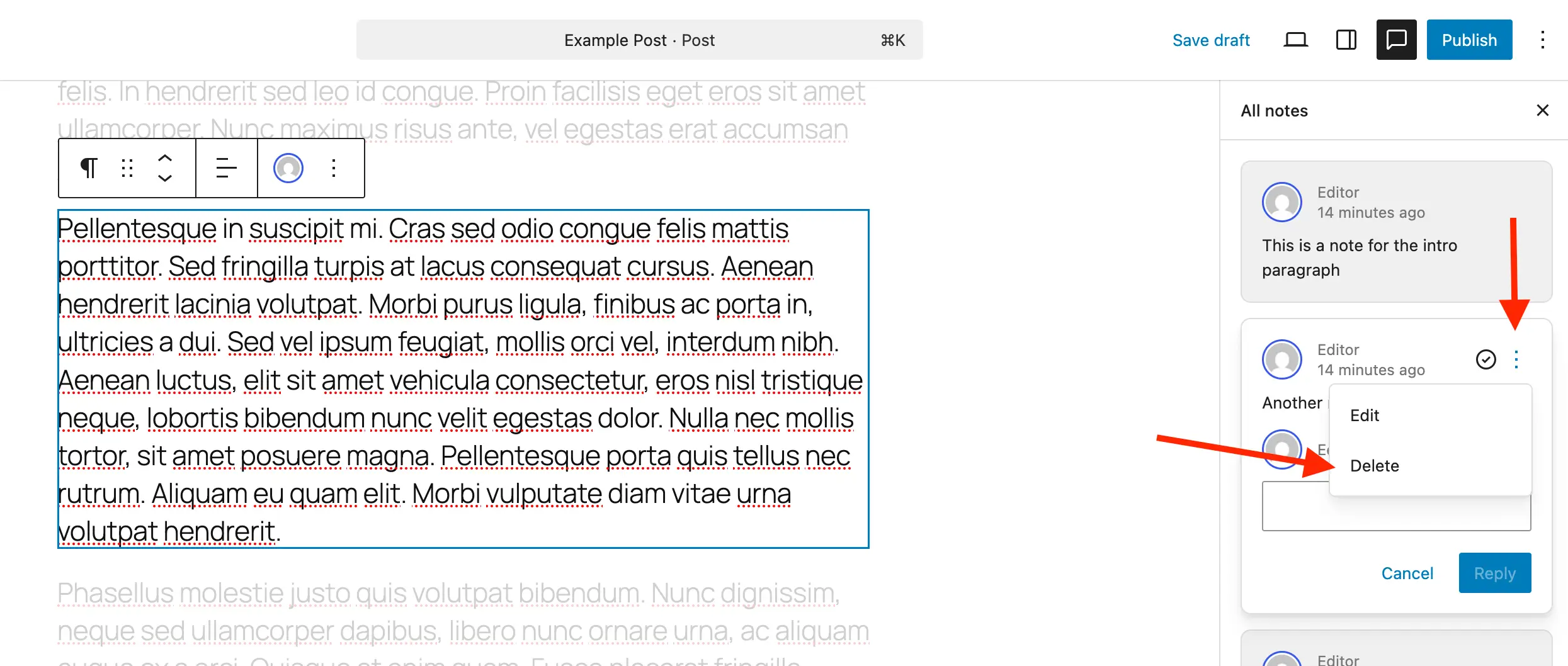
- Dedicated Notes Side Panel: While notes can be seen adjacent to their blocks when the default settings sidebar is closed, a dedicated "Notes" icon (resembling a comment bubble) in the editor toolbar opens a comprehensive Notes sidebar. This panel aggregates all notes for the current post or page, presenting them in an organized list. This centralized view is invaluable for an editor or project manager to quickly scan all pending feedback, prioritize tasks, and track overall progress.
- Contextual Focus: Clicking any note within the Notes panel instantly highlights its corresponding block in the editor and dims surrounding content, maintaining focus on the relevant section.
- Reply and Threading: Each note includes a reply field, enabling direct, threaded conversations around specific feedback points. This keeps discussions organized and prevents confusion that often arises in flat comment streams.
- Resolution and Tracking: Once feedback has been addressed and implemented, a note can be marked as "Resolved" using a simple check icon. Resolved notes are typically hidden from the main content view to reduce clutter but remain accessible within the Notes panel, allowing for a historical record of feedback and changes. This feature is crucial for accountability and post-mortem analysis of content production.
- Deletion: For notes that are no longer relevant or were added in error, a "Delete" option is available via the three-dot menu on the note. While resolving is generally preferred for traceability, deletion offers a cleanup mechanism.
- Reopening: Should further discussion be required on a previously resolved item, notes can be easily "Reopened," bringing them back into active discussion.
This comprehensive management suite ensures that the feedback loop is not only initiated smoothly but also brought to a conclusive and trackable resolution, minimizing the chances of overlooked feedback or recurring issues.
Extending Functionality: Custom Post Type Integration
Recognizing the diverse applications of WordPress beyond standard posts and pages, the Notes feature is designed to be extensible to custom post types (CPTs). By default, Notes are enabled for standard posts and pages. For developers and agencies working with bespoke content structures, enabling Notes for CPTs is straightforward:
- Via Post Types Unlimited Plugin: For users leveraging plugins like "Post Types Unlimited" for CPT registration, a simple checkbox in the plugin’s "Supports" settings can enable Notes. This graphical interface simplifies the process for non-developers.
- Manual Registration (Code): When registering a new CPT programmatically, developers need to include
"notes" => truewithin the'editor'parameter under the'supports'argument of theregister_post_type()function. This explicitly declares support for the Notes feature for that custom content type. - Enabling on Existing CPTs (Code): For custom post types already in existence, a code snippet can be used to merge Notes support into their existing editor capabilities. This involves using the
add_action( 'init', ... )hook to modify the post type’s supports array, ensuring other editor features remain intact while adding Notes. This method offers flexibility for retroactive integration.
This extensibility ensures that the benefits of in-editor collaboration are not confined to default content types but can be applied across the full spectrum of a WordPress site’s content architecture, a critical aspect for enterprise-level deployments and specialized applications.
Controlling the Feature: Disabling Notes
While Notes offer significant advantages, WordPress also provides mechanisms to disable the feature for specific post types where it might not be desired, helping to reduce visual clutter and simplify the editor interface when collaboration is not a primary concern for certain content. There is no global "off switch" for Notes, but granular control is available:
- Targeted Disablement: A code snippet utilizing the
register_post_type_argsfilter allows developers to remove Notes support from specific post types, such as ‘post’ or ‘page’. By unsetting'notes'within the'editor'supports argument, the feature can be effectively removed from the chosen content types. This approach allows administrators to tailor the editor experience precisely to the needs of different content teams or workflows.
This flexibility underscores WordPress’s commitment to user choice and adaptability, allowing site owners to optimize their editorial environment.
Strategic Advantages: Why Notes Matter for Modern Teams
The integration of Notes into WordPress is more than just a new feature; it represents a strategic enhancement that aligns WordPress with the demands of contemporary content production. Its impact reverberates across various aspects of digital publishing:
- Enhanced Productivity: By centralizing feedback, Notes significantly reduces the time spent switching between applications, copying content, and deciphering disjointed comments. This streamlined workflow allows teams to focus more on content quality and less on administrative overhead. A study by the Nielsen Norman Group suggests that minimizing context switching can improve productivity by up to 40%.
- Improved Content Quality: Direct, contextual feedback leads to clearer communication and more precise revisions. Designers can ensure brand consistency, writers can refine their prose with specific suggestions, and editors can maintain editorial standards with unprecedented clarity.
- Reduced Errors and Rework: The ability to attach comments directly to specific blocks minimizes misinterpretations and ensures that feedback is applied accurately, thereby reducing the need for costly rework cycles.
- Faster Turnaround Times: Efficient feedback loops directly translate into quicker content creation and publishing cycles. This agility is crucial for businesses operating in fast-paced digital environments where timely content delivery is a competitive advantage.
- Democratization of Feedback: Notes makes it easier for various stakeholders—from junior writers to senior executives—to provide input directly within the platform, fostering a more inclusive and collaborative content creation process.
- Stronger Adoption of Gutenberg: The rich interactive features of Notes further enhance the appeal and usability of the block editor, encouraging broader adoption and utilization of its full capabilities. For teams previously resistant to Gutenberg, this new collaborative layer might be the compelling reason to embrace it.
- Competitive Edge: This native, robust collaboration feature bolsters WordPress’s standing against other CMS platforms and dedicated content collaboration tools. It positions WordPress not just as a publishing platform but as a comprehensive content operations hub.
By incorporating Notes into the editing process, content teams can achieve unprecedented levels of communication efficiency, resulting in higher quality output, reduced operational costs, and faster market responsiveness. Whether managing a small blog or an enterprise-level content factory, Notes transforms the WordPress editor into a more powerful and intuitive platform for collective creativity and precision.
Broader Implications for the WordPress Ecosystem
The introduction of Notes has significant implications for the broader WordPress ecosystem. For agencies, it means less reliance on third-party tools, potentially simplifying their tech stacks and reducing subscription costs for clients. They can now offer a more integrated solution for content management and review. Developers might see a shift in plugin development, with less need for bespoke collaboration plugins as core functionality improves. Furthermore, it reinforces WordPress’s commitment to evolving beyond its blogging roots, solidifying its position as a versatile and enterprise-ready content management system capable of supporting complex editorial workflows.
This strategic move by WordPress is a testament to its ongoing evolution, ensuring that it remains at the forefront of digital publishing by continuously adapting to the dynamic needs of its vast global user base. Notes is not just a feature; it’s a statement about the future of collaborative content within WordPress.