When AI Feature Enhancements Add Work Instead of Saving Time: A Product Team’s Guide to Auditing Enterprise Software

The modern enterprise software landscape is currently experiencing a profound paradigm shift driven by generative artificial intelligence. Product teams across nearly every sector—from healthcare and finance to human resources and logistics—are racing to integrate machine learning capabilities into existing workflows. The underlying pitch from software vendors is consistently alluring: promise dramatic reductions in task completion times, eliminate repetitive drudgery, and drive operational efficiency. However, a growing body of real-world user research and workplace analytics reveals a paradoxical counter-trend. Often, an automated feature designed to save users time on a specific task simply redistributes that time, requiring workers to spend those newly recovered hours exhaustively checking, validating, and correcting the system’s automated results.
This friction-heavy dynamic has forced product design teams to rethink how they evaluate AI integrations before committing significant capital, engineering hours, and strategic real estate to development. To navigate this landscape, user experience researchers and product strategists are increasingly adopting practical evaluation frameworks—audits designed to determine precisely where artificial intelligence earns its place in an enterprise workflow, and what specific safeguards users need to effectively verify machine-generated outputs.
The Anatomy of a Failed Enterprise AI Rollout: A Health Insurance Case Study
To understand the core mechanics of this friction, consider a case study involving a product team at a major health insurance provider. The organization set out to develop and deploy an AI capability designed to draft full, written determinations for benefits appeals specialists. From a purely technical perspective, the implementation was an unmitigated success. The underlying large language model processed complex medical policy documents, ingested patient clinical histories, and generated coherent, professionally formatted written determinations matching the insurer’s linguistic standards.
Despite this technical triumph, the deployment faltered rapidly in the field. Appeals specialists largely stopped using the feature. Those who persisted and attempted to incorporate the AI-generated drafts into their daily routines actually recorded longer case completion times than their colleagues who completely ignored the tool.
A rapid post-deployment evaluation conducted with the frontline specialists uncovered the root cause of the failure. Reading an AI-written benefits determination carefully enough to legally and ethically sign one’s name to it took roughly as much cognitive effort as writing the document from scratch. Furthermore, the specialists were forced to actively search for subtle, unpredictable mistakes—hallucinations or misapplications of policy—that they would never have introduced themselves. Instead of streamlining the workflow, the AI feature added a burdensome layer of error-checking to a complex task these professionals had already mastered over years of practice.
The product team ultimately resolved the crisis by fundamentally rescoping the release. In the second, successful iteration of the software, the AI was repurposed away from generative drafting. Instead, the tool was programmed to instantly surface the specific policy provisions, regulatory guidelines, and historical precedents relevant to each individual appeal, while leaving the actual writing entirely in the hands of the human specialist. The laborious search step vanished from the workflow, review times plummeted, and the core cognitive responsibility remained where it belonged: with the human expert. The underlying machine learning technology was identical in both versions; the critical variable was simply which part of the task the system was asked to handle.
Understanding the Break-Even Line: Cognitive Load and Working Memory
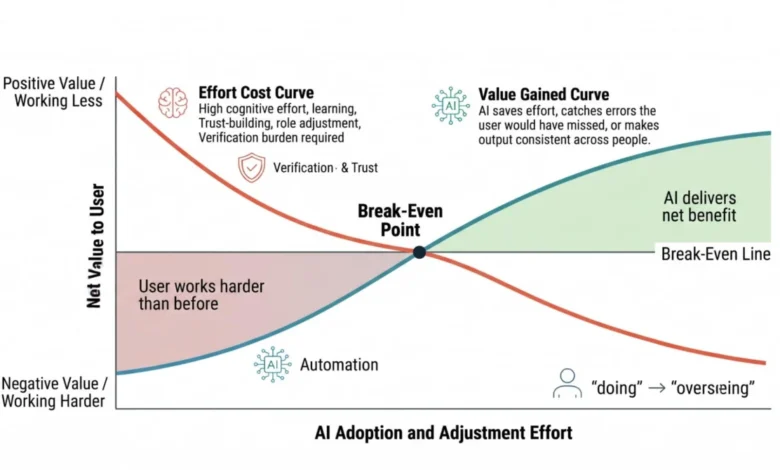
Every interface modification, workflow alteration, or automated feature introduced into an enterprise setting extracts an upfront tax from the user before it yields any tangible return. Before realizing any productivity gains, workers must mentally reconstruct their internal model of how the software operates, discover where interface elements have migrated, and calibrate their level of trust in the information the AI presents.
This operational tax directly challenges human cognitive limitations. Groundbreaking research in cognitive psychology, such as Nelson Cowan’s foundational 2001 review of working memory capacity, has established that the human brain can hold only about four discrete items in active working memory at any given moment. Introducing an AI feature into enterprise software places a heavy demand on this finite mental resource.
When an organization hands the synthesis phase of a complex task over to an algorithm, the human user is instantly relegated to the role of a passive checker. If the system is also programmed to deliver the final recommendation or decision, the job shrinks entirely to mechanical sign-off. Both types of operational changes consume immense user attention. For professionals whose standing, confidence, and career identity are tied to their domain expertise, these automated shifts can frequently feel like a professional demotion.
Supporting this observation, recent academic literature highlights the psychological toll of enterprise automation. In a 2025 study led by researcher Sophia Ackerhans and her colleagues, physicians who were asked to sign off on AI-assisted clinical decisions reported a severe perceived threat to their professional identity. Intriguingly, providing detailed explanations of the AI’s underlying reasoning simultaneously increased the physicians’ trust in the system and exacerbated their feelings of professional displacement.
To determine whether a proposed feature is viable, product teams must identify the "break-even line." An AI feature officially earns its rightful place in a workflow only when the productivity and accuracy returns it delivers surpass the cumulative adjustment costs inflicted on the individual user performing that specific task. These returns generally manifest in three primary ways: catching errors that humans routinely miss, scaling operations across massive datasets, or drastically accelerating routine exploratory work. When an automated fraud-screening tool flags subtle anomalies an analyst would otherwise overlook, the cognitive cost of reviewing those flags is justified by the elevated catch rate, pushing the feature safely above the break-even line.
Four Foundational Audit Questions for Product Teams
To locate the break-even line before a single line of code is written or design mockups are finalized, product teams can subject every proposed AI feature to four rigorous evaluation questions. These inquiries must be answered collectively rather than in isolation, and they require direct qualitative input from practitioners who perform the target job daily—whether they are loan officers, financial analysts, or claims specialists.
Question 1: Does this reduce the total effort the task takes for this user?
Product teams must calculate the comprehensive effort required by the task, incorporating deep thinking, physical clicking, and post-generation verification. A reduction in raw interface clicks is completely meaningless on its own, as a poorly scoped feature can easily eliminate clicks while forcing the human operator to work significantly harder. For instance, consider a loan officer reviewing forty complex financial disclosures to identify discrepancies against lending policy. An AI system that directly surfaces those conflicting data points genuinely reduces cognitive demand. Conversely, pre-filling a routine tracking field with a loan number saves a negligible amount of physical effort while shifting the burden of validation onto the officer. Teams must map out the "after" state to account for the hidden labor of error-checking. Furthermore, user seniority dictates success; a tool that aids a junior analyst may merely annoy a senior expert who possesses an internal pattern library.
Question 2: Does this beat the way the user does the task now?
Developers must rigorously benchmark the proposed AI solution against existing manual workarounds, spreadsheets, and established habits. Artificial intelligence gains a genuine advantage when handling tasks defined by high ambiguity, massive scale, high speed, multi-source synthesis, or exceptional error-catching capabilities. However, once a user has established a practiced, reliable route to a known answer, the AI’s utility evaporates. For example, using AI to identify internal corporate candidates with rare skill combinations for a succession planning initiative wins on scale and ambiguity. Conversely, using AI to draft a standardized notification email once a candidate is selected loses against the existing manual method, which takes two minutes and satisfies the sender’s specific preferences for professional tone.
Question 3: Can the user catch the errors?
Every artificial intelligence architecture is inherently probabilistic and will inevitably generate mistakes. Product teams must evaluate whether human users possess the capacity to notice those errors. This analysis depends heavily on error visibility and consequence. An invisible error—such as an AI travel itinerary recommending a museum on its scheduled closure day—leads directly to failure when the user stands outside a locked door. In contrast, an airline connection that departs before an incoming flight lands presents an obvious, highly visible contradiction. Compounding this challenge is automation bias, a well-documented psychological phenomenon explored extensively by researchers Raja Parasuraman and Dietrich Manzey. Their decades of human factors research demonstrate that human operators across aviation, medicine, and industrial control systems tend to defer uncritically to automated outputs, even when those outputs are demonstrably incorrect. To counteract this, high-consequence, low-visibility features must ship with robust provenance displays—clear citations of source data, retrieval timestamps, and underlying documents—to anchor user trust in verifiable facts.
Question 4: After a year of using this, can the user still tell when the AI is wrong?
While offloading routine formatting or mechanical calculations is a valid benefit of automation, human professional judgment must remain strictly exempt from permanent delegation. Disuse causes cognitive degradation in human skills just as it does in physical muscles. Compelling empirical evidence from clinical radiology illustrates the rapid erosion of critical judgment caused by automation reliance. In a landmark 2023 study led by Thomas Dratsch and colleagues, researchers had 27 radiologists interpret mammograms alongside a simulated AI advisory tool. After introducing deliberately flawed AI suggestions into a subset of cases, the researchers observed a marked decline in diagnostic accuracy across all experience levels. Highly experienced readers, averaging fifteen years in the field, saw their correct classification rates drop precipitously when faced with incorrect AI guidance. If a user relies on an automated system for twelve months without exercising their foundational diagnostic judgment, their underlying competency degrades to a dangerous degree. Consequently, product designs must incorporate deliberate friction mechanisms—such as periodic blind reviews or randomized non-assisted case rotations—to keep verification skills sharp.

Synthesizing Findings into the AI Addition Decision Matrix
To operationalize these insights, product organizations utilize a structured decision matrix during roadmap reviews. By mapping audit questions against performance signals and required design conditions, teams transform vague aspirations into enforceable technical requirements.
| Audit Question | AI Earns Its Place When… | AI Costs the User When… | Mandatory Design Condition |
|---|---|---|---|
| Does this reduce total effort? | Task demands synthesis across large inputs; judgment calls are bottlenecks. | Task follows a fast manual procedure; verification matches original work effort. | Define the specific user segment served; provide an exit path for others. |
| Does this beat current methods? | AI outperforms existing methods on ambiguity, scale, speed, or catch rate. | The user’s current workflow already reaches answers quickly and reliably. | Strip AI from steps adequately handled by current manual methods. |
| Can the user catch errors? | Errors are visually obvious; stakes are low; correction is inexpensive. | Errors are subtle; stakes are high; verification requires delegated skill. | Implement provenance displays and verification prompts, or cancel build. |
| Can users detect errors after a year? | AI handles raw volume while humans retain core decision-making responsibilities. | AI absorbs critical judgments without providing feedback on quality or accuracy. | Build a permanent workflow mechanism to preserve human verification skills. |
Comparative Industry Applications: Appeals Processing vs. Meeting Summaries
The practical utility of this audit framework becomes strikingly apparent when applied to distinct enterprise software categories.
In the healthcare appeals processing scenario previously examined, the initial concept failed the effort and error-catching audits because it forced specialists into a high-stakes verification loop of generated text. The redesigned architecture succeeded by shifting the AI’s role from generative writing to precise information retrieval, anchoring every surfaced policy provision with explicit provenance data (source documents and retrieval timestamps) while preserving human authorship to protect long-term diagnostic judgment.
Conversely, consider the ubiquitous enterprise feature of AI-generated meeting summaries. When evaluated through the four-question audit, meeting summaries yield a markedly different operational profile. On effort reduction, summaries eliminate the tedious chore of note-taking for participants, trading it for the minor task of reviewing action items. While habitual note-takers may experience a more complex trade-off, overall enterprise effort drops. On current method comparison, AI summaries vastly outperform the patchy, half-listening manual notes traditionally produced by harried attendees, winning decisively on completeness and cross-meeting consistency.
Regarding error visibility, an AI summary that misattributes an action item possesses a subtle error profile, necessitating visible provenance—such as linked source audio or transcript timestamps behind every recorded commitment. Finally, meeting summaries easily clear the one-year cognitive retention test: no professional suffers a catastrophic loss of core career competency by surrendering the drafting of meeting minutes. Consequently, meeting summaries ship successfully with timestamp integrations, requiring no artificial friction mechanisms to preserve human capability.
Strategic Implications for Product Roadmaps
The rapid proliferation of generative artificial intelligence features within enterprise software must be tempered by rigorous operational discipline. As long-term research into human-computer interaction demonstrates, the human attention span remains a strictly finite resource regardless of how advanced underlying large language models become.
By conducting a structured 60-minute audit before committing engineering resources to development, product teams can successfully counter pro-innovation bias—the widespread organizational assumption that deploying new technology inherently equates to progress. Translating audit findings into concrete design conditions rather than abstract risk concerns empowers product managers and software engineers to negotiate realistic scopes, protect user workflows, and deliver sustainable, high-utility enterprise software that genuinely serves its human operators.