The WordPress core development team has officially released the beta version of WordPress 7.2 for public testing, marking a significant milestone as the final major software iteration of the year. Scheduled for a stable, general-availability launch on December 8, 2026, this upcoming update focuses heavily

on refining existing content management systems, enhancing editorial collaboration, and reducing the reliance on custom CSS for everyday site owners. Following extensive testing phases since the rollout of Beta 1 on simulated multi-author environments, developers and site administrators are finding that Version 7.2 prioritizes practical functionality over headline-grabbing experiments.
While earlier updates such as WordPress 6.9 and 7.1 laid the groundwork for robust block-based layouts and foundational collaborative tools, the forthcoming 7.2 release addresses long-standing usability hurdles. From margin-anchored editorial notes to streamlined media uploads and native form-control styling, the update bridges the gap between complex web design and accessible, code-free customization.

Timeline and Release Roadmap
The development cycle for WordPress 7.2 adheres strictly to the project’s established release methodology. Following the beta rollout, core contributors are systematically addressing bugs, refining performance metrics, and evaluating feature stability ahead of the final deployment.
- Early November 2026: Initial beta testing commences via the WordPress Beta Tester plugin, allowing community developers and agency partners to stress-test the software on staging environments.
- Mid-November to Late November 2026: Subsequent beta and release candidate iterations deploy minor patches, resolve legacy compatibility issues, and freeze feature additions.
- December 8, 2026: The official stable release of WordPress 7.2 becomes available for global deployment across self-hosted WordPress installations.
Because major core updates carry inherent risks of plugin conflicts or theme discrepancies, the core development team strongly advises against installing beta iterations on live, production websites. Instead, administrators are encouraged to utilize local development environments or dedicated staging servers to audit compatibility before the December rollout.
Enhanced Editorial Workflow with Margin-Bound Notes
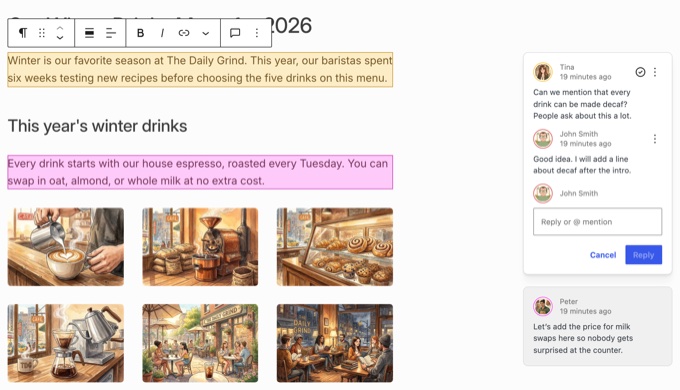
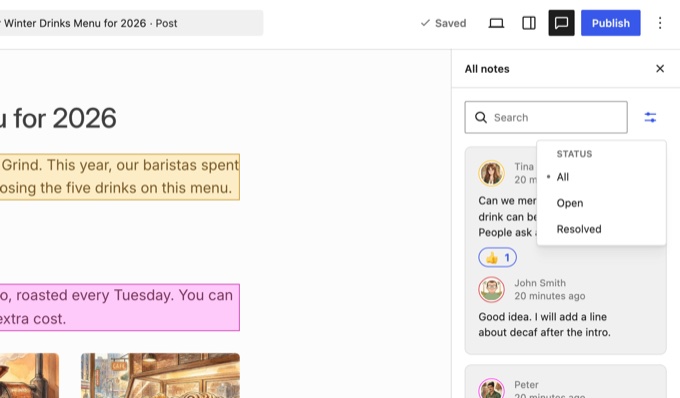
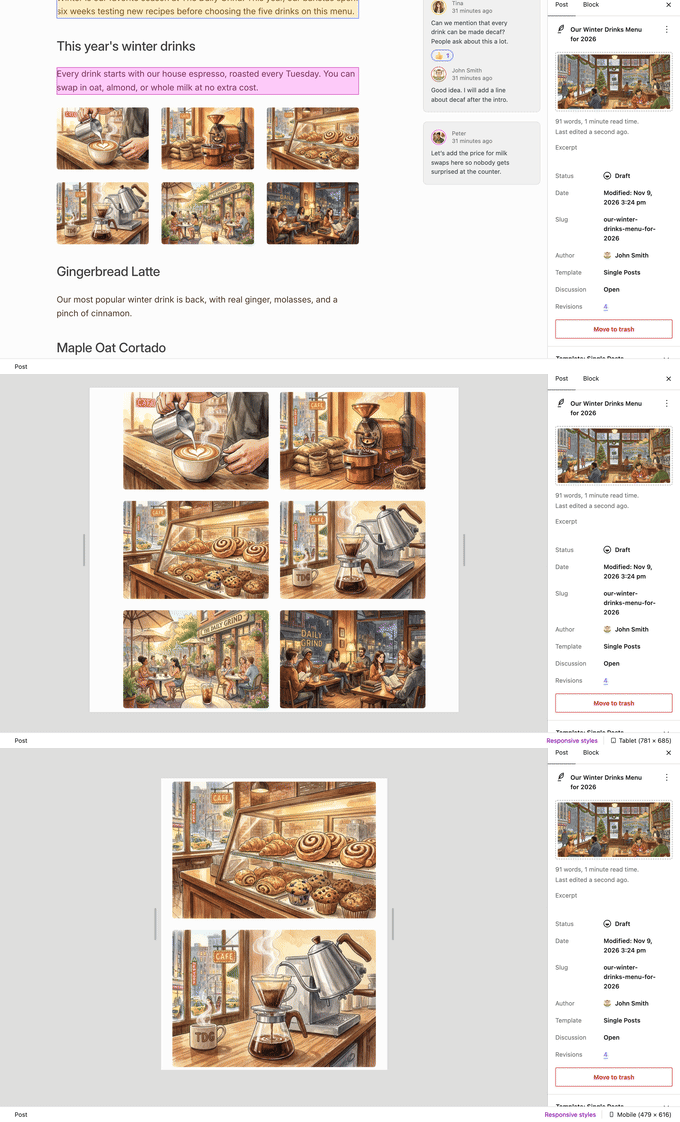
Editorial collaboration within the WordPress block editor has steadily evolved, beginning with the introduction of editorial notes in Version 6.9 and expanded @mentions in Version 7.1. WordPress 7.2 refines this capability by shifting the interface architecture of notes from a constrained sidebar panel into floating margin elements.
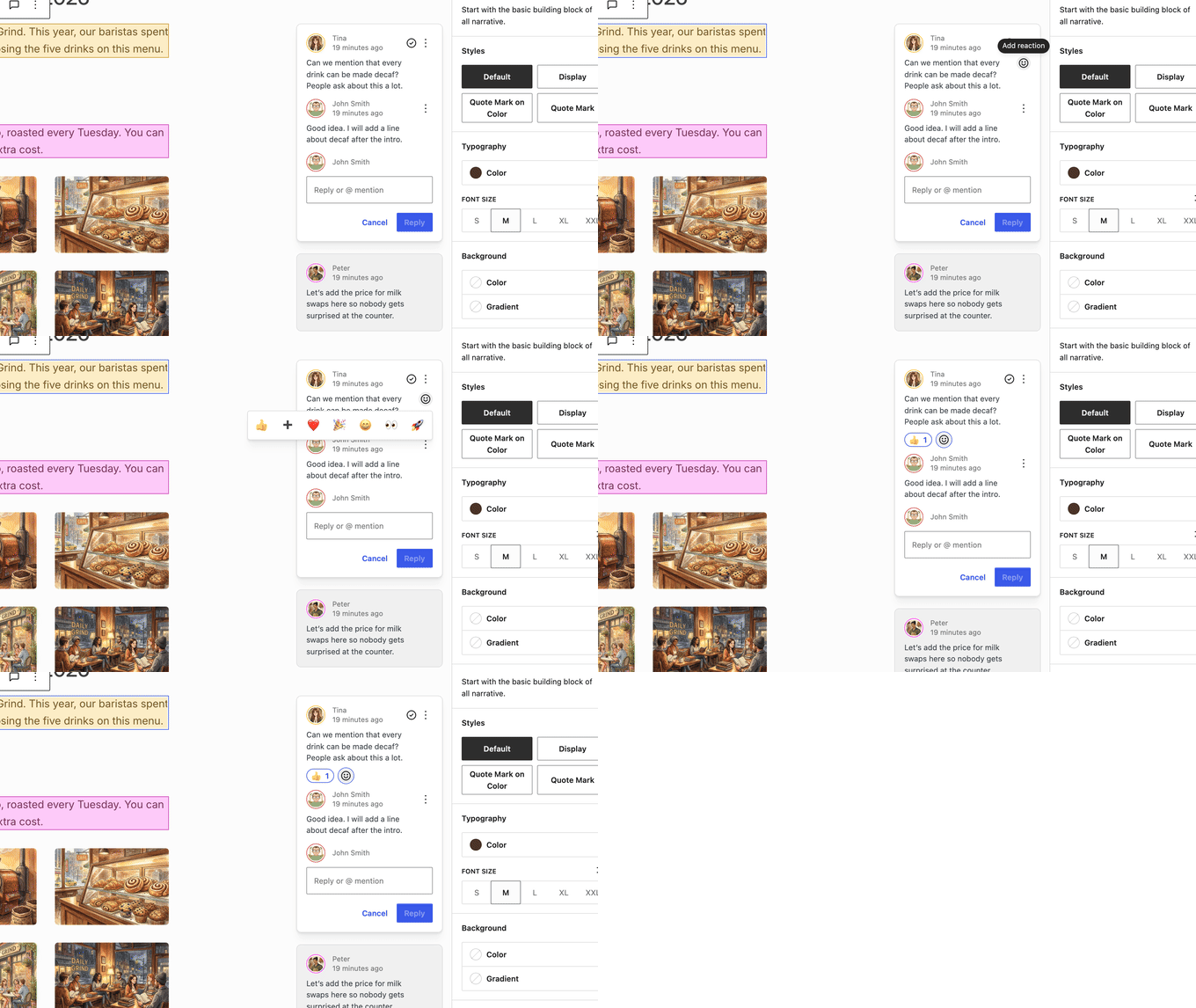
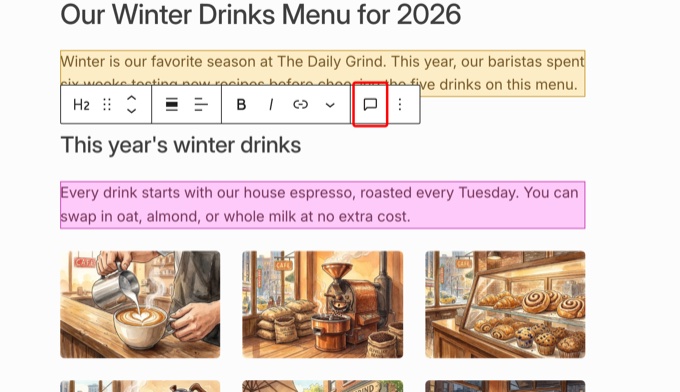
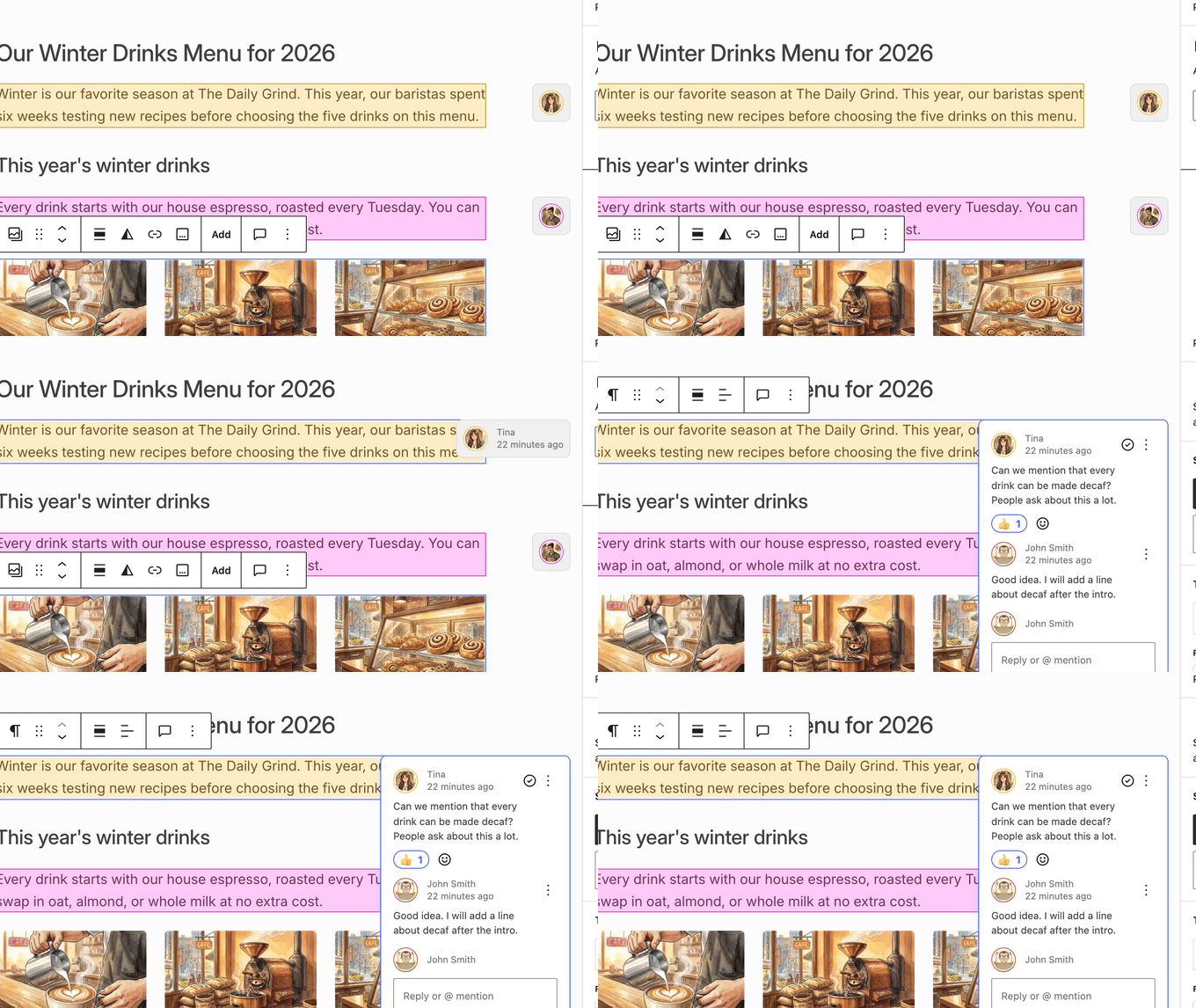
Operating similarly to comment threads in collaborative document processors like Google Docs, these notes now sit directly adjacent to the specific content blocks they reference. When multiple team members review a draft concurrently, individual blocks are highlighted in distinct, color-coded hues corresponding to the respective author or editor. This visual distinction allows content managers to track feedback distribution instantly.
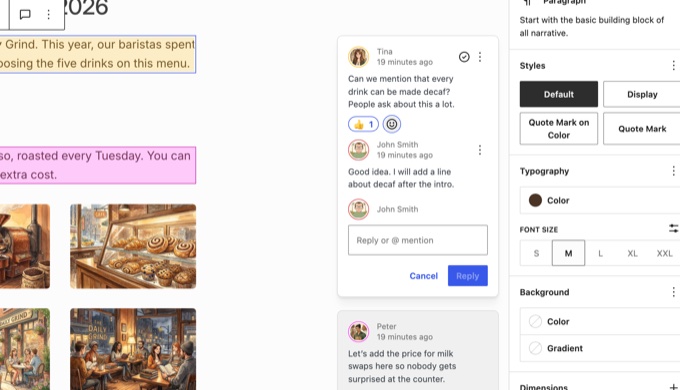
Furthermore, detaching notes from the primary sidebar resolves a persistent user experience bottleneck. Administrators and writers can now keep the block settings panel open simultaneously while reviewing and addressing editorial feedback. Additional refinements include the integration of an "Add Note" button directly within the block toolbar, expandable avatar bubbles that minimize inactive threads, and a centralized filter panel offering "All," "Open," and "Resolved" status toggles.
Although a more advanced "Suggestion Mode"—designed to allow inline insertions and deletions similar to traditional track-changes systems—was initially slated for this release, core contributors elected to defer it to WordPress 7.3 to ensure rigorous stability testing. Consequently, suggestion-mode experiments will remain confined to the Gutenberg plugin repository for the immediate future.
The Debut of Ipsum: A Minimalist Default Theme
Breaking a 16-year naming convention established with Twenty Ten, WordPress 7.2 introduces a departure from year-based theme nomenclature by unveiling its new default block theme: Ipsum. Taking its moniker from the traditional typography placeholder "lorem ipsum," the theme is architected to serve as a structurally minimal, highly adaptable canvas for bloggers and independent publishers.
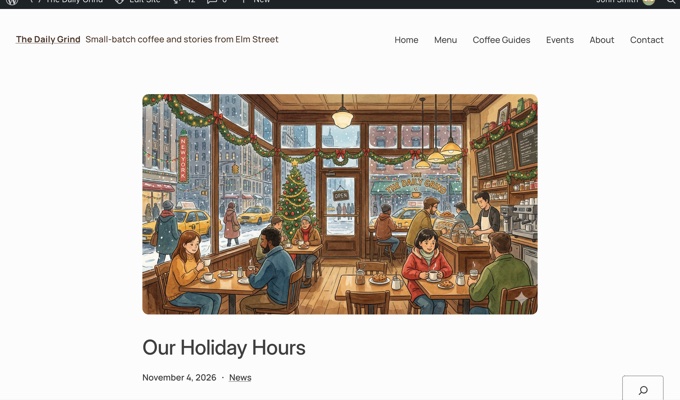
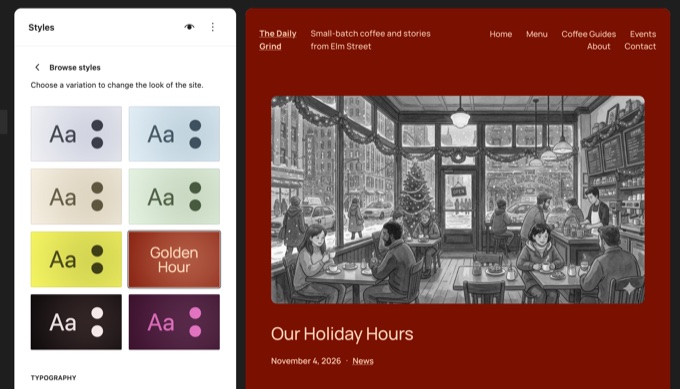
Ipsum ships with eight distinct color variations and six typography sets accessible directly through the Site Editor interface (Appearance » Editor » Styles » Browse styles). Applying a variation—such as the warm-toned "Golden Hour" palette—instantly restyles site-wide elements, including integrated image filters, with a single click.
Crucially, Ipsum is optimized for modern agentic artificial intelligence workflows. By integrating with tools like WPVibe, site owners can utilize conversational AI assistants, such as Anthropic’s Claude or OpenAI’s ChatGPT, to modify theme aesthetics and construct custom page layouts using plain-text prompts. Changes are processed safely within a draft environment, safeguarding the live front end from inadvertent modifications.
Expanded Responsive Styling and Code-Free Form Controls
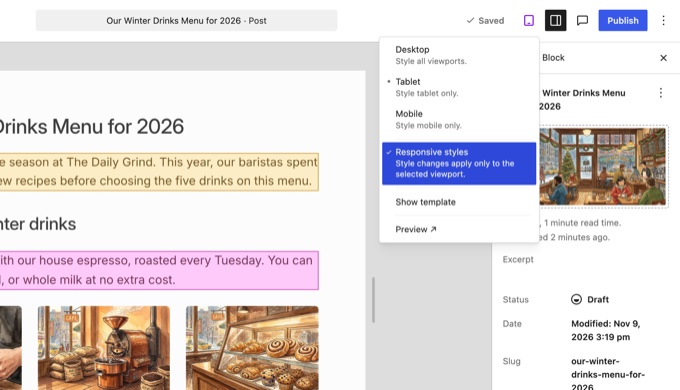
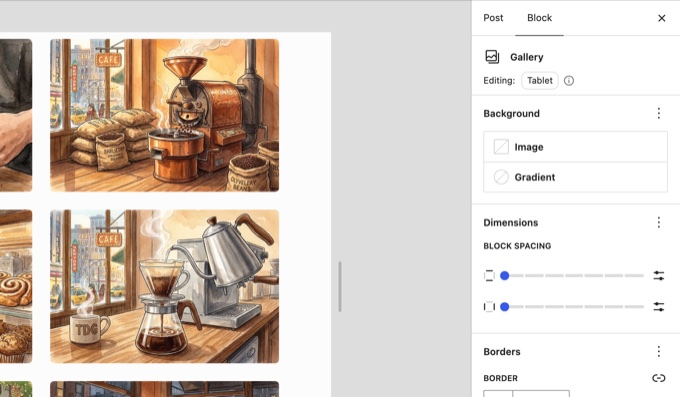
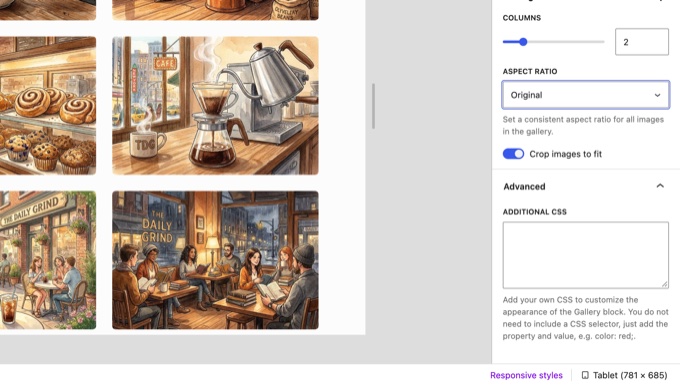
Building upon the responsive design controls introduced in Version 7.1, WordPress 7.2 extends device-specific customization to a wider array of core blocks, most notably the Gallery block. Administrators can now independently configure column counts, image cropping parameters, and aspect ratios for desktop, tablet, and mobile breakpoints without writing custom cascading style sheets (CSS).
By activating responsive styles via the device preview menu, editors gain granular control over layout presentation across varying viewports. The block settings panel dynamically surfaces an "Editing: Tablet" or "Editing: Mobile" badge, concealing non-responsive parameters to streamline the interface.
In tandem with responsive enhancements, WordPress 7.2 addresses a perennial pain point for non-technical users: form styling. Previously, core elements such as search boxes, dropdown menus, and submission buttons often clashed with custom theme aesthetics unless manually overridden with CSS. The new release introduces centralized form-control management within Global Styles (Appearance » Editor » Styles » Blocks & Elements).
Administrators can now define typography, background colors, borders, shadows, and padding for standard inputs, select menus, and buttons in a single location. These rules apply universally to matching native elements across the site, though specialized third-party form plugins retain their individual stylesheet priorities unless explicitly customized via dedicated block settings.
Global Styles Transparency and Design Tool Expansion
To eliminate confusion surrounding block inheritance, WordPress 7.2 introduces structural transparency within the block settings sidebar. Previously, when global typography or color parameters were enforced via Global Styles, individual block panels appeared blank, obscuring the origin of active styling rules.
Version 7.2 now explicitly displays inherited global values within individual block settings, allowing editors to verify whether a parameter stems from a global rule or a localized override. Additionally, a new "Customized" filter icon within the Global Styles panel aggregates all blocks that have received manual adjustments, permitting rapid auditing without requiring users to navigate through extensive nested menus.
Complementing these diagnostic tools, the core software introduces over 70 block support improvements. Notable additions include text gradient and text shadow options for heading blocks, synchronized duotone filters applicable to entire gallery collections rather than isolated images, and keyword-based search functionality for the native Icon block.
Media Processing and Performance Upgrades
Media management receives significant performance and functional enhancements in WordPress 7.2. Expanding upon browser-based image processing capabilities initiated in Version 7.1, the platform now utilizes local client-side processing within Chromium-based web browsers (such as Google Chrome and Microsoft Edge) when handling uploads via the Media Library. Images are resized, compressed, and optimized directly within the user’s browser before transmission to the server, substantially reducing hosting server resource consumption.
Furthermore, the release resolves a 12-year-old architectural limitation: animated GIFs and animated WebP files uploaded to the media library now retain their animation across automatically generated thumbnail and intermediate sizes, preventing them from degrading into static graphics.

Other media-centric updates include a redesigned media inserter tab featuring cleaner grid layouts and advanced filtering, alongside a dedicated "Use attached images" button within gallery configurations.
Dashboard Additions, Administrative Speed, and Navigation Management
Site administration experiences notable under-the-hood performance gains. WordPress 7.2 abandons the legacy practice of bundling admin scripts and stylesheets into monolithic files, instead loading them individually to optimize browser caching. Combined with a new prefetch mechanism that anticipates user navigation paths, administrators can transition between dashboards, post lists, and editing screens with noticeably reduced latency.
Within the dashboard interface, the legacy "Recent Comments" widget has been separated, making room for a new "Published On This Day" section embedded within the primary Activity widget. This addition surfaces historical posts published on the current calendar date across previous years, providing long-standing blogs with an automated mechanism to identify legacy content suitable for review or resharing.
Navigation management within the Site Editor has also been streamlined. Administrators can now construct, reorder, and modify navigation menus directly from the Site Editor sidebar without opening the full-page Navigation block canvas. Link search algorithms have similarly been refined to categorize and rank results intelligently, accommodating specialized elements like the Home Link block.
Random Post Discovery and Developer Considerations
A novel addition to Version 7.2 is the native inclusion of random post-discovery endpoints. By navigating to yoursite.com/random/, visitors are automatically redirected via temporary 302 headers to a randomly selected published post. This functionality extends to category and author archives (e.g., /random/category/news/), offering a native alternative to third-party redirection plugins.
However, because this feature is activated by default across all public post types featuring archives, enterprise and agency developers have raised concerns regarding accidental exposure of non-public custom post types. Site administrators can disable the feature globally by inserting a simple code snippet via snippet management plugins like WPCode:
add_filter( 'wp_enable_random_content_redirect', '__return_false' );Alternatively, developers registering custom post types programmatically can exclude specific schemas by declaring 'randomable' => false within the post type registration arguments.
Broader Implications and Outlook
As the WordPress ecosystem moves toward the final December 8, 2026 launch date, Version 7.2 represents a maturation of the full-site editing paradigm. By emphasizing granular responsive controls, transparent global styling inheritance, and collaborative editorial workflows, the core development team is successfully lowering the barrier to entry for non-technical site owners while equipping developers with cleaner, modular administrative APIs.
While certain ambitious roadmap items—such as real-time multi-user co-editing and advanced AI integration—remain deferred to subsequent release cycles, the practical enhancements delivered in WordPress 7.2 promise to make it an essential, productivity-boosting upgrade for millions of websites worldwide.