Transforming WordPress Management: The Rise of AI Coding Agents and the Pivotal Role of Developer-Centric Hosting

The landscape of WordPress development and site management is undergoing a significant transformation, driven by the rapid advancements in artificial intelligence. While much attention has been directed towards AI website builders that promise to conjure a complete site from a simple prompt, a distinct and arguably more impactful application of AI is quietly revolutionizing how existing WordPress installations are maintained, optimized, and evolved: the AI coding agent. This paradigm shift, however, hinges critically on the underlying hosting infrastructure, demanding environments that prioritize developer-centric tools and unhindered access.
For years, the promise of AI in web development largely centered on initial site creation. Tools emerged that could generate layouts, craft placeholder copy, and even suggest design elements based on a user’s business description. These AI website builders, while genuinely useful for rapid prototyping or for users seeking a quick online presence without coding knowledge, represent only one facet of AI’s potential. They excel at getting a site up and running. The deeper, more granular challenges of operating and evolving a live WordPress site – tasks traditionally reserved for seasoned developers – are now being tackled by a new class of AI: the coding agent.
Differentiating AI Website Builders from AI Coding Agents
To understand this evolution, it is crucial to draw a clear distinction between these two categories of AI tools.
-
AI Website Builders: These platforms, exemplified by solutions like ZipWP, 10Web, and Elementor AI, focus on the generative aspect of web design. Users provide high-level inputs, such as business type, desired features, and aesthetic preferences. The AI then constructs a website, complete with pages, content, and a foundational design. Their primary value proposition is speed and accessibility for individuals or businesses lacking development expertise, allowing them to launch a functional site rapidly without writing a single line of code. They are ideal for "greenfield" projects where a new site needs to be established quickly.
-
AI Coding Agents: In contrast, AI coding agents like Claude Code, OpenAI’s Codex (or models powering similar functionalities), and Cursor operate differently. They do not build a site from scratch. Instead, they interact directly with an existing WordPress installation, mimicking the actions of a human developer. These agents are designed to understand natural language instructions and translate them into precise commands executed against the live server environment. Their utility lies in ongoing maintenance, complex modifications, debugging, optimization, and automation of repetitive tasks that are often time-consuming and prone to human error. This workflow is geared towards site managers, agencies, and developers who need granular control over their sites but seek to offload the manual execution of command-line operations.
The emergence of AI coding agents signifies a maturation of AI’s role in web development, moving beyond mere content generation to active code manipulation and system administration. Industry analysts suggest that this shift reflects a broader trend towards "augmented development," where AI tools enhance, rather than entirely replace, human expertise, allowing developers to focus on higher-level problem-solving and strategic tasks.

The Mechanics of Agentic WordPress Management
When an AI coding agent "operates" a WordPress site, it does so through a sophisticated, yet fundamentally command-line driven, process. The core interaction typically occurs over SSH (Secure Shell), a cryptographic network protocol that allows secure remote access to a computer. Once connected, the agent primarily leverages WP-CLI (WordPress Command Line Interface).
WP-CLI is a powerful, developer-centric toolset that enables a vast array of WordPress operations to be performed directly from the command line, bypassing the traditional wp-admin dashboard. From installing and updating plugins and themes to managing users, posts, and database queries, WP-CLI offers unparalleled control and efficiency. An AI agent, fed with a natural language prompt, interprets the request, determines the necessary WP-CLI commands (and sometimes direct file system operations or database queries), executes them, and then analyzes the output to confirm success or troubleshoot issues. This iterative process allows for complex, multi-step operations to be automated.
Consider these real-world scenarios where an AI coding agent demonstrates its profound utility:
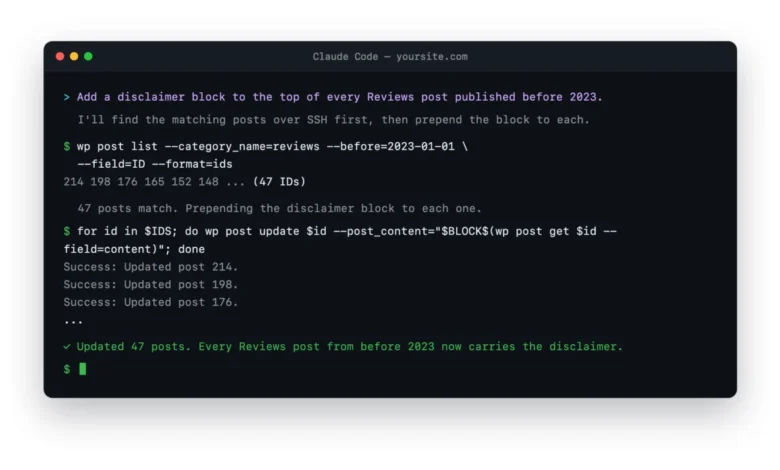
- Bulk Content Editing: Imagine needing to add a specific disclaimer to all 200 "review" posts published before a certain date. Manually editing each post through the dashboard would be a tedious, hours-long task. An AI agent, given a prompt like "Find all posts in the ‘reviews’ category published before January 1, 2023, and prepend ‘This review may contain affiliate links’ to their content," can execute this operation in minutes, leveraging WP-CLI’s
wp post updatewith appropriate filters. - Plugin Configuration Across Multiple Sites: For agencies managing numerous client sites, reconfiguring a security plugin or a caching solution across all installations can be a significant undertaking. An agent can connect to each site sequentially, ensuring consistent settings are applied, dramatically reducing manual effort and potential inconsistencies.
- Debugging Fatal Errors: When a WordPress site encounters a "white screen of death" or a fatal error, pinpointing the cause often involves sifting through error logs and systematically deactivating plugins or themes. An AI agent can be instructed to "Analyze the server error logs, identify the source of the fatal error, and if it’s a plugin, deactivate it to restore site functionality." The agent can then read log files, identify the offending plugin, and use
wp plugin deactivateto resolve the issue promptly. - Content Migration and Database Operations: Moving specific content types between sites, performing search-and-replace operations across the database, or even optimizing database tables can be orchestrated by an agent, translating complex SQL queries or WP-CLI database commands from plain English instructions.
- Security Audits and Hardening: An agent can be tasked with checking file permissions, identifying outdated plugin versions, or enforcing security best practices by modifying
.htaccessfiles orwp-config.php, all through secure command-line interactions.
These examples underscore the agent’s capacity to act as a highly efficient, tireless virtual developer, executing tasks with precision that would otherwise consume significant human time and attention.
The Indispensable Role of Hosting Infrastructure
The effectiveness of AI coding agents is inextricably linked to the quality and configuration of the WordPress hosting environment. A host that restricts developer access or provides a locked-down filesystem will render an AI agent largely impotent. Conversely, a host designed with developers in mind transforms agentic editing into a seamless and highly productive workflow.
The critical features a host must provide for optimal AI coding agent performance include:

- Full SSH Access: This is non-negotiable. Without secure shell access, the AI agent cannot establish a direct command-line connection to the server, effectively cutting off its primary means of operation.
- Preinstalled WP-CLI: While WP-CLI can often be installed manually, a host that provides it pre-configured and readily accessible streamlines the setup process and ensures the agent has immediate access to its most powerful toolset.
- Robust Staging Environments: Crucial for safety, staging sites allow the AI agent to perform changes, test new configurations, or debug issues in an isolated environment without affecting the live production site. One-click staging capabilities significantly enhance this workflow.
- Git Integration: For developers, version control is paramount. Hosting that supports Git repositories allows agents to work with code in a structured manner, facilitating rollbacks, collaboration, and continuous integration/deployment practices.
- Unrestricted Filesystem Permissions: The AI agent needs appropriate permissions to read, write, and modify files and directories within the WordPress installation. Overly restrictive permissions, common in some budget shared hosting environments, can hinder the agent’s ability to perform necessary operations.
- Adequate Server Resources: While AI agents are efficient, complex operations on large sites still require sufficient CPU, RAM, and I/O capacity to execute commands swiftly.
- Reliable Backups and Restore Options: Even with staging, a robust backup system is a fundamental safety net. Automated, easily restorable backups mitigate risks associated with any unforeseen issues during agent-driven modifications.
A host that fails to provide these elements will create a frustrating and inefficient experience, forcing the user (and the AI agent) to contend with environmental limitations rather than focusing on the actual tasks. The choice of hosting, therefore, becomes a foundational decision in adopting an AI-powered WordPress management strategy.
Leading WordPress Hosts for AI-Powered Development
Based on their commitment to developer-centric features and robust infrastructure, several WordPress hosts stand out as ideal environments for deploying AI coding agents:
- Kinsta: Renowned for its premium managed WordPress hosting, Kinsta offers SSH and WP-CLI out of the box, coupled with one-click staging environments and Git integration. Its consistent, high-performance environment ensures that AI agents rarely encounter unexpected hurdles, making it a top choice for serious sites where reliability and a polished tooling experience are paramount.
- WP Engine: A long-standing favorite among agencies and development teams, WP Engine provides a mature developer toolkit, comprehensive staging environments, and robust Git workflows. Its infrastructure is built to scale and support complex multi-site management, making it a natural fit for AI agents working across a portfolio of client sites.
- Servebolt: As a host prioritizing raw performance and a developer-first stack, Servebolt is optimized for command-line operations. With first-class SSH and WP-CLI support, it offers an unhindered environment for AI agents, particularly appealing to those who demand maximum speed and minimal environmental friction. WP Mayor itself leverages Servebolt for its operational needs, highlighting its capability.
- Cloudways: Offering managed cloud servers with full SSH and WP-CLI access, Cloudways provides a flexible and powerful solution at a competitive price point. While it might require a slightly higher comfort level with server management than fully managed hosts, its control and scalability make it an excellent choice for developers seeking a budget-friendly yet capable cloud VPS environment for their AI agents.
- Rocket.net: This host combines serious speed and performance with a streamlined managed experience. Crucially, Rocket.net ensures that SSH and WP-CLI remain accessible, avoiding the restrictive practices of some other managed solutions. It strikes an excellent balance between managed simplicity and developer control, making it a strong contender for those seeking both speed and AI agent compatibility.
When evaluating these hosts, the key is to assess how well their offerings align with the needs of an AI agent: unencumbered access, robust command-line tools, and safety nets like staging.
Implementing an AI-Powered Workflow: Practical Steps and Safeguards
Adopting an AI coding agent workflow doesn’t require sysadmin-level expertise, but it does demand a structured approach and adherence to best practices. The initial setup typically involves:
- Selecting an AI Coding Agent: Choose an agent like Claude Code, Cursor, or an OpenAI API-powered custom solution, ensuring it can connect via SSH.
- Choosing a Developer-Friendly Host: Based on the criteria outlined above, select a hosting provider that offers SSH, WP-CLI, and staging environments.
- Configuring SSH Access: Generate SSH keys and add them to your hosting account. This provides a secure, password-less connection for the AI agent.
- Creating a Dedicated SSH User (Optional but Recommended): For enhanced security, create a specific SSH user for the AI agent with limited permissions, ensuring it only has access to the necessary directories and commands.
- Verifying WP-CLI: Once connected via SSH, run
wp --infoto confirm WP-CLI is installed and functional. - Establishing a Staging Environment: Before any significant changes on a live site, always clone your production site to a staging environment. This is where the AI agent should first operate.
- Initiating the Agent: Connect your chosen AI agent to the staging site via SSH, providing the necessary credentials and host information.
- Prompting the Agent: Begin issuing clear, precise instructions in plain English. For example, "Deactivate all inactive plugins," "Find all posts with ‘old-tag’ and replace it with ‘new-tag’," or "Check for any PHP errors in the last 24 hours."
- Reviewing and Deploying: Carefully review the agent’s actions and the results on the staging site. Once verified, you can either instruct the agent to replicate the changes on the production site (if the host supports automated staging-to-production deployment) or manually push the changes after a final backup.
Crucial guardrails are essential. Treating the AI agent like a highly capable, yet supervised, junior developer is a useful analogy. Always work on a staging copy first. Maintain automated backups. Exercise extreme caution with destructive commands like database resets or large-scale search-and-replace operations, ideally performing a "dry run" first to see what changes would be made without committing them. These safety nets transform potential risks into non-events, ensuring that the speed and power of the agent are harnessed responsibly.
Advantages and Emerging Limitations of AI Coding Agents

The benefits of integrating AI coding agents into a WordPress workflow are substantial:
- Unparalleled Efficiency: Tasks that once took hours or days can be completed in minutes, freeing up human developers for more complex, creative, or strategic work.
- Accuracy and Consistency: AI agents don’t get bored, make typos, or miss steps. They execute commands with a high degree of precision, ensuring consistency across operations.
- Scalability: Managing hundreds or thousands of posts, users, or configurations across multiple sites becomes feasible and less labor-intensive.
- Proactive Maintenance and Debugging: Agents can be tasked with monitoring logs, identifying potential issues, and even performing automated fixes before they escalate.
- Learning and Adaptation: Over time, with feedback and refinement, these agents can learn preferred workflows and common solutions, becoming even more efficient.
However, AI coding agents are not without their limitations:
- Lack of Creative Intuition: Agents excel at executing precise instructions but struggle with subjective design decisions, aesthetic evaluations, or understanding nuanced user experience. They cannot tell you if a layout "feels cluttered" or if a color scheme is "inviting."
- Reliance on Clear Prompts: Ambiguous or poorly phrased instructions can lead to incorrect or undesirable outcomes. The agent is only as smart as the prompt it receives.
- No "Big Picture" Understanding: While they can perform complex operations, they don’t possess a holistic understanding of the business goals or brand identity in the same way a human developer or designer would.
- Potential for Misinterpretation: Despite advancements, language models can still misinterpret intent, leading to unexpected results that require human oversight.
- Dependency on Hosting: As established, their capabilities are severely curtailed by non-developer-friendly hosting environments.
Ultimately, for greenfield site design and initial brand establishment, an AI website builder remains the more suitable tool. But for the ongoing, intricate, and often repetitive work of managing, optimizing, and evolving existing WordPress sites, the AI coding agent, powered by a robust hosting environment, offers a transformative advantage.
The Future of WordPress Management: A Synergistic Approach
The rise of AI coding agents signals a pivotal moment for WordPress development. It suggests a future where human developers move away from rote, repetitive tasks and instead focus on architecting solutions, providing strategic oversight, and leveraging their unique creative and problem-solving abilities. AI agents will augment their capabilities, acting as powerful extensions of their expertise.
This evolution also places renewed emphasis on the hosting industry to provide environments that support these advanced workflows. As more developers and site managers adopt AI agents, the demand for hosts offering full SSH, WP-CLI, staging, and Git integration will only grow. Those providers that embrace this shift will likely emerge as leaders in the next generation of web hosting.
The integration of AI coding agents is not merely a technological novelty; it is a fundamental shift in how WordPress sites are managed and maintained. For those who run and constantly iterate on existing WordPress installations, embracing this workflow, particularly on a host built for developers, promises to unlock unprecedented levels of efficiency, precision, and control. It moves AI from a speculative tool to an indispensable component of the modern web development toolkit, poised to reshape the daily work of countless WordPress professionals.