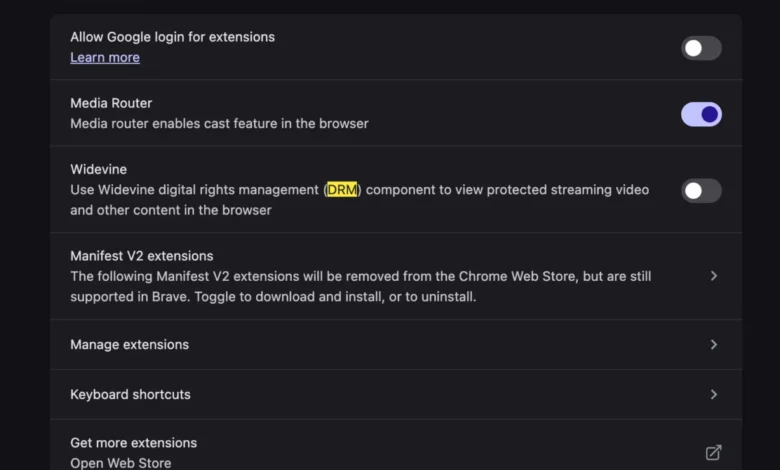
The transition to a new computing environment, while often characterized by improved performance and the absence of legacy software bloat, frequently introduces unexpected compatibility challenges for end-users. A prevalent issue currently affecting MacBook users involves the inability to stream content on YouTube TV, manifesting as a persistent error message stating, "This video format is not supported." This technical hurdle, which prevents users from accessing live broadcast content, is primarily rooted in the digital rights management (DRM) configurations within modern web browsers. By understanding the underlying architecture of browser-based media playback and the specific role of Widevine Content Decryption Modules (CDM), users can rectify this interruption to their service.
The Mechanism of Digital Rights Management in Web Browsers
To comprehend why a modern, high-performance MacBook might fail to play a standard video stream, one must first look at the industry standards governing content distribution. YouTube TV, like most premium streaming services, employs Encrypted Media Extensions (EME), a World Wide Web Consortium (W3C) standard that allows web applications to interact with protected content. Because premium video content is protected by copyright, it is encrypted to prevent unauthorized redistribution.

The decryption process relies on a Content Decryption Module (CDM). In the ecosystem of modern web browsers—including Google Chrome, Microsoft Edge, and increasingly, those based on the Chromium engine—the most widely utilized CDM is Google’s Widevine. Widevine is designed to provide a secure environment for decrypting and playing protected media, ensuring that the content remains encrypted until the moment it is rendered on the user’s screen. When a browser lacks the necessary Widevine plugin or has the component disabled due to security policies or a fresh installation reset, the browser cannot communicate with the streaming service’s authentication servers, leading to the "format not supported" error.
Chronology of the Compatibility Conflict
The rise of browser-based DRM has fundamentally changed how users troubleshoot media playback. Historically, users were required to manually install external codecs—such as those associated with QuickTime, RealPlayer, or various Windows Media components—to ensure video compatibility. Today, that responsibility has shifted to the browser’s internal configuration.
- Initial Hardware Provisioning: Upon the acquisition of a new MacBook, the user performs a clean installation of the operating system and web browser. During this phase, security-centric browser settings often default to "high privacy," which may restrict the automatic downloading or activation of third-party plugins.
- Detection of Restricted Content: When the user navigates to the YouTube TV domain, the platform performs a handshake with the browser to determine its ability to decrypt protected streams.
- The Failure State: If the CDM is inactive, the browser sends a signal back to the platform indicating a lack of support for the required decryption format. The platform then triggers a generic error message, which the user perceives as a video format issue, despite the underlying hardware being perfectly capable of processing the stream.
- Configuration Adjustment: By navigating to the browser’s settings—specifically the "Content" or "Protected Content" sections—users can manually toggle the Widevine CDM to an active state, thereby enabling the browser to perform the necessary decryption.
Supporting Data and Industry Context
The prevalence of this error is directly linked to the rapid adoption of HTML5 video over legacy technologies like Adobe Flash. According to industry reports on web technology, HTML5 now accounts for over 99% of video content delivery on the web. This shift, while beneficial for battery life and security, has centralized the power of content control within browser vendors.
Data from browser market share reports indicates that Chromium-based browsers now command more than 80% of the desktop market. Because Google owns both the Widevine DRM solution and the Chromium engine, the vast majority of web traffic is subject to these specific authentication protocols. When a user experiences a "format not supported" error, it is rarely an issue with the video file itself, but rather a failure in the secure communication between the browser’s plugin architecture and the DRM licensing server.
Broader Implications for Content Streaming
The necessity of Widevine highlights a broader tension in modern computing: the balance between user privacy and content security. Browsers are increasingly implementing "privacy-first" architectures that limit the ability of plugins to track users or run in the background. However, these same protections often stifle the functionality of streaming services that require persistent access to DRM modules.
Analysts suggest that as streaming services move toward higher resolution (4K) and higher frame rates, the demands on these CDMs will only increase. Future updates to macOS and browser versions may continue to tighten restrictions on background plugins, potentially leading to more frequent instances of DRM-related playback errors during the initial setup of new hardware.

Resolving the Conflict: A Technical Overview
For users facing this specific error, the resolution path is standard across most Chromium-based environments. The process involves ensuring that "Protected Content" is enabled within the browser’s privacy or site settings. In many cases, a browser restart is required to trigger the automatic background download of the latest Widevine binaries if they were not installed during the initial browser setup.
It is important to note that this is an authentication issue, not a hardware limitation. Modern Apple silicon (M1, M2, M3, and M4 chips) features advanced hardware-based media encoders and decoders that are more than capable of handling high-bitrate streaming. The "format not supported" error is an architectural bottleneck created by the browser’s inability to negotiate the security handshake, rather than an inability of the MacBook to decode the actual video data.
Future Perspectives on DRM and Browser Standards
As the industry moves forward, there is a push toward standardizing these decryption processes to make them more transparent to the end-user. While current implementations rely on the user manually intervening in settings, browser developers are exploring ways to make these components "self-healing." This would involve the browser detecting a failed DRM handshake and automatically prompting the user to allow the necessary plugin, rather than displaying a misleading "format not supported" message.

Until such automation becomes universal, users setting up new machines should be aware that the "out of the box" experience is often conservative regarding plugin activity. When navigating to content-heavy platforms, ensuring that Widevine or equivalent DRM plugins are enabled remains a critical step in the setup process. This ensures that the high-performance capabilities of the new hardware are fully utilized, allowing for a seamless experience across all streaming media platforms.
In conclusion, while the "This video format is not supported" message may initially suggest a significant compatibility issue, it is a routine byproduct of the secure, encrypted streaming environment that defines modern web media. By recognizing the role of Widevine and the underlying DRM protocols, users can quickly diagnose the error and restore functionality to their streaming services, confirming that the issue lies with configuration rather than the device itself.