The GreenSock Animation Platform, widely recognized in the global developer community as GSAP, has introduced a significant technical update that addresses a long-standing challenge in user interface (UI) design: the visual dissonance often associated with reversed animations. With the release of version 3.15, the development team has integrated a new property known as easeReverse, designed to provide developers with granular control over the easing curves of animations when they are played in the opposite direction. This advancement marks a pivotal shift from mathematically symmetric motion to perception-based motion design, allowing for interfaces that feel more responsive, intentional, and polished.
The Technical Evolution of Reversible Animations
For years, web developers and motion designers have utilized the .reverse() method in GSAP to create toggleable UI elements such as navigation menus, modal windows, and dropdowns. Historically, when a GSAP timeline was reversed, the engine would mathematically mirror the easing curve. While this logic is technically sound—playing an animation from end to start—it often resulted in a sub-optimal user experience. For instance, an element designed to enter the screen with an "ease-out" curve (decelerating as it reaches its destination) would, upon reversal, exit with an "ease-in" curve (accelerating from a standstill). In many UI contexts, this "ease-in" exit can feel sluggish or heavy, failing to provide the "snappy" feedback users expect when dismissing a component.
The introduction of easeReverse solves this by decoupling the forward and backward easing behaviors. Developers can now specify a distinct easing curve for the reverse action within the same tween or timeline. This eliminates the need for redundant code or the creation of two separate timelines to handle "open" and "close" states, thereby streamlining the development workflow and reducing the final bundle size of web applications.
Case Study: The Game-Inspired Clip-Path Menu
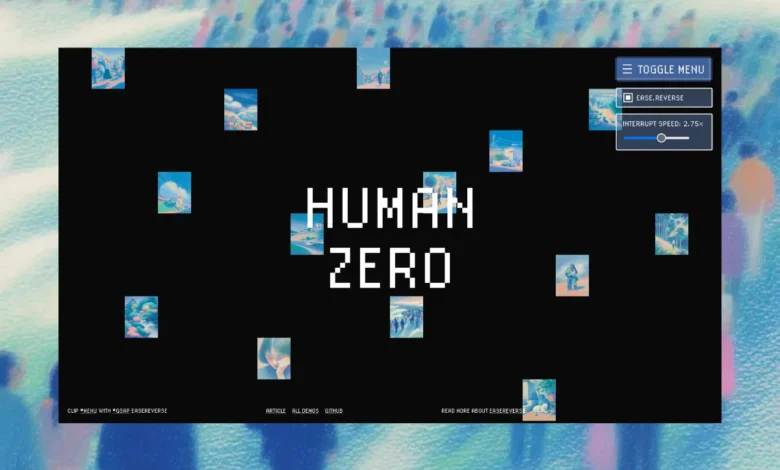
A recent demonstration published by Codrops, a leading authority in web design and development trends, highlights the practical application of this feature through a sophisticated menu interaction. The demo utilizes a combination of GSAP and CSS clip-path properties to create a game-inspired menu reveal.
In the forward state, the menu opens as a set of cover images scatter outward from the center of the viewport, while the menu container itself is revealed through a geometric clip-path animation. When the user interacts with the close toggle, the easeReverse property takes over. Instead of a simple mirrored retreat, the returning motion adopts a unique character—specifically an "elastic" feel in the demo’s configuration—which provides a more tactile and playful conclusion to the interaction.
The code implementation for this behavior is notably concise. By defining ease: 'expo' for the entrance and easeReverse: 'elastic.out(0.3)' for the exit, the developer ensures that the menu enters with high-speed precision and exits with a subtle, organic bounce. This level of detail was previously difficult to achieve without significant manual calculation or complex state management.
Chronology and Development Timeline
The path to GSAP 3.15 and the inclusion of easeReverse reflects a broader trend in the web industry toward "micro-interactions" and high-fidelity motion.
- The Pre-GSAP 3 Era: Developers often had to manually recalculate timings or create "exit" timelines that were triggered by specific event listeners. This led to "callback hell" or bloated codebases where every interactive element required double the logic.
- The Rise of GSAP 3: Upon its initial release, GSAP 3 consolidated many plugins and improved performance, making it the industry standard for high-performance web animation. However, the limitation of mirrored easing remained a common pain point in the GreenSock forums.
- The 3.15 Update: Released in early 2024, version 3.15 specifically targeted "interruptible interactions." The dev team recognized that in modern web apps, users rarely wait for an animation to finish before clicking again.
- Community Integration: Following the update, platforms like Codrops began experimenting with the feature, demonstrating to the wider design community that easeReverse is not just a technical luxury, but a tool for improving the perceived performance of a website.
Supporting Data: The Impact of Motion on Perceived Performance
The importance of easing in UI design is supported by cognitive psychology and usability studies. Research into "Perceived Latency" suggests that users judge the speed of an application not just by its actual load time, but by the smoothness of its transitions.
According to data from the Nielsen Norman Group, motion in UI serves three primary functions: informing the user of what happened, directing their attention, and providing a sense of direct manipulation. When an animation feels "off"—as is often the case with mirrored easing—it creates a "cognitive load" where the user’s brain must process the unnatural movement. By utilizing easeReverse to create more natural exit transitions, developers can reduce this load.
Furthermore, performance benchmarks for GSAP indicate that its engine can handle hundreds of concurrent animations while maintaining a 60-frames-per-second (FPS) refresh rate, even on mobile devices. The addition of easeReverse does not introduce measurable overhead, making it a "free" upgrade in terms of performance costs versus user experience gains.

Official Responses and Expert Perspectives
Manoela Ilic, Editor-in-Chief at Codrops and a veteran in the web design space, noted that the easeReverse feature allows for "smoother, snappier, and more intentional" animations. In her analysis of the clip-path menu demo, she emphasized that the ability to switch between easing behaviors allows developers to "visualize the magic" and compare different motion profiles in real-time.
Jack Doyle, the founder of GreenSock, has frequently advocated for "interruptible" animations. In technical documentation and community discussions, the GSAP team has highlighted that easeReverse is particularly vital for UI components like tooltips and modals, where a user might accidentally trigger an opening and want to immediately dismiss it. The ability to control the "interrupt speed" via timeScale() in conjunction with easeReverse ensures that the UI feels responsive to user intent at every millisecond.
Broader Impact and Industry Implications
The introduction of easeReverse has implications that extend beyond simple menu animations. As the web moves toward more immersive, "app-like" experiences, the demand for sophisticated motion design is increasing across several sectors:
1. E-commerce and Conversion Optimization:
Smooth transitions in product galleries and shopping carts can reduce friction in the buying process. When a cart drawer slides out with a satisfying, custom-eased motion, it enhances the "premium" feel of a brand, potentially leading to higher user retention.
2. SaaS and Complex Dashboards:
In data-heavy applications, motion is used to manage spatial mental models. If a sidebar menu closes with a different ease than it opened, it can more effectively signal to the user that they are returning to the primary workspace, effectively "clearing" the visual stage.
3. Accessibility and Motion Sensitivity:
While high-fidelity motion is a boon for many, it can be problematic for users with vestibular disorders. The granular control provided by GSAP allows developers to more easily implement "Reduced Motion" preferences. By having central control over easing through properties like easeReverse, developers can globally adjust or disable specific exit animations for certain users without breaking the underlying logic of the site.
4. The "Game-ification" of the Web:
As seen in the Codrops demo, web design is increasingly borrowing from video game UI. Games use non-linear easing to create a sense of weight and impact. GSAP’s new features bring these professional-grade animation principles to the browser, allowing web developers to compete with the polish of native applications.
Technical Deep Dive: Implementation and Logic
For developers looking to integrate this into their stack, the demo highlights a crucial helper function for testing and implementation. By using a checkbox-controlled variable, the demo allows for a side-by-side comparison of standard reversal versus easeReverse.
The use of gsap.utils.clamp() and timeline.progress() ensures that the animation can be interrupted at any point without jumping or glitching. This "rebuild" logic is essential for modern web development, where state-driven frameworks like React or Vue might trigger re-renders. The GSAP 3.15 update ensures that the animation engine remains synchronized with the application state, regardless of how complex the easing logic becomes.
Conclusion
The release of GSAP 3.15 and the subsequent exploration of its features by the creative community represent a significant step forward in the democratization of high-end motion design. By prioritizing the "feel" of an interaction over the mathematical symmetry of a timeline, easeReverse empowers developers to create digital environments that are not only functional but also emotionally resonant. As web standards continue to evolve, tools that bridge the gap between technical execution and human perception will remain at the forefront of the industry’s progress.
Related posts: