Streamlining WordPress Data Management: An In-Depth Analysis of Import Export by RockStarLab

The task of synchronizing data between disparate WordPress environments—such as staging, development, and production sites—has long been a notorious bottleneck for developers and site administrators. Standard native tools often prove insufficient for complex, high-traffic installations. For years, the WordPress ecosystem has relied on either basic XML exporters that fail to preserve advanced custom field structures or full-scale database migrations that overwrite critical real-time data. A new solution, Import Export by RockStarLab, has emerged to address these specific technical gaps, offering a sophisticated alternative for content synchronization and data portability.
The Evolution of WordPress Migration Challenges
Historically, the native WordPress Export/Import suite has functioned as the baseline for moving content. While effective for simple posts and static pages, it fails to account for the increasing complexity of modern WordPress stacks. As websites transition toward "decoupled" or "hybrid" structures using Advanced Custom Fields (ACF), WooCommerce, and complex page builders like Elementor, the limitations of default tools have become apparent.
When a developer moves content using a standard database dump, they frequently encounter "The Staging-Production Paradox." This occurs when a development team finishes a three-week content update on a staging site, while the live production environment simultaneously processes new customer orders, user registrations, and inventory updates. A standard database migration would wipe out these live transactions, while a manual copy-paste effort is error-prone and time-consuming. This friction point is the primary catalyst for the development of specialized plugins like Import Export by RockStarLab, which focus on granular, selective data synchronization rather than blunt-force database overwriting.

Core Technical Capabilities and Data Mapping
At the heart of the Import Export tool is a robust mapping engine designed to interpret the complex metadata structures of major WordPress plugins. The software supports ACF and ACF PRO, ensuring that repeater fields and flexible content layouts remain intact during transfer. This is a significant improvement over traditional methods where serialized data often breaks, resulting in "lost" fields that require manual reconstruction.
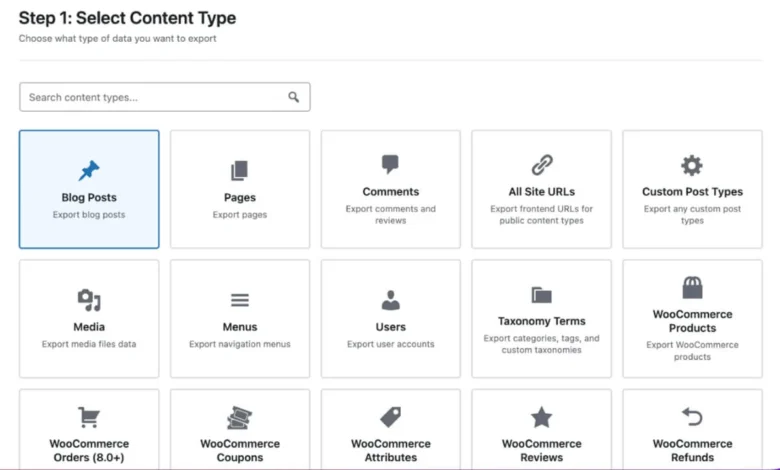
The tool covers a broad spectrum of data types:
- Core Content: Posts, pages, custom post types, taxonomies, comments, and users.
- WooCommerce Data: Products, complex attributes, orders, coupons, refunds, and customer history.
- Compatibility Layers: Deep integration with Yoast SEO and Rank Math to ensure that metadata and site structure carry over seamlessly.
Beyond mere portability, the plugin supports a variety of file formats, including CSV, XLSX, JSON, XML, and ODS. This allows teams to treat their website content as a manageable dataset. For example, a store manager can export product inventory to a spreadsheet, perform bulk updates to prices or stock levels, and re-import the file. The plugin then maps these changes back to the corresponding database entries without requiring the administrator to navigate the standard WooCommerce backend for each individual variation.
A Chronology of Deployment and Integration
The integration of such a tool into a standard agency workflow typically follows a structured timeline. In the initial "Discovery Phase," developers assess the database size and the specific reliance on custom meta-fields. During the "Sync Phase," the plugin establishes a secure connection between the staging and production environments. Unlike traditional methods that require the creation of an intermediate file, the direct site-to-site sync feature enables real-time content pushing.

For agencies and enterprises, the ability to automate this process is critical. By utilizing the plugin’s built-in scheduler, administrators can set up recurring synchronization jobs. This ensures that staging content—such as blog posts or landing page revisions—is pushed to production at designated intervals, maintaining site freshness without disrupting the live operational environment. The inclusion of a comprehensive "Jobs Log" provides an audit trail, documenting exactly what data was moved and when, which is essential for compliance and troubleshooting in multi-user environments.
Data-Driven Insights and AI Implementation
A notable addition to the tool’s architecture is the AI-driven URL Importer. This feature marks a shift toward automated content ingestion. Users provide a list of target URLs, and the plugin uses an OpenAI API integration to extract and structure data according to predefined maps. This allows for the migration of content from external sources or legacy sites directly into the desired post type or custom field structure.
From an analytical perspective, this automation addresses the common issue of "content rot" or data loss during site migrations. By implementing a preview mechanism before final database writes, the tool mitigates the risk of corrupted data. Furthermore, the ability to throttle requests ensures that users stay within the rate limits of their API providers, a vital consideration for projects involving thousands of pages.
Implications for Agency and Enterprise Operations
The implications for developers and agency owners are two-fold: operational efficiency and risk mitigation. By moving away from manual database swaps, organizations can significantly reduce the potential for human error. The ability to perform selective migrations—such as moving only new product entries while ignoring outdated system configurations—allows for a cleaner, more predictable deployment cycle.

For store owners, the utility lies in data agility. WooCommerce environments often require frequent, bulk adjustments. The plugin’s support for advanced WooCommerce data types, including order processing, allows for sophisticated workflows that were previously only possible through custom-coded scripts or expensive enterprise-grade ERP integrations.
Licensing and Market Positioning
The software employs a freemium model, which serves as a strategic entry point for smaller users while reserving advanced functionality for high-volume environments. The free version provides essential capabilities, including standard content exports and the AI-driven URL importer. This creates a low barrier to entry for developers who need to evaluate the tool’s mapping accuracy before committing to a paid tier.
The premium version unlocks advanced features such as bulk editing, custom post type management, and full WooCommerce order support. Pricing is tiered by site count, with annual and monthly subscriptions designed to accommodate different project scales. Current market positioning includes lifetime deals, which offer long-term value for established agencies. Furthermore, the "one-month free" trial for premium features provides a risk-free window for testing the tool against specific, complex data architectures.
Concluding Assessment
The release and adoption of tools like Import Export by RockStarLab reflect a broader trend within the WordPress ecosystem: the demand for more professional, granular control over data management. As websites evolve from simple blogs into complex digital storefronts and enterprise platforms, the industry has outgrown the "one-size-fits-all" migration approach.

By focusing on direct synchronization, advanced field mapping, and AI-assisted content ingestion, this plugin addresses the specific pain points of modern site management. Whether it is an agency pushing approved staging content to live, or an e-commerce store managing thousands of product variations via spreadsheet, the shift toward structured, reliable data movement is essential for scaling. As WordPress continues to power a significant portion of the web, the requirement for such specialized tools will likely grow, further professionalizing the maintenance and development workflows of the platform.