Bridging the Gap Between 3D Design and UI Prototyping: The Development and Impact of Depth for Figma

In the fast-paced ecosystem of digital product design, the integration of three-dimensional assets into user interface layouts has traditionally required a fragmented, multi-software workflow. Designers frequently find themselves exporting static assets from heavy specialized packages like Blender, Cinema 4D, or 3ds Max, only to discover that subsequent layout revisions demand an entirely new rendering cycle. This operational friction has long hindered rapid prototyping, particularly for teams relying heavily on visual marketing and product presentation. To solve this bottleneck, a new developer-designer hybrid has introduced Depth, a specialized plugin for Figma that embeds a fully functional 3D renderer directly into the design canvas, allowing professionals to manipulate models, adjust lighting, and generate high-fidelity layers without ever leaving their primary interface.
The Genesis of a Workflow Bottleneck
The conceptual origins of Depth trace back to a common frustration experienced by UI/UX designers tasked with building product websites dependent on complex 3D renders. During the development of a promotional site requiring frequent, bi-weekly reviews with executive leadership, the creator of Depth encountered a persistent operational hurdle. While access to raw 3D models was readily available, testing basic layout ideas, compositional adjustments, or lighting changes necessitated exporting assets out of Figma, importing them into complex 3D suites, re-rendering, and finally re-importing the resulting flattened images.

For early-stage design reviews, the demand was rarely for final, hyper-realistic production materials or ray-traced lighting; rather, designers simply needed sufficient form, volume, and shadow depth to judge whether an asset functioned correctly within the context of a web page. Recognizing that existing tools covered isolated segments of this pipeline but lacked a unified, arbitrary model-handling renderer within Figma, the project began as a targeted proof-of-concept aimed at eliminating context-switching.
Technical Architecture and Implementation
Built to integrate natively into the Figma ecosystem, Depth operates through a dual-layered architecture. The system divides its responsibilities between a visualization window powered by Three.js and a dedicated controller script that interfaces directly with the active Figma document.
Inside the plugin window, Three.js manages the complexities of the 3D environment, including mesh geometry, camera positioning, material properties, and lighting fixtures. Meanwhile, the background controller monitors user selections, capturing frames from the Figma canvas and transmitting them into the 3D viewport as PNG textures. Once the user finalizes their adjustments, the rendered output is injected back into the document as a standard image layer.

To balance performance with output quality, Depth implements intelligent rendering optimization. During active camera movements or scene manipulation, the plugin dynamically reduces rendering overhead to maintain fluid, real-time interactivity. Once the viewport settles, it automatically restores full shadow fidelity, antialiasing, and edge definition. Furthermore, the tool supports a 2x export multiplier, effectively doubling the pixel dimensions of the exported PNG while preserving its logical scale on the canvas, yielding crisper assets for high-density displays without disrupting existing layouts. For translucent and transparent materials, the engine factors in the surrounding scene background, ensuring that refractions and reflections remain physically plausible.
Interactive Web Showcase and Hybrid Rendering
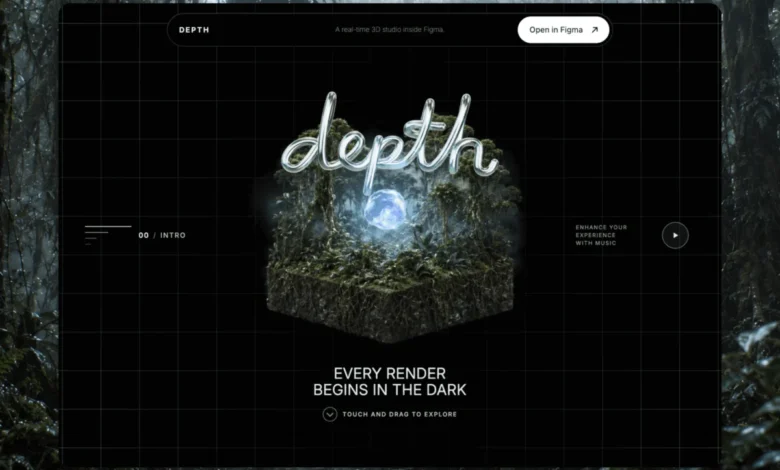
To demonstrate the capabilities of the plugin to the broader design community, its creator developed an interactive promotional website at depth.fyi, structured around the fundamental stages of render creation: form, material, environment, and final composition.
Developing the website’s cinematic opening scene presented significant engineering challenges. Initial attempts to utilize a fully live, real-time 3D model for the hero section fell short of visual expectations; while the interactive mechanics functioned correctly, the resulting materials and lighting lacked the atmospheric polish required for a high-end web presentation. To overcome this limitation, the developer adopted a hybrid approach. Using image generation tools, specific keyframes were rendered and synthesized into a 360-degree rotational sequence comprising 240 distinct frames. This sequence was then bound to horizontal mouse movement, allowing visitors to fluidly rotate a central 3D island simply by moving their cursor across the page.

Surrounding this pre-rendered sequence, real-time 3D layers were implemented to maintain immediate spatial responsiveness and depth. This strategic compromise allowed the website to achieve cinematic visual fidelity while preserving interactive engagement, supported by a progressive loading strategy that prioritizes static fallback posters before initializing heavier media assets.
Material Dynamics and Lighting Environments
Moving beyond the introductory hero section, the website guides users through chapters dedicated to surface textures and environmental lighting. When transitioning between different material properties on a static form, Depth introduces a deliberate transition period, allowing the new surface characteristics—such as roughness, metallic sheen, color gradients, and bump maps—to sweep across the object over the course of roughly two seconds.
The underlying control interface responds instantly to user input, ensuring that the physical manipulation of the object remains unbroken while the visual shader interpolates. If a user alters their selection mid-transition, the rendering engine smoothly reverses or redirects the animation, preventing visual stuttering and maintaining stability across the mesh boundaries.

For the environmental lighting chapter, the application separates the utility of High Dynamic Range Imaging (HDRI) from the visible background. While an invisible HDRI map provides accurate global illumination, specular highlights, and environmental reflections onto the model, the visible backdrop is rendered as a sparse, point-sampled terrain field. This artistic choice prevents traditional photographic backgrounds—such as clouds or horizons—from cluttering the minimalist aesthetic, keeping the presentation aligned with professional design software conventions.
Industry Implications and Future Outlook
The introduction of tools like Depth highlights a broader, ongoing shift in digital product design: the blurring lines between traditional 2D interface layout and real-time 3D visualization. As consumer-facing web applications increasingly incorporate immersive, spatial elements, the demand for streamlined asset pipelines has grown exponentially.
By eliminating the friction between prototyping environments and rendering software, plugins of this nature empower UI designers to take greater creative control over their visual assets without requiring fluency in complex 3D animation suites. Industry analysts note that reducing workflow fragmentation not only accelerates product iteration cycles but also fosters tighter collaboration between specialized 3D visualization teams and interface designers.

As digital tools continue to evolve toward native multi-dimensional integration, Depth serves as a case study in practical developer tooling—solving a specific, localized pain point through targeted technical execution. The plugin is currently available for community use via the Figma Community platform, alongside its companion web showcase at depth.fyi, offering designers a glimpse into a more unified, efficient approach to spatial web creation.