How to Resolve the YouTube TV Video Format Support Error via Widevine Content Decryption Settings

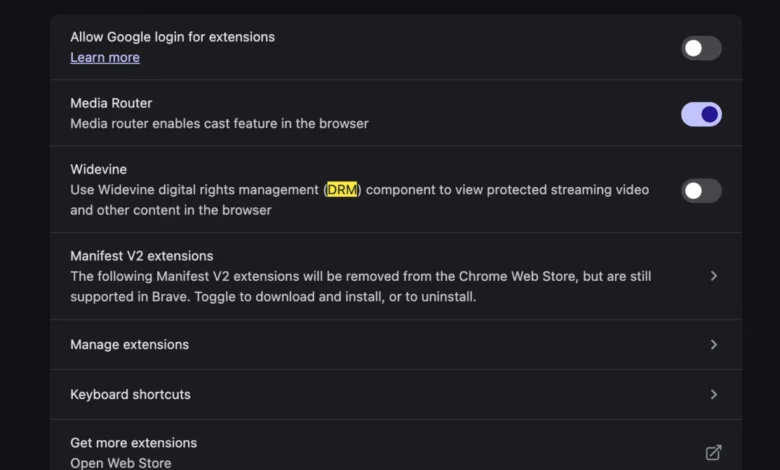
The transition to new computer hardware is typically characterized by improved processing speeds, enhanced graphical capabilities, and the absence of legacy software bloat, yet this migration often introduces unforeseen configuration challenges that can disrupt essential services. Recent technical reports and user feedback indicate that a significant number of consumers migrating to new macOS and Windows environments have encountered a specific playback interruption on the YouTube TV platform, manifested as an error message stating "This video format is not supported." This issue, while appearing to be a fundamental incompatibility with the hardware’s video codecs, is fundamentally rooted in the digital rights management (DRM) configurations of the host browser. Specifically, the resolution lies in the manual activation or update of the Widevine Content Decryption Module, a proprietary component developed by Google that facilitates the secure playback of encrypted media.
Understanding the Technical Roots of the Playback Error
To understand why a state-of-the-art MacBook or high-end PC would fail to play standard streaming video, one must examine the architecture of modern web-based content delivery. YouTube TV, like many premium streaming services including Netflix, Disney+, and Amazon Prime Video, utilizes Encrypted Media Extensions (EME) to protect intellectual property and prevent unauthorized distribution of live broadcasts. The "This video format is not supported" error is frequently a misnomer; the browser is not necessarily unable to process the video codec (such as H.264 or VP9) but is instead unable to decrypt the stream because the necessary DRM handshake has failed.
Widevine is the industry-standard DRM solution used by Chromium-based browsers (including Google Chrome, Microsoft Edge, and Brave) as well as Mozilla Firefox. When a user sets up a new machine, certain browser privacy settings or incomplete background updates may prevent the Widevine module from loading. On macOS devices, where security protocols are particularly stringent, the browser may require explicit user permission to execute the decryption module, or the module may simply not have been downloaded yet during the initial setup phase.

The Chronology of a Typical Hardware Migration Issue
The lifecycle of this error generally follows a predictable pattern during the "out-of-the-box" experience for many users. Following the initial unboxing and system setup, the user installs their preferred web browser and attempts to access their subscription services.
- System Initialization: The user performs a clean installation of the operating system or migrates data via tools like Apple’s Migration Assistant.
- Browser Deployment: A fresh version of a browser is installed. In many cases, the browser’s core engine is ready, but secondary plugins and modules like Widevine are scheduled for background installation.
- Service Access: Upon navigating to the YouTube TV interface and selecting a live channel or DVR recording, the application attempts to initialize the encrypted stream.
- The Failure Point: The browser detects that the Widevine Content Decryption Module is either disabled, outdated, or missing. Instead of providing a detailed technical log, the user interface displays the generic "This video format is not supported" message.
- Resolution Discovery: Users typically check their internet connection and hardware acceleration settings before identifying the DRM module as the culprit.
Step-by-Step Resolution: Enabling Widevine
For users experiencing this disruption, the solution is standardized across most modern browsers, though the specific menu locations may vary slightly. The primary objective is to ensure that the browser has permission to "Play protected content."
In Google Chrome, the most common platform for YouTube TV, users must navigate to the "Privacy and Security" section within the settings menu. Under "Site Settings," there is a specific toggle for "Additional Content Settings" where "Protected Content IDs" must be enabled. If the setting is already on, toggling it off and back on can often trigger a re-download of the Widevine component.
For users of the Brave browser, which emphasizes privacy, Widevine is often disabled by default to prevent tracking. Upon visiting a site that requires DRM, Brave typically prompts the user with a notification bar at the top of the screen asking for permission to install the Google Widevine component. If this prompt is missed or dismissed, the video will fail to load indefinitely until the user manually enables it in the "Extensions" settings.

Data and Market Context: The Growth of vMVPDs
The significance of these technical hurdles is amplified by the massive growth of Virtual Multichannel Video Programming Distributors (vMVPDs). As of late 2024, YouTube TV has solidified its position as the market leader in this sector, boasting over 8 million subscribers. This represents a significant shift from traditional cable and satellite services.
According to data from Leichtman Research Group, the top vMVPDs in the United States added nearly 2 million subscribers in the last year alone, even as traditional pay-TV continued to see declines. This surge in adoption means that more "non-technical" users are interacting with browser-based streaming daily. When technical barriers like DRM errors occur, they impact a broader demographic that may not be familiar with the intricacies of browser plugins, leading to increased pressure on customer support channels.
Industry Standards and the Evolution of Web Video
The transition from the "old days" of manually installing codecs like DivX or Xvid to the modern era of integrated DRM modules represents a significant evolution in web standards. Historically, video playback on the web was fragmented and often required third-party software like Adobe Flash or Silverlight. These technologies were plagued by security vulnerabilities and high resource consumption.
The move toward HTML5 video and the standardization of EME by the World Wide Web Consortium (W3C) was intended to create a more seamless and secure experience. However, the reliance on proprietary modules like Widevine creates a paradox: while the video player is native to the browser, the "key" to unlock the content remains a separate, often invisible component. This invisibility is exactly what leads to user confusion when the "format not supported" error appears; the user sees a modern browser and a modern computer and cannot logically conclude why a standard video stream would be "unsupported."

Statements and Reactions from the Tech Community
While Google and YouTube TV have not issued a formal press release regarding this specific "format not supported" error on new hardware, their support forums are replete with community managers directing users toward Widevine troubleshooting. Independent developers and tech analysts have noted that as hardware becomes more secure (e.g., the introduction of Apple Silicon’s Secure Enclave), the handshake between the hardware-level security and the browser-level DRM becomes more complex.
Software engineers specializing in media playback have commented on social media platforms that the error message itself is a "relic of a simpler time." They argue that streaming platforms should implement more descriptive error handling that explicitly identifies a DRM failure rather than a codec failure, which would significantly reduce user frustration and the time spent on unnecessary troubleshooting.
Broader Implications for Privacy and Security
The necessity of Widevine and other DRM modules highlights an ongoing tension in the tech world between content protection and user privacy. Privacy advocates have long criticized DRM modules like Widevine because they are closed-source and can potentially be used for "fingerprinting" a user’s device.
In browsers like Brave or Librewolf, which are designed for maximum privacy, the exclusion of Widevine by default is a deliberate choice. However, the reality of the modern media landscape is that without these modules, high-definition and 4K content from major networks is inaccessible. For the average consumer, the trade-off is almost always made in favor of functionality. The "This video format is not supported" error is, in a way, a symptom of a user’s browser successfully protecting their privacy by blocking a third-party module, albeit at the cost of their entertainment.

Conclusion and Future Outlook
As we move further into 2025 and beyond, the integration of DRM within web browsers is expected to become even more deeply embedded into the operating system level. With the rise of 4K and 8K streaming, content providers are demanding "Level 1" Widevine security, which requires a hardware-backed trusted execution environment. This means that future versions of these errors may not just be a matter of toggling a setting but could involve complex permissions related to hardware-level decryption.
For now, the resolution for YouTube TV users remains relatively simple: ensure the browser is authorized to handle protected content. As hardware continues to evolve, the "bliss" of a new computer will always be tempered by the need for initial configuration. By understanding that "format not supported" is often a shorthand for "DRM not authorized," users can bypass hours of frustration and return to their live broadcasts with minimal downtime. The era of the manual codec install may be over, but the era of the DRM configuration has firmly taken its place.