Streamlining Content Collaboration: WordPress Introduces In-Editor Feedback Notes

The landscape of digital content creation has long grappled with the challenge of efficient feedback and revision cycles, particularly within robust content management systems. Historically, teams working with WordPress, the internet’s most ubiquitous CMS, often navigated a fragmented workflow, relying on external platforms like Google Docs for textual comments, Figma for design annotations, or extensive email threads to review drafts, compile feedback, and ultimately finalize content or design elements before publication. This multi-tool approach, while functional, invariably introduced inefficiencies, forcing collaborators to juggle disparate applications, copy content back and forth, and frequently lose crucial contextual information in the process. This workflow fragmentation has been a consistent pain point for agencies, enterprises, and individual content creators alike, with industry studies suggesting that context switching between applications can reduce productivity by as much as 40% for knowledge workers, costing organizations significant time and resources annually.
This long-standing operational bottleneck is now undergoing a significant transformation with the introduction of a sophisticated, built-in feedback mechanism directly within the WordPress editor, aptly named Notes. This innovative feature represents a pivotal enhancement, allowing users to embed comments and suggestions directly onto specific content blocks—be it a paragraph, an image, a heading, or a layout element—precisely where the content resides. This integration eliminates the cumbersome process of sending screenshots or managing lengthy, disconnected comment threads, ushering in an era of more focused, efficient, and context-rich collaboration. This guide will delve into the intricacies of WordPress Notes, exploring their functionality, practical application, and the profound impact they are poised to have on digital content workflows.

The Evolution of Collaboration in Content Management
For decades, content management systems, including WordPress, prioritized content creation and publication over integrated collaboration. Early iterations of WordPress, primarily a blogging platform, offered basic commenting functionalities for published posts but lacked robust in-editor review capabilities essential for professional team environments. As WordPress evolved into a comprehensive CMS powering over 43% of all websites, the demand for sophisticated collaboration tools grew exponentially. Agencies managing client websites, large organizations with multiple content stakeholders, and even small businesses with distributed teams found themselves patching together solutions.
Before the advent of Notes, a typical content review process in WordPress might involve an author drafting content, exporting it or copying it into a Google Doc, sharing it with an editor for comments, and then perhaps moving it to a design tool for visual feedback. Each stage presented opportunities for miscommunication, version control issues, and the dreaded "feedback loop," where revisions themselves generated further rounds of external comments. This disjointed ecosystem was particularly taxing for remote teams, where asynchronous communication necessitated crystal-clear, context-specific feedback. The average content marketing team, for instance, might spend 20-30% of their project time simply managing feedback and revisions, a figure that the new Notes feature aims to drastically reduce.
The development of the Gutenberg block editor in WordPress, starting with its initial integration in WordPress 5.0, laid the foundational groundwork for such an integrated feature. Gutenberg’s modular, block-based architecture inherently lends itself to granular feedback, making the idea of attaching comments to individual blocks a natural progression. The journey to Notes involved extensive community feedback, experimental features, and iterative development within the WordPress core team, culminating in its stable release, which became officially available to the wider user base around April 7, 2026. This release marks a significant milestone in WordPress’s ongoing commitment to enhancing user experience and professional capabilities.

Understanding WordPress Notes: Core Functionality and Interface
WordPress Notes is a built-in feature that enables direct, block-specific feedback within the Gutenberg editor. Each note is meticulously attached to a particular content block—whether it’s a paragraph, an image, a heading, or a custom block—ensuring that feedback is always precisely aligned with the element it addresses. This direct linkage is crucial for maintaining clarity and preventing ambiguity in revision requests.
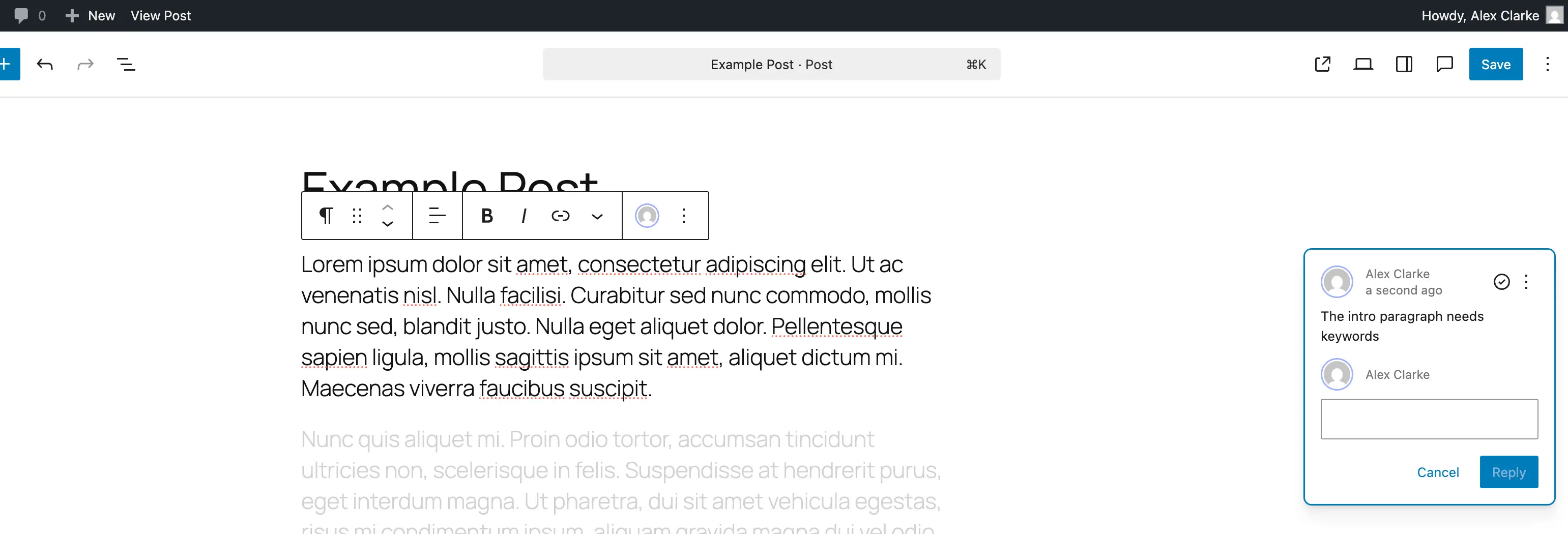
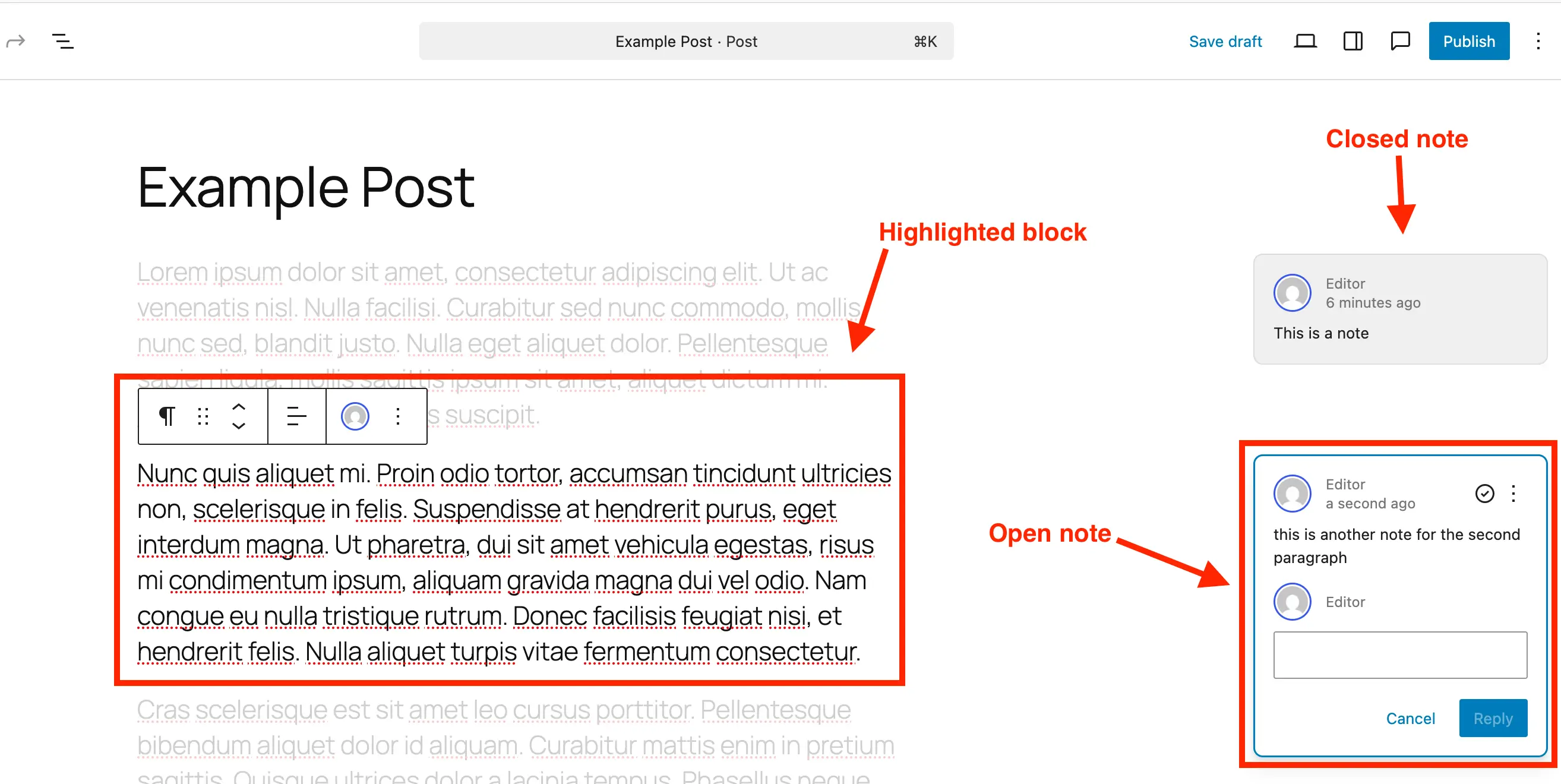
Visually, a note manifests as a small, discreet bubble icon appearing on the right-hand side of the editor interface, akin to comment functionalities found in document collaboration tools. Upon clicking a note, the associated block within the main content area is highlighted, while the rest of the content subtly fades into the background. This intuitive visual cue ensures that the reviewer’s attention is immediately drawn to the specific element under discussion, facilitating a highly focused review process. The note panel itself displays the author of the note, the date it was created, and provides a direct reply field, transforming the static feedback into a dynamic, conversational thread.
The core advantage of Notes lies in its ability to centralize communication. Instead of fragmented discussions across emails or external documents, all feedback, replies, and resolutions pertaining to a specific piece of content or design are housed within the WordPress editor itself. This not only streamlines communication but also serves as a comprehensive audit trail of content development, invaluable for project managers and content strategists.
Practical Guide: Adding and Managing Notes in WordPress
The implementation of Notes within WordPress is designed to be intuitive, integrating seamlessly into the existing editor workflow. For content creators, editors, and designers, understanding how to effectively add, review, and manage these notes is paramount to leveraging their full collaborative potential.
How to Add Notes in WordPress
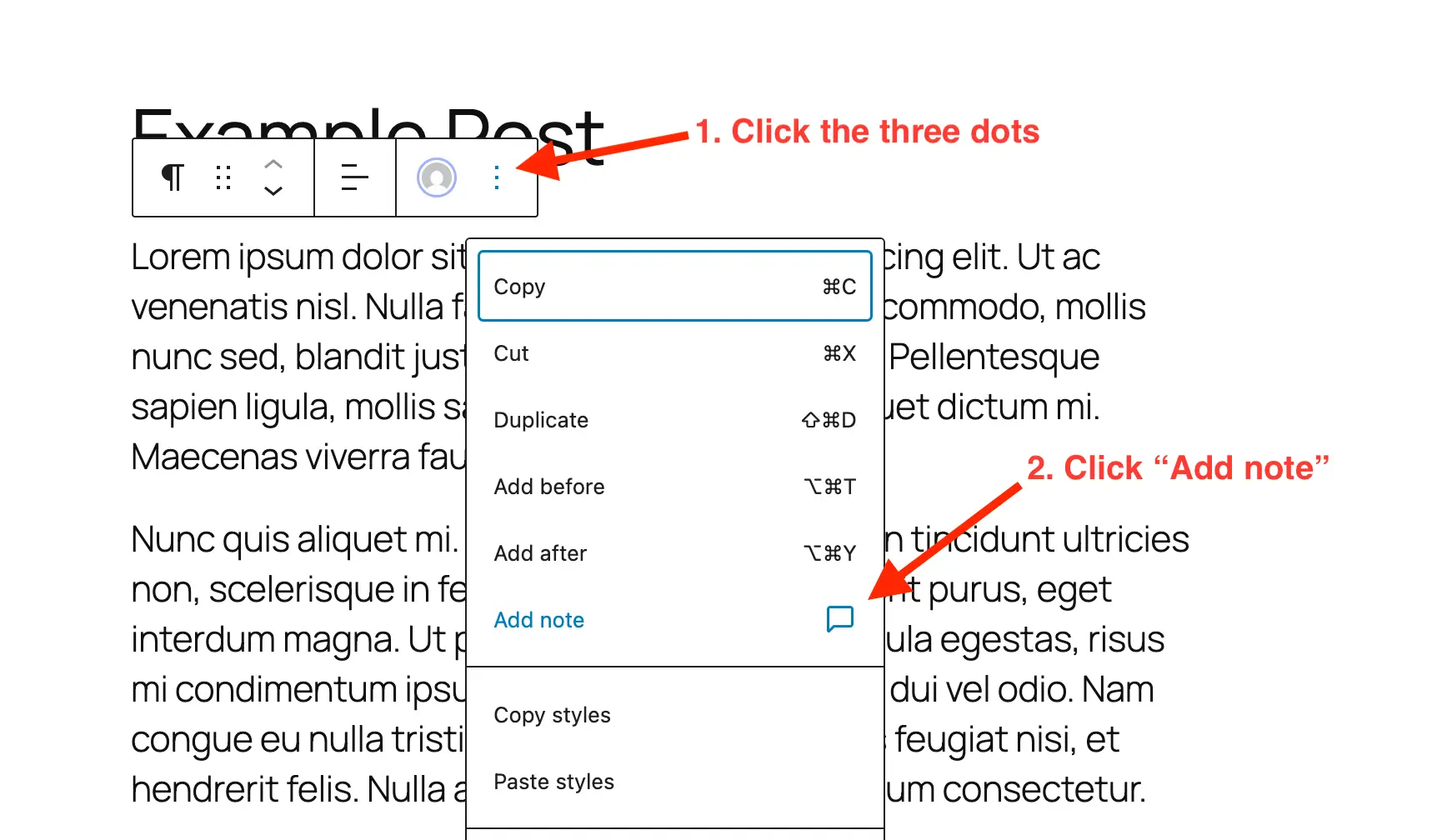
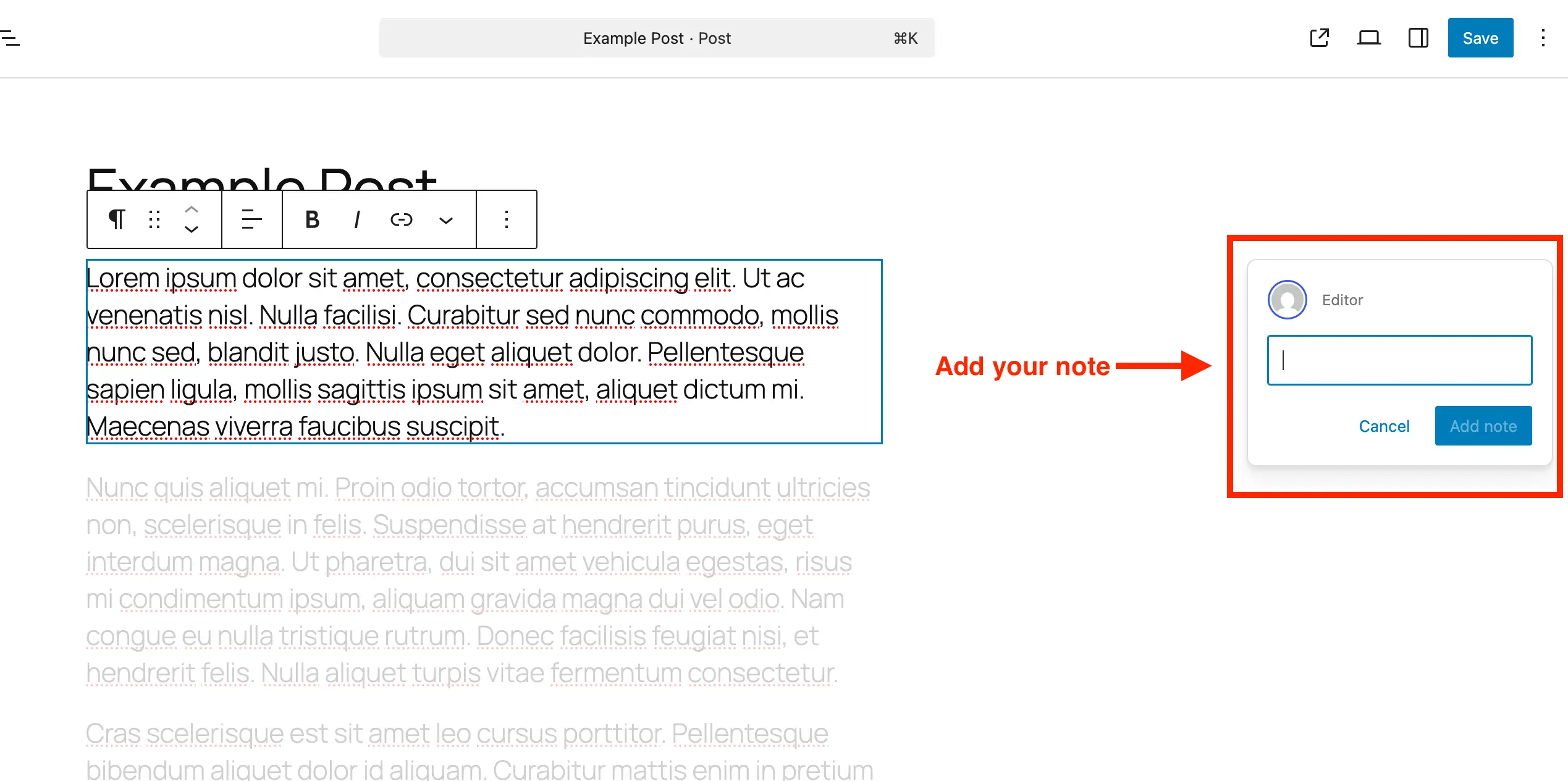
Adding a note is a straightforward process, designed to be quick and unobtrusive:
- Open the Post or Page: Navigate to the specific post or page in the WordPress block editor where feedback is required.
- Select the Block: Click on the particular block (e.g., a paragraph, heading, image, button, or custom block) that you wish to comment on. This action brings up the block’s contextual toolbar.
- Access Block Options: Within the block’s toolbar, locate and click the three-dot menu icon (often referred to as "More options").
- Select "Add Note": From the dropdown menu, choose the "Add Note" option. This action will typically open a dedicated panel on the right-hand side of the editor.
- Write and Submit Feedback: In the newly opened panel, an input field will appear. Type your feedback, suggestions, or questions. The input field intelligently expands as you type, accommodating longer comments and allowing for line breaks by pressing Enter. Once your note is complete, it will be automatically saved and associated with the selected block.
How to Edit & Review Notes in WordPress
Managing existing notes is equally user-friendly, providing a comprehensive overview of all feedback and the ability to engage in dynamic discussions:
- Open the Post or Page: Access the post or page containing the notes you intend to review.
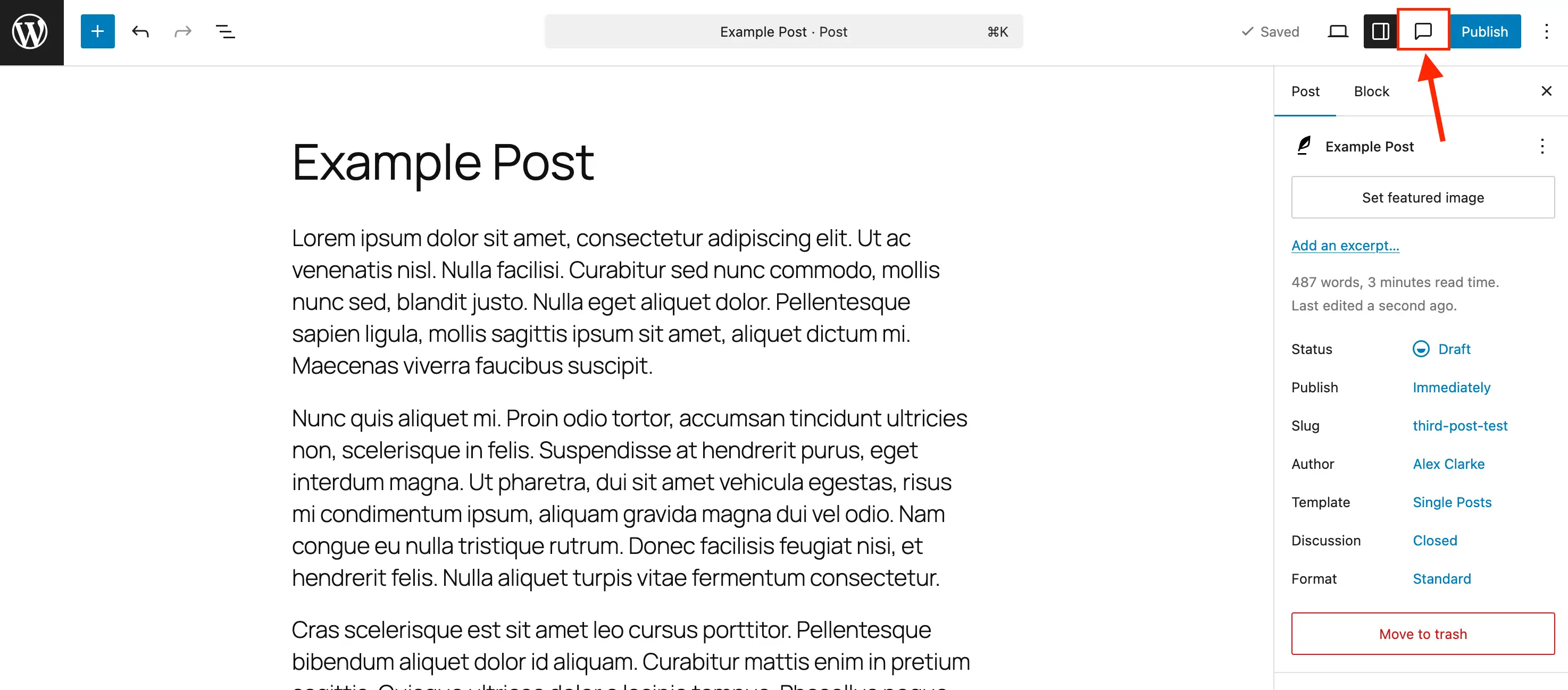
- Toggle the Notes Side Panel: While the default settings sidebar may initially be open, it is recommended to activate the dedicated Notes sidebar for comprehensive management. This is achieved by clicking the "Notes icon" (resembling a comment bubble) located in the editor’s top toolbar. This sidebar aggregates all notes, presenting them in a structured list, which significantly enhances the review process.
- Click a Note to Focus: Within the Notes panel or sidebar, clicking on any listed note will instantly highlight its corresponding block in the main content area, fading out unrelated content. This visual emphasis ensures focused attention on the specific feedback point. Alternatively, clicking directly on a block with an attached note will activate that note in the sidebar.
- Reply to a Note: To engage in a discussion, type your response directly into the reply field beneath an active note and click the "Reply" button. This action maintains a clear, chronological conversation thread directly tied to the original feedback.
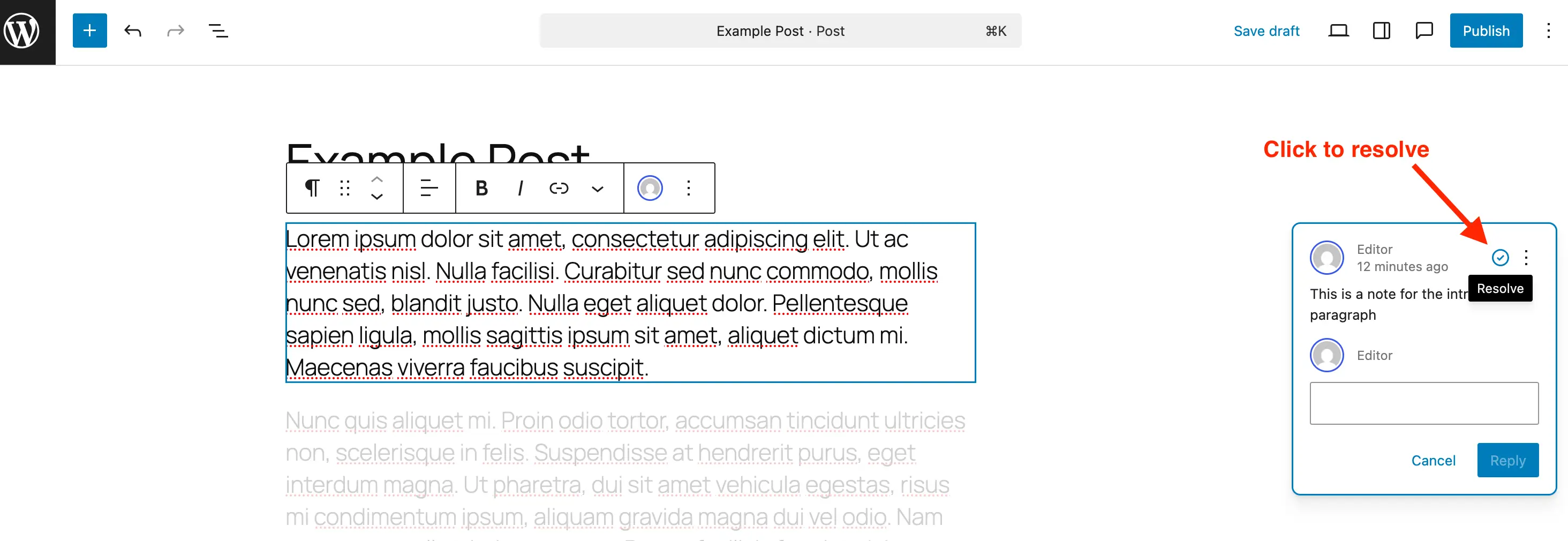
- Resolve a Note: Once the feedback contained within a note has been addressed and implemented, click the "Resolve" icon (typically a checkmark). Resolving a note marks it as complete, and it will no longer appear in the main editor view when all sidebar panels are closed, reducing visual clutter. However, resolved notes remain visible within the Notes panel, allowing for historical review.
- Delete a Note: For feedback that is no longer relevant or required, notes can be permanently removed. Click the three-dot menu on the specific note and select "Delete." It is generally recommended to delete resolved notes once they are no longer needed, especially on large sites, to maintain database efficiency and minimize unnecessary data storage.
- Reopen a Note: Should further discussion or action be required on a previously resolved note, it can be easily reactivated. Access the three-dot menu on the note within the Notes panel and select "Reopen."
Extending Notes Functionality: Custom Post Types and Disabling
WordPress Notes, while enabled by default for standard posts and pages, offers flexibility for developers and administrators to control its availability across various content types.
Enabling Notes for Custom Post Types
For websites leveraging custom post types (CPTs) – a common practice for portfolio items, products, events, or custom content structures – Notes can be explicitly enabled.
-
Using a Plugin: If a plugin like "Post Types Unlimited" is used to register CPTs, enabling Notes is often as simple as checking a box within the plugin’s settings under the ‘Supports’ section.
-
Via Code (Registration): When registering a new custom post type manually, developers must include
"notes" => truewithin theeditorparameter of thesupportsargument. For example:register_post_type( 'book', [ 'label' => 'Books', 'public' => true, 'show_in_rest' => true, 'supports' => [ 'title', 'editor' => [ 'notes' => true ], // Crucial line for enabling Notes 'author', ], ] ); -
Via Code (Existing CPTs): For custom post types that are already registered, Notes can be merged into their existing editor supports using a dedicated snippet. This ensures that other existing editor features remain intact. The
$post_typesarray should be modified to include the specific CPT slugs for which Notes are to be enabled./** * Enable editor notes for custom post types. */ add_action( 'init', function() $post_types = [ 'MY_CUSTOM_POST_TYPE_SLUG_1', 'MY_CUSTOM_POST_TYPE_SLUG_2' ]; // Modify this array foreach ( $post_types as $post_type ) $supports = get_all_post_type_supports( $post_type ); $editor_supports = array( 'notes' => true ); if ( is_array( $supports['editor'] ) && isset( $supports['editor'][0] ) && is_array( $supports['editor'][0] ) ) $editor_supports = array_merge( $editor_supports, $supports['editor'][0] ); add_post_type_support( $post_type, 'editor', $editor_supports ); );
How to Disable Notes in WordPress
While highly beneficial, there might be scenarios where Notes are not desired for specific content types, perhaps to minimize visual clutter or align with a different established workflow. WordPress does not offer a global toggle to disable Notes entirely, but they can be removed from particular post types.
To remove Notes from standard posts and pages, or any other post type, a snippet can be utilized to modify the register_post_type_args filter. This snippet should be adjusted to include or exclude specific post types from the $post_types array based on requirements.
/**
 * Disable Notes via post type args filter.
 */
add_filter( 'register_post_type_args', function( $args, $post_type )
    $post_types = [ 'post', 'page' ]; // Modify this array to target specific post types
    if ( in_array( $post_type, $post_types, true ) && isset( $args['supports']['editor']['notes'] ) )
        unset( $args['supports']['editor']['notes'] );

    return $args;
, 10, 2 );
The Strategic Advantages and Broader Implications of WordPress Notes
The integration of Notes into the WordPress editor is more than just a new feature; it represents a strategic advancement for the platform, offering substantial benefits across various user demographics and solidifying its position in the competitive CMS market.
Enhanced Productivity and Streamlined Workflows
The most immediate and tangible benefit of Notes is the significant boost in productivity. By centralizing feedback, teams drastically reduce the time spent on context switching and managing disparate communication channels. This leads to:
- Faster Iteration Cycles: Direct, contextual feedback enables quicker revisions and approvals, accelerating the content pipeline from draft to publication.
- Reduced Miscommunication: Attaching feedback directly to specific blocks eliminates ambiguity, ensuring that revisions are accurate and aligned with the original intent.
- Optimized Resource Allocation: Content managers and project leads can spend less time coordinating feedback and more time on strategic planning and content creation.
Improved Content Quality and Consistency
Notes empower collaborative teams to refine content with greater precision, leading to higher quality outputs:
- Granular Feedback: Reviewers can pinpoint exact phrases, images, or design elements that require attention, fostering meticulous content refinement.
- Comprehensive Review: The integrated system encourages a thorough review process, as all feedback is readily accessible and manageable within a single interface.
- Consistency Across Teams: For large organizations, Notes helps enforce style guides, brand messaging, and design principles by providing a unified feedback platform for all contributors.
Strengthening WordPress’s Competitive Edge
In an ecosystem where modern CMS platforms and SaaS tools are increasingly prioritizing collaboration, Notes significantly enhances WordPress’s appeal:
- Attracting Professional Teams: Agencies, enterprises, and professional content teams, who previously sought external solutions for collaboration, now find a more complete workflow within WordPress itself.
- Democratizing Advanced Features: WordPress continues its mission to make powerful web development and content management tools accessible to a broader audience, bridging the gap between open-source flexibility and enterprise-grade functionality.
- Future-Proofing the Platform: This feature positions WordPress to evolve further with integrated project management and advanced workflow capabilities, ensuring its relevance in a rapidly changing digital landscape.
Broader Industry Impact and Future Outlook
The introduction of WordPress Notes is likely to be met with widespread positive reception from the vast WordPress community. Prominent voices within the ecosystem, including developers, agency owners, and enterprise users, are expected to laud this feature for its potential to resolve long-standing workflow frustrations. This move underscores WordPress’s ongoing commitment to user experience, performance, and collaborative capabilities, especially following the transformative shift brought by the Gutenberg editor.
Looking ahead, the Notes feature could serve as a foundational layer for even more sophisticated in-editor collaboration tools. Potential future enhancements might include @mentions for specific team members, custom notification systems, integration with project management dashboards, or even version comparison tools tied to feedback threads. By integrating Notes, WordPress not only simplifies current content workflows but also lays the groundwork for a more robust, interactive, and collaborative content creation environment in the years to come. This evolution reaffirms WordPress’s status as a dynamic and adaptive platform, continually striving to meet the complex demands of the modern web.