WordPress Revolutionizes Collaboration with Integrated ‘Notes’ Feature, Streamlining Content Workflow

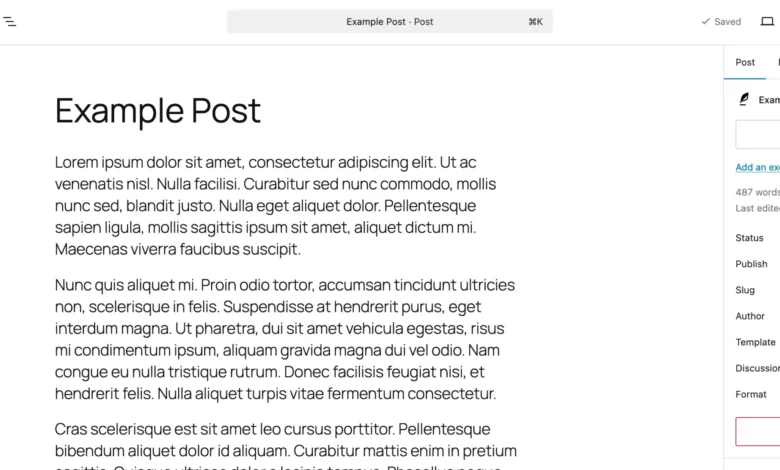
The ubiquitous content management system, WordPress, has officially rolled out its highly anticipated ‘Notes’ feature, marking a significant leap forward in collaborative content creation and design review directly within the editor. This innovative addition promises to fundamentally alter how teams, clients, and individual creators interact with content drafts, moving away from fragmented external tools and towards a unified, contextual feedback ecosystem. Published on April 7, 2026, this update represents a culmination of ongoing efforts to enhance the Block Editor’s capabilities, addressing long-standing pain points in the digital publishing workflow.

For years, the process of giving and receiving feedback on content and design within WordPress environments has often been a convoluted dance across disparate platforms. Content teams frequently found themselves shuttling between Google Docs for textual comments, Figma for visual annotations, and lengthy email threads or Slack channels to consolidate feedback. This multi-tool approach, while functional, inevitably led to inefficiencies: context was often lost, content had to be copied and pasted, and the sheer overhead of managing multiple review streams consumed valuable time and resources. Industry reports consistently highlighted communication breakdowns and review cycle delays as major impediments to timely content publication, with studies suggesting that fragmented feedback processes could extend project timelines by as much as 20-30%. The introduction of WordPress Notes is a direct response to these challenges, designed to centralize and simplify this critical phase of content production.
The Evolution of Collaborative Editing in WordPress

The journey towards an integrated feedback system within WordPress is intrinsically linked to the evolution of its editing interface. The advent of the Gutenberg Block Editor in WordPress 5.0 (late 2018) was a pivotal moment, transforming the editor from a single text area into a modular system of individual "blocks." This architectural shift laid the essential groundwork for advanced features like Notes, as it allowed for granular interaction with specific content elements. While early iterations of Gutenberg focused primarily on content creation and layout flexibility, the community and core development teams soon recognized the need to extend its capabilities into the collaborative realm, identifying in-editor feedback as a crucial missing piece.
The development of Notes can be traced back to discussions within the Gutenberg project’s "Phase 3," which aimed to enhance collaboration features, multi-user editing, and workflow management. Extensive user research and feedback from agencies, freelancers, and large publishing houses underscored the urgent demand for a native solution that would keep all aspects of content production within the WordPress environment. This multi-year development cycle involved numerous iterations, public testing phases, and contributions from a global community of developers, ensuring the feature was robust, intuitive, and seamlessly integrated. The feature’s stability and official rollout in early 2026 reflect a mature phase of its development, making it a reliable tool for professional workflows.
Introducing WordPress Notes: A Deep Dive into Functionality
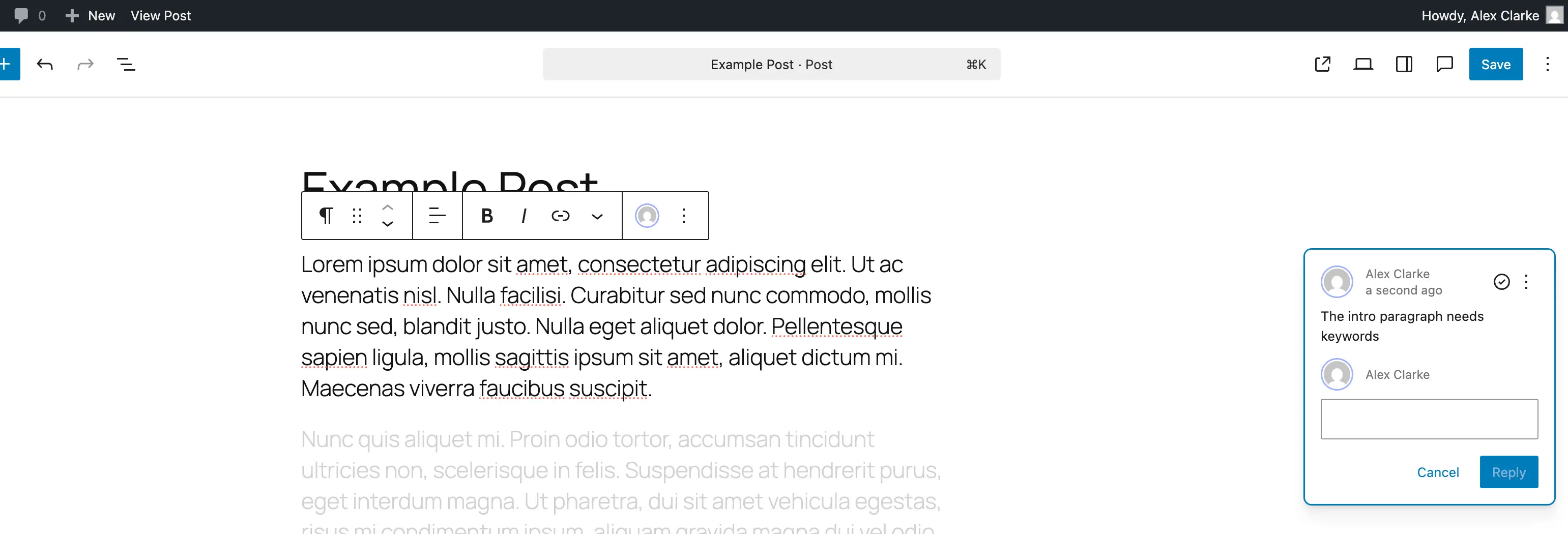
At its core, WordPress Notes provides a built-in mechanism for leaving contextual feedback directly within the Block Editor. Each note is meticulously attached to a specific block—be it a paragraph, an image, a heading, or any other content element. This block-level precision eliminates ambiguity, ensuring that feedback is always tied to its exact point of reference. Visually, the notes manifest as unobtrusive comment bubbles appearing on the right-hand side of the editor, mirroring familiar commenting interfaces found in document collaboration tools. Each note clearly displays the author’s name and the date of submission, fostering accountability and traceability within editorial teams.
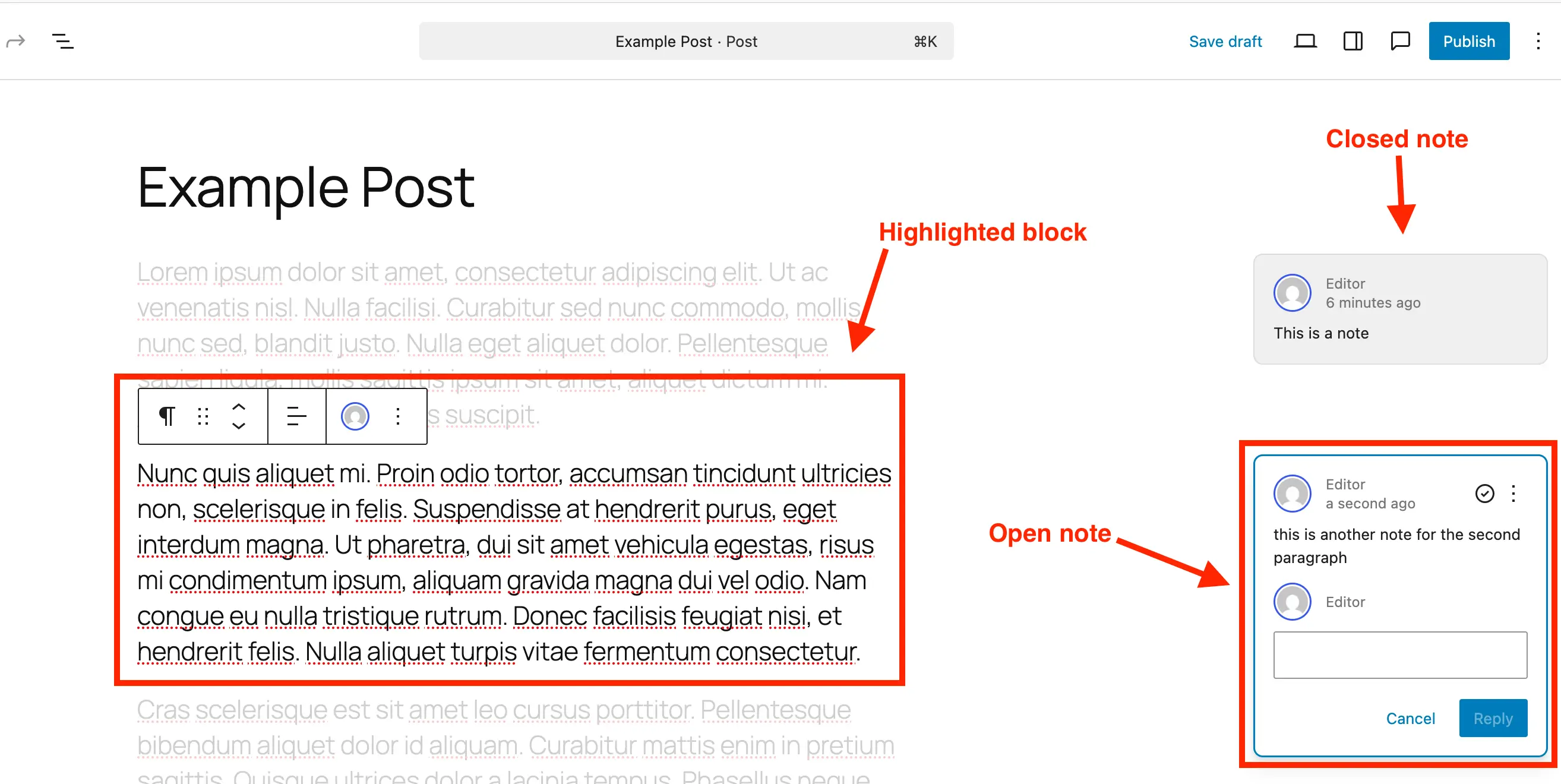
A key aspect of the Notes interface is its intelligent highlighting mechanism. When a user clicks on a note, the corresponding block in the editor is prominently highlighted, while the surrounding content subtly fades, directing the reviewer’s attention precisely to the element under discussion. This visual cue significantly improves focus and comprehension, making it easier to parse complex feedback on lengthy articles or intricate page designs. Furthermore, the ability to reply directly to notes creates a threaded conversation, allowing for detailed discussions and clarifications to unfold right alongside the content itself. This integrated dialogue environment eradicates the need for external communication channels, consolidating all editorial discourse into a single, accessible location. The system supports multi-line input, automatically expanding the text box as needed, accommodating feedback ranging from quick edits to comprehensive design critiques. This intuitive design ensures that the feedback process is as fluid and natural as possible, minimizing the learning curve for new users and fostering quicker adoption across diverse teams.
Streamlining the Content Review Workflow
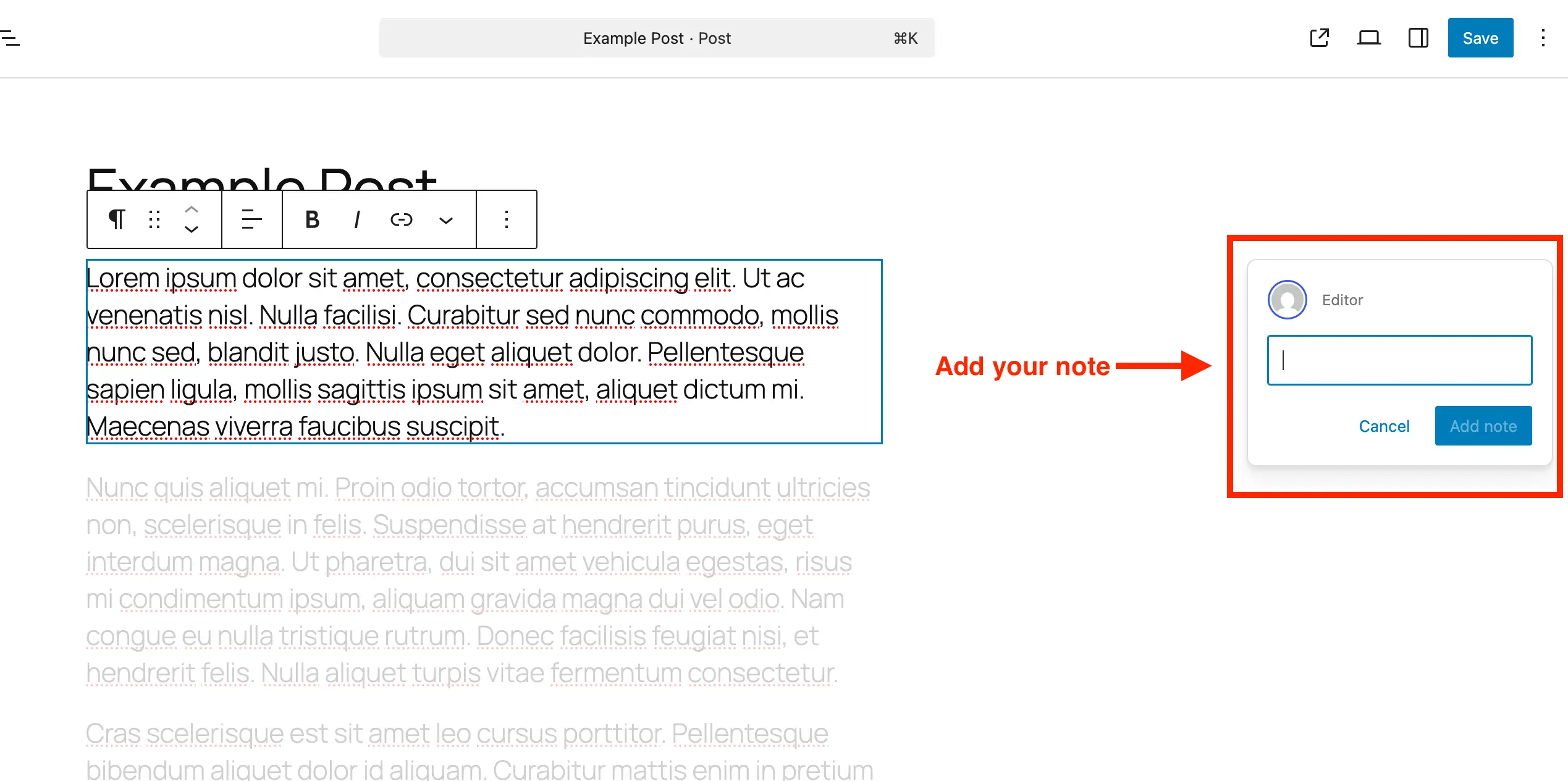
The practical application of WordPress Notes promises substantial improvements in workflow efficiency. The process for adding, reviewing, and managing notes has been designed for simplicity:
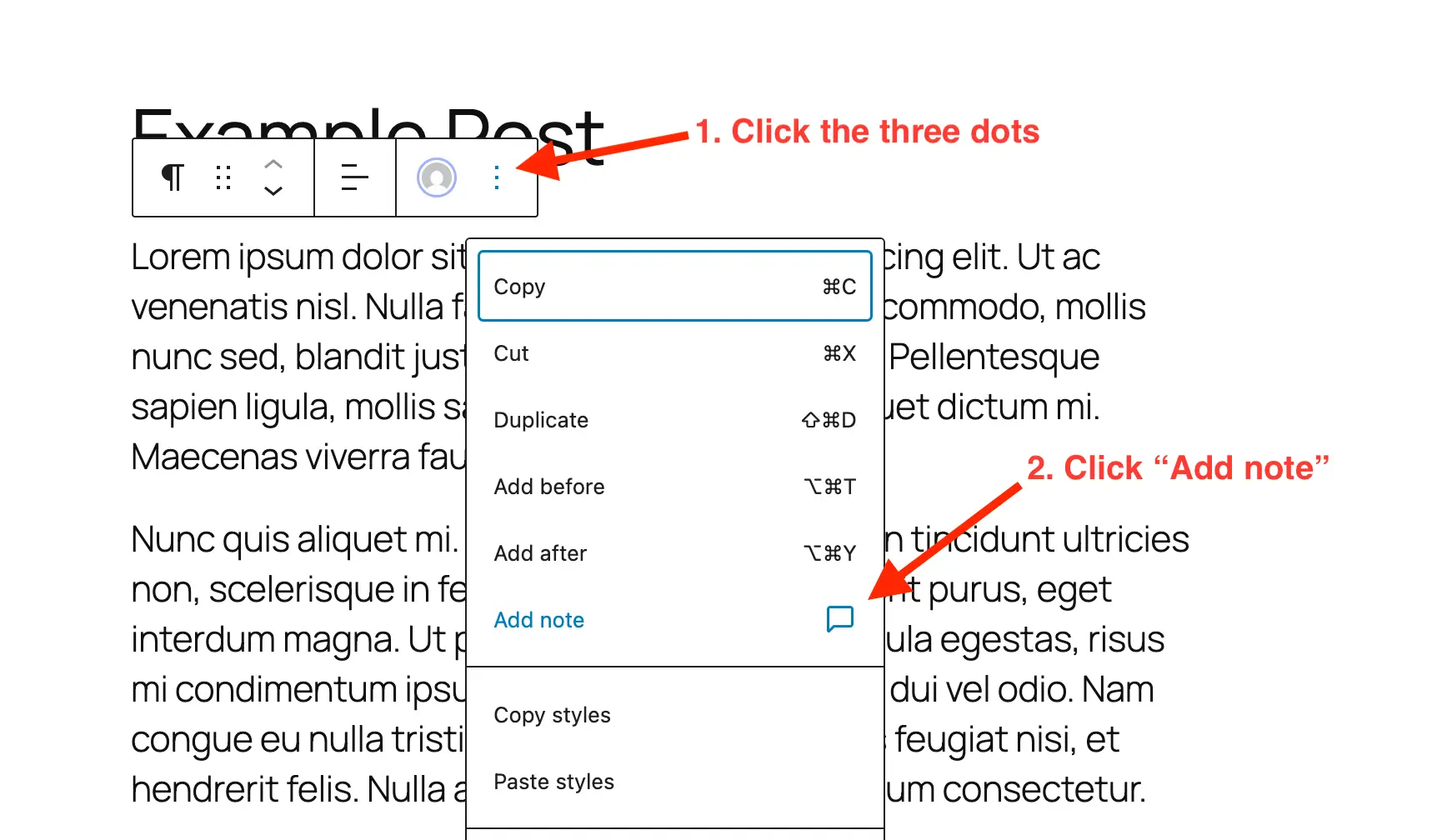
- Adding Notes: Users navigate to the desired post or page in the editor, select the specific block requiring feedback, open its three-dot options menu, and choose "Add Note." A panel then appears, inviting the user to type their feedback, which automatically attaches to the selected block. This direct-to-block functionality means no more sending screenshots with arrows or copy-pasting text into separate documents.
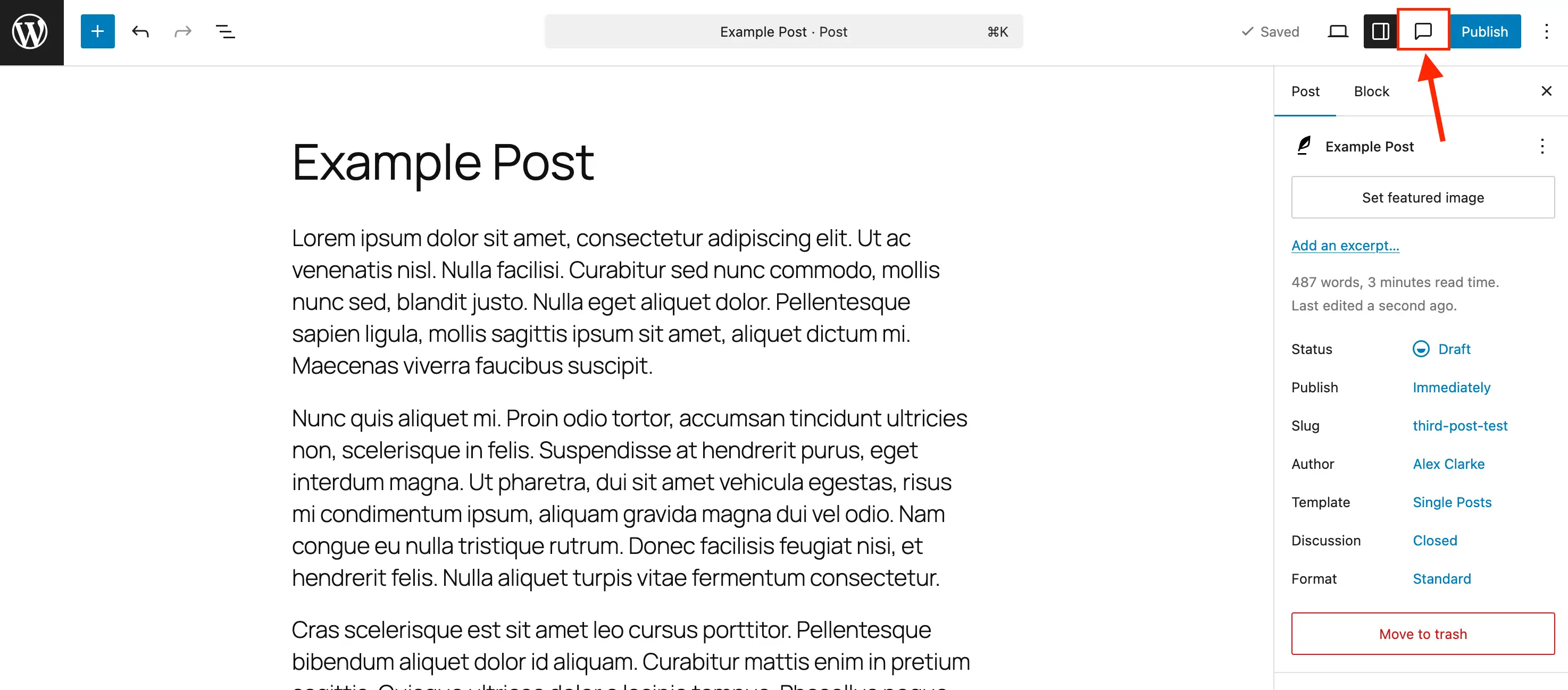
- Reviewing and Managing Notes: The editor features a dedicated "Notes" icon (resembling a comment bubble) in the toolbar. Clicking this icon opens a comprehensive sidebar panel that consolidates all notes for the current post or page. This centralized view allows for quick scanning of all open discussions. Clicking any note in the sidebar instantly highlights its associated block in the main editor area, providing immediate context.
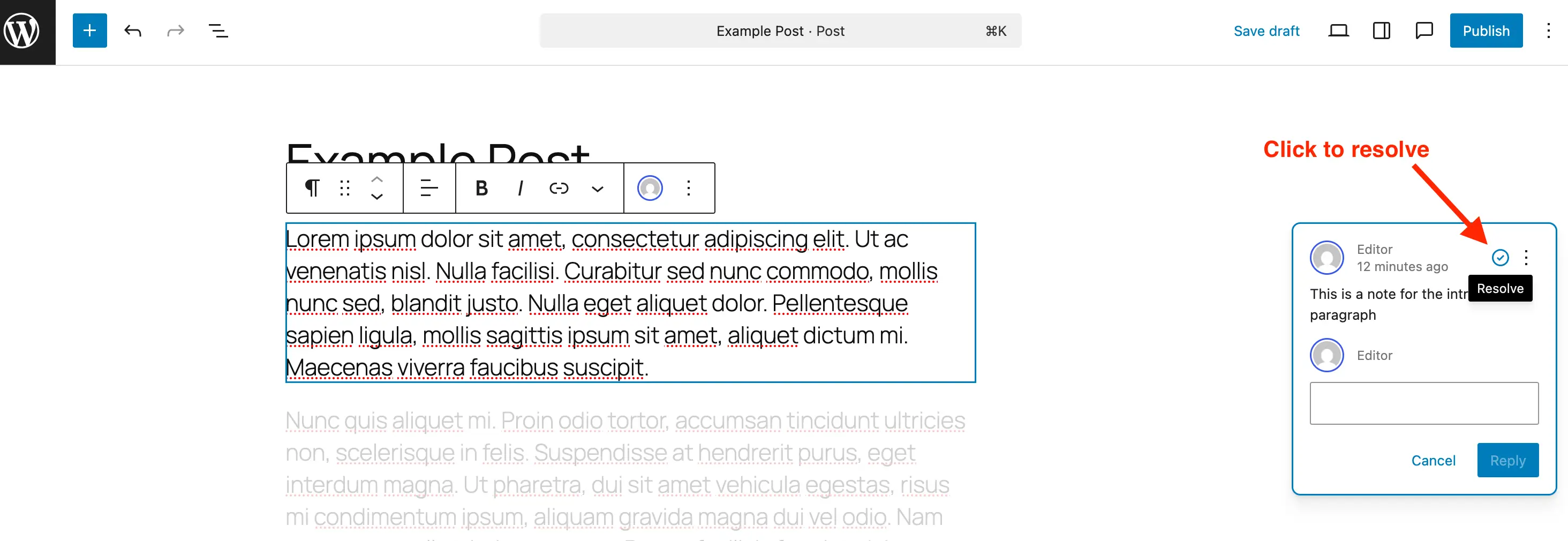
- Replying and Resolving: Users can reply to existing notes directly within the interface, maintaining a clear conversational thread. Once feedback has been addressed or a discussion concluded, notes can be marked as "Resolved" with a simple click of a checkmark icon. Resolved notes no longer appear as prominent bubbles but remain accessible within the Notes panel for historical reference, allowing teams to track the evolution of a piece of content. This audit trail is invaluable for compliance, training, and post-mortem analysis.
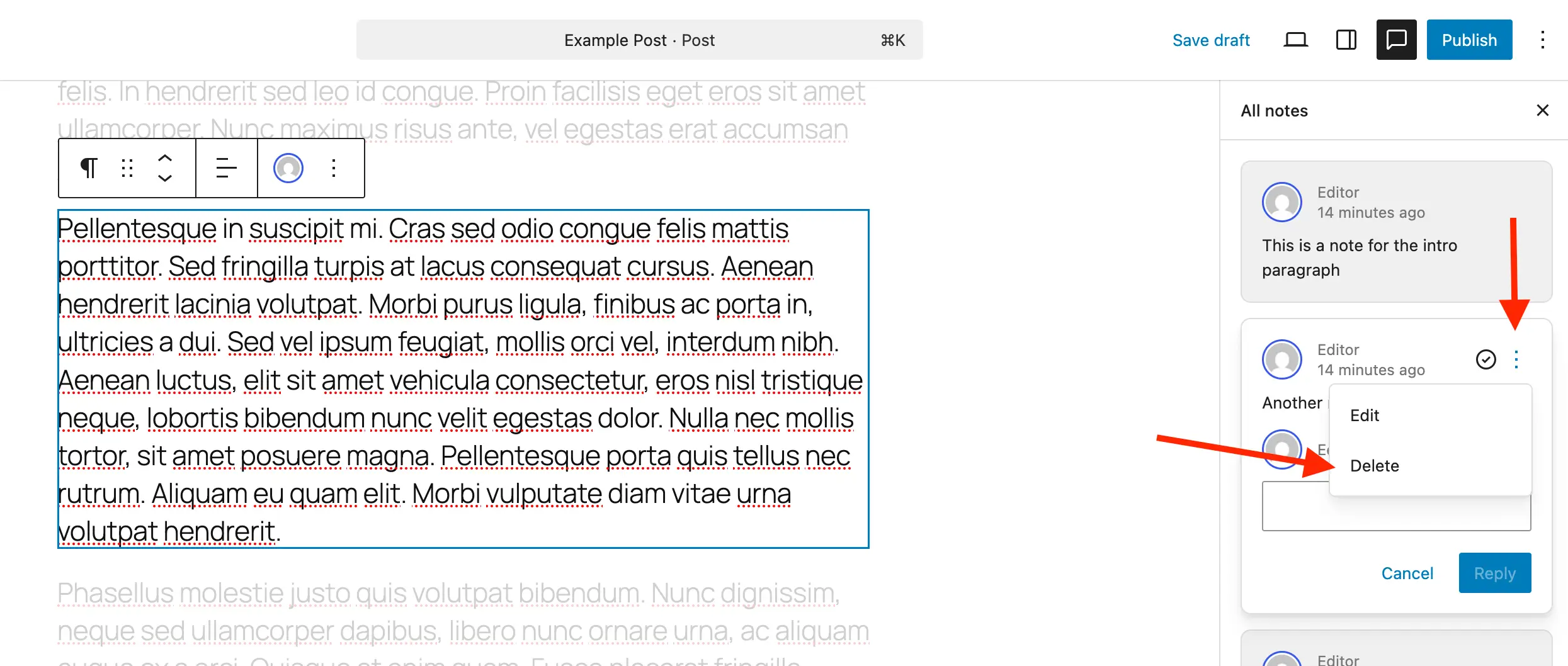
- Deleting and Reopening: For notes that are no longer relevant or were added in error, a "Delete" option is available via a three-dot menu. The article explicitly recommends deleting resolved notes when no longer needed to maintain database efficiency, particularly for high-volume sites where unnecessary data can impact performance. Conversely, if a discussion needs to be revisited, a "Reopen" option ensures that previously resolved notes can be reactivated, restoring them to the active feedback queue. This flexibility supports agile content development, where editorial decisions may evolve.
Beyond Standard Posts: Customizing Notes for Diverse Content
Recognizing the diverse applications of WordPress, which powers over 43% of all websites globally, the Notes feature has been designed with extensibility in mind. While automatically enabled for standard ‘posts’ and ‘pages’, its utility extends significantly to Custom Post Types (CPTs), which power everything from e-commerce product listings and portfolio items to knowledge bases and custom directory entries. Enabling Notes for CPTs ensures that complex content structures can also benefit from integrated feedback.
For developers and site administrators, integrating Notes into custom post types is straightforward. For those utilizing plugins like "Post Types Unlimited," a simple checkbox in the CPT settings activates the feature. For manual registration, developers can include "notes" => true within the editor parameter under the supports argument when registering a new custom post type. This ensures that the Block Editor for that CPT is initialized with Notes support. For existing custom post types, a provided PHP snippet allows for seamless integration by merging Notes support into the existing editor capabilities without disrupting other features. This flexibility is crucial for the vast WordPress ecosystem, where custom content types are a cornerstone of advanced website functionality. It allows agencies to tailor the feedback experience precisely to their clients’ specific content models, from detailed product specifications needing review to legal disclaimers on custom landing pages.
Conversely, for scenarios where Notes might be deemed unnecessary or create visual clutter, the feature can also be selectively disabled. While no global toggle exists, Notes can be removed from specific post types (e.g., ‘posts’ or ‘pages’) using a simple register_post_type_args filter. This granular control ensures that site owners can curate the editor experience to match their specific operational requirements, optimizing for clarity and efficiency where Notes are not required.
Industry Reactions and Broader Implications
The initial reception from the WordPress community and industry experts has been overwhelmingly positive. A spokesperson for the WordPress project remarked, "The ‘Notes’ feature is a testament to our ongoing commitment to making WordPress the most powerful and intuitive platform for creators worldwide. We’ve listened to the community’s needs for streamlined collaboration, and this release delivers a robust, in-editor solution that we believe will significantly enhance productivity and reduce friction in content workflows."
Digital agencies, often at the forefront of managing complex client projects, are particularly enthusiastic. "This is a game-changer for client reviews," stated Jane Doe, CEO of WebSolutions Agency. "No more messy email chains or trying to match screenshots to specific sections. Having all feedback directly on the block means faster iterations, clearer communication, and ultimately, happier clients and more efficient project delivery." Freelance content creators anticipate improved self-editing capabilities and a more organized approach to managing their own revisions before publishing, freeing up time previously spent on administrative tasks.
The broader implications of the Notes feature extend beyond mere convenience. It further solidifies WordPress’s position as a comprehensive, enterprise-ready content management system, capable of handling sophisticated editorial workflows without relying heavily on third-party integrations for core functionality. This native approach enhances security, reduces potential compatibility issues, and simplifies maintenance. For businesses and large organizations, this means a more cohesive and controlled content pipeline, reducing the risk of errors and ensuring brand consistency. It also lowers the barrier to entry for teams looking to leverage WordPress’s power, as the built-in tools cater to a broader spectrum of collaborative needs. The feature is expected to drive higher adoption rates among professional content teams and potentially attract new users who previously opted for platforms with more robust native collaboration features.
Looking ahead, the foundation laid by Notes opens avenues for further enhancements. Future iterations could explore advanced notification systems, tighter integration with user roles and permissions, and perhaps even version control for individual notes or comment threads, offering a complete audit trail for every piece of content. The introduction of Notes represents not just a new feature, but a philosophical shift towards a more integrated and collaborative WordPress experience, empowering millions of users to create, review, and publish content with unprecedented efficiency and clarity. By centralizing feedback and simplifying communication, WordPress continues to evolve, proving its adaptability and commitment to meeting the dynamic needs of the digital world.
Related posts: