Making Immersive LLM Chat Experiences More Accessible: A Blueprint for Inclusive Web Development


As large language model (LLM) chat interfaces rapidly transform from novel tech demonstrations into foundational digital utilities, accessibility experts are raising urgent alarms regarding their design. Full-screen conversational environments—ranging from Claude and ChatGPT to enterprise search platforms and government portals—have saturated the modern web. However, their pervasive reliance on heavily visual paradigms risks systematically alienating millions of users who depend on assistive technologies.
Industry data underscores the scale of the issue. Recent digital inclusion surveys indicate that over 15 percent of the global population lives with some form of disability, with millions relying on screen readers, refreshable braille displays, or alternative input devices to navigate digital platforms. Without intentional design considerations baked into the core architecture of LLM interfaces, these users face insurmountable access barriers. Industry advocates stress that exclusion in the digital sphere translates directly to lost utility, diminished employment opportunities, restricted access to essential services, and curtailed educational advancement.
The Technical Challenge of Conversational UIs
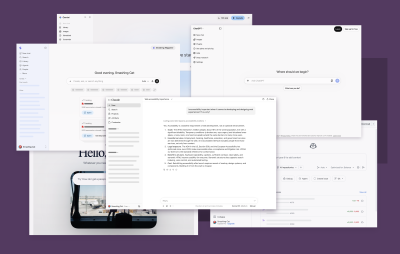
The proliferation of LLM chat patterns across both web and native desktop wrappers—frequently built using frameworks like Electron or Tauri—presents unique engineering hurdles. Unlike static web pages or simple pop-up chat widgets, immersive LLM experiences involve dynamic, streaming content generation, complex multi-turn interactions, and shifting application states.
Historically, software creation suffers from a deep-seated visual bias. Developers and designers naturally conceptualize interfaces through sight, utilizing left-to-right alignment, color cues, and transient animations to communicate system activity. For instance, when an LLM generates a response, the text visually streams onto the screen in real-time. A sighted user instantly perceives this update by glancing at the message window. Conversely, a screen reader user remains entirely unaware that new content has materialized unless explicit programmatic accommodations are made.
Bridging the Experience Gap Through Live Regions
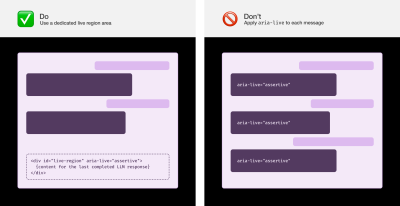
To achieve true parity between sighted users and those utilizing assistive technology, developers must implement robust aria-live regions. According to accessibility engineering guidelines established by organizations like TetraLogical, utilizing dedicated live region containers placed strategically at the end of the Document Object Model (DOM) provides a stable mechanism for announcing updates.
Crucially, experts advise against applying live region attributes directly to individual streaming messages. Doing so often results in a chaotic, juddering audio output as text updates character by character. Instead, best practices dictate that applications should wait until the LLM response has completed streaming in full before dispatching the complete message text to a centralized live region.
Furthermore, managing user expectations during extended processing times is vital. Because complex LLM queries often take several seconds to execute, visual indicators such as "Thinking" or animated loading states must be mirrored by periodic live region updates. Inclusive user research suggests that triggering a subtle "Loading" announcement approximately five seconds after prompt submission—and repeating it at regular intervals—prevents users from erroneously concluding that the application has crashed or stalled.
Navigating Complexity with Landmarks and Headings
Beyond live announcements, efficient keyboard and screen reader navigation relies heavily on structured HTML and ARIA landmarks. In long-running chat sessions containing dozens of individual turns, wrapping every message in a landmark element can inadvertently bloat the accessibility tree, rendering navigation cumbersome.

Instead, industry veterans recommend employing visually hidden heading elements (such as <h2> or <h3> paired with utility classes like sr-only) before each message block. Preceding these headings with explicit indicators such as "You said:" or "Agent said:" replicates the contextual awareness that sighted users derive from message alignment. Additionally, implementing traditional web skip links allows keyboard-only users to bypass peripheral navigation and jump directly to the primary conversation feed or input prompt.
For complex sidebars, such as conversation history lists, developers are encouraged to utilize composite widget patterns. This architecture enables users to tab into a list once and navigate through dozens of chat sessions using the up and down arrow keys, dramatically reducing physical fatigue for individuals with motor control conditions.

Institutional Responses and Emerging Standards
As legal frameworks surrounding digital accessibility tighten globally—including enforcement under the European Accessibility Act and updated standards for digital public services—organizations are reallocating engineering resources to address these gaps. Accessibility advocates, including notable researchers like Sarah Higley, have continually pushed platform developers to integrate robust preference settings into their applications.

Providing granular user controls is rapidly becoming the gold standard for accessible AI software. Key features now recommended by accessibility specialists include:
- Announcement Granularity Toggles: Allowing users to switch off live announcements for secondary LLM actions (such as reasoning, file reading, or tool calls) to avoid audio clutter.
- Motion Reduction Settings: Honoring operating system-level
prefers-reduced-motionqueries to disable distracting streaming animations and interface transitions. - Sound Effects Management: Providing discrete toggles for auditory notifications so users can maintain focus aids like white noise without muting the application entirely.
- Rebindable Keyboard Shortcuts: Ensuring power users and individuals with specialized input devices can remap or disable conflicting shortcuts.
Implications for the Future of AI Software

The push to make LLM interfaces universally accessible arrives at a critical juncture in software development. As artificial intelligence embeds itself into every facet of enterprise software, education, and governance, the baseline requirements for digital inclusion must evolve in tandem.
Industry analysts note that failing to account for accessibility during the initial architectural phase of AI deployment leads to costly retroactive refactoring and exposes organizations to significant legal liabilities. Conversely, companies that prioritize inclusive design from the ground up not only ensure compliance with international standards but also deliver superior, highly polished user experiences that benefit all consumers, regardless of ability.

Ultimately, achieving equitable AI interaction models requires shifting the paradigm from retrofitted compliance to empathetic, user-centered engineering. By actively incorporating feedback from disabled users and adhering to rigorous assistive technology standards, the web development community can ensure that the transformative potential of artificial intelligence remains open and accessible to everyone.