The Science of Accordion Icons: Why NN/g Research Proves Carets Reign Supreme Over Confusing Split Menus

User experience design relies heavily on small, seemingly insignificant visual cues to guide visitors through complex web architectures. Among these interface elements, the accordion menu—a vertically stacked list of headers that can be clicked to reveal or hide associated content—remains a staple of modern web development. However, despite its widespread adoption, designers have long debated the optimal visual indicators for expansion and collapse states. Recent empirical research from the Nielsen Norman Group (NN/g) sheds light on this debate, offering definitive insights into how users interpret accordion icons, why certain patterns like split menus fail, and how UI designers can optimize navigation without overcomplicating interfaces.
Understanding User Expectations: The Anatomy of Accordion Interactions

To comprehend why certain icons succeed while others fail, researchers must first analyze user mental models. When a user encounters a navigation menu item on a desktop or mobile device, their brain instantly evaluates the visual hierarchy to predict the outcome of an interaction. Does clicking this element navigate to a brand-new page, or does it expand a hidden submenu inline?
According to NN/g findings, the presence or absence of an icon sets the primary baseline expectation. When a menu item features no icon whatsoever, users overwhelmingly assume that tapping the label will trigger a page transition, routing them directly to a destination URL. Conversely, when custom or non-standard icons are introduced, users frequently experience cognitive friction. Because these bespoke graphical elements lack standardized behavioral associations, users exhibit erratic tapping behavior, clicking indiscriminately on the text label or the icon itself. This lack of predictability highlights the necessity for universally recognized visual signifiers in interface design.
The Pitfalls of Custom Signifiers and Overcomplicated Hierarchies

In an effort to craft visually dynamic interfaces, many digital product designers introduce complex arrays of directional arrows, chevrons, and custom geometric shapes that dynamically shift orientation depending on the menu state. While artistic ambition is understandable, usability testing demonstrates that this approach often backfires.
For instance, employing a right-facing arrow does not inherently communicate page navigation, nor does rotating that same arrow downward reliably signal inline expansion. Furthermore, designers frequently overcomplicate multi-level navigation systems by implementing competing visual directions. Users should not have to decipher a complex cartographic legend just to locate a product category or view a list of site sub-sections. When interface components require conscious mental processing to operate, the fundamental goal of user experience—frictionless navigation—is compromised.
The Danger of Split Menus and Dual-Action Links

One of the most critical takeaways from recent UX research is the inherent danger of split menus within accordion architecture. A split menu typically separates the functionality of a single navigation row: the text label routes the user to a dedicated category page, while the adjacent icon or dropdown arrow triggers the accordion expansion.
Usability evaluations consistently reveal that split menus are harmful to the overall user experience. Users rarely parse the subtle visual distinction between the text link and the icon hit target. Consequently, they frequently trigger unintended page loads when attempting to open a menu, or conversely, find themselves trapped in an accordion when they intended to visit a master category page.
Industry case studies, such as the navigation patterns deployed by major logistics providers like DHL, demonstrate the superiority of streamlined interactions. Rather than forcing a dual-action split menu, modern best practices dictate that tapping the main category row should consistently expose the submenu. To accommodate direct access to the primary category page, designers can simply integrate an explicit "Overview" or landing page link directly within the newly revealed dropdown options. This eliminates ambiguity and respects the user’s predictable motor and cognitive patterns.

Evaluating Icon Alternatives: Plus-Minus Signs and Directional Arrows
Beyond carets, interface designers frequently turn to alternative signifiers, most notably the plus-and-minus symbol pair (+/-) or standard directional arrows. While these icons are generally understood by digital natives, they carry significant baggage due to semantic overload.
The plus symbol, for example, is subjected to a wide array of digital interpretations depending on the context of the application. In e-commerce, it often signals adding an item to a shopping cart; in document viewers, it represents zooming in; in utility apps, it can mean saving content for later or creating a new entry. When applied to multi-level navigation trees where multiple tiers may remain expanded simultaneously, the plus-and-minus convention can quickly become visually cluttered and conceptually ambiguous.

Similarly, horizontal and vertical arrows are heavily overloaded. Arrows frequently denote scrolling behaviors, pagination sequences, sliding carousels, or intra-page anchor jumps. While users eventually adapt to these symbols through contextual learning, their overloaded nature increases the likelihood of misinterpretation, particularly among demographics with lower digital literacy.
The Verdict: Why Carets Stand Out as the Safest Choice
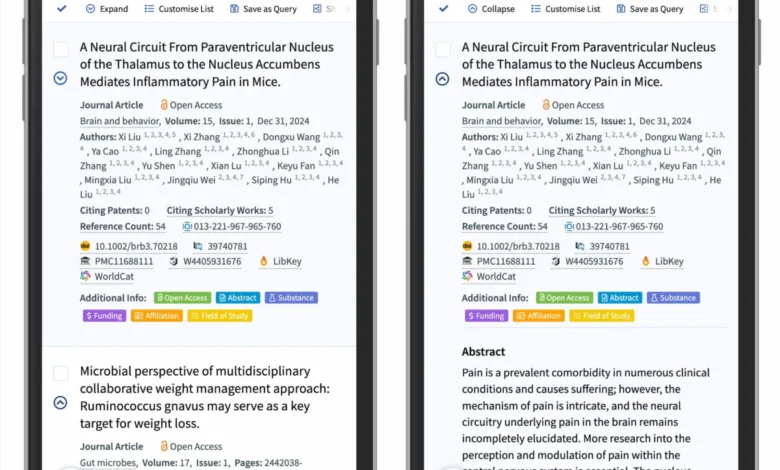
Synthesizing empirical usability data, the research points to a clear, unambiguous victor in the realm of accordion design: the caret, specifically a triangle pointing downward by default and rotating upward or sideways upon interaction.

The caret possesses a uniquely ingrained behavioral mapping. Users instinctively associate the downward-pointing triangle with hidden content waiting to be revealed vertically. Moreover, eye-tracking and interaction studies indicate that users target the caret icon more reliably than text labels when actively attempting to manipulate accordion states.
For links that require direct navigation without expansion, the research advises falling back on the most reliable, time-tested convention in web history: underlining the text. While a simple text underline may lack avant-garde visual flair, it remains universally understood, accessible, and functionally flawless across all viewports and assistive technologies.
Broader Implications for Web Accessibility and Design Systems

The ongoing refinement of accordion icons highlights a broader truth in digital product design: simplicity consistently outperforms complexity. As design systems scale across enterprise applications, mobile platforms, and responsive web environments, maintaining strict adherence to standard UI patterns directly impacts conversion rates, task completion times, and overall user satisfaction.
By eliminating split menus, removing redundant directional arrows, standardizing on the downward caret for expansions, and reserving text underlines exclusively for hyperlinks, organizations can dramatically reduce user error rates. Ultimately, the most successful user interfaces are those that recede into the background, allowing users to achieve their objectives with absolute cognitive ease.