The security landscape for WordPress, which now powers over 43% of the entire internet, has shifted from a secondary concern to a critical operational requirement for site owners. As cyber threats evolve—moving from simple brute-force attacks to sophisticated automated botnets targeting vulnerabilities in plugins—the necessity for a robust, multi-layered defense strategy has never been more pressing. Security is no longer a "set-it-and-forget-it" task; it is an active, ongoing process that requires a combination of firewall protection, vulnerability management, and strict access control.

The Evolution of the WordPress Threat Landscape
In recent years, the nature of attacks against the WordPress ecosystem has fundamentally changed. Historically, malicious actors focused on weak passwords. While credential stuffing remains a prevalent issue, the current trend involves the exploitation of vulnerabilities in third-party plugins and themes. According to data from various security researchers, over 90% of all WordPress compromises are linked to vulnerabilities in outdated software or themes.
For the editorial team at WPMayor, this reality became unavoidable during a high-profile "carding" attack. In this incident, malicious actors utilized a botnet to hammer the WooCommerce checkout page with thousands of stolen credit card numbers. This technique, known as "card testing," exploits e-commerce platforms to verify stolen data. The attack demonstrated that security is not merely about preventing unauthorized login; it is about defending the functional integrity of a business. This event served as a stark reminder that the threats site owners prepare for—such as basic malware—are often eclipsed by specialized attacks targeting specific business functions.

A Layered Defense Strategy: The Essential Trio
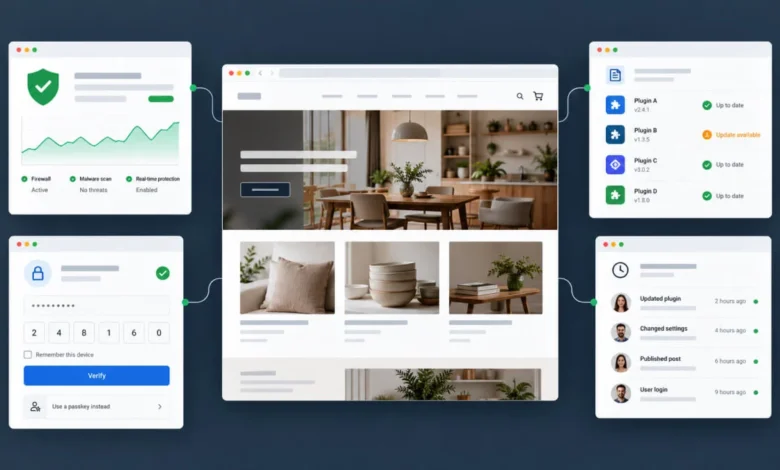
To mitigate these risks effectively, industry experts recommend a "defense-in-depth" approach. For any site owner looking to establish a baseline of security without immediate capital expenditure, the most effective combination includes three specific tools. First, a robust firewall and malware scanner, such as Wordfence, serves as the primary line of defense. Second, a vulnerability intelligence platform like Patchstack provides critical alerts regarding plugin weaknesses before they are widely exploited. Finally, implementing two-factor authentication (2FA) via a plugin like Sigil ensures that even if a password is compromised, an attacker cannot gain administrative access.
This combination addresses the most common attack vectors while remaining accessible to those with limited technical resources. However, advanced users and business owners must look beyond these basics to include audit trails, off-site scanning, and trust-building mechanisms.

Categorized Analysis of Security Solutions
Because no single plugin provides a holistic security solution, it is necessary to select tools based on their specific functionality. Below is an analysis of the top-tier solutions currently defining the market.
1. Endpoint and Perimeter Defense: Wordfence Security
Wordfence remains the industry standard for endpoint security. By integrating an endpoint firewall and a malware scanner, it provides a comprehensive look at the site’s status. The primary trade-off for its free version is a 30-day delay in receiving the latest threat signatures. For enterprise-level or high-traffic sites, this latency poses a significant risk, making the Premium version—which includes real-time updates—a necessary investment.

2. Vulnerability Management: Patchstack
Patchstack occupies a unique niche by focusing on the "time-to-patch" window. By monitoring the specific plugins and themes installed on a site, it provides immediate alerts when a vulnerability is disclosed. Its virtual patching capability is particularly effective; it allows site administrators to block malicious requests targeting a specific vulnerability before the plugin author has issued an official update.
3. Off-Site Scanning and Remediation: MalCare
For larger sites or those concerned about server performance, MalCare offers a significant advantage: it performs scanning on its own infrastructure. This prevents the security process from consuming the resources of the hosting environment. Furthermore, MalCare’s automated cleanup tools provide a critical "break-glass-in-case-of-emergency" solution for sites that have already been compromised, saving hours of manual labor.

4. Hardening and Access Control: Kadence Security and Sigil
Kadence Security (formerly Better WP Security/iThemes) remains a leader in "hardening" a WordPress installation. It focuses on closing the gaps often overlooked by users, such as disabling file editing in the dashboard, changing database prefixes, and limiting login attempts. Complementing this, Sigil 2FA introduces modern authentication standards, including the use of passkeys and biometrics, which are significantly more secure than traditional SMS-based 2FA.
5. Transparency and Audit Trails: WP Activity Log
For agencies managing multiple client sites, visibility is paramount. WP Activity Log acts as a "black box" flight recorder for WordPress. It tracks every action taken on the site, from content changes to plugin updates and configuration modifications. This level of granular detail is essential for forensic analysis following a security incident and provides a foundation for compliance and client accountability.

Strategic Selection for Different Site Profiles
The implementation of these tools should be scaled according to the site’s complexity.
- For Blogs and Brochure Sites: A combination of the free version of Wordfence (or All-In-One Security), Patchstack, and Sigil 2FA provides a robust, cost-effective baseline. Backups should be handled by the hosting provider.
- For WooCommerce Stores: The stakes are higher due to customer data. Here, premium investments are warranted. Wordfence Premium or MalCare for real-time scanning, combined with Patchstack’s virtual patching and the PCrisk Trust Badge, helps maintain customer confidence and protects against transaction-based attacks.
- For Agency Portfolios: Security must be centralized. Utilizing tools like MalCare or Sucuri across all client sites ensures rapid incident response, while WP Activity Log provides the necessary audit trails to document site management and demonstrate professionalism to clients.
The Role of Managed Hosting and Infrastructure
A common misconception is that a security plugin renders the hosting provider’s own security measures redundant. This is incorrect. Host-level security, such as server-side firewalls, DDoS protection, and isolation, is foundational. However, these measures operate at the network level. They cannot interpret the specific context of a WordPress application. A security plugin is required to handle application-specific logic, such as enforcing user roles, managing 2FA, and monitoring plugin-level vulnerabilities.

Industry Implications and Future Trends
The shift toward "Security-as-a-Service" is accelerating. We are seeing a move away from plugins that rely solely on local server resources. Cloud-based firewalls, such as those provided by Sucuri, filter traffic before it ever reaches the server, which is the most effective way to prevent brute-force attacks and resource exhaustion.
Furthermore, the integration of "Trust Badges" that are linked to real-time security scans—rather than static, decorative seals—is changing how e-commerce sites signal safety to consumers. These dynamic reports provide a layer of verification that builds trust through transparency.

Conclusion: A Disciplined Approach to Security
The most frequent error in WordPress security is the belief that a single plugin provides total protection. As cybercriminals continue to exploit the weakest links in the chain—often outdated plugins or compromised administrative accounts—site owners must adopt a disciplined, multi-layered approach.
Security is not a static destination; it is an active state of maintenance. By ensuring that software is updated promptly, that administrative access is protected by modern 2FA standards, and that clear audit trails exist to track system activity, site owners can drastically reduce their risk profile. Whether you are managing a personal blog or a high-volume enterprise store, the mandate is clear: defend the perimeter, monitor the vulnerabilities, and secure the keys to the dashboard. The tools described here, when applied as part of a coherent strategy, represent the current industry best practice for protecting the WordPress ecosystem against the threats of 2025 and beyond.