A New Era of Collaboration: How WordPress In-Editor Notes Are Reshaping Content Workflows

The landscape of digital publishing and collaborative content creation has historically been characterized by fragmentation. For years, web development agencies, marketing departments, editorial teams, and independent content creators relying on WordPress have been forced to orchestrate their review cycles across a disparate array of external platforms. Whether coordinating through lengthy email chains, tracking edits inside Google Docs, or leaving visual feedback on mockups in Figma, the fundamental process of refining a webpage demanded constant context switching. Content had to be copied, pasted, exported, and re-imported, frequently leading to version control issues, lost commentary, and communication breakdowns between stakeholders.

Today, this operational friction is systematically being dismantled. WordPress has officially introduced a robust, native feedback mechanism integrated directly into the core editing environment: Editor Notes. By allowing collaborators to attach contextual comments directly to individual blocks—ranging from paragraphs and headings to complex layout containers and media elements—the platform is bridging the historical divide between content management systems and digital asset review tools. This integration marks a significant milestone in the evolution of the Gutenberg editor, transforming WordPress from a standalone publishing platform into a centralized hub for content lifecycle management.
Understanding the Mechanics of WordPress Editor Notes

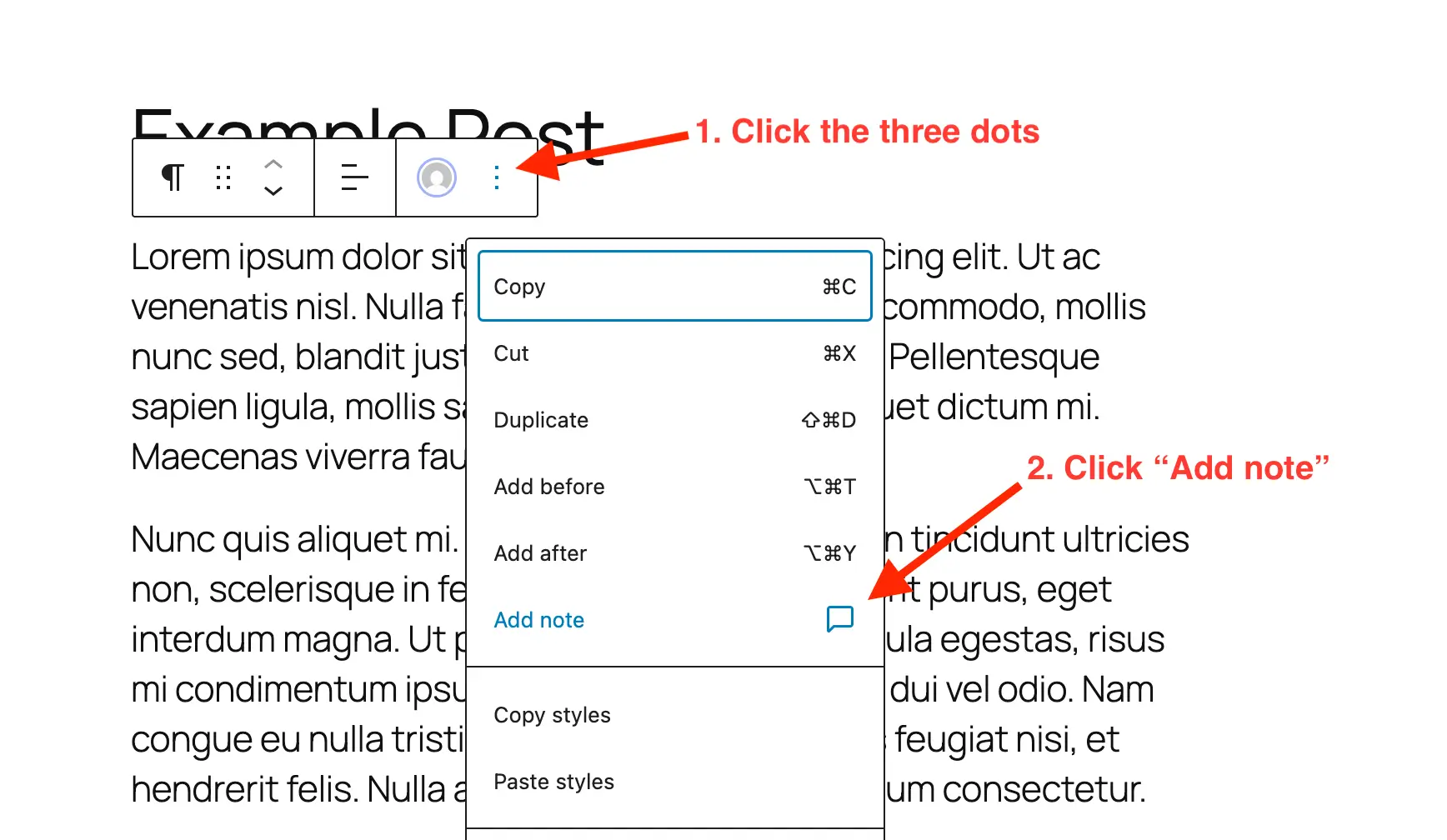
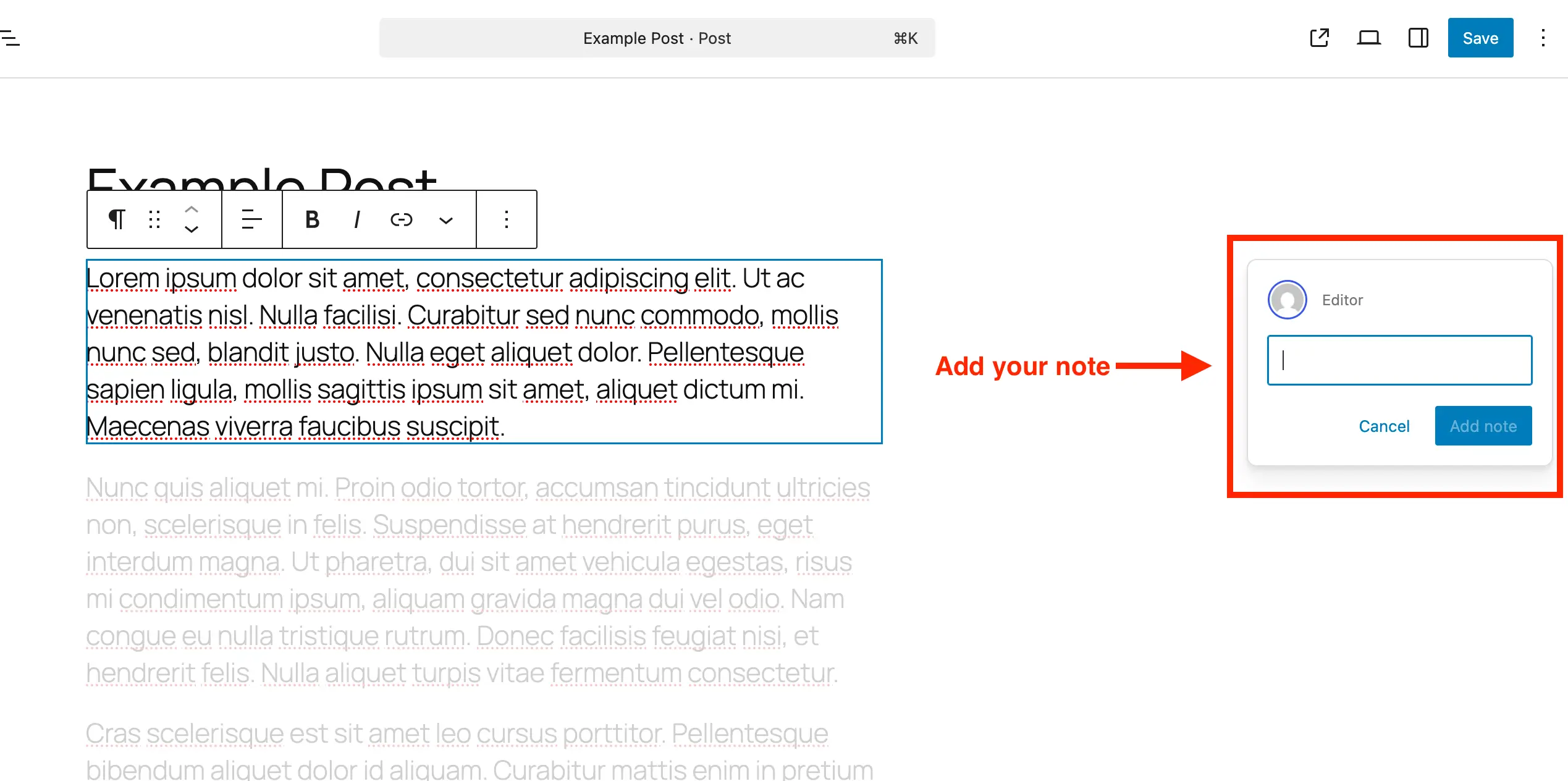
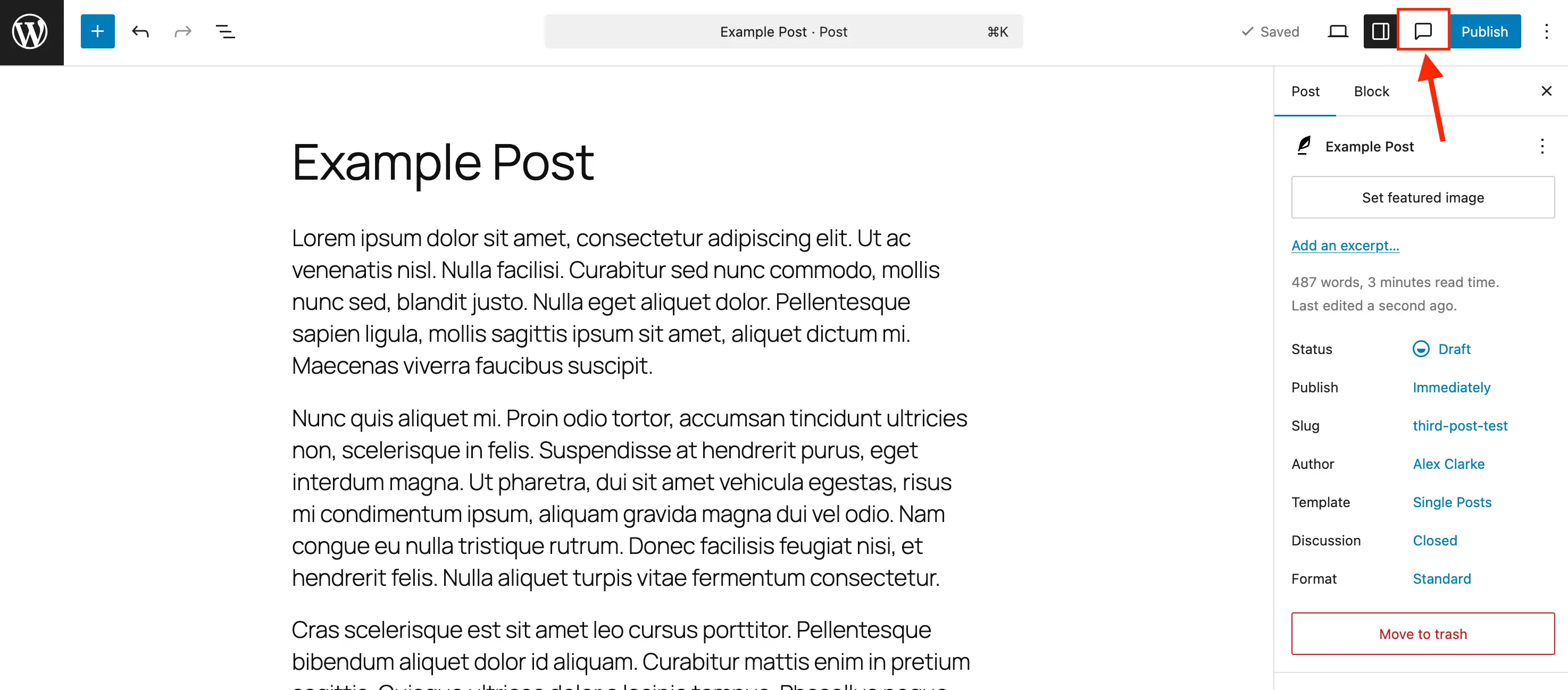
At its technological core, the WordPress Notes feature is engineered to mimic the intuitive functionality of collaborative document-editing suites while remaining strictly anchored to the block-based architecture of the Gutenberg environment. When a user navigates to a specific content element within a post or page, they can access the block’s contextual options menu to invoke the "Add Note" command.
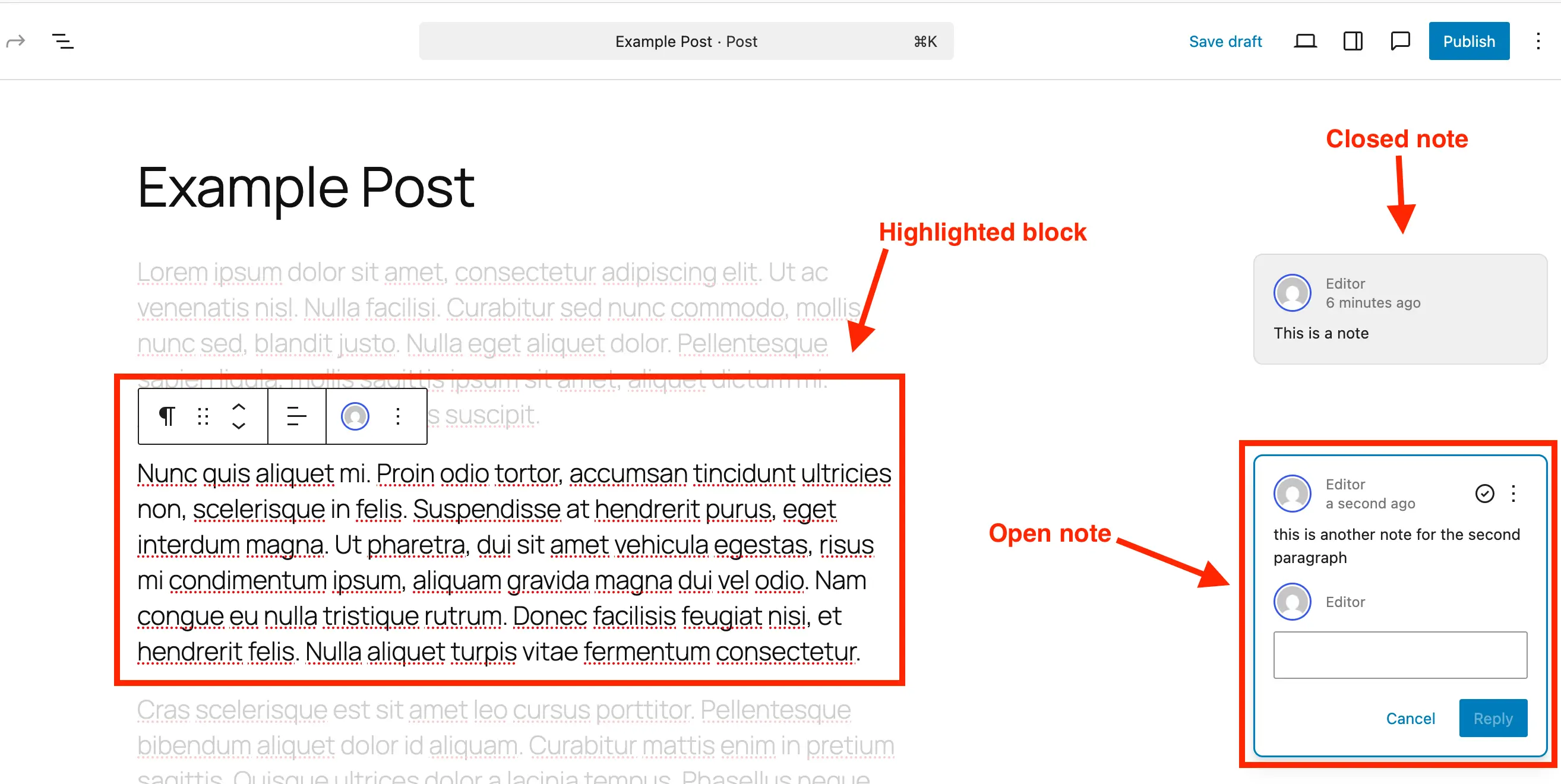
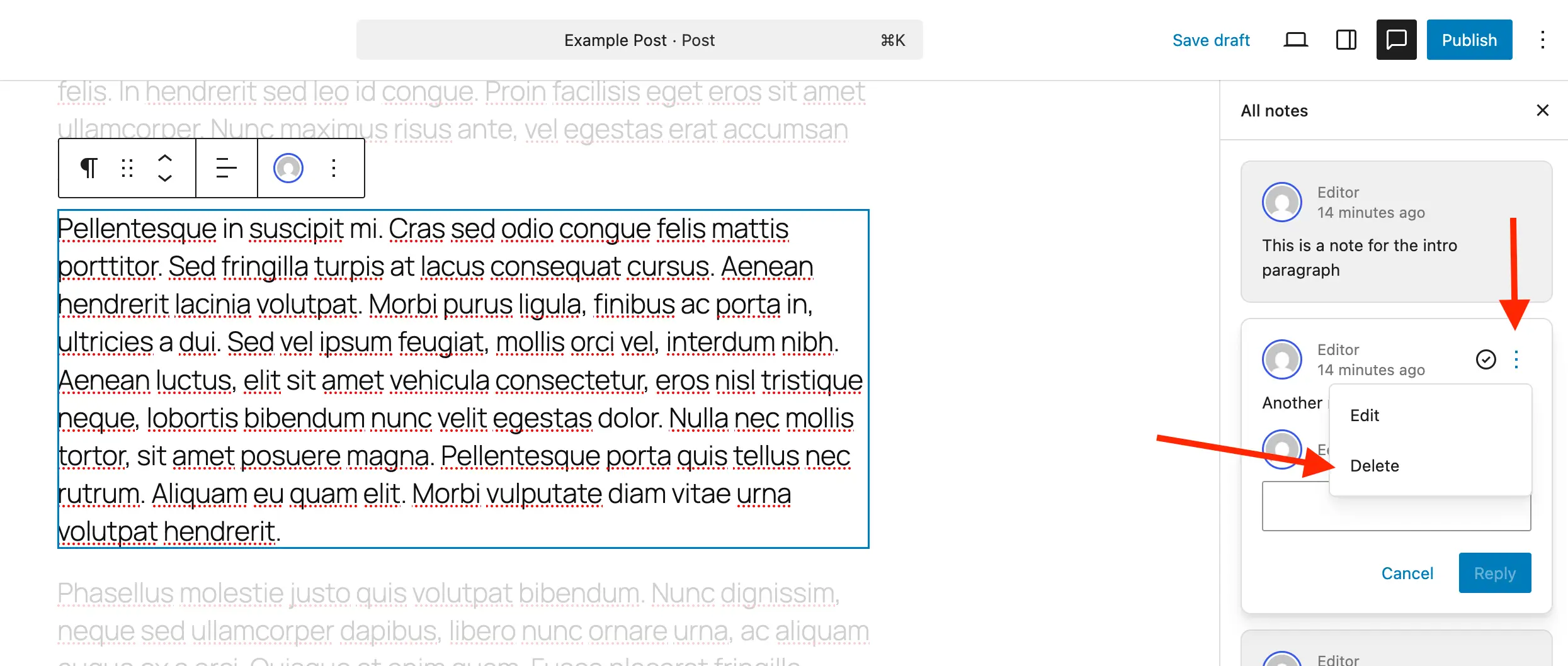
Once submitted, the feedback manifests as an interactive comment bubble anchored to the right-hand side of the editing interface. The visual presentation is purposefully designed to minimize cognitive load: clicking upon an individual note initiates a focus state where the targeted block remains brightly illuminated while the surrounding page content subtly fades into the background. This dynamic isolation ensures that reviewers and editors can concentrate entirely on the specific layout choice, grammatical correction, or stylistic adjustment under scrutiny.
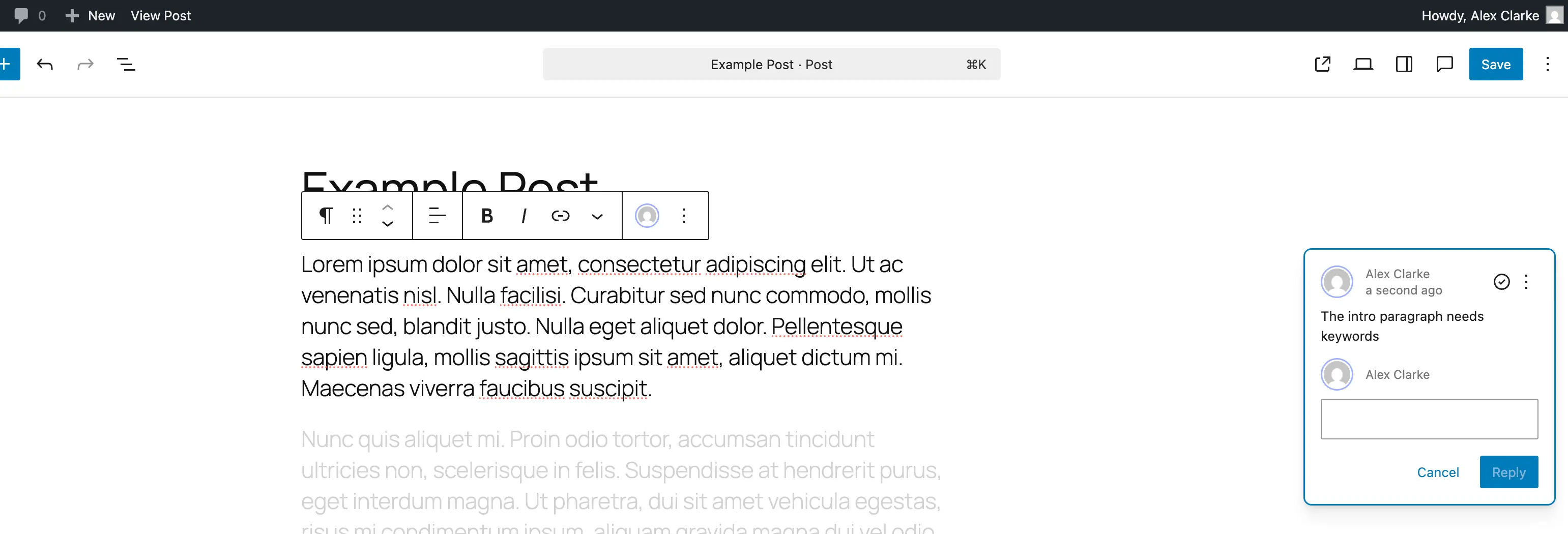
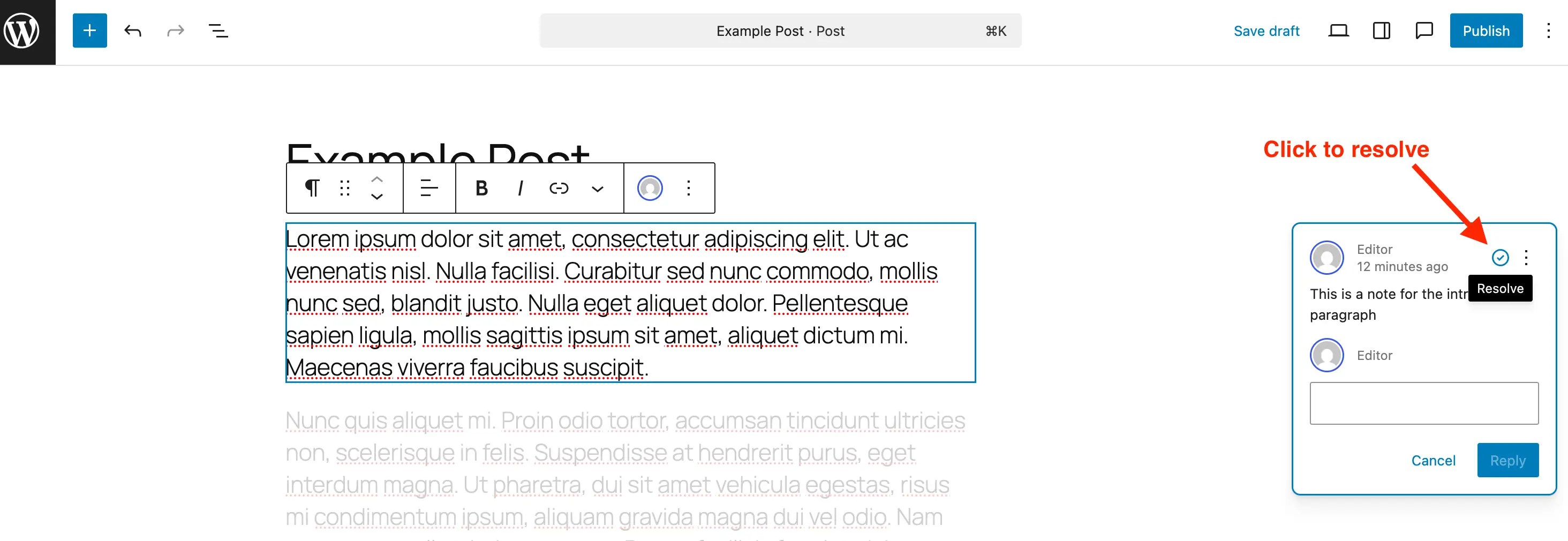
Furthermore, the system provides comprehensive thread management capabilities. Collaborators can reply directly to existing remarks, creating a linear history of discussion tied inextricably to the lifecycle of that specific block. Once a requested change has been successfully executed, users can click a resolution icon, which marks the item as complete. While resolved notes automatically vanish from the active editing margin to keep the workspace uncluttered, they remain accessible within a centralized Notes panel. This preservation ensures a transparent audit trail, allowing teams to review past decisions or reopen discussions if project requirements shift.
Streamlining Agency and Client Relationships
The introduction of native notes addresses one of the most persistent pain points in the web development and client-service industries: client review management. Historically, collecting revisions from non-technical clients often resulted in ambiguous feedback, such as "change the text in the middle of the page" or "fix the spacing on the second image." Developers and designers would then spend valuable billable hours deciphering these instructions.
By embedding feedback directly into the block editor, WordPress eliminates ambiguity. Clients and stakeholders are greeted with an intuitive interface where their commentary is visually bound to the exact component requiring modification. Agencies report that this native approach drastically reduces the iteration cycle for new website deployments. Rather than training clients on how to use third-party project management applications or forcing them to comprehend raw backend interfaces, teams can grant them restricted access to the WordPress editor, where the review process becomes as simple as clicking a block and leaving a remark.
Database Hygiene and Advanced Configuration
While the user-facing side of Notes emphasizes simplicity, developers and site administrators are provided with granular controls to manage how the feature behaves across diverse hosting environments and complex architectures.
A primary consideration for database administrators is performance optimization. Because notes are stored within the WordPress database alongside post meta and revisions, leaving large quantities of obsolete, resolved comments intact can lead to unnecessary database bloat, particularly on enterprise-level sites publishing hundreds of pages daily. To counteract this, core documentation and developer guidelines strongly recommend permanently deleting resolved notes once they have been fully addressed, maintaining a lean database structure.
By default, WordPress enables the Notes feature exclusively for standard posts and pages. However, modern WordPress ecosystems frequently rely heavily on Custom Post Types (CPTs)—ranging from product portfolios and real estate listings to internal knowledge bases and event schedules. To accommodate these tailored architectures, core developers have built explicit support hooks into the block editor API.
Developers utilizing management tools such as the Post Types Unlimited plugin can activate Notes for custom post types simply by checking a designated box within the plugin’s graphical settings interface. Alternatively, developers writing custom themes or plugins programmatically can enable the feature during the post type registration phase by appending the parameter "editor" => ['notes' => true] directly into the supports argument array. For legacy custom post types already established in production environments, administrators can execute a targeted initialization hook using add_post_type_support to seamlessly merge the functionality into existing editor configurations without disrupting other operational parameters.
Conversely, organizations that prioritize a strictly minimalist editing experience or wish to restrict third-party commentary on specific content types can deactivate the feature. Utilizing a straightforward filter on register_post_type_args, system administrators can systematically strip the notes parameter from designated post types, ensuring that the editor remains clean and tailored strictly to the organization’s internal governance model.
Broader Industry Implications and Future Outlook
The launch of in-editor notes represents a philosophical shift within the WordPress open-source project. Over the past several years, the trajectory of Gutenberg has clearly focused on competing with proprietary website builders and content management systems by offering all-inclusive design and publishing capabilities. By absorbing features traditionally relegated to external SaaS (Software as a Service) products—such as content staging reviews, proofreading tools, and collaborative feedback loops—WordPress is actively reducing the total cost of ownership for digital publishing operations.
For enterprises and publishers, minimizing the reliance on external collaboration tools translates directly to enhanced data security. In traditional workflows, transmitting page drafts, proprietary copy, and unreleased product imagery through third-party platforms creates potential security vulnerabilities. Keeping the entire collaborative review process encapsulated within the self-hosted WordPress environment ensures that sensitive intellectual property never leaves the organization’s controlled server infrastructure.
As the Gutenberg project continues its multi-phase roadmap—moving deeper into collaborative real-time editing and advanced site-building capabilities—features like Editor Notes lay the foundational infrastructure for more complex multi-user interactions. By standardizing how feedback is captured, resolved, and audited within the core software, WordPress has established a new benchmark for what content creators should expect from a modern publishing platform. The days of fractured communication channels and lost context are officially yielding to a more unified, efficient, and natively integrated digital workspace.
Related posts: