Building Local-First Web Applications in 2026 Architectures Challenges and the Future of Distributed Data

The landscape of web development has undergone a fundamental transformation as of mid-2026, driven by a paradigm shift from traditional request-response models toward local-first architecture. This architectural evolution, once considered an academic curiosity, has matured into a viable engineering standard for collaborative, high-performance, and privacy-centric applications. By prioritizing local data storage and background synchronization over constant server-side round-trips, developers are addressing the long-standing limitations of cloud-dependent software, particularly in environments with unstable connectivity or high latency requirements.
The Evolution of Data Ownership: From Thin Clients to Distributed Nodes
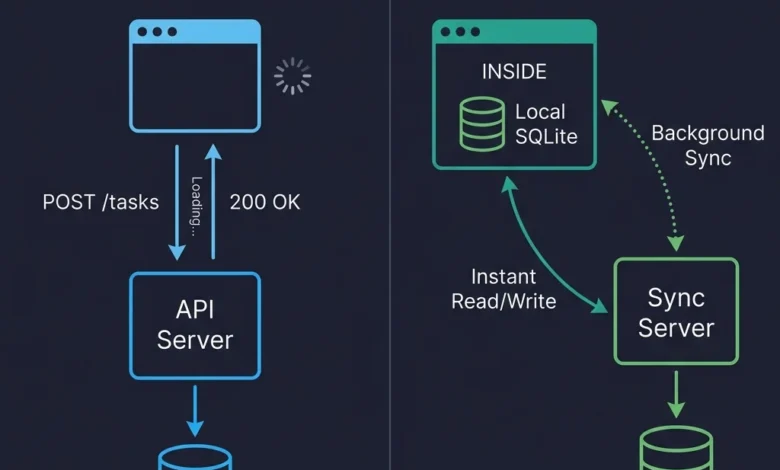
The shift toward local-first development represents a departure from the "thin client" philosophy that dominated the early 2010s. Under the traditional model, client applications served as transient views, requesting permission from a central server to read or modify data. In contrast, local-first architecture treats the client—whether a browser, mobile device, or desktop app—as a primary node in a distributed system.
The movement gained significant momentum following the 2019 publication of the "Local-First Software" research paper by Ink & Switch. The paper outlined seven core ideals: fast performance, multi-device support, offline capability, seamless collaboration, data longevity, privacy, and user ownership. While the tooling in 2019 was insufficient for mainstream adoption, the subsequent seven years have seen a surge in specialized sync engines, browser capabilities, and conflict-resolution libraries that have moved these ideals from a "wish list" to engineering requirements.
Distinguishing Local-First from Offline-First and PWAs
A common point of confusion in the industry remains the distinction between local-first and its predecessors. While often conflated, industry experts emphasize that local-first is a data architecture rather than a delivery mechanism.
- Offline-First: This approach focuses on handling network loss gracefully, yet the server remains the ultimate "source of truth." When connectivity is restored, the server’s state generally overrides local changes unless complex reconciliation logic is manually implemented.
- Progressive Web Apps (PWAs): These are delivery mechanisms that allow web applications to be installable and cached via service workers. While PWAs enhance performance and availability, they do not inherently change the underlying data ownership model.
- Local-First Architecture: In this model, the user’s device holds the primary copy of the data. The application reads and writes to a local database with zero latency. Synchronization with servers or other peers occurs in the background, treating the server as a peer with special authority for backup and access control rather than a gatekeeper.
Technical Infrastructure: The Rise of SQLite WASM and OPFS
The technical viability of local-first web apps in 2026 is largely due to the maturation of WebAssembly (WASM) and the Origin Private File System (OPFS). For years, developers were limited to localStorage, which is synchronous and restricted in size, or IndexedDB, which offers more space but features a notoriously difficult API and inconsistent performance.
The current industry standard involves running SQLite—a robust, relational database—directly in the browser via WASM. When paired with OPFS, SQLite can achieve high-performance, synchronous file access within Web Workers, providing a full SQL environment on the client side. This allows for complex queries, transactions, and indexing that were previously only possible on the server.
Data from 2025 performance benchmarks indicates that querying a local SQLite database for several hundred records typically takes under two milliseconds on modern hardware, compared to the 100-500 millisecond latency associated with traditional API requests over a standard 4G/5G connection. However, this performance comes with a "bundle tax"; compiling SQLite to WASM adds approximately 400KB (gzipped) to an application’s initial payload, necessitating strategic lazy-loading.
Synchronization and Conflict Resolution Strategies
The primary engineering challenge in local-first systems is reconciling changes made across multiple replicas. In 2026, the market has coalesced around two primary methodologies:
Conflict-Free Replicated Data Types (CRDTs)
Libraries such as Yjs and Automerge have become the gold standard for real-time collaborative text editing. CRDTs are mathematically designed to ensure that concurrent edits can always be merged without conflicts. Industry data suggests that Yjs is currently the most mature implementation, boasting a large ecosystem of integrations with popular rich-text editors.
Database Replication and Sync Engines
For applications that do not require character-by-character collaboration (such as project management tools or CRM systems), row-level replication is the preferred path. Tools like PowerSync and ElectricSQL facilitate synchronization between a server-side Postgres database and a client-side SQLite database.
PowerSync, for instance, utilizes a model where Postgres acts as the source of truth for the sync layer, while the client operates entirely against its local SQLite replica. This reduces the complexity for developers, as they can use standard SQL for both local operations and sync rules.
The Problem of Semantic Conflicts
Despite the mathematical guarantees of CRDTs or the efficiency of Last-Write-Wins (LWW) strategies, "semantic conflicts" remain a significant hurdle. A semantic conflict occurs when data merges cleanly at a structural level but results in a business-logic violation.
A classic example is a room booking system: two users may book the same 2:00 PM slot while offline. Structural merging will accept both entries, but the result is an impossible double-booking. Leading architects in 2026 recommend a "validate and flag" approach. Instead of the server rejecting the write—which can lead to state divergence and "ghost records" on the client—the server accepts the conflicting data but generates a "violation record." This record is synced back to the client, prompting the user to resolve the conflict manually, similar to a Git merge conflict but handled within the application UI.
Implementation Timeline and Industry Adoption
The trajectory of local-first adoption has followed a distinct chronology over the last decade:

- 2019-2021: Theoretical phase; early research by Ink & Switch; development of initial CRDT libraries.
- 2022-2023: Infrastructure phase; introduction of OPFS in major browsers; SQLite WASM becomes stable.
- 2024-2025: Proliferation of sync engines; startups like ElectricSQL, PowerSync, and Triplit enter the market; early production deployments in niche sectors (note-taking, design tools).
- 2026: Consolidation; local-first becomes a standard recommendation for collaborative SaaS; major frameworks begin offering first-class support for local data persistence.
Security, Authentication, and Schema Migrations
Moving the database to the client introduces unique security and maintenance challenges. Authentication in a local-first world typically involves using JWTs to secure the sync connection itself rather than individual REST endpoints.
Authorization is enforced at the sync boundary. Using "sync rules" or "shapes," servers ensure that only the data a user is permitted to see is ever replicated to their device. This is a critical security requirement, as the client device is not a trust boundary; any data stored locally is technically accessible to the user via browser developer tools.
Schema migrations also require a decentralized approach. Unlike a centralized server where a migration runs once, local-first apps must handle "migrations on a thousand devices." Developers must design additive migrations (adding columns or tables rather than renaming them) to ensure that users running older versions of the application can still sync data without triggering failures.
Broader Impact and Future Outlook
The implications of local-first architecture extend beyond mere performance. By keeping data on-device, applications can offer superior privacy and end-to-end encryption (E2EE), as the server only needs to store and relay encrypted blobs it cannot read. This aligns with increasing global regulatory pressure on data residency and user privacy.
Furthermore, the rise of local AI models (Local LLMs) is expected to synergize with local-first data. By having both the data and the processing power on the client, developers can build highly personalized, AI-driven experiences that do not require sending sensitive user information to a cloud provider.
However, industry experts warn of a "complexity budget." Local-first adds significant overhead in terms of architectural planning, sync logic, and debugging difficulty. For simple CRUD (Create, Read, Update, Delete) applications used in high-connectivity environments, traditional cloud-first models remain the more efficient choice.
As the web continues to evolve, the distinction between "online" and "offline" is blurring. The successful implementation of local-first web apps in 2026 demonstrates that the future of the web lies in distributed systems that prioritize the user’s local environment while utilizing the cloud as a powerful, secondary synchronization peer.