CSS container queries represent one of the most significant paradigm shifts in modern web development, yet industry adoption lags far behind technological readiness. Despite achieving robust browser support crossing approximately 94 percent globally, developers continue to rely primarily on traditional viewport-based media queries. This persistent hesitation stems largely from a fundamental misunderstanding of how container queries operate and a misplaced assumption that they serve the exact same functional purpose as their legacy counterparts.
To understand the current state of modern responsive design, it is necessary to examine the architectural evolution of cascading style sheets, the constraints of viewport metrics, and the practical implications of shifting responsive logic from the browser window down to individual component wrappers.
The Evolution of Responsive Design and Viewport Limitations
Since the introduction of responsive web design in the late 2000s, the browser viewport has served as the universal proxy for environmental adaptation. Media queries empowered developers to ask a single, binary question of the browser window: how wide is the screen right now? Based on that metric, layout rules governed the entirety of a web document, dictating macro-level structural shifts such as transitioning a website from a multi-column desktop grid to a single-column mobile view.
However, modern web architecture has evolved dramatically away from monolithic page designs toward modular, component-driven development systems. Reusable UI elements—such as cards, widgets, navigation menus, and form controls—are routinely deployed across diverse contexts within the same application. A single card component might appear in a wide, sprawling main content area on a large desktop monitor, or it might be squeezed into a narrow sidebar within that same layout.
When developers use traditional media queries to govern component layouts based solely on screen width, severe structural failures occur. If a card is styled to display horizontally via a media query threshold of 1024 pixels, that style fires on a massive 1920-pixel desktop monitor even if the card itself is restricted to a narrow sidebar grid cell measuring only 300 pixels wide. The viewport remains large, triggering the media query, while the internal container lacks the physical space required to render the component correctly. Consequently, content overflows, elements cramp, and the user interface deforms.
The State of Adoption and Industry Metrics
Industry surveys highlight a striking disparity between feature availability and real-world implementation. According to data compiled by the 2025 State of CSS survey, awareness of container queries is remarkably high, with roughly 86 percent of surveyed developers acknowledging their existence. Yet, actual utilization sits at a mere 41.4 percent.
This low adoption rate has not gone unnoticed by prominent figures in the web development community. During industry events such as SmashingConf Amsterdam, leading educators and developers have openly criticized the sluggish pace at which teams are integrating container queries into production codebases. This reluctance is particularly puzzling given that the capability for components to adapt natively to the size of their parent containers has historically dominated developer feature wishlists for over a decade.
Industry analysts attribute this lag to a conceptual hurdle. Because container query syntax bears a striking resemblance to media query syntax, developers frequently assume they are interchangeable tools. Treating container queries merely as a substitute for @media statements often results in implementation errors, leading frustrated developers to abandon the feature prematurely.
Macro Layout Versus Micro Layout: Defining the Boundaries
To deploy responsive design effectively in the modern web ecosystem, developers must establish a clear division of labor between macro layouts and micro layouts.
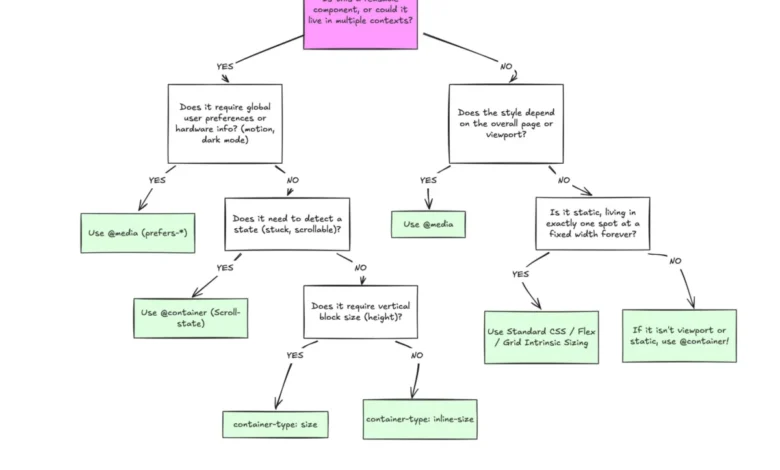
Macro layouts govern the overarching page structure, global navigation frames, primary grid systems, and system-level environmental preferences, such as detecting dark mode via prefers-color-scheme or identifying touch capabilities. For these global architectural concerns, traditional media queries remain entirely appropriate and structurally sound. The viewport is the correct reference point because the page structure inherently depends on the total available screen real estate.

Micro layouts, by contrast, govern the internal components that inhabit the macro structure. Container queries look inward rather than outward. Instead of asking how much space the entire device possesses, a container query asks a localized question: how much space is available for this specific component in this exact spot, right now? By registering a parent wrapper as a container using properties like container-type: inline-size, components become self-reliant entities capable of responding dynamically to their immediate surroundings.
Technical Mechanics and Practical Implementations
Implementing container queries requires a fundamental shift in markup and styling logic. Unlike media queries, which can target any element arbitrarily because the global viewport is always accessible to the document, container queries rely on a strict containment context. An element cannot query its own dimensions directly, as doing so would create an infinite computational loop. Instead, a parent wrapper must be explicitly declared as a container, allowing its descendant elements to adapt when the container crosses specific dimensional thresholds.
Beyond structural layout adjustments, container queries have transformed typographic scaling and internal component state detection. Historically, fluid typography relied heavily on viewport-relative units such as vw or vh paired with the CSS clamp() function. While effective for full-screen hero headers, viewport units fail when a component is relocated to a confined sidebar, causing text to scale inappropriately.
Container queries introduce dedicated relative units—such as cqi (container query inline-size) and cqb (container query block-size)—which can be paired with clamp() to achieve true component-level fluid typography. A card title styled with container units scales seamlessly in direct proportion to the size of its immediate parent container, entirely independent of whether the user is viewing the page on a smartphone or an ultra-wide monitor.
Furthermore, container queries offer advanced capabilities that surpass the limitations of traditional stylesheets, such as assisting with flexbox wrap detection. Because CSS lacks a native pseudo-class to detect when flex items wrap onto a new line, developers previously had to rely on JavaScript-based ResizeObserver APIs to monitor internal layout changes. By nesting container queries within flex items, developers can establish CSS-only workarounds that detect when a container’s inline size forces a state change, applying appropriate styling updates automatically.
Side Effects, Limitations, and Best Practices

While container queries provide powerful architectural benefits, they also introduce specific technical caveats that developers must navigate carefully.
The first notable constraint involves containment rules. As established, an element cannot serve as both the container and the target of its own query. Attempting to apply container-type and a corresponding @container rule to the exact same selector will fail. Proper implementation requires a dedicated wrapper element to act as the boundary.
The second consideration involves the choice of containment type. Querying a container’s complete size (incorporating both inline and block dimensions) can inadvertently cause elements to collapse to a zero-pixel height if explicit vertical dimensions are omitted. This occurs because the browser calculates container dimensions independently of the children unless specified otherwise. Consequently, industry best practices recommend defaulting to inline-size queries unless block-size measurements are strictly necessary.
Finally, container queries do not currently support custom properties (CSS variables) directly within their conditional logic. Developers cannot evaluate a container query against a variable defined on the root element, such as @container (min-width: var(--breakpoint-lg)). This restriction exists to prevent circular dependency loops where a query-driven style change alters the variable being evaluated, leading to unpredictable rendering behavior.
Broader Implications for the Future of Web Development
The slow but steady transition toward container queries reflects a mature realization within the web development community: component reusability requires localized layout logic. With the modern web encompassing thousands of unique viewport sizes across an ever-expanding array of form factors—ranging from foldable mobile devices to desktop monitors and automotive dashboards—relying solely on global screen widths is no longer sustainable.
By establishing clear distinctions between macro and micro layouts, development teams can decouple component behavior from the browser window. Container queries do not render media queries obsolete; rather, they complete the responsive design toolkit by solving the precise structural limitations that viewport-only design left unaddressed. As industry education improves and tooling matures, container queries are poised to transition from an underutilized advanced feature into a foundational standard of professional web engineering.