The Ultimate Guide to Choosing the Best WordPress Media Offload Plugins for Scalability and Performance

Managing a website’s media library is a task that often escapes the attention of site administrators until performance metrics begin to degrade. As a WordPress site matures, the accumulation of high-resolution images, video content, and PDF documents creates a significant burden on the primary web server. This storage bloat directly impacts server response times, increases backup sizes, and escalates hosting costs. To address these challenges, many developers turn to media offloading—the process of transferring assets from the local WordPress server to specialized cloud storage solutions, typically paired with a Content Delivery Network (CDN) to accelerate global delivery.

The technical landscape for these solutions is fragmented, with pricing models ranging from storage-based fees to traffic-dependent costs. Choosing the right plugin requires a nuanced understanding of a site’s specific architecture, whether it is a media-heavy photography portfolio or a high-traffic e-commerce storefront.
The Rationale Behind Media Offloading
The primary motivation for offloading media is the optimization of server resources. In the current digital landscape, high-resolution media—particularly 4K video—is a leading driver of internet traffic. According to recent data from industry analysts, digital video ad spend continues to grow at an exponential rate, and the storage requirements for such assets can quickly exceed the limits of standard shared or VPS hosting plans.

Beyond storage, the integration of a Content Delivery Network is a standard byproduct of offloading. By storing media on a distributed network of servers located closer to the end-user, site owners can drastically reduce latency. This is particularly vital for achieving high Core Web Vitals scores, as search engines increasingly prioritize Largest Contentful Paint (LCP) metrics. While image optimization plugins can compress files, offloading addresses the foundational storage and bandwidth bottlenecks that image optimization alone cannot resolve. Furthermore, offloading off-premises often enhances data security and compliance, as cloud providers typically offer robust, redundant infrastructure that surpasses the capabilities of standard web hosting environments.
Comparative Analysis of Leading Offload Solutions
The market for WordPress offload plugins is characterized by distinct philosophies, ranging from comprehensive all-in-one platforms to highly specialized, developer-centric tools.

1. Infinite Uploads: The All-In-One Ecosystem
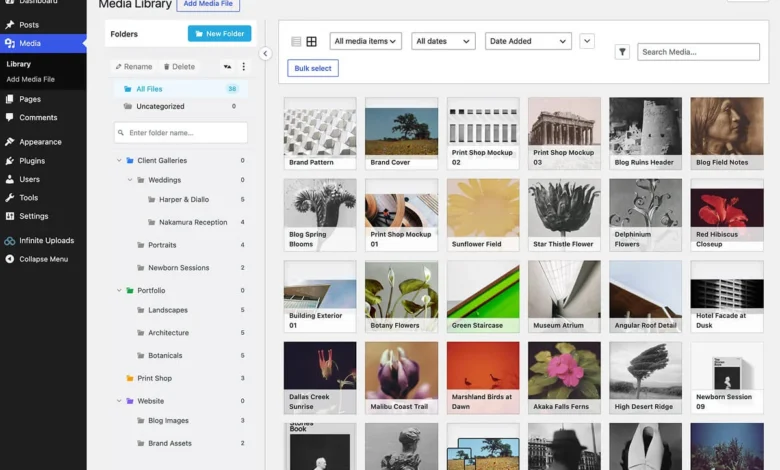
Infinite Uploads has emerged as a comprehensive solution for site owners seeking a unified management system. Unlike plugins that strictly handle offloading, this platform integrates cloud storage, a global CDN, automated image optimization, media library organization via folders, and a proprietary video player.
Its architecture is designed for ease of use, with a dashboard that enables rapid deployment. From a strategic perspective, it is particularly well-suited for digital agencies managing multiple client sites, as its pricing model is based on aggregate storage and bandwidth rather than per-site or per-file constraints. This provides a level of predictability in operational costs that many traditional enterprise solutions lack.

2. WP Offload Media: The Developer Standard
WP Offload Media, developed by Delicious Brains, has long been a staple in the professional WordPress development community. It is designed to provide granular control over the integration with major cloud providers, most notably Amazon S3 and Cloudflare R2.
The plugin is geared toward users who require technical precision. Unlike "plug-and-play" solutions, it requires the manual configuration of credentials within the wp-config.php file. While this creates a higher barrier to entry for non-technical users, it grants developers the ability to fine-tune asset delivery, making it the preferred choice for complex, high-traffic applications that require strict compliance with specific cloud infrastructure protocols.

3. Next3 Offload: Versatility and Integration
Next3 Offload, by ThemeDev, differentiates itself through its extensive compatibility list. It supports a vast array of S3-compatible providers, including Bunny, Google Cloud, DigitalOcean, and Wasabi. This flexibility is a significant advantage for organizations that have already committed to a specific cloud storage vendor.
The platform employs a tiered subscription model, where advanced features such as WebP conversion and CSS/JS asset offloading are restricted to higher-tier licenses. A notable inclusion is the availability of a lifetime license option, which serves as a hedge against the recurring subscription fatigue often seen in the SaaS market.

4. Advanced Media Offloader: The Lightweight Alternative
For users who prefer a lean, open-source approach, Advanced Media Offloader provides a robust, no-frills foundation. It is a free-to-use plugin available through the WordPress repository, emphasizing functionality over bundled services. It lacks a built-in CDN, meaning users must configure their own delivery network separately.
This plugin is ideal for developers who require a programmatic interface to manipulate media offloading via hooks and filters. Its lack of premium tiers makes it an excellent choice for budget-constrained projects where the administrator possesses the technical acumen to manage the infrastructure manually.

5. Offload, AI, and Optimize with Cloudflare Images
This solution is specialized for the Cloudflare ecosystem. It leverages Cloudflare’s infrastructure to handle media storage, image optimization, and AI-driven tagging. The plugin is characterized by a simplified interface, utilizing toggle-based controls to automate the offload process.
The inclusion of AI features—such as automated image captioning and metadata generation—positions this plugin as an innovative tool for large-scale content repositories. It serves as a prime example of how niche-specific plugins are providing competitive advantages by leveraging the proprietary features of large cloud providers.

6. Optimole: Prioritizing Image Weight
Optimole approaches the problem from the perspective of image optimization rather than raw storage management. It acts as a real-time, cloud-based image processing engine. It serves images based on the specific device and connection speed of the visitor, which is a departure from traditional "one-size-fits-all" image serving.
With over 200,000 active installations, it is the most widely adopted solution in this comparison. However, users should be aware of the "inactive account" policy: if a subscription is allowed to lapse, the service may purge stored media, necessitating a careful migration plan before cancellation.

Strategic Implications and Decision Framework
The selection of a media offload plugin is no longer a matter of choosing the most popular tool, but rather identifying the specific pain point the site faces. The following framework serves as a guide for decision-makers:
- For Agencies: Solutions like Infinite Uploads provide the best scalability, as their billing model aligns with the cumulative growth of multiple client sites.
- For High-Performance Developers: WP Offload Media remains the industry standard for those who require direct control over their S3-compatible buckets and asset delivery headers.
- For Cloud-Native Organizations: If the infrastructure is already built on Cloudflare or specific S3-compatible providers, Next3 or the Cloudflare-specific plugin provides the most seamless integration.
- For Image-Heavy Blogs: Optimole’s visitor-based pricing and real-time scaling ensure that images are always served at the optimal weight, regardless of the user’s device.
Future Outlook
The trajectory of the WordPress ecosystem suggests that media offloading will become an increasingly standard requirement rather than an optional optimization. As mobile-first indexing becomes more sophisticated and the demand for high-definition video content continues to rise, the limitations of single-server hosting will become more apparent.

Furthermore, the rise of AI in image processing—as seen in the Cloudflare-centric plugins—indicates that the next generation of offload tools will do more than just store files; they will intelligently manage, label, and optimize them in real-time. Site owners should prioritize solutions that offer data portability, allowing for future transitions between cloud providers as pricing and performance landscapes evolve. By selecting a tool that balances current technical needs with long-term infrastructure flexibility, administrators can ensure their WordPress sites remain resilient, performant, and scalable in an increasingly media-centric web.