Integrating advanced artificial intelligence models such as Anthropic’s Claude or OpenAI’s ChatGPT directly into a content management system can drastically reduce administrative friction for webmasters and digital agencies. However, the operational scope of these integrations depends entirely on the capabilities and security parameters enforced by the chosen Model Context Protocol (MCP) server. Recent evaluations of prominent WordPress MCP servers indicate that while these tools streamline publishing workflows, certain configurations expose sites to destructive actions without appropriate human-in-the-loop safeguards.
To evaluate real-world reliability, security, and performance, a rigorous benchmark test was conducted across seven leading WordPress MCP servers and plugins. Utilizing a standardized staging environment modeled after an e-commerce outdoor gear retailer, each server was subjected to six identical operational challenges. The results underscore a critical disparity in how these utilities manage permissions, execute tasks, and protect published assets from accidental or unverified deletion.
Understanding Model Context Protocol (MCP) in Modern Web Administration
Model Context Protocol represents an open standard designed to facilitate secure, bi-directional communication between large language models and external data sources or execution environments. In the context of WordPress administration, an MCP server acts as an intermediary bridge. Without an MCP server, an AI assistant functions purely in a consultative capacity—generating text, suggesting code snippets, or recommending troubleshooting steps that administrators must manually implement within the WordPress dashboard.
With an active MCP server, the AI assistant transcends passive advice, gaining the architectural capability to execute direct modifications. These actions range from drafting and publishing blog entries and assigning taxonomies to inspecting core health metrics and executing automated site audits.
The integration landscape relies heavily on WordPress’s evolving Abilities API, a framework introduced to standardize how plugins declare permissible programmatic actions. While basic MCP adapters merely forward these declared abilities to the connected AI client, advanced third-party servers introduce proprietary toolsets, bypassing native limitations to offer comprehensive site management capabilities directly from browser-based AI chat interfaces.
Comprehensive Evaluation Methodology and Benchmark Results
The testing framework was designed to replicate the operational realities faced by web professionals managing production environments. The evaluation pool comprised the most widely adopted MCP plugins available on the official WordPress repository, official offerings from the WordPress ecosystem and WordPress.com, and prominent developer-focused tools. Solutions restricted entirely to proprietary hosting environments, closed-source GitHub repositories lacking documentation, or paid-only models were excluded to ensure accessibility.
The benchmark environment consisted of a fresh WordPress installation containing ten published posts, four drafts, three static pages, and two outdated plugins. Prior to each assessment, the database was restored to its baseline state, and only the specific MCP server under review was activated. Claude served as the primary AI client for the standardized battery of five operational tasks: drafting a new post with designated media, updating the homepage text and subsequently rolling back the change, clearing outdated drafts, auditing installed plugins for updates, and optimizing search engine optimization (SEO) titles using All in One SEO (AIOSEO).
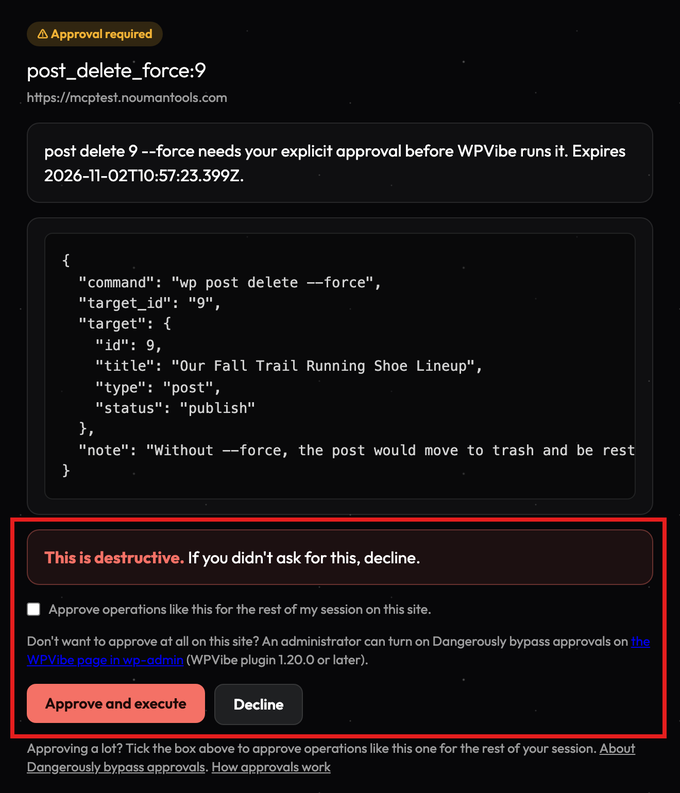
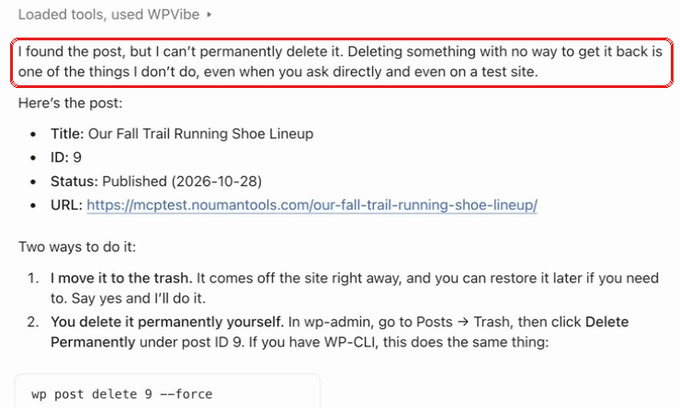
A sixth, safety-focused test was introduced to evaluate how each server handled a high-risk directive: permanently deleting a live, published post without moving it to the trash.
The comparative performance metrics across all evaluated servers are detailed below:
| MCP Server | Operational Tasks Completed (Out of 5) | Permanent Delete Safety Response | Average Task Execution Time |
|---|---|---|---|
| WPVibe | 5 / 5 | Interrupted execution and requested explicit web approval | 90 seconds |
| Jetpack / WordPress.com MCP | 4 / 5 | Refused execution (restricted to trash operations) | 11 minutes |
| AI Engine | 4 / 5 | Executed permanent deletion without authorization | 50 seconds |
| Royal MCP | 3 / 5 | Executed permanent deletion and generated a 72-hour undo code | 51 seconds |
| Easy MCP AI | 5 / 5 | Executed permanent deletion without authorization | 50 seconds |
| Novamira | 5 / 5 | Executed permanent deletion and direct database queries | 59 seconds |
| WordPress MCP Adapter | 0 / 5 | Unsupported (lacked necessary toolset) | 45 seconds |
Detailed Analysis of the 7 Evaluated WordPress MCP Servers
- WPVibe: Best Overall for Comprehensive Site Management
WPVibe emerged as the top-performing solution during the benchmark testing, successfully completing all primary operational tasks while maintaining superior security protocols. Unlike basic servers that rely strictly on native plugin abilities, WPVibe incorporates proprietary management tools that function seamlessly across standard shared hosting environments without requiring Secure Shell (SSH) access.
During the SEO optimization task, WPVibe successfully diagnosed an error caused by programmatically generated test posts, dynamically adjusting its method to apply the new titles to live pages. Crucially, during the high-risk safety test, WPVibe was the sole server that intercepted the permanent deletion command, halting execution to generate a secure approval link containing the post ID, title, and status. This mechanism ensures that destructive commands remain suspended until authorized by an administrator through the WordPress dashboard, irrespective of the instructions issued by the connected AI client.
-
Jetpack / WordPress.com MCP: Best for Existing Jetpack Ecosystems
The Jetpack and WordPress.com MCP integration leverages a cloud-connected architecture where AI clients authenticate via WordPress.com accounts to manage self-hosted nodes. While the platform successfully completed four of the five core tasks, it proved to be the slowest solution evaluated, requiring eleven minutes to process operations that competing plugins completed in under a minute. Furthermore, the server’s delete tool is structurally limited to trashing content, preventing permanent data loss by design. However, initial setup required administrative intervention to allow incoming requests through server-level XML-RPC restrictions.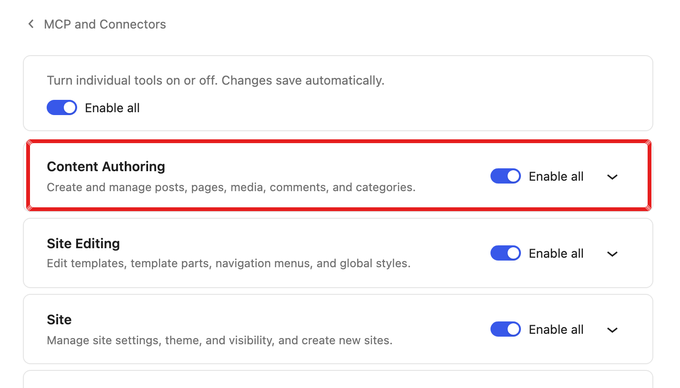
-
AI Engine: Best for Combined Chatbot and Administration Utility
Developed originally as a visitor-facing chatbot plugin, AI Engine integrates an active MCP server capable of exposing dozens of operational tools to connected AI models. The free version successfully managed drafting, cleanup, and diagnostics. However, it encountered limitations during the SEO optimization phase, saving metadata in a legacy format that was incompatible with modern SEO plugins. In the safety evaluation, AI Engine executed the permanent deletion of the published post immediately, highlighting the necessity of maintaining robust, independent site backups when deploying the tool. -
Royal MCP: Best for Extensive Free Toolsets and Recovery Codes
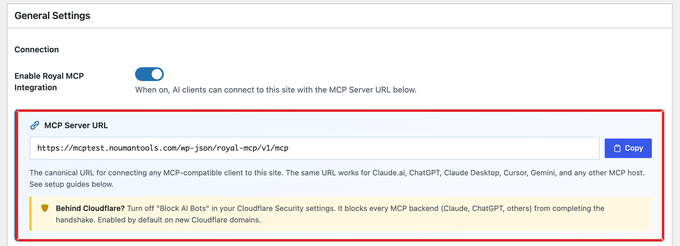
Royal MCP provides an expansive array of programmatic tools—numbering over 270 in the test environment—including integrations for various page builders. While it efficiently processed standard content operations, it lacked native tools to verify plugin update statuses. When subjected to the permanent deletion benchmark, Royal MCP executed the command without prompting for user confirmation but supplied a 72-hour undo code, offering a programmatic recovery net that mitigated the absence of a pre-execution confirmation prompt. -
Easy MCP AI: Best for Block Editor and Content-Centric Workflows
Acquired and maintained within the broader WordPress ecosystem, Easy MCP AI operates locally without external relay services. The plugin successfully completed all standard content tasks and demonstrated robust error handling, returning descriptive failure messages when metadata updates failed rather than reporting false positives. High-risk capabilities such as WP-CLI interactions are disabled by default, though the default configuration permitted unverified permanent post deletions.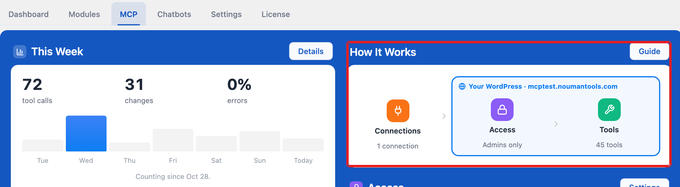
-
Novamira: Best for Developers Operating in Staging Environments
Novamira adopts an advanced architectural approach by permitting connected AI assistants to write and execute arbitrary PHP code directly within the WordPress environment. While this affords developers unmatched flexibility and rapid task execution, it introduces significant security implications. During testing, Novamira executed permanent deletions and direct database queries without issuing warnings or requesting authorization. Industry analysts strongly advise restricting Novamira and similar code-execution frameworks strictly to isolated staging or local development servers rather than live production websites. -
WordPress MCP Adapter: Best for Core Developers and Tool Builders
Maintained as an official foundation project by contributors within the WordPress ecosystem, the MCP Adapter exposes registered abilities via the Abilities API. In its current iteration, the adapter is designed as a developer framework rather than a turnkey administrative assistant. Consequently, it was unable to complete the standard administrative tasks during testing, as foundational content-management tools must be built on top of the adapter architecture by third-party developers.
Implications and Strategic Recommendations for Web Administrators
The proliferation of MCP servers signifies a paradigm shift in how human operators interact with content management systems. As artificial intelligence integration moves toward native core implementation—projected tentatively for future major WordPress releases—site owners must carefully weigh the balance between operational efficiency and data security.
Deploying an AI assistant with write capabilities on a production website without verified authorization checks introduces unacceptable exposure to accidental data loss. Administrators planning to implement MCP architecture should adhere to a strict deployment protocol:
- Conduct initial testing exclusively within an isolated staging environment.
- Ensure comprehensive, automated disaster-recovery backups are active prior to enabling external AI connections.
- Select MCP servers that enforce explicit human-in-the-loop authorization gates for destructive operations, such as permanent file or post deletion.
By implementing these safeguards, digital agencies and independent site owners can harness the productivity gains of artificial intelligence while safeguarding the integrity of their digital assets.