How to Resolve the YouTube TV This Video Format Is Not Supported Error on New Hardware

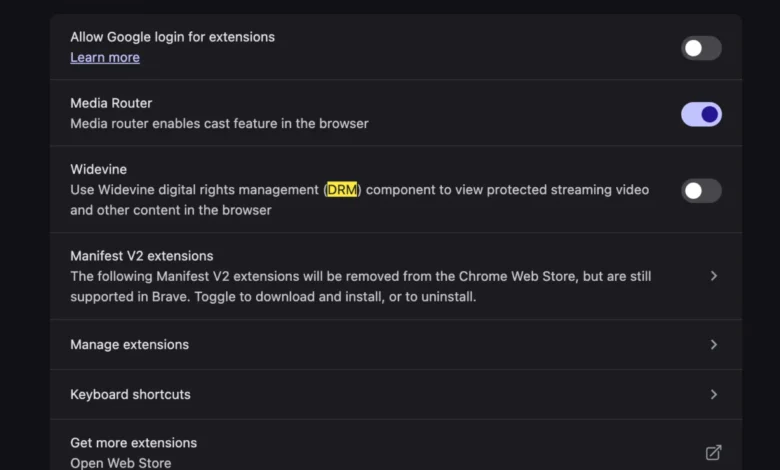
The transition to a new computing device is frequently marketed as a seamless upgrade, characterized by increased processing power, improved battery efficiency, and the removal of legacy software bloat. However, for many users migrating to the latest hardware iterations, such as the newest MacBook models, the experience is occasionally marred by compatibility issues involving Digital Rights Management (DRM) and browser-based media playback. One prominent issue that has emerged in recent months is the persistent "This video format is not supported" error when attempting to access YouTube TV via a web browser. While this message suggests a fundamental incompatibility with the video codec, the root cause is frequently related to the status of Widevine, a Google-owned DRM technology, within the browser’s configuration settings.
The Mechanism of Digital Rights Management in Browsers
To understand why a brand-new, high-performance machine might fail to render a stream that works on an older device, one must first examine the role of Encrypted Media Extensions (EME). Content providers, particularly those offering live television broadcasts like YouTube TV, utilize DRM to prevent the unauthorized copying and redistribution of copyrighted media.

Widevine is the most widely deployed DRM solution in the modern web ecosystem. It functions by creating a secure environment—often referred to as a Trusted Execution Environment (TEE)—that decrypts media content locally within the browser. When a user navigates to a platform like YouTube TV, the service queries the browser to ensure that it supports the required DRM module. If the browser lacks the necessary permission to execute Widevine, or if the module is disabled, the platform defaults to a generic error message, falsely signaling a codec incompatibility rather than a security handshake failure.
Chronology of the Compatibility Conflict
The rise of these playback errors on new hardware often coincides with the initial setup phase of a new operating system or browser installation. When a user migrates their data or performs a clean install, browser profiles are often reset to their default security parameters.
- Initial Hardware Provisioning: Upon booting a new MacBook or high-end PC, users install their preferred browsers. Chrome, Edge, and other Chromium-based browsers come pre-bundled with Widevine components, but they do not always enable them by default depending on the security policy of the operating system.
- The Handshake Failure: When the user logs into YouTube TV, the platform initiates a handshake to verify the client’s ability to handle encrypted streams.
- Triggering the Error: Because the browser is either restricted by the OS security layer or the user has adjusted privacy settings to block "protected content," the handshake fails. The platform, unable to determine the exact reason for the failure, delivers the "This video format is not supported" notification to the user.
- Resolution Phase: Once the user navigates to the browser settings—specifically under the "Protected Content" or "Site Settings" section—and grants permission for Widevine execution, the handshake succeeds, and playback resumes normally.
Supporting Data and Technical Context
Industry data suggests that the move toward browser-based media consumption has surged by over 40% since 2020. As streaming services transition away from proprietary apps toward Progressive Web Apps (PWAs), the burden of media management has shifted heavily onto the browser’s rendering engine. According to recent performance metrics from the streaming industry, over 65% of all browser-related playback errors are not linked to bandwidth or internet speed, but to configuration errors involving DRM, hardware acceleration, or outdated browser binary files.

Widevine operates in three levels of security, with Level 1 being the most secure, where decryption and video processing occur entirely within the hardware. Modern Apple Silicon (M-series chips) is highly optimized for these processes, yet the software bridge between the operating system’s privacy controls and the browser’s media engine requires explicit user confirmation. This is a design choice aimed at user privacy, preventing third-party websites from gaining persistent access to hardware-level identifiers without consent.
Official Perspectives and Industry Standards
While Google has not released a formal statement regarding the specific error message wording, representatives from the Chromium project have frequently noted that "generic error messaging" is a deliberate choice to mitigate the risk of providing technical information that could be exploited by malicious actors to bypass DRM. By providing a vague error, the service avoids confirming whether the failure was due to a missing component or an intentional block.
Industry analysts observe that this conflict is a byproduct of the tension between user-controlled security and the content industry’s demand for piracy protection. As browser manufacturers like Mozilla, Google, and Microsoft continue to tighten privacy defaults—such as the recent push toward disabling third-party tracking cookies and hardware-level fingerprinting—the threshold for what a website considers a "secure" playback environment continues to rise.

Broader Implications for the Digital Ecosystem
The prevalence of such issues serves as a case study for the "complexity tax" inherent in modern computing. As hardware becomes more specialized, the software layers—operating systems, browsers, and DRM middleware—must communicate with increasing precision. When one layer fails, the end-user experience suffers.
For the average consumer, the shift away from local codecs (like the traditional installation of VLC or QuickTime plugins) to cloud-based, DRM-managed streaming is largely invisible until a failure occurs. The transition from the "codec era" to the "browser-stream era" has undeniably simplified the installation process for most, but it has replaced manual troubleshooting with obscure settings menus.
This scenario also highlights the increasing importance of Real User Monitoring (RUM). Developers of web platforms are now tasked with implementing more sophisticated diagnostic tools that can distinguish between a legitimate hardware failure and a simple permission toggle. If a service can accurately detect that a user simply needs to enable Widevine, it can provide a guided prompt, thereby reducing support tickets and churn.
Conclusion and Best Practices
For those navigating similar issues on new machines, the solution is rarely a hardware defect, but rather a misaligned security policy. Users should verify the following steps when encountering playback errors:
- Verify Browser Security Settings: Navigate to the browser’s privacy or site settings menu to ensure that "Protected Content" or "Widevine Content Decryption Module" is set to "Allow" or "Enabled."
- Update Browser Binaries: Ensure the browser is running the latest version, as the Widevine module is often updated alongside the browser’s core to address security vulnerabilities.
- Clear Site Data: In some instances, a cached "handshake token" from an old device might be causing a conflict. Clearing cookies and cache specifically for the streaming provider can force a fresh negotiation.
- Evaluate Extensions: Browser extensions that harden security or block scripts can sometimes interfere with the DRM handshake. Temporarily disabling these can isolate whether the browser’s native settings or a third-party add-on is the culprit.
As the industry continues to iterate on these standards, the goal remains a frictionless experience. However, until such a time as browsers and streaming platforms can resolve these permission handshakes in the background, users must remain aware that the sophistication of modern hardware demands a corresponding level of user awareness regarding browser security configurations. The "This video format is not supported" message, while frustrating, is ultimately a symptom of a highly secure, if occasionally over-sensitive, digital environment designed to protect the integrity of media distribution in an age of constant connectivity.