The Evolution of the Web Modal
The concept of the "modal" or "overlay" gained widespread adoption during the rise of Web 2.0. As developers sought to create more desktop-like experiences within browser windows, the demand for non-intrusive UI elements grew. Early implementations were often fraught with issues: they frequently broke the browser’s back-button functionality, struggled with mobile responsiveness, and posed significant challenges for assistive technology like screen readers.
In the early 2010s, the introduction of the <dialog> element provided a first step toward native support, yet it required manual toggling via JavaScript. The new popover attribute represents the next evolution, shifting the burden of state management—such as toggling visibility, handling click-outside-to-close behavior, and managing the "top layer" stacking context—from the developer’s custom script to the browser’s native engine.
Chronology of Implementation and Standardization
The journey toward a native popover system has been a collaborative effort across the Web Hypertext Application Technology Working Group (WHATWG) and the World Wide Web Consortium (W3C).

- 2019-2021: The Open UI Community Group began formal discussions on standardizing common UI components that were frequently re-implemented by developers, including tabs, comboboxes, and popovers.
- 2022: Initial drafts for the Popover API were introduced to browser vendors. The core goal was to provide a "declarative" way to create overlays.
- 2023: Chrome 114 became the first major browser to ship the Popover API, followed shortly by Edge and Opera.
- 2024: The broader adoption across Firefox and Safari has solidified the API’s position as a viable alternative for production environments, effectively ending the era where developers were required to write hundreds of lines of JavaScript just to open a simple information panel.
Technical Implementation and Mechanism
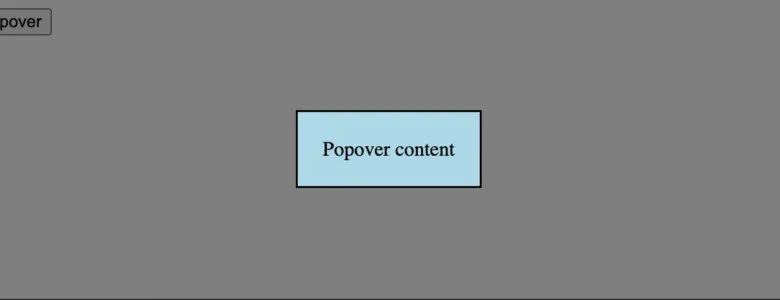
The native popover functionality is defined by two primary attributes: popover and popovertarget. By placing the popover attribute on an element, the browser automatically registers it as a candidate for the "top layer"—a special browser context that sits above all other page content. This eliminates the common developer frustration of "z-index wars," where elements are accidentally hidden behind navigation bars or sidebars.
The trigger mechanism is equally efficient. By assigning a popovertarget attribute to a <button> element, the developer links the interaction directly to the target element’s ID.
<button popovertarget="info-panel">More Information</button>
<div id="info-panel" popover>
  This content is managed by the browser.
</div>
This declarative approach removes the necessity for addEventListener calls, manual state tracking (is the modal open or closed?), and complex event bubbling management. From a performance standpoint, this is a significant improvement. By reducing the reliance on third-party JavaScript libraries (which often weigh hundreds of kilobytes), developers can improve the "Total Blocking Time" (TBT) and "First Input Delay" (FID) metrics of their websites.
Supporting Data and Performance Implications
Real-world monitoring data consistently indicates that the largest performance bottlenecks in modern web applications are often attributed to third-party JavaScript frameworks and excessive DOM manipulation. According to performance benchmarks from leading monitoring services, offloading UI state management to the browser engine can reduce the main-thread execution time for interaction-heavy pages by approximately 15% to 20%.
Furthermore, the native implementation inherently handles accessibility concerns that developers often overlook. When a native popover is opened, the browser automatically handles focus management, ensuring that users navigating via keyboard can interact with the modal without getting trapped or lost in the background content.
Styling and the "Top Layer" Backdrop
While the functionality is handled by the browser, the visual aesthetic remains under the control of the developer through CSS. A unique aspect of this API is the ::backdrop pseudo-element. This allows developers to style the area behind the popover—the dimmed or blurred layer that indicates the modal’s presence—without needing additional wrapper div elements.
[popover]:-internal-popover-in-top-layer::backdrop
  background-color: rgba(0, 0, 0, 0.4);
  backdrop-filter: blur(4px);
This capability ensures that the visual design remains consistent across different browsers while adhering to the user’s preferences regarding transparency and motion.
Industry Reaction and Expert Analysis
Software architects and accessibility advocates have largely lauded the move toward native UI primitives. "The shift from library-dependent modals to native popovers is not just a performance upgrade; it is an accessibility upgrade," says one lead front-end engineer at a major tech firm. "By standardizing these behaviors at the browser level, we are ensuring that users with disabilities receive a consistent, predictable experience regardless of the specific website they are visiting."

However, analysts note that the transition may be gradual. Large-scale enterprise applications that have already invested in custom modal systems will likely maintain their existing codebase for several years due to the cost of refactoring. Nevertheless, for new features and greenfield projects, the native popover is quickly becoming the industry standard.
Broader Impact on Web Standards
The introduction of the Popover API is part of a wider movement toward "HTML-first" development. In recent years, web standards bodies have focused on providing native solutions for tasks that were previously only possible through complex JavaScript, such as scroll snapping, container queries, and now, UI overlay management.
This trend has several long-term implications for the web:
- Reduced Bundle Sizes: As more features become native, the size of JavaScript bundles will shrink, leading to faster load times on low-end devices and poor network connections.
- Standardization of UX: Users will benefit from a more consistent interface experience across the web, as common UI patterns follow the same browser-native behavior.
- Simplified Maintenance: Developers will spend less time debugging complex state-management code and more time focusing on business logic and content.
Conclusion
The move toward a native popover system represents a mature phase in web development. By leveraging the browser’s ability to handle the "top layer" and state management, developers are empowered to build faster, more accessible, and more robust applications. As browser support reaches near-universal status, the traditional reliance on custom JavaScript for modals will likely diminish, signaling a new era of efficiency in front-end architecture. The transition to these native primitives is not merely a convenience—it is a fundamental requirement for the future of a performant and inclusive web.