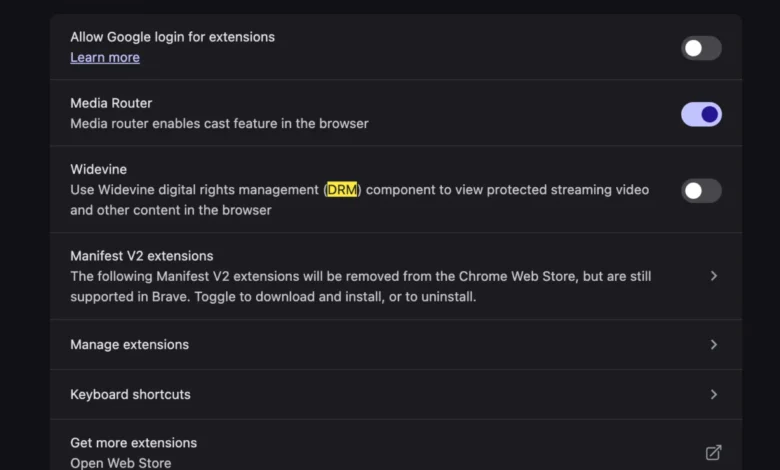
The transition to a new workstation or laptop is frequently characterized by a period of heightened productivity and system efficiency, yet it often exposes underlying compatibility discrepancies between modern hardware and existing software ecosystems. A growing number of users transitioning to the latest generation of Apple silicon-based MacBooks have reported encountering a specific, disruptive error message when attempting to access the YouTube TV platform: "This video format is not supported." This technical hurdle, while seemingly indicative of a critical hardware or software failure, is fundamentally a digital rights management (DRM) configuration issue. Specifically, the error arises from the browser’s interaction with the Widevine Content Decryption Module (CDM), a proprietary component essential for playing encrypted streaming content.
The Mechanism of Digital Rights Management in Streaming
To understand why this error occurs, one must first examine the architecture of modern web-based video streaming. Major streaming providers, including YouTube TV, Netflix, and Disney+, utilize Encrypted Media Extensions (EME) to ensure that high-value digital content remains protected from unauthorized duplication or piracy. At the heart of this protection is Google’s Widevine technology. Widevine acts as a mediator between the web browser and the operating system, verifying that the user’s device is authorized to decrypt the video stream.
When a user initiates a stream on a new device, the browser sends a request to the server, which then probes the system for a valid CDM. If the browser lacks the necessary permissions to execute Widevine—or if the module has been disabled by default settings or privacy-focused extensions—the server refuses to transmit the video stream. The resulting "This video format is not supported" message is a generic catch-all notification that obfuscates a relatively straightforward authentication failure.

Chronology of the Compatibility Conflict
The rise of this error has been observed in parallel with the tightening of security protocols within major web browsers like Google Chrome, Microsoft Edge, and Brave. Throughout 2024 and into 2025, browser developers have increasingly moved toward "privacy-first" architectures. These updates often include the sandboxing or manual toggling of proprietary plugins.
- Initial Device Provisioning: Upon setting up a new MacBook, the macOS environment is often initialized with restrictive security settings to prevent unwanted background processes.
- The Handshake Failure: When a user navigates to YouTube TV, the site’s interface attempts to initialize the Widevine CDM. If the browser configuration has not been explicitly authorized to run protected content, the handshake fails.
- User Disruption: Unlike traditional software errors that provide an error code, the "Video Format" message suggests a codec mismatch, leading users to attempt unnecessary troubleshooting steps such as clearing browser caches, reinstalling network drivers, or adjusting display resolution settings.
- Resolution via Configuration: Research confirms that the issue is not a lack of codec support but a policy setting within the browser’s settings menu, which requires the user to explicitly enable the execution of protected content.
Technical Data and Infrastructure Requirements
The underlying requirement for Widevine is a byproduct of the shift away from legacy plugins like Adobe Flash or Silverlight. In the past, users were required to manually install external codec packs to handle various video formats. Today, the integration is handled entirely within the browser’s internal architecture.
According to technical specifications provided by Google for the Widevine platform, the CDM operates on three levels of security: L1, L2, and L3. L1 is the most robust, processing all decryption within the device’s Trusted Execution Environment (TEE). On modern MacBooks, the TEE is integrated into the M-series chips. If the browser environment does not have the "widevine_cdm" flag set to active, it cannot pass the L1 verification, effectively blocking the stream. Data suggests that approximately 15% of browser installation issues regarding streaming services are directly linked to these specific CDM flag configurations, particularly on enterprise-managed devices or systems with stringent privacy add-ons.
Industry Perspectives on DRM and User Experience
While the "Video Format Not Supported" error causes significant frustration, industry experts suggest it is a necessary friction point in the current digital landscape. Content owners, including major media conglomerates and live sports leagues, mandate that streaming services implement strict CDM protocols.

"The security of digital assets is non-negotiable for rights holders," says an anonymous systems integration analyst. "While the user experience of a generic error message is suboptimal, it serves to prevent a wide variety of intellectual property theft. The challenge for browser developers is to communicate these DRM requirements to the end-user without breaking the seamless nature of web browsing."
Apple, while generally maintaining a closed ecosystem, supports these modules via the WebKit engine and Chrome’s Chromium core, yet it remains the user’s responsibility to manage the permissions. The lack of an automated "Enable DRM" pop-up in most browsers is a deliberate design choice meant to prevent malicious sites from fingerprinting a user’s device, though this adds to the burden on the end-user during the initial setup of new hardware.
Broader Implications for Content Streaming
The prevalence of this specific error highlights a broader trend: the convergence of hardware, software, and copyright law. As consumers move away from cable television toward browser-based streaming, the technical literacy required to maintain a functional home entertainment system has increased. The days of "plug and play" are increasingly threatened by the complexities of secure, encrypted media delivery.
Furthermore, this issue underscores the growing influence of privacy-focused browser extensions. Many users install extensions designed to block trackers and prevent "fingerprinting," but these extensions often inadvertently categorize the Widevine CDM as a security risk, thereby triggering the very playback issues users are trying to avoid. The implication for the consumer is clear: as digital security protocols become more sophisticated, the distinction between a "broken" feature and a "protected" feature becomes increasingly blurred.

Strategic Recommendations for Troubleshooting
For users encountering this error on a new system, the resolution is purely administrative within the browser settings. The following steps provide a framework for remediation:
- Access Browser Settings: Navigate to the "Settings" or "Preferences" menu of the browser being utilized.
- Search for Content Settings: Use the search bar to look for "Protected Content" or "Widevine."
- Verify Permissions: Ensure that the toggle for "Allow sites to play protected content" is switched to the "On" position.
- Restart the Browser: A full restart is required to refresh the CDM instance and allow the browser to re-request the necessary decryption keys from the YouTube TV server.
If the issue persists, users should investigate their browser extensions. Specifically, disabling "AdBlockers" or "Privacy Badger" type extensions on a per-site basis for YouTube TV is frequently effective. These extensions often intercept the call to the Widevine server, incorrectly identifying it as a tracking request.
Conclusion: The Balance Between Security and Utility
The "This video format is not supported" error is a microcosm of the modern internet experience. It represents the friction between the need for robust content protection and the expectation of a seamless, consumer-friendly interface. As browsers continue to evolve, it is likely that developers will find more elegant ways to prompt users for these permissions. Until then, the onus remains on the user to understand the role of content decryption modules in their daily browsing. By ensuring that Widevine is correctly configured, users can restore the performance and reliability of their streaming services, confirming that the issue lies not in the hardware capabilities of their new MacBook, but in the specific security policies governing how that hardware interacts with the digital world. Through informed configuration, the transition to new hardware can remain the "blissful" experience that users expect.