

How to allow users to choose a payment method on WordPress forms is a crucial step for any online business. This guide delves into the various payment gateways compatible with WordPress, popular plugins, and best practices for integrating secure and user-friendly payment options into your website forms.
From selecting the ideal payment plugin to crafting a seamless user experience, this comprehensive guide walks you through each step. We’ll explore the crucial aspects of payment processing, security, and customization, equipping you with the knowledge to easily incorporate secure and flexible payment options into your WordPress forms.
Introduction to Payment Methods in WordPress Forms

Integrating payment processing into WordPress forms significantly enhances the functionality and usability of your website. This allows users to complete transactions directly on your site, streamlining the process and reducing friction. A well-designed payment system fosters trust and encourages conversions, ultimately benefiting your business.Payment gateways are crucial for handling transactions securely and efficiently. They act as intermediaries between your website and payment processors, ensuring secure handling of sensitive financial information.
Selecting the right gateway and appropriate payment options for your WordPress forms is key to maximizing user satisfaction and minimizing complications.
Payment Gateway Compatibility
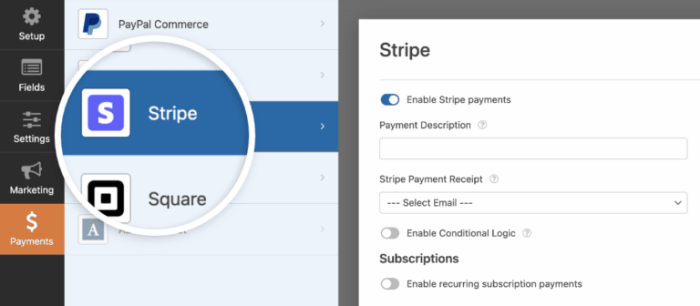
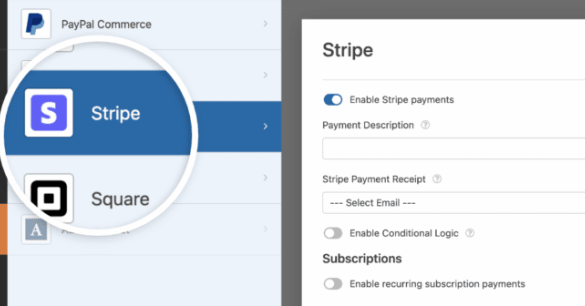
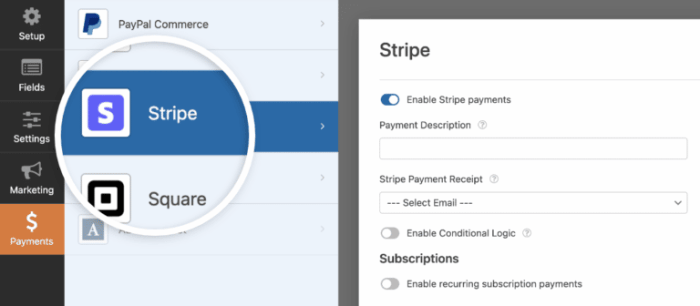
WordPress offers seamless integration with various payment gateways. Popular options include Stripe, PayPal, and Square, each with its own set of features and pricing models. Choosing the right gateway depends on factors like transaction volume, business needs, and desired features. For instance, Stripe offers robust APIs and advanced features suitable for high-volume transactions, while PayPal is widely recognized for its user-friendly interface and extensive global reach.
Square caters well to small businesses with its straightforward setup and focus on ease of use.
Common Payment Methods
Users expect a variety of payment options for a seamless experience. Common payment methods include credit cards (Visa, Mastercard, American Express), debit cards, and digital wallets like Apple Pay and Google Pay. Providing options like PayPal or cryptocurrency payment methods expands the potential customer base. Offering a range of choices is crucial to cater to diverse preferences and avoid alienating potential customers.
For example, if you’re targeting a younger demographic, including digital wallets may be a vital inclusion.
Importance of User-Friendly Payment Selection
A user-friendly payment selection process is critical to a positive user experience. A clear and intuitive interface, with concise descriptions of each payment method, significantly reduces user frustration and improves conversion rates. Users should easily understand the steps involved and feel confident in completing the transaction. The selection process should be clear and easy to follow. A confusing or complex payment selection process can deter users and lead to lost sales.
Enhancing User Experience with Payment Selection
A user-centric payment selection process minimizes friction and maximizes conversion rates. This involves clear labeling of each payment method, visually appealing design, and error messages that are helpful rather than confusing. The process should be optimized for mobile devices, as mobile transactions are increasingly common. This consideration ensures that the payment experience is positive and consistent across all devices.
For example, ensure payment buttons are clearly marked and prominent on all screen sizes.
Benefits of Offering Various Payment Options
Providing a variety of payment options caters to a wider range of users, increasing your potential customer base. This is especially important in global markets where different payment methods are preferred. For instance, in some countries, mobile wallets or specific regional payment networks are widely used. Offering diverse options demonstrates consideration for user needs and enhances trust.
Offering multiple payment methods is a vital aspect of customer experience.
WordPress Plugins for Payment Processing
Choosing the right WordPress plugin for handling payments is crucial for a smooth user experience and secure transactions. Selecting a plugin that integrates seamlessly with your chosen payment gateway and offers robust security features is paramount. A well-integrated payment solution minimizes the risk of fraud and ensures that users feel confident making purchases on your site.Integrating payment processing directly into your WordPress forms can streamline the checkout process, reducing friction for your customers.
This efficiency can lead to increased conversions and a more positive user experience, ultimately benefiting your business. Properly selected and configured plugins will save time and resources compared to manual processing.
Popular Payment Plugin Options
Several popular plugins offer comprehensive payment processing solutions for WordPress. These plugins typically handle the entire transaction, from capturing payment information to processing the funds. Each plugin has its strengths and weaknesses, and the best choice will depend on your specific needs and budget.
Comparison of Popular Plugins
The following table provides a comparison of some of the most popular payment processing plugins for WordPress, focusing on their features, pros, and cons. This comparison can help you evaluate which plugin best suits your requirements.
| Plugin Name | Features | Pros | Cons |
|---|---|---|---|
| WooCommerce | Offers extensive e-commerce functionality, including payment processing, product management, and shipping options. Compatible with various payment gateways. | Robust, versatile, and highly customizable. Excellent support community. Integrates seamlessly with existing e-commerce setups. | Can be overwhelming for simple payment form integrations. Requires a dedicated e-commerce site structure. Might have a steeper learning curve for beginners. |
| WPForms with Payment Add-ons | Allows for simple integration of payment gateways within WordPress forms. Provides options for handling various payment methods. | User-friendly interface for form creation and payment setup. Works well for single-form payment needs. Generally easier to use than dedicated e-commerce plugins. | Might not be as feature-rich as dedicated e-commerce plugins. Limited scalability for complex needs. |
| Easy Digital Downloads | Specifically designed for selling digital products. Handles payment processing and download management. | Excellent for digital product sales. Streamlines the download process for buyers. | Not suitable for physical products or complex payment workflows. Limited features if you don’t sell digital products. |
| Gravity Forms with Payment Add-ons | A powerful form builder plugin that allows you to integrate various payment gateways. | Highly customizable forms and payment options. Works well with diverse payment methods. | Can be more complex to set up compared to simpler plugins. Might require more technical expertise. |
Pricing and Support
The pricing models for payment plugins vary significantly. Some plugins are free, while others have premium features with associated costs. The cost often depends on the number of transactions, the features included, and support levels. Comprehensive support documentation and active community forums are beneficial in resolving issues quickly. It’s essential to carefully review the pricing structure and ensure it aligns with your budget and expected transaction volume.
Integrating Payment Gateways with WordPress Forms
Integrating payment processing into your WordPress forms allows users to seamlessly pay for services or products directly within your website. This streamlined process enhances user experience, reduces friction in the checkout process, and increases conversion rates. Proper configuration ensures secure transactions and accurate handling of payments.This section delves into the crucial steps involved in connecting payment gateways with your WordPress forms.
It Artikels the configuration process for popular payment plugins and provides a detailed guide on incorporating payment fields into your forms. Following these steps will empower you to effortlessly manage transactions and enhance your online presence.
Configuring a Chosen Payment Plugin
Before integrating payment methods into your forms, you need to choose and configure the selected payment plugin. This process typically involves setting up API credentials, specifying transaction details, and customizing the appearance of the payment form. Each plugin has unique requirements. Thorough review of the plugin documentation is essential.
- Install and Activate the Plugin: Download and install the chosen payment plugin from the WordPress plugin repository. Activate the plugin after installation.
- Configure Plugin Settings: Access the plugin settings page within your WordPress dashboard. Provide necessary details, such as your API keys, merchant IDs, and other required information. Refer to the plugin’s documentation for detailed instructions.
- Test the Payment Gateway: Initiate a test transaction using the test mode provided by the payment gateway. This allows you to verify the configuration without processing real money.
- Verify the Connection: Ensure the plugin successfully connects to the payment gateway by checking for any errors or warnings in the plugin’s settings page or the payment processing logs.
Setting Up Different Payment Gateways
Different payment gateways have unique setup requirements. The process typically involves creating an account with the chosen gateway, obtaining necessary credentials, and configuring the plugin settings accordingly.
- Stripe: Configure your Stripe account and obtain your API keys. Input these keys into the Stripe plugin settings within your WordPress dashboard.
- PayPal: Set up your PayPal business account. Obtain the necessary API credentials and integrate them with the PayPal plugin. Follow the plugin’s specific instructions for proper configuration.
- Square: Create a Square account, obtain your API credentials, and configure the Square plugin. Ensure that the plugin is correctly connected to your Square account.
Adding Payment Fields to a WordPress Form
This section details the steps for adding payment fields to your WordPress forms. Proper implementation ensures a seamless user experience and a smooth transaction flow.
- Identify the Form: Select the WordPress form where you want to add payment functionality.
- Choose the Payment Field Type: Use the payment plugin’s field type for adding payment details, such as credit card number, expiration date, and CVV. Each plugin has its own set of payment fields.
- Configure Field Settings: Customize the appearance and functionality of the payment fields. Ensure the fields are appropriately labeled and provide clear instructions for user input.
- Enable the Payment Processing: Ensure the payment field is correctly linked to the payment gateway plugin’s processing system.
User Interface Design for Payment Selection: How To Allow Users To Choose A Payment Method On WordPress Forms
Picking the right payment method is crucial for a smooth checkout experience. A poorly designed payment selection interface can lead to frustration and lost sales. This section dives deep into creating a user-friendly and efficient payment selection area within your WordPress form. We’ll explore best practices, mobile optimization, and different layout options.
Payment Option Presentation
Clear and concise presentation of payment options is paramount. Users should quickly and easily identify available methods. Avoid overwhelming them with too many choices. Use visually appealing icons or short descriptions alongside each payment method. This allows users to quickly grasp the options without needing extensive explanations.
For instance, use a recognizable credit card icon next to “Credit Card,” and a PayPal logo next to “PayPal.” Color-coding can also enhance visual differentiation. Presenting payment options in a logical order, like the most common methods first, is another effective strategy.
Mobile Optimization, How to allow users to choose a payment method on wordpress forms
Mobile users account for a substantial portion of online transactions. The payment form needs to be perfectly responsive to various screen sizes. A mobile-friendly design ensures a seamless checkout experience across all devices. Avoid cluttering the interface with unnecessary elements. Keep the form concise, and use large, easily tappable buttons.
Optimize form fields for touch input, ensuring clear and straightforward interactions. Consider using a single column layout for mobile, and keep fields close together to reduce scrolling.
Responsive Table of Payment Method Layouts
Different layout approaches can enhance the visual appeal and user experience. A well-structured table can demonstrate various presentation styles.
| Layout | Description | Example |
|---|---|---|
| Single Column | Simple and straightforward, ideal for mobile. |
[Payment Method 1] [Payment Method 2] [Payment Method 3] |
| Two Column | Suitable for displaying multiple options side-by-side, maximizing screen space. |
[Payment Method 1] [Payment Method 2] [Payment Method 3] [Payment Method 4] |
| Accordion | Hides less-used options, improving visual clarity. |
[Payment Method 1] [Payment Method 2] (Hidden) [Payment Method 3] (Hidden) |
Each layout has its advantages and disadvantages. Consider your specific audience and website design to choose the layout that best fits your needs. A/B testing different layouts can provide valuable data for optimization. For example, if you’re a company primarily targeting mobile users, a single-column layout might be more effective.
Handling Payment Processing and Success
Successfully processing payments and confirming transactions is crucial for a smooth user experience and ensuring that your WordPress form functions reliably. This section dives into the intricacies of handling payment processing within the form submission, addressing potential errors, and guiding users through the confirmation process.
Figuring out how to let users pick their payment method in WordPress forms can be tricky. You’ll likely need to use a plugin that supports various payment gateways, but understanding the nuances of how different plugins handle user choices is key. This often involves a bit of process optimization, like deciding whether to use process builder vs workflow rules to manage the flow of payment data.
Ultimately, the best approach depends on the specific plugin and your form’s complexity. Properly configuring your form’s payment handling is essential for a smooth user experience.
Payment Processing Within Form Submission
Payment processing is often handled by the payment gateway plugin. Upon form submission, the plugin will typically communicate with the gateway’s API to initiate the transaction. This communication involves sending relevant user data, including payment details, to the gateway’s server for validation and authorization. The plugin will then typically handle the response from the gateway, updating the form status accordingly.
Handling Potential Errors During Payment Process
Payment gateways can encounter various errors during the transaction process. These errors could stem from insufficient funds, invalid card details, network issues, or gateway-specific problems. A robust payment system should incorporate error handling to gracefully manage these issues and inform the user about the problem, preventing the transaction from failing silently. Proper error handling is key to maintaining a positive user experience.
Setting up payment options in WordPress forms can be a real game-changer for your business. You need a way for users to easily select their preferred method, and integrating different payment gateways can make this process smooth and efficient. This is crucial for a seamless user experience. Thinking beyond the immediate technicalities, consider how CRM and marketing automation tools can significantly improve your workflow and ultimately drive sales.
For a deeper dive into how these systems can revolutionize your business, check out this insightful article: how crm and marketing automation can revolutionize your business. Ultimately, using the right tools to allow customers to easily choose their preferred payment method will lead to a more successful online store.
Redirecting Users to Payment Gateway
Secure transactions require redirection to the payment gateway. The WordPress plugin should handle this redirection after the form is submitted. The plugin should include a method to redirect the user to the gateway’s secure payment page for processing. This redirection should maintain the user’s session and data for the subsequent transaction confirmation.
Want to let users pick their payment method on WordPress forms? It’s totally doable! Integrating various payment gateways is key. While exploring different options, consider how artificial intelligence (AI) can revolutionize your lead generation strategies. For example, check out 5 ways artificial intelligence can boost lead generation to see how AI can personalize the user experience, leading to better conversion rates.
Ultimately, using AI-powered tools could streamline the entire payment process, making it easier for users to complete transactions on your forms.
Example: The plugin can use the `wp_redirect()` function to send the user to the gateway’s page. This ensures that the payment process happens securely on the gateway’s platform. This approach is vital to maintaining the integrity of the payment data.
Displaying Payment Confirmation Messages
After a successful transaction, the user needs confirmation. The plugin should display a confirmation message to the user, providing details like transaction ID, amount, and payment method used. This confirmation should ideally be displayed on the form page or a separate confirmation page. Clear and concise confirmation messages build trust and transparency.
- Successful Transaction Message: A message like “Your payment was successful! Transaction ID: 12345” should be displayed to the user. This message can be combined with other details about the transaction to provide more comprehensive confirmation.
- Error Handling Messages: When a transaction fails, the plugin should present clear error messages to the user. For example, “Payment failed. Please try again later.” or “Invalid card details.” This helps users understand the issue and take corrective actions.
Security Considerations for Payment Processing
Protecting user payment information is paramount when implementing payment processing in WordPress forms. Robust security measures are crucial to build trust and avoid potential financial and reputational damage. This section details essential security practices, emphasizing compliance with industry standards and secure handling of sensitive data.PCI DSS (Payment Card Industry Data Security Standard) compliance is non-negotiable for any business accepting credit cards.
Failure to adhere to these standards can lead to significant penalties and damage to your brand. Understanding and implementing the necessary safeguards is essential for mitigating risks and ensuring user trust.
PCI DSS Compliance
Adhering to PCI DSS standards is vital for safeguarding payment data. The standard Artikels specific requirements for protecting cardholder information throughout the entire payment processing lifecycle. These requirements cover various aspects, from network security to employee training.
- Secure Network Environment: Implement firewalls, intrusion detection systems, and other security measures to protect your network from unauthorized access. Regular security audits and vulnerability assessments are also critical.
- Data Encryption: Utilize strong encryption protocols (like TLS/SSL) to protect sensitive data during transmission and storage. This protects information from being intercepted during transit between the user’s browser and the payment gateway.
- Access Controls: Restrict access to sensitive data to only authorized personnel. Employ robust user authentication and authorization systems to control who can access payment information.
- Vulnerability Management: Proactively identify and address security vulnerabilities. Implement a vulnerability management program that includes regular software updates, patching, and penetration testing.
- Regular Security Assessments: Conduct regular security assessments to identify and address potential risks. These assessments should include penetration testing, vulnerability scanning, and security audits.
Secure Handling of Sensitive Payment Data
Protecting payment information requires careful handling at every stage, from data collection to final processing.
- Data Minimization: Collect only the necessary payment data. Avoid storing unnecessary information. For example, avoid storing credit card numbers for longer than absolutely required by PCI DSS.
- Data Validation: Implement robust data validation procedures to ensure that payment data is correctly formatted and meets required standards. Validating card numbers, expiry dates, and CVV2 codes can help prevent fraudulent transactions.
- Secure Storage: Store sensitive data in a secure environment, using encryption and access controls. Utilize secure storage solutions to protect payment data from unauthorized access.
- Secure Payment Gateway Integration: Choose a reputable payment gateway that complies with PCI DSS. Ensure that your chosen gateway has appropriate security features.
- Employee Training: Train all employees involved in handling payment data on security best practices. This includes training on identifying and reporting potential security threats and fraudulent activities.
Security Best Practices
Implementing a comprehensive security strategy requires a multi-layered approach. This table Artikels key security best practices for protecting payment information within your WordPress forms.
| Security Best Practice | Description |
|---|---|
| Strong Passwords | Require strong, unique passwords for all accounts and systems handling payment data. |
| Regular Security Audits | Conduct regular security assessments to identify and address potential vulnerabilities. |
| Regular Software Updates | Keep all software, including plugins and themes, updated to patch known vulnerabilities. |
| HTTPS Encryption | Ensure all payment data is transmitted over a secure HTTPS connection. |
| Input Validation | Validate all user inputs to prevent malicious data entry and potential attacks. |
| Secure Data Storage | Store payment data in encrypted and secure databases. |
Testing and Troubleshooting Payment Integration
Successfully integrating payment processing into your WordPress forms requires thorough testing. A robust testing strategy will help identify and resolve potential issues before they impact users. This proactive approach ensures a smooth and reliable payment experience.Thorough testing of the payment gateway integration is crucial to ensure the seamless and secure processing of transactions. A well-planned testing process not only verifies the functionality of the plugin and gateway integration but also helps to uncover and address potential problems early in the development cycle.
Testing Plan for Payment Integration
A comprehensive testing plan should cover various scenarios, including successful payments, failed payments, and edge cases. This approach helps ensure the payment gateway integration works as expected under different conditions. Test cases should address the following aspects of the integration:
- Valid Transactions: Test payments with various amounts, credit card types, and billing addresses. Ensure that successful transactions are processed correctly and that the appropriate confirmation messages are displayed to the user. For example, verify that the transaction details are correctly recorded in your payment processing system and that the payment receipt is correctly generated. A valid transaction scenario ensures the system processes the transaction as expected and updates the appropriate records.
- Invalid Transactions: Test payments with invalid or expired credit card information. Confirm that appropriate error messages are displayed to the user and that the system does not allow the transaction to proceed. An example of an invalid transaction is testing with a deliberately incorrect credit card number to verify the system rejects the transaction and provides the appropriate error message.
- Edge Cases: Test situations such as exceeding transaction limits, insufficient funds, and incorrect billing addresses. Confirm that the system handles these scenarios correctly and displays informative error messages to the user. An example of an edge case is testing with a payment amount that exceeds the credit card limit to verify the system handles this scenario correctly.
- Security: Test the security measures implemented to protect sensitive payment information. Ensure that the payment gateway integration adheres to industry standards for data encryption and security. Verify that all sensitive data is handled securely and that appropriate security measures are in place to prevent fraud.
Common Payment Processing Issues
Several issues can arise during the payment processing stage. Understanding these common problems is essential for effective troubleshooting.
- Gateway Connectivity Problems: The payment gateway might be temporarily unavailable or experiencing technical issues. This can prevent transactions from being processed. Confirming the gateway is online and functioning is a critical first step.
- Incorrect Configuration: Incorrect settings in the WordPress plugin or the payment gateway can lead to errors during the payment process. Double-checking the plugin settings and gateway configuration against the documentation is essential.
- Insufficient Funds: The user’s account might not have sufficient funds to cover the transaction. This can result in failed transactions. This is an obvious issue but worth highlighting as a common reason for failure.
- Plugin Conflicts: Conflicts with other WordPress plugins can interfere with the payment gateway integration. This could manifest as unexpected errors or a complete inability to proceed with payment.
- User Input Errors: Incorrect user input during the payment process, such as typos in credit card numbers, can lead to failed transactions. This is a user-facing issue but part of the integration testing.
Troubleshooting Guide
This guide provides solutions for common issues encountered during payment processing.
Problem: Payment gateway is not responding.
Solution: Verify the payment gateway’s status. Check the gateway’s website or support resources for any known outages or issues. If the gateway is down, try again later. Contact the payment gateway provider if the problem persists.
Problem: Error message “Incorrect Credit Card Information”.
Solution: Review the credit card number, expiration date, and CVV carefully. Ensure the data entered is accurate and correctly formatted. Contact the user for clarification if needed.
Problem: Payment is failing after successful form submission.
Solution: Check the transaction logs in your payment gateway and WordPress plugin for any error messages. Review the plugin settings and payment gateway configuration for discrepancies. Ensure the user’s account has sufficient funds.
Problem: Transaction is not being recorded in the database.
Solution: Verify that the plugin is properly integrating with the database. Check the plugin’s code for potential database errors. Ensure the payment gateway is configured to record transactions.
Customizing the Payment Form
Giving your payment form a unique look and feel is crucial for a seamless user experience and brand consistency. This customization allows you to tailor the form to your website’s aesthetic, improving the overall user journey and reinforcing your brand identity. Proper customization also helps users quickly understand the steps involved in the payment process.Customizing the payment form involves more than just altering colors; it’s about creating a user-friendly experience.
This involves modifying labels, input fields, and potentially the entire layout to match your website’s design. By tailoring the form to your specific needs, you can enhance the user experience and ensure a smooth transaction flow.
Customizing Labels and Fields
The labels and fields within the payment form are critical components that directly impact user interaction and comprehension. Modifying these elements allows you to adapt the form’s language and structure to better suit your brand’s voice and visual identity.Carefully chosen labels, clear instructions, and easily identifiable fields improve the user experience, reducing confusion and increasing conversion rates. Clear, concise language and intuitive formatting ensure users understand the requirements of each field.
Modifying the User Interface
The visual presentation of the payment form significantly affects user engagement and trust. A visually appealing and well-structured interface encourages users to complete the payment process without hesitation.User interface customization can involve adjustments to font styles, colors, and spacing. Consider using branding elements, such as logos or color palettes, to enhance brand recognition and create a cohesive experience.
Custom Payment Form Layouts
Employing HTML tables allows for a flexible and structured approach to creating custom payment form layouts. The structure of the table can be modified to accommodate different payment methods, or other details needed for the form.
| Payment Method | Card Number | Expiry Date |
|---|---|---|
| Credit Card | ||
| Debit Card | ||
| PayPal |
This table structure allows you to arrange elements logically, enabling users to easily find and input the necessary payment details. A well-organized layout improves the efficiency of the payment process and reduces the likelihood of errors.
Last Recap
In conclusion, enabling diverse payment options on your WordPress forms is achievable with the right tools and strategies. By carefully selecting a plugin, designing a user-friendly interface, and prioritizing security, you can enhance your user experience and broaden your customer base. Remember to thoroughly test your integration and address any potential issues before launching your payment system to ensure a smooth and secure process for your users.