Unlocking New Possibilities for Web Multitasking with the Document Picture-in-Picture API


The landscape of browser-based multitasking has undergone a significant transformation with the official release of the Document Picture-in-Picture (DPIP) API in Firefox 151. While the browser-native Picture-in-Picture (PiP) functionality has long been a staple for users wishing to detach video streams from the main window, the DPIP API represents a fundamental shift in web architecture. Unlike its predecessor, which is strictly limited to HTML <video> elements, the Document Picture-in-Picture API allows developers to detach any arbitrary HTML content into a persistent, resizable, and always-on-top window.
The Evolution of Browser Multitasking
The history of web-based multitasking has been constrained by the "sandboxed" nature of browser tabs. For years, users have relied on extensions or secondary monitors to maintain visibility of auxiliary information—such as stock tickers, real-time dashboards, or chat interfaces—while focusing on primary tasks. The emergence of the PiP API, standardized by the W3C, began to solve this for media consumption, but it lacked the versatility required for interactive web applications.
The introduction of the Document Picture-in-Picture API, championed by the Web Incubator Community Group (WICG), marks the next logical step in the evolution of the user agent. By providing a controlled, API-driven method for spawning secondary windows that exist outside the standard tab structure, developers can now provide "web widgets" that survive tab switching and OS-level window management. This development aligns with the broader industry trend toward "ambient computing," where digital information remains present without requiring constant user intervention.
Technical Implementation and Constraints
For developers looking to integrate this functionality, the implementation process involves a departure from standard DOM manipulation. The DPIP API works by creating a secondary window context that requires its own set of resources. Because the new window acts as a separate browsing context, developers cannot simply move DOM nodes; they must account for the transfer of styles, scripts, and state.
A typical implementation involves a feature detection check using JavaScript, as CSS-based feature queries for the DPIP mode are still inconsistent across browsers. Developers must check if documentPictureInPicture is present in the window object. If supported, the requestWindow() method is invoked, returning a promise that provides access to the new window’s document object.
A critical technical consideration is the handling of CSS. When an element is moved from the main document to a DPIP window, it may lose its original styling if those styles are defined in external stylesheets or scoped to the main document’s root. Consequently, developers must programmatically clone relevant <style> and <link rel="stylesheet"> tags into the head of the new window. To optimize performance and prevent excessive layout thrashing, the use of DocumentFragment is highly recommended when appending multiple nodes to the secondary window.
Chronology of Development and Support
The rollout of this API has been iterative. Following initial proposals within the WICG, browser vendors began evaluating the security and usability implications of allowing websites to spawn always-on-top windows.
- Initial Proposal: The WICG published the early explainer documentation, outlining the security protocols required to prevent "clickjacking" or malicious window behavior.
- Chrome Integration: Google Chrome was the first to implement experimental support, providing the foundation for the current W3C specification.
- Firefox 151: The release of Firefox 151 marked a milestone in cross-browser compatibility, bringing the DPIP API to a broader user base.
- Safari Compatibility: As of early 2025, Safari support remains a primary point of discussion. While Safari Technology Preview 251 has hinted at improved at-rule detection, native DPIP support has not yet reached the stable branch, necessitating robust fallback strategies for web developers.
Data-Driven Design: The Case for Targeted CSS
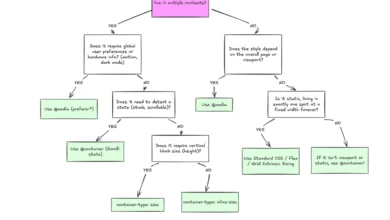
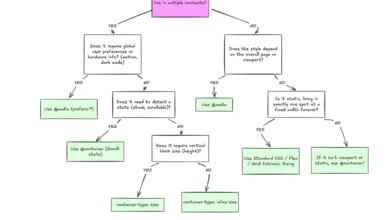
The implementation of DPIP is not merely a JavaScript challenge; it is a design imperative. Because the API allows developers to recontextualize web components, developers must utilize the display-mode: picture-in-picture media query. This allows for specific layout adjustments, such as removing rounded corners or adjusting padding, that might be appropriate for a full-screen desktop view but detrimental to a compact, always-on-top window.
For example, a stock ticker that functions effectively in a dashboard view may need to collapse its columns or increase font legibility when relegated to a smaller DPIP window. By utilizing targeted CSS, developers can ensure that the user experience remains cohesive, regardless of whether the content is in the primary tab or the secondary floating window.
Security and Ethical Implications
The ability for a website to spawn a secondary, persistent window carries significant implications for user privacy and attention management. To mitigate the risk of abusive implementations, the API is governed by strict user-gesture requirements. A window can only be opened in response to a user-initiated event, such as a button click. Furthermore, browsers impose limits on the number of windows that can be open, and the windows are subject to the same permissions and security policies as the parent tab.
Industry analysts suggest that while this API empowers developers to create more useful tools, it also places the onus of "attention hygiene" on the web developer. The risk of overwhelming the user with persistent, intrusive windows is a genuine concern that the W3C and browser vendors have sought to address through mandatory "Back to tab" functionality, which allows users to easily collapse the secondary window and return to the primary session.
The Broader Impact on Web Applications
The long-term implications for the Document Picture-in-Picture API are substantial. In the enterprise sector, this feature enables the creation of "Command Center" style web applications. Traders, project managers, and customer support representatives can maintain live feeds, real-time analytics, or incoming support tickets in a dedicated window, while the primary browser tab remains dedicated to deep-work tasks like writing reports or coding.
Moreover, the API supports a more fluid interaction model between the web and the operating system. By moving closer to the behavior of native desktop applications, the web continues to close the feature gap that has historically favored platform-specific software. As developers become more familiar with the API’s limitations—such as the lack of support for nested iframes in some environments—the quality and reliability of these floating widgets will undoubtedly increase.
Conclusion and Future Outlook
The Document Picture-in-Picture API is a significant addition to the modern web developer’s toolkit. While the initial learning curve involves understanding the nuances of DOM cloning, styling, and window lifecycle management, the benefits of enhanced multitasking are clear. As support for this API continues to grow across the browser ecosystem, we can expect to see a shift toward more modular web interfaces that prioritize user control and ambient awareness.
Looking ahead, the industry focus will likely shift toward standardizing the event listeners for DPIP, such as the enter event, and refining the user interface elements that browsers provide to manage these windows. For now, developers are encouraged to implement the API with a focus on progressive enhancement, ensuring that their web applications remain fully functional in browsers where DPIP is not yet supported. By bridging the gap between static web pages and dynamic, persistent widgets, the Document Picture-in-Picture API provides a glimpse into a more efficient and customizable future for the web.